Armor cosmetics
- By
Cosmetic Armor (Bedrock)
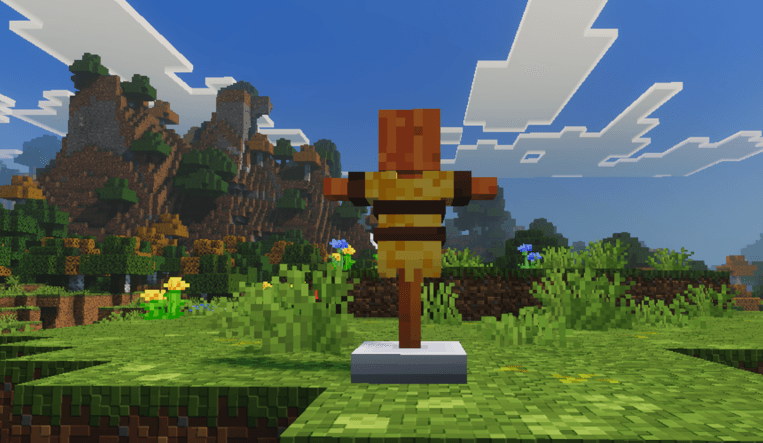
Main Features:
-
Dual-slot system: Equip your "Real" armor to keep the stats and your "Cosmetic" armor to override the visual appearance.
-
Visibility control: Toggle the visibility of any piece (helmet, chestplate, leggings, boots) independently using the UI buttons (eye icon).
-
Dedicated UI: A visual system to manage your cosmetics cleanly and intuitively.
-
Vanilla Support: Works with all base game armors (leather, iron, copper, gold, diamond, netherite, chainmail).
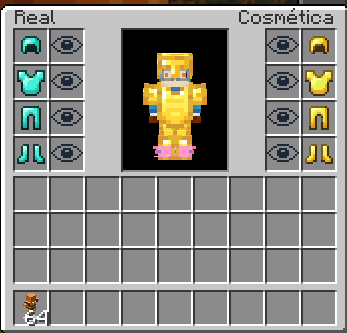
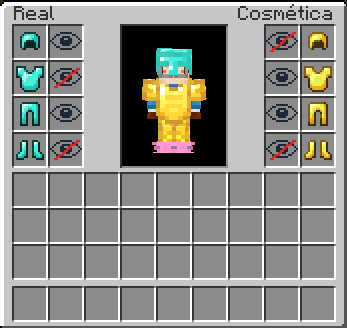
How to use: Place the Cosmetic Wardrobe block in your world and interact with it to open the customization menu. Use the interface to equip cosmetic armor and toggle the visibility of each piece independently.
Search Tags / Keywords: Cosmetic armor, vanity armor, transmog, invisible armor, hide armor, visual armor, custom armor, wardrobe, display armor, armadura visible,, invisible armor, armadura cosmética, ocultar armadura, armadura visual, skin, overlay, Bedrock cosmetics, UI armor, aesthetic armor, transmogrification, fashion, wearable, invisible helmet, show skin, hide chestplate, roleplay armor, RP cosmetics, outfit, fake armor, vanity slots, Terraria style armor, armadura estética, transfiguración, ropa, armadura de rol, trajes, sin armadura, accesorios, armadura de vanidad, bedrock transmog, MCPE cosmetics, pocket edition armor addon, behavior pack, resource pack, custom UI inventory, addon Bedrock, Minecraft PE mods, how to hide armor bedrock, change armor appearance, ver skin con armadura, cómo ocultar armadura en Minecraft, toggle armor visibility.
Armor cosmetics Team