ALN Bow Aimbot
- By
Use the ALN: Bow Aimbot item to steer bow and crossbow arrows to the target in your aim circle, up to 48 blocks away.

by ALNStudios
Use the ALN: Bow Aimbot item to steer bow and crossbow arrows to the target in your aim circle, up to 48 blocks away.
ALN Bow Aimbot is a bow-and-arrow item that opens a menu with the Bow Aimbot, a target highlight, a friends list and tuning options, saved separately for every player. It suits friends who practice archery in a world they own and want to pick their own settings.
Bedrock: 1.26+
Experimental: No
Achievements: Yes, achievement-friendly

You get an ALN: Bow Aimbot item, use it, and switch on Bow Aimbot in the ALNStudios menu. From then on, arrows you shoot turn toward the mob or player closest to your crosshair inside the aim circle. Vanilla Minecraft has no switch like it. This is a cheat-style helper, so use it only on worlds where everyone agrees.


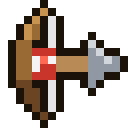
ALN: Bow Aimbot Item
A bow-and-arrow item that opens the menu when you use it. You craft one from a Bow, 2 Arrows, an Eye of Ender and a String, or take one from the Equipment tab of the Creative inventory.
How It Works: Hold the item and use it, like right-clicking on PC or tapping on mobile. To craft one, put the Eye of Ender in the top middle square of a crafting table, the Bow in the center with an Arrow on each side of it, and the String in the bottom middle square.
Good To Know: Use the command /give @s allenscreations:aln_bow_aimbot to get another one, which needs cheats.
Bow Aimbot
Arrows you shoot from a bow or crossbow steer toward the mob or player closest to your crosshair within 48 blocks and inside the aim circle on your screen.
How It Works: Aim roughly at a target and release. The arrow leads a moving target and allows for arrow drop, and it keeps correcting its aim for up to 4 seconds in flight, so long shots and moving targets are hit more often.
Good To Know: If nothing is near your crosshair, the arrow flies as normal. A mob or player hidden behind blocks is never chosen, and players in Creative or Spectator mode are never chosen. Every arrow of a crossbow with Multishot aims at the same target.
Mob Types
Four On or Off choices under Bow Aimbot in Bow Aimbot Settings pick what it hits: hostile mobs, neutral mobs, passive mobs and players.
How It Works: Open Bow Aimbot Settings and set each choice. Hostile mobs and players are on by default.
Good To Know: Tamed pets are never targeted. Neutral mobs include wolves, endermen, piglins, iron golems, bees, llamas, polar bears, dolphins, pandas and goats.
Target Highlight
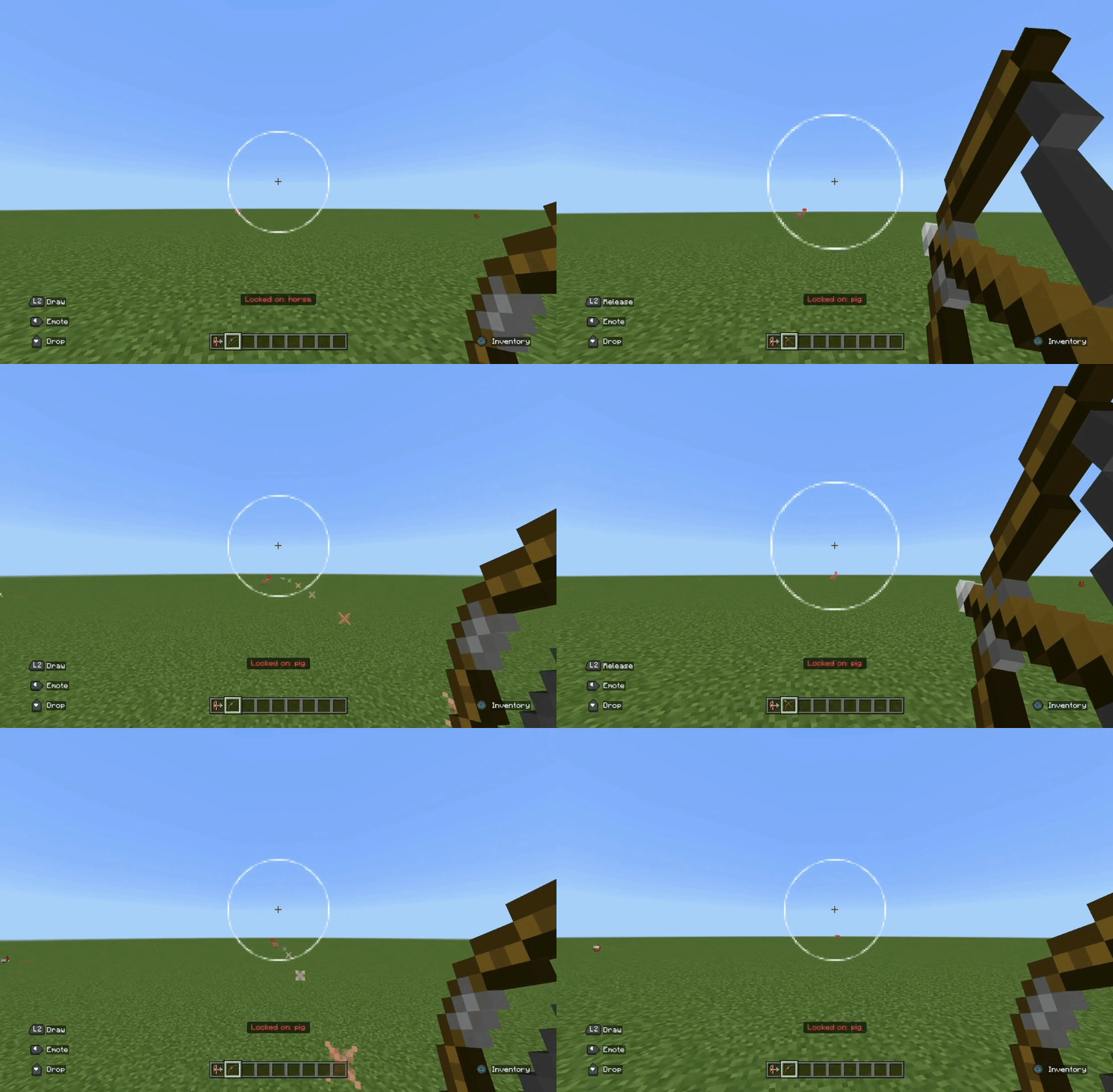
While you hold a bow or crossbow, a small target picture floats above the mob or player Bow Aimbot will pick, the action bar names it, and a circle picture sits on your crosshair on the screen to show the aim range. Only you see them.
How It Works: Switch on both Bow Aimbot and Target Highlight, hold a bow and aim near an enemy.
Good To Know: It does nothing when Bow Aimbot is off, and the target picture only shows when a target is inside the circle. The circle can be switched off in Bow Aimbot Settings, and its size follows the Aim circle zoom and your Your game FOV setting value.
Bow Zoom
While you draw a bow the game zooms in, so the aim circle grows to cover the same area.
How It Works: Raise Bow zoom while drawing, from 0 to 30 percent, until the circle matches what you see.
Good To Know: It is 0 percent by default, so the circle stays the same size until you set it.
Friends
You pick online players as friends, and Bow Aimbot skips them.
How It Works: Open the Bow Aimbot Menu, tap Friends, tick the players you want and tap Apply.
Good To Know: Friends stay on your list when they go offline. The list is yours alone, so a friend is only safe from your aimbot, not the other way round.
Tuning
Tuning holds your Your game FOV setting, an exact list of values from 30 to 110, so the aim circle matches the Field of View you set in the game's video settings.
How It Works: Open the Bow Aimbot Menu, tap Tuning, pick your FOV, turn on Confirm changes and tap Apply. Nothing saves unless Confirm changes is on. Turning on Reset all tuning to the defaults puts every slider and choice back to its starting value.
Good To Know: The range, zoom and mob type choices are in Bow Aimbot Settings.



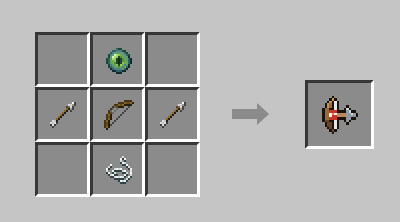


1 | Craft an ALN: Bow Aimbot from a Bow, 2 Arrows, an Eye of Ender and a String, or take one from the Equipment tab of the Creative inventory. |
2 | Hold the item and use it to open the ALNStudios menu, then tap Bow Aimbot Menu and Bow Aimbot Settings. |
3 | Switch on Bow Aimbot and Target Highlight, then tap Apply. |
4 | Hold a bow, aim near a target inside the circle and release. |

How do I get another ALN: Bow Aimbot?
Craft one from a Bow, 2 Arrows, an Eye of Ender and a String on a crafting table, or take one from the Equipment tab of the Creative inventory.
Do my settings affect other players?
No. Each player has their own saved settings, and a toggle only changes what that player does.
Can I use it on a server?
This acts like a cheat. Many servers ban it, so use it only where the owner and the other players agree.

1 | Download the file from this page and open it with Minecraft. |
2 | Create or edit a world and turn on the new pack(s) in its settings. |
3 | Play. No Experimental toggles needed. |
Found a Bug or Have a Suggestion?
Please leave a comment on this project page! All bug reports, gameplay feedback, and pack suggestions are welcome and appreciated.


CurseForge | MCPEDL | Ko-fi
By ALNStudios
Permissions and credits
- Rights: All rights reserved for ALNStudios.
- Content creators: You may feature this creation in videos and streams with credit to ALNStudios.
- Redistribution: Do not re-upload this pack or provide direct monetized download bypasses. Link to this page.
- Visual: Promotional/cover imagery used on this page is AI-generated to illustrate the concept and purpose of the pack.
- Unofficial community creation. Not an official Minecraft product and not approved by or associated with Mojang or Microsoft.
Minecraft Bedrock add-on, ALN Bow Aimbot Bedrock mod, Bow Aimbot, aim circle, Target Highlight, friends list, crossbow, Minecraft PE survival, MCPEDL add-on, CurseForge Bedrock, ALNStudios.
ALN Bow Aimbot Team