Description
# 🦘 Air Jumps
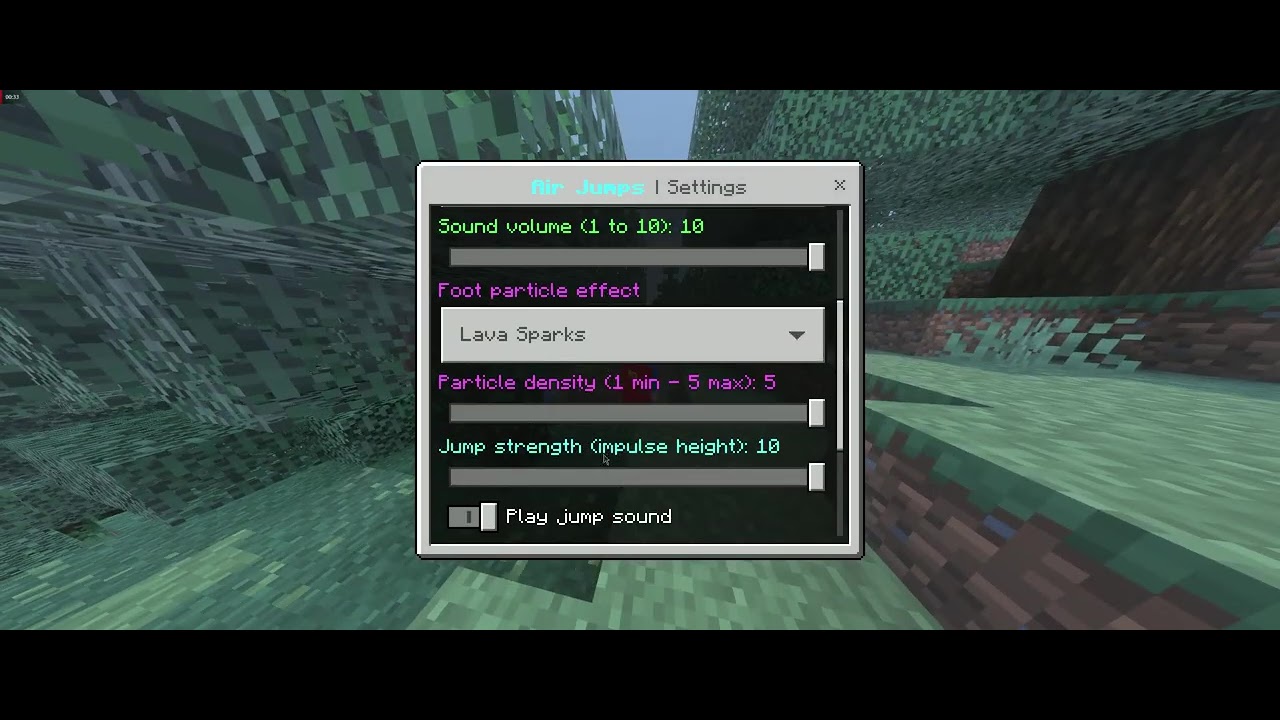
Keep jumping, even after you’ve left the ground! **Air Jumps ** brings extra mid-air jumps to Minecraft Bedrock Edition. Now featuring an **in-game graphical settings menu**: customize your jump count from 2 to 30 with a smooth slider, adjust sound volume and particle density, choose between 20 sound effects, and select from 16 particle effects right inside the game!
## ✨ Features
- **Interactive in-game settings menu**: configure everything on the fly without cheats or chat commands.
- **Master Mod Toggle**: turn mid-air jumps completely on or off. The menu always stays openable via 3 quick crouches to re-enable them.
- **Jump count slider (2 to 30)**: pick the exact number of additional mid-air jumps you want.
- **Sound volume slider (1 to 10)**: adjust audio volume from 10% to 100%.
- **Particle density slider (1 to 5)**: control visual effect density from subtle to ultra-rich.
- Standard Minecraft jumps are independent and do not consume your extra jumps.
- **20 verified jump sound effects**: dragon wings, Breeze jump, wind charge burst, enderman teleport, slime squish, magma cube, frog jump, amethyst chime, totem, xp ding, level up, town bell, squid ink squirt, thunder crack, firework, bow, anvil, TNT explosion, bubble pop, and shulker teleport!
- **16 optimized foot particle effects**: classic explosion + cloud, flame, soul fire, totem sparks, enchanting runes right under feet, critical hits, lag-free ender void sparks, hearts, lava sparks, water splash, dense campfire smoke cloud, glow dust, electric sparks, frost snowflakes strictly under feet, dense azalea flower spores, and breeze wind swirl!
- **Jump impulse height slider**: adjust vertical strength from 4 to 10.
- **Action bar display**: shows remaining jumps in real time.
- **Fall damage protection**: granted after using an extra jump, provided you land on a solid surface.
- **Per-player persistence**: all settings are stored per player using Dynamic Properties.
## 🎮 Controls
- **Jump while in mid-air** — perform an extra jump.
- **Crouch 3 times quickly (Shift x3 in a row)** — open the in-game settings menu.
- Works everywhere: in mid-air, on the ground, in caves, holding any item or bare-handed, **even when the mod is disabled**!
- Never interrupts building bridges on Shift or fighting mobs.
- No chat commands or cheats required!
For example, in mode **2**, you get your standard Minecraft jump followed by **two extra jumps** provided by the add-on. The counter will display `2/2`, then `1/2`, and finally `0/2`.
## 🛡️ Fall Damage Protection
After performing an extra jump, the add-on negates fall damage, provided that the first surface you land on is a solid block. If a player hits water first, the fall protection will not prevent them from falling into the water.
Fall protection does not negate damage from mobs or other sources. The "Slow Falling" effect is not applied by this add-on.
## ⚙️ In-Game Settings Menu
The menu provides full control over all features:
1. **Master Mod Toggle**: enable or disable extra mid-air jumps.
2. **Extra mid-air jump count**: slider from 2 to 30.
3. **Jump sound**: dropdown with 20 audio options (including mute).
4. **Sound volume**: slider from 1 to 10 (10% to 100%).
5. **Foot particle effect**: dropdown with 16 visual effects (including disabled).
6. **Particle density**: slider from 1 to 5 (subtle to ultra-rich).
7. **Jump strength (impulse height)**: slider from 4 to 10.
8. **Sound toggle**: quickly turn jump sounds on or off.
9. **Particle toggle**: quickly turn foot particles on or off.
10. **Fall protection toggle**: enable or disable safe landing.
11. **Action bar toggle**: enable or disable the HUD counter.
## ⚙️ Customize Settings in Code
The jump settings are located in `scripts/main.js`, inside the `const CONFIG = { ... }` object near the top of the file.
Each line includes detailed comments `//` explaining what it does:
```javascript
const CONFIG = {
// Включен ли мод (воздушные прыжки) по умолчанию для новых игроков.
// Whether extra air jumps are enabled by default for new players.
defaultModEnabled: true,
// Количество быстрых приседаний подряд для открытия меню настроек.
// Number of consecutive quick crouches to open the settings menu.
crouchCountToOpenMenu: 3,
// Окно времени (в тиках) для серии быстрых приседаний (15 тиков ≈ 0.75 сек).
// Time window (in ticks) to complete the quick crouch sequence (15 ticks ≈ 0.75s).
crouchSequenceWindowTicks: 15,
// Минимальное и максимальное количество дополнительных прыжков для ползунка в меню.
// Minimum and maximum extra air jump count for the menu slider.
minJumps: 2,
maxJumps: 30,
// Количество дополнительных прыжков по умолчанию для нового игрока.
// Default extra jumps count for a new player.
defaultJumps: 2,
// Уровень громкости звука по умолчанию: от 1 до 10 (8 = 80%).
// Default sound volume level: from 1 to 10 (8 = 80%).
defaultSoundVolume: 8,
// Плотность частиц по умолчанию: от 1 до 5 (3 = стандартная плотность).
// Default particle density: from 1 to 5 (3 = standard density).
defaultParticleDensity: 3,
// Сила импульса прыжка по умолчанию: от 4 до 10 (6 = стандартная высота).
// Default jump impulse level: from 4 to 10 (6 = standard jump height).
defaultImpulseLevel: 6,
// Запрет повторного срабатывания прыжка для одного нажатия (в тиках).
// Prevents multiple jump triggers from a single press (in ticks).
jumpPressDebounceTicks: 3,
// Задержка между повторными открытиями меню для защиты от спама (в тиках).
// Delay between menu openings to prevent spam clicks (in ticks).
menuDebounceTicks: 10,
// Высота появления частиц у ступней игрока.
// Height offset for particles spawning at the player's feet.
footParticleHeight: 0.05,
// Радиус кругового кольца частиц вокруг ног.
// Radius of the particle ring expanding around the feet.
particleRingRadius: 0.65,
// Высота кругового кольца частиц относительно земли.
// Height offset of the particle ring relative to ground.
ringParticleHeight: 0.02,
// Глубина сканирования блоков вниз для проверки твёрдой поверхности.
// Scan depth downward to check safe landing surface for fall protection.
fallScanDepth: 512,
// Время сохранения защиты от падения после касания земли (в тиках).
// Fall damage protection grace duration after touching ground (in ticks).
fallProtectionGraceTicks: 20,
// Время отображения статуса в ActionBar (в тиках).
// Duration for displaying status in ActionBar (in ticks).
actionbarDurationTicks: 35,
// Вода в столбце под игроком отменяет защиту от падения.
// Water blocks under the player cancel fall damage protection.
waterBlockIds: [
"minecraft:water",
"minecraft:flowing_water",
"minecraft:bubble_column",
],
};
```
- `defaultModEnabled` — default mod status (`true` = enabled, `false` = disabled).
- `crouchCountToOpenMenu` — consecutive crouches required to open the menu (default is 3).
- `minJumps` and `maxJumps` — the range of the menu slider. To allow up to 50 jumps, set `maxJumps: 50`.
- `defaultJumps` — starting number of extra jumps for a new player.
- `defaultSoundVolume` — initial volume level (1 to 10).
- `defaultParticleDensity` — initial particle density (1 to 5).
- `defaultImpulseLevel` — initial jump boost strength (4 to 10).
- `waterBlockIds` — list of water blocks under the player that negate fall damage cancellation.
## 📦 Installation
1. Open the `.mcpack` file; Minecraft will import the add-on.
2. Open your world settings and enable **Air Jumps ** under the **Behavior Packs** section.
3. Under the **Experiments** section, enable **Beta APIs**.
4. Launch the world and start jumping!
**Requirements:** Minecraft Bedrock Edition **1.26.0 or later**, `@minecraft/server` (2.6.0) and `@minecraft/server-ui` (2.0.0).
## 📝 Editing and Importing a Modified Copy
1. Create a backup of the `.mcpack` file, rename its extension from `.mcpack` to `.zip`, and extract its contents.
2. Edit `scripts/main.js` and save your changes.
3. Open `manifest.json`. If you have already installed the pack, replace both `header.uuid` and `modules[0].uuid` with new, unique UUIDs.
4. To generate unique UUIDs locally in Windows PowerShell, run:
"" [guid]::NewGuid().ToString() ""
5. Select the files inside the folder (`manifest.json`, `scripts/`, `pack_icon.png`, and `README-en.md`) and compress them into a new ZIP archive (do not include the outer parent folder).
6. Rename the ZIP file extension to `.mcpack` and open it to import your custom copy into Minecraft Bedrock.
air jumps Team