AccessShulkerInInventory
- By
Using this addon you can access shulker directly through inventory i.e. See item in shulker Or Place item or take item without placing shulker
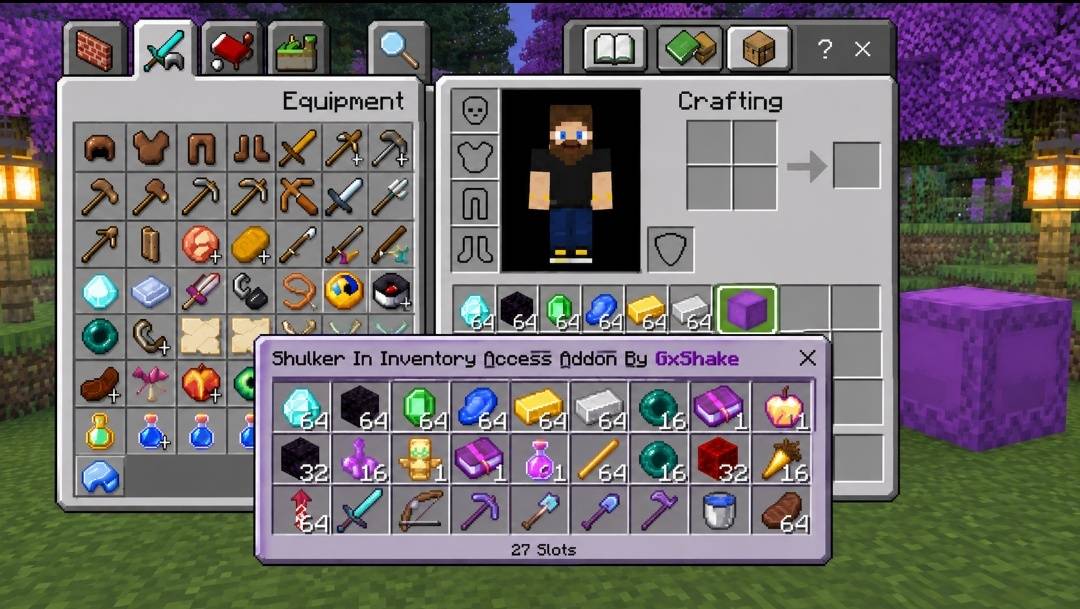
Screenshot_20261121_144038.jpg
Description
Shulker Access by GxShake
Open and use your shulker boxes straight from your inventory. No placing, no breaking, no hassle.
Overview
Shulker Access adds a clean chest-style screen for shulker boxes. Hold a shulker box, crouch, and click. Everything inside opens in a 27-slot chest view with your inventory shown below it, so moving items is quick and easy.
Features
- Open anywhere: Crouch and click while holding a shulker box. No need to place it down.
- Chest-style screen: A familiar 27-slot layout with your full inventory (hotbar and main slots) shown underneath.
- One-tap transfers: Tap a stack in the shulker to move it to your inventory. Tap a stack in your inventory to move it into the shulker.
- Smart stacking: Items first top up matching stacks, then fill empty slots.
- Detailed item display: Stack counts, durability bars, enchantment glint, custom names and lore are all shown.
- All 17 shulker colors: Undyed plus all 16 dyed colors are supported.
- Custom names: If the shulker box has a custom name, it becomes the screen title.
- Safety rules: Shulker boxes can't be stored inside shulker boxes. Messages tell you when your inventory or the shulker is full.
How to Use
- Hold a shulker box in your hand.
- Crouch (sneak) and click or use the item.
- Tap a stack to move it between the shulker and your inventory.
- Close the screen when you're done.
Installation
- Download
GxShake_ShulkerAccess_v2_1_2.mcaddon. - Open the file with Minecraft. Both the Behavior Pack and Resource Pack import automatically.
- Create a new world or edit an existing one.
- Under Behavior Packs, activate Shulker Access by GxShake.
- Under Resource Packs, activate Shulker Access by GxShake (Resources).
- Load your world and try it with any shulker box.
Requirements
- Minecraft Bedrock Edition 1.26.60 or newer
- Both packs (Behavior and Resource) must be active
Compatibility Note
The addon uses its own shulker box items that look and behave like the vanilla ones. Shulker boxes you already own are converted automatically as they enter your inventory.
AccessShulkerInInventory Team