


afkzstudios
Creating some useful mods
Multi Keybind — a Minecraft mod (Fabric/Forge/NeoForge) that lets one action respond to several keys
- Owner
- Utility & QoLTechnology+1
- 366
- Nov 12, 2026Nov 12, 26
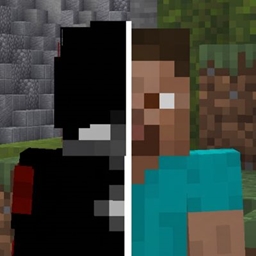
Change your own Minecraft skin without leaving the game. Fetch any player's skin from Mojang or load your own 64x64 PNG.
- Owner
- Utility & QoLTechnology+1
- 150
- Nov 12, 2026Nov 12, 26
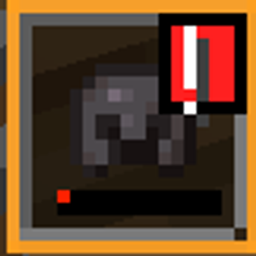
Armour HUD is a client-side Minecraft mod that shows the armour you're wearing and how close each piece is to breaking.
- Owner
- Utility & QoLTechnology+1
- 2.1K
- Nov 10, 2026Nov 10, 26

Fake Fps+ is a Minecraft Fabric mod that lets you fake your FPS display. Press F6 to open a config GUI where you can set a static FPS value or a random
- Owner
- Utility & QoLTechnology+1
- 1.6K
- Nov 10, 2026Nov 10, 26
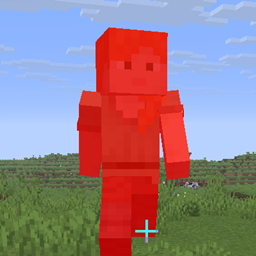
Hitcolour replaces Minecraft's vanilla entity hit-flash — the red wash that flashes over a mob/player when they take damage
- Owner
- Utility & QoLTechnology+1
- 1.0K
- Nov 7, 2026Nov 7, 26

Smooth, customizable zoom for Minecraft: scroll-while-zooming, secondary zoom key, spyglass integration and a dark modern settings screen.
- Owner
- Utility & QoLTechnology+1
- 1.3K
- Nov 6, 2026Nov 6, 26

Easy Sit A lightweight Fabric mod that lets you sit on slabs and stairs by right-clicking, or lay down
- Owner
- Utility & QoLTechnology+1
- 1.1K
- Nov 5, 2026Nov 5, 26

A Minecraft Mod For Saving And Loading Kits
- Owner
- Utility & QoLTechnology+1
- 2.5K
- Nov 2, 2026Nov 2, 26
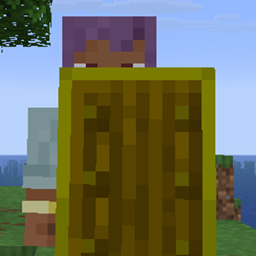
Colors your shield to show its current state — default, blocking, windup, or cooling down. Toggle each state's color on/off and pick from built-in presets, all from a clean single-page config screen. Client-side only
- Owner
- TechnologyUtility & QoL+1
- 4.7K
- Oct 31, 2026Oct 31, 26

A Fabric client mod that displays health, armor, and absorption indicators above entities' heads.
- Owner
- Utility & QoLTechnologyPerformance+2
- 2.1K
- Oct 31, 2026Oct 31, 26

Afkz Clean View is a Minecraft Fabric mod that lets you remove potion particles and water/lava fog with configurable toggles via an in-game config screen
- Owner
- TechnologyUtility & QoLPerformance+2
- 4.8K
- Oct 30, 2026Oct 30, 26
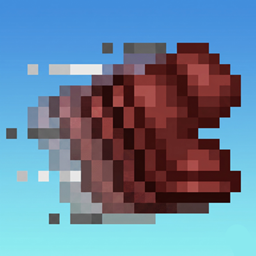
Always Sprint is a lightweight client-side Fabric mod that keeps sprinting smooth and simple. It adds auto sprint, preserves toggle sprint through respawns, and works without Fabric API.
- Owner
- Utility & QoLTechnology+1
- 6.5K
- Oct 29, 2026Oct 29, 26

**Ping Display 1.0** Ping Display shows every player’s ping as a clear number in the tab list, replacing or complementing the usual signal bars
- Owner
- Utility & QoLTechnology+1
- 153
- Oct 28, 2026Oct 28, 26
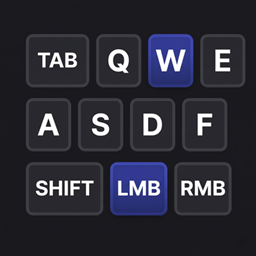
A keystrokes display for your screen — the same idea as the overlay streamers use, but built for everyday play
- Owner
- Utility & QoLTechnology+1
- 1.0K
- Oct 28, 2026Oct 28, 26
AFKZ Motion Blur is a lightweight client-side Fabric mod that adds smooth temporal motion blur with simple in-game controls and saved settings.
- Owner
- Utility & QoLTechnologyProcessing+2
- 14.4K
- Sep 20, 2026Sep 20, 26

This client side Minecraft Fabric mod improves visibility on multiplayer servers by letting you press G to remove darkness H to clear fog and J to open your settings menu.
- Owner
- Utility & QoLPerformanceTechnology+2
- 4.6K
- Sep 16, 2026Sep 16, 26

Freecam with auto-fullbright — press F4 to fly your camera while your body stays put.
- Owner
- Utility & QoLTechnology+1
- 2.9K
- Sep 16, 2026Sep 16, 26

Colored hitboxes for combat training and PvP
- Owner
- TechnologyUtility & QoL+1
- 10.0K
- Sep 16, 2026Sep 16, 26