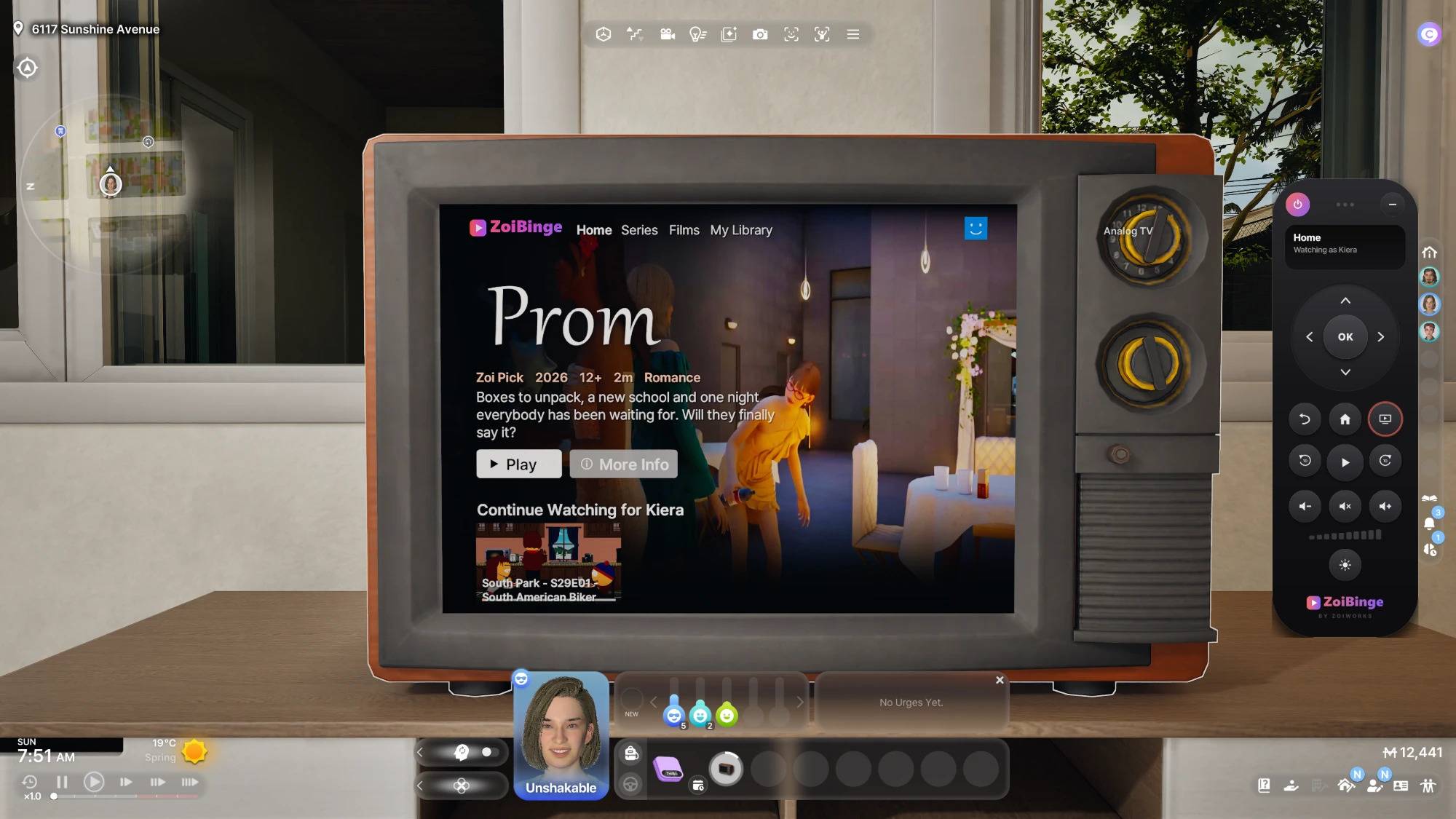
ZoiBinge turns the TV into a streaming app: films and series on the real TV screen, and a little remote on your own screen to browse, play and pause.
WHAT YOU GET
- The app on the real TV: rows of films and series, a details page with episodes, and real video with sound – drawn on the TV screen itself, not in a pop-up.
- A remote on your screen: arrows, OK, Back, Home, play and pause, 10 seconds back or forward, volume, mute, brightness and power. Drag it anywhere or fold it away.
- Who's on the couch? Every household member keeps their own Continue Watching row.
- Series start the next episode by themselves.
- TV view: one button moves the camera in front of the TV, press it again to go back.
- A movie moodlet that fits the genre when you finish a film or episode.
- Keeps playing like a real TV when your Zoi walks away.
- Works on 15 TVs: the classic and retro TVs, the wall TVs, the projector screen, the CRT monitor and the LG OLED TVs (Evo, Flex and Pose). The LG StanbyMe has no TV menu in the game, so ZoiBinge is not on it.
WHAT YOU CAN WATCH
4 films, 4 series and 4 quick watches, each with its own picture, description and episodes. They all come with inZOI itself, so ZoiBinge adds nothing to your download.
Films: Mine, Not Yours · Prom · The New House · Turtle Coast
Series: Meow at Work · Forever Yours · The Butterfly · Sky Trips
Quick watches: Welcome to inZOI · Dance Floor · Cahaya Nights · The Glowing Paw
Want your own videos on the TV? The ZoiBinge My Library add-on puts your own films and series on ZoiBinge. It's free on my Patreon (it comes with a small helper script, and CurseForge doesn't allow those).
HOW TO START ZOIBINGE
Click a TV and choose ZoiBinge. Your Zoi sits down to watch, the app opens on the TV and the remote appears on your screen. Use the arrows and OK to pick who is watching and what to watch. Press the TV button on the remote for a close-up of the screen. To stop, click the TV and choose Turn Off ZoiBinge, or press power on the remote.
GOOD TO KNOW
- Works in existing saves.
- Brightness and volume are remembered.
- ZoiBinge is in English for now.
- Turn ZoiBinge off before you uninstall.
Works on its own and plays well with all other ZoiWorks mods. Uses a small script for the TV picture and the remote. Run into a bug? Let me know on Discord and I'll fix it.
More to watch is planned!
More ZoiWorks mods and news on Patreon: https://www.patreon.com/cw/ZoiWorks
Join the ZoiWorks Discord for news, sneak peeks and requests: https://discord.gg/VaCaTMask