Zeto Fake Players - with bot AI talks
- By
FakePlayers is a Hytale mod that lets you summon fake players to artificially populate your server and make it feel more active, alive, and busy.
ZetoFakePlayers – Smart Server Population System
ZetoFakePlayers is a Hytale mod designed to make your server feel active, social, and alive by adding simulated players that behave like part of the community.
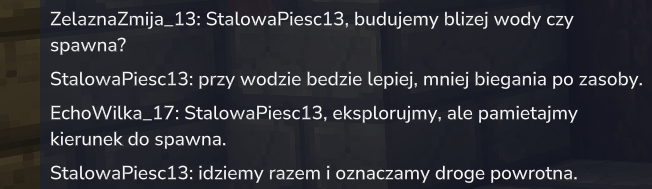
The mod can create fake online players that appear on the server, populate the player list, and help give the world a more natural sense of activity. Instead of an empty-looking server, FakePlayers creates the impression of a living environment where players are already present, moving, chatting, and interacting.
Fake players can naturally talk with each other using configurable chat behavior, making the server feel more realistic and dynamic. For more advanced setups, the mod also supports integration with OpenAI, allowing bots to respond directly to real players on chat and create much more immersive conversations.
This makes FakePlayers useful not only for artificial server population, but also for testing, roleplay atmosphere, MMORPG-style worlds, tutorials, social hubs, and servers that want to feel active even during low-player hours.
Features:
- Add fake players to make your server look more active
- Create a more populated and lively server atmosphere
- Fake players can naturally chat with each other
- Optional OpenAI integration for full chat interaction with real players
- Useful for testing server systems and player-count behavior
- Great for survival, RPG, MMORPG, hub, and roleplay servers
- Configurable behavior for better control over how fake players appear and act
ChatGPT / OpenAI Integration
The mod can be connected to the OpenAI API through the included ZetoAiBridge application. The bridge securely sends requests between your Hytale server and OpenAI without exposing your API key to players.
Requirements
You will need:
-
An OpenAI API key created at:
https://platform.openai.com/api-keys -
API billing enabled on your OpenAI account.
ChatGPT Plus is separate from the OpenAI API and does not include API usage. -
Hosting capable of running a Node.js application.
-
A private authentication token for the bridge, for example:
Zeto-2026-my-private-random-token
Use a long, randomly generated token that is difficult to guess.
Uploading ZetoAiBridge
The ZetoAiBridge folder should preferably be placed outside the public_html directory, for example:
/home/your_username/ZetoAiBridge
Only regular website files should be stored inside public_html.
The bridge contains sensitive configuration data and should not be publicly accessible as a normal website directory.
Hosting Configuration
-
Open your hosting control panel and create a new Node.js application.
-
Set the application directory to the
ZetoAiBridgefolder. -
Set the startup file to:
server.mjs
-
Install the required dependencies:
npm install
-
Add the following environment variables:
OPENAI_API_KEY=paste_your_openai_api_key_here
ZETO_AI_TOKEN=paste_the_same_private_token_used_in_the_mod_config
OPENAI_MODEL=gpt-5.2-mini
PORT=3000
The port may be different if your hosting provider automatically assigns one.
Never place your OpenAI API key directly inside the mod configuration or share it with other users.
Domain Configuration
The recommended solution is to create a dedicated subdomain, for example:
https://ai.domain.com
The subdomain must point to the Node.js application, not to a regular directory inside public_html.
The API endpoint used by the mod will then be:
https://ai.domain.com/chat
You can check whether the bridge is running by opening:
https://ai.domain.com/health
If the page returns:
ok
the bridge is running correctly.
Hytale Server Mod Configuration
Open the following file on your Hytale server:
plugins/ZetoFakePlayers/config.json
Configure the AI integration:
{
  "aiEnabled": true,
  "aiEndpoint": "https://ai.domain.com/chat",
  "aiAuthToken": "paste_the_same_private_token_used_as_ZETO_AI_TOKEN",
  "aiTimeoutMs": 2500,
  "aiChancePercent": 100,
  "botLanguage": "pl"
}
The value of aiAuthToken must be exactly the same as the ZETO_AI_TOKEN environment variable configured in ZetoAiBridge.
Configuration options:
-
aiEnabled— enables or disables AI-generated messages. -
aiEndpoint— the full address of the bridge/chatendpoint. -
aiAuthToken— the private authentication token shared between the mod and the bridge. -
aiTimeoutMs— the maximum time the mod will wait for an AI response. -
aiChancePercent— the percentage chance that an eligible bot response will use AI. -
botLanguage— the language used by AI-controlled bots, for exampleplfor Polish orenfor English.
Restart the Hytale server after changing the configuration.
Hosting with Only public_html Access
Uploading the ZetoAiBridge folder directly to public_html is not enough if your hosting provider does not support Node.js applications.
In this situation, you have three options:
-
Enable Node.js support in your hosting control panel, if available.
-
Run the bridge on a VPS or an application hosting service such as Render, Railway, or Fly.io.
-
Use a separately prepared PHP version of the bridge for standard web hosting.
The recommended and most secure option is to run the Node.js bridge outside public_html. This keeps the OpenAI API key on the server and prevents players or website visitors from accessing it.
Check my other mods:
 Zeto Admin Map Markers - Customizable Markers & Graphics on Map
 Zeto Gambling - Casino!
 Metin Reforging - Upgrade items like in Metin2
Premium mods:
The Zeto Fake Players - with bot AI talks Team