YAS Currency
- By
YASCurrency is a native Hytale economy and wallet system with digital balances, physical cash support, transaction history, admin tools, API support, multilingual UI, and optional integrations for shops and server economy systems.
20260531145739_1.jpg
20260531145743_1.jpg
20260531145741_1.jpg
20260531145746_1.jpg
20260531145818_1.jpg
20260531145815_1.jpg
20260531145812_1.jpg
20260531145809_1.jpg
20260531145806_1.jpg
Description
YASCurrency
YASCurrency is a native Hytale currency, wallet, cash, HUD, transaction, storage, and economy-control system for servers.
It combines digital player balances, immersive physical cash items, configurable wallets, player HUDs, transaction history, QuestLines support, VaultUnlocked support, shop integration support, multilingual UI, optional MariaDB storage, storage diagnostics, migration tools, and a public developer API into one complete economy foundation.
Major Economy Control Update:
YASCurrency is no longer just a currency plugin. It is now a full server economy management system with transaction monitoring, fee and tax handling, rollback tools, source blocking, player account inspection, cash/digital tracking, inflation-control options, reward scaling, optional MariaDB support, storage diagnostics, migration tools, and API v4 support for structured integrations.
Whether you run a simple server economy, a roleplay cash system, a quest-driven RPG server, a shop network, a player market, or a large economy with multiple plugins, YASCurrency gives you the tools to monitor, manage, protect, store, migrate, and scale your money flow.
Documentation:
API & End User Docs: https://api-yas-currency.web.app/
Major Update: Economy Control
This update adds a full economy-control layer on top of the existing YASCurrency wallet, cash, HUD, and transaction system.
- Transaction monitoring for digital and cash-based economy activity.
- Economy dashboard for money creation, money destruction, transfers, warnings, and total supply.
- Admin transaction journal with filtering, player lookup, source inspection, and transaction details.
- Rollback support through safe counter-transactions instead of deleting ledger history.
- Source and external-ID blocking for suspicious or unwanted transaction flows.
- Per-player account inspection with player-specific transaction history.
- Pagination for player account history inside the admin account tools.
- Configurable fees and taxes for transfers, shops, PlayerShops, cash, QuestLines rewards, and claim payments.
- Optional inflation control with configurable daily mint limits and large-transaction warnings.
- Optional dynamic reward scaling for advanced server economy balancing.
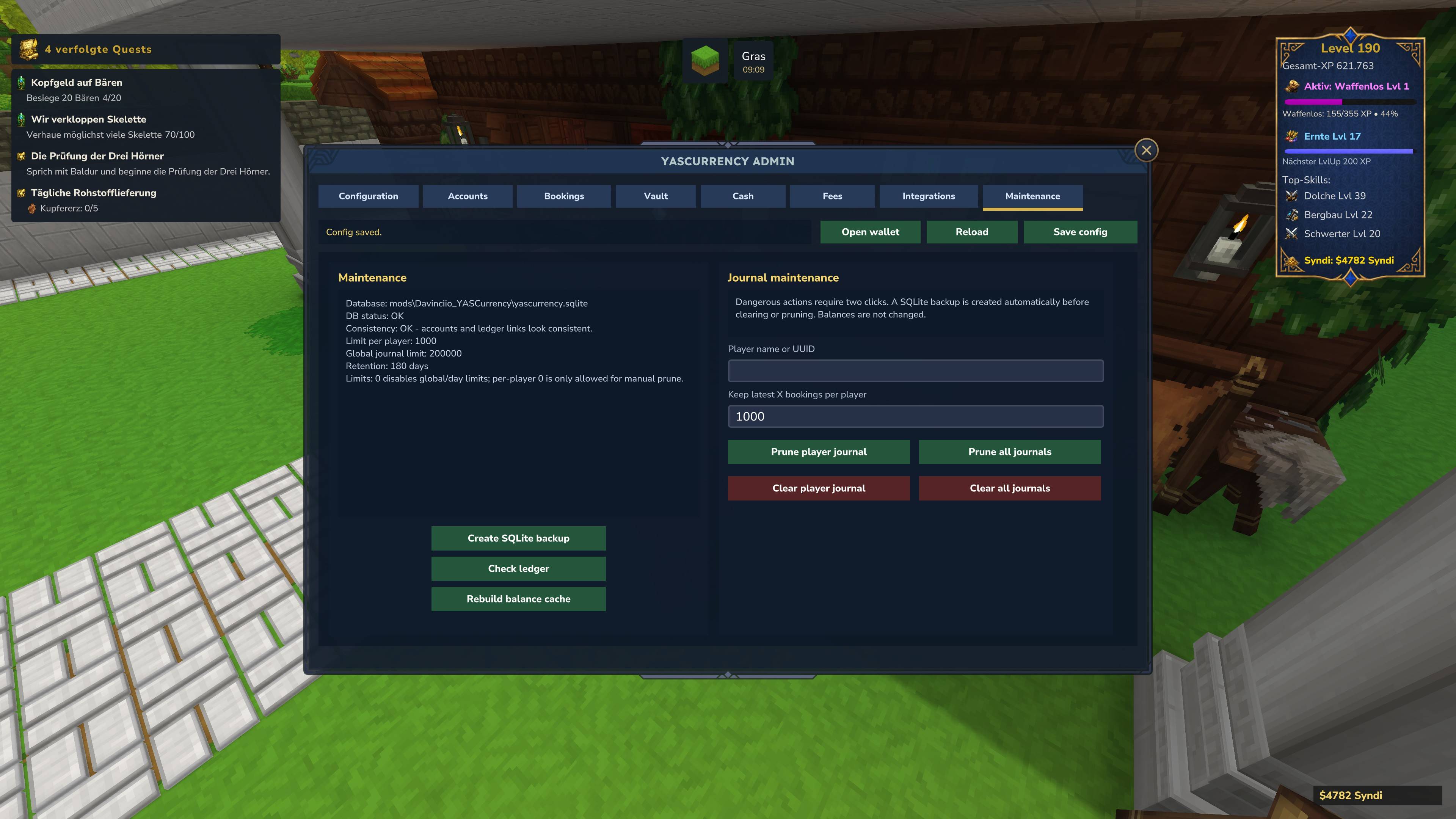
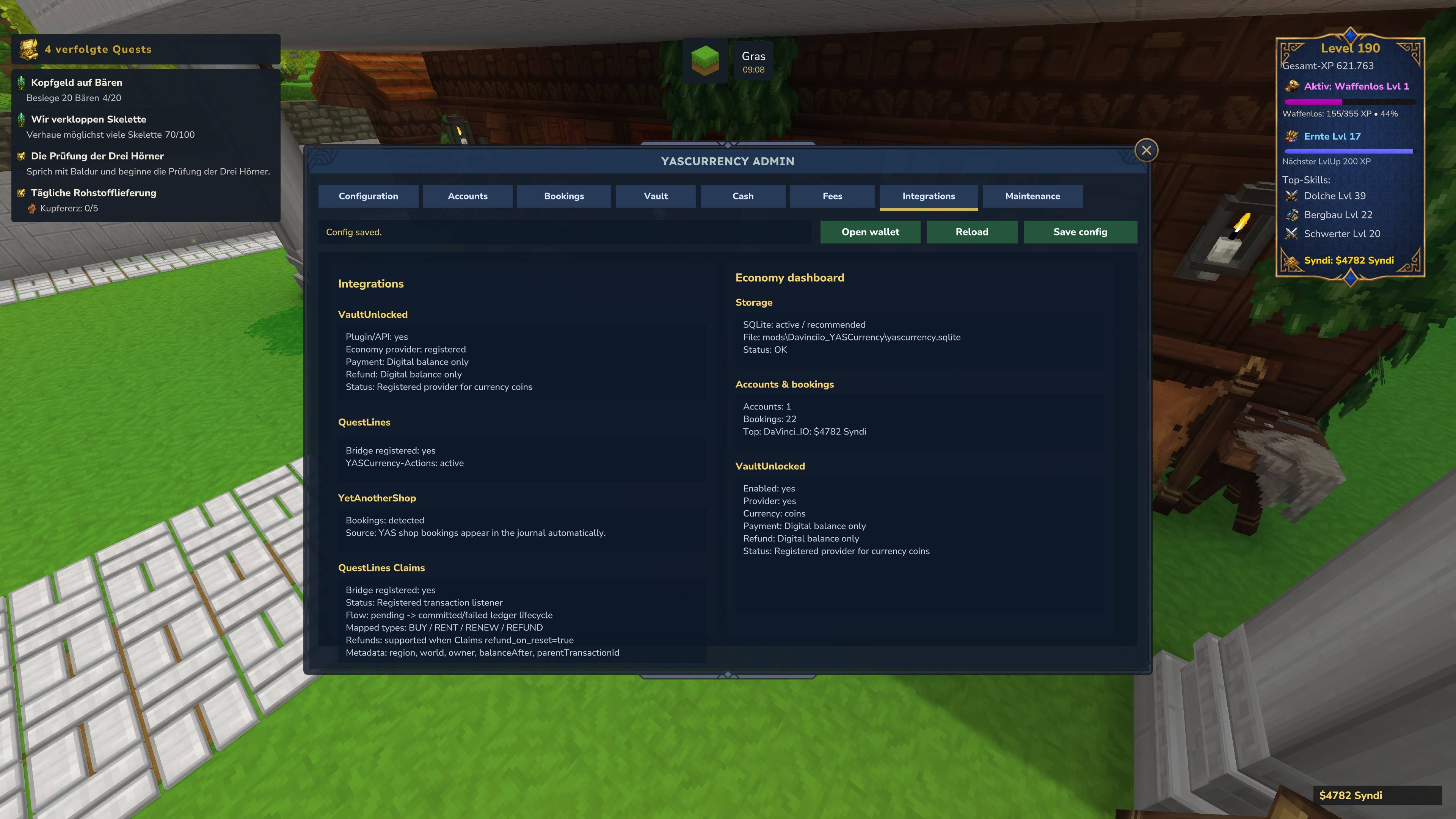
- Storage diagnostics for checking the active backend, health, account count, transaction count, and total money supply.
- API v4 with structured transaction contexts, fee policies, previews, and result objects.
Simple servers can keep the advanced controls disabled and use YASCurrency as a clean wallet and cash system. Larger servers can enable monitoring, limits, fees, MariaDB storage, storage diagnostics, migration tools, and advanced economy controls when they need deeper control.
New: Optional MariaDB Storage Backend
YASCurrency now supports MariaDB as an optional storage backend in addition to the default SQLite storage.
SQLite remains the default and recommended storage option for most single-server setups. Existing servers continue to work with SQLite without any required external database setup or migration.
MariaDB is intended for larger servers, hosted environments, external database management, or administrators who prefer storing economy data in a dedicated database server.
- SQLite remains the default backend and requires no external database.
- MariaDB can be enabled manually through the YASCurrency config.
- Automatic table creation is supported when the MariaDB database already exists.
- Storage diagnostics help admins verify which backend is currently active.
- SQLite to MariaDB migration is available through an explicit admin command.
- No automatic backend switch is performed after migration, so admins stay fully in control.
This makes YASCurrency flexible for both simple local server setups and larger production environments.
Storage Setup: SQLite or MariaDB
YASCurrency can run with either SQLite or MariaDB.
SQLite Default Storage
SQLite is the default storage backend. It is simple, reliable, and requires no external database server.
storage.type=sqlite
storage.file=yascurrency.sqlite
This is the recommended setup for most small and single-server installations.
MariaDB Optional Storage
MariaDB can be enabled manually for larger or externally managed server setups.
storage.type=mariadb
mariadb.host=localhost
mariadb.port=3306
mariadb.database=yascurrency
mariadb.username=yascurrency
mariadb.password=change-me
mariadb.useSsl=false
mariadb.connectionTimeoutMs=5000
mariadb.autoCreateTables=true
The MariaDB database and database user must be created by the server administrator. YASCurrency can create the required tables inside the existing database when mariadb.autoCreateTables=true is enabled.
Example MariaDB Preparation
CREATE DATABASE yascurrency
  CHARACTER SET utf8mb4
  COLLATE utf8mb4_unicode_ci;

CREATE USER 'yascurrency'@'localhost' IDENTIFIED BY 'your_password';

GRANT ALL PRIVILEGES ON yascurrency.* TO 'yascurrency'@'localhost';

FLUSH PRIVILEGES;
Storage Diagnostics
Admins can verify the active backend and storage health with:
/yascurrency storage test
/yascurrency storage status
The diagnostics show the active backend, storage description, health status, account count, transaction count, and total money supply.
SQLite to MariaDB Migration
YASCurrency includes an explicit migration command for moving from SQLite to MariaDB:
/yascurrency storage migrate sqlite-to-mariadb
The migration command:
- Checks that SQLite is currently active.
- Creates a SQLite backup before importing data.
- Initializes the MariaDB target schema.
- Copies accounts, transactions, and metadata.
- Refuses to import into a MariaDB database that already contains YASCurrency data.
- Compares account count, transaction count, and total money supply after migration.
- Reports whether the migration finished with OK or WARNING status.
Important: YASCurrency does not automatically switch to MariaDB after migration. After a successful migration, set storage.type=mariadb manually in the config and restart the server.
Main Features
- Native Hytale UI using in-game custom UI pages.
- Digital player balances for account-based server currency.
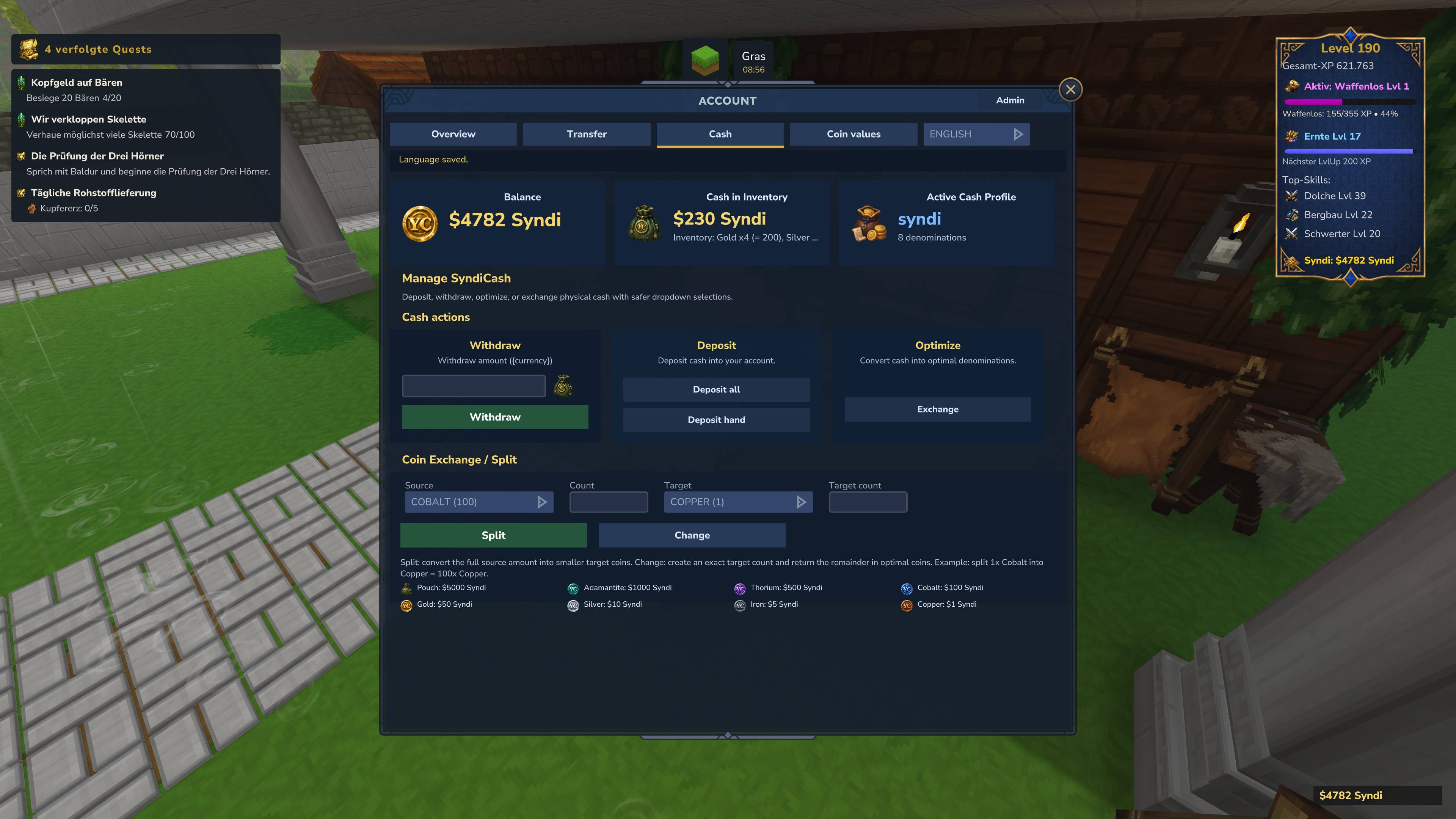
- Physical cash support for immersive cash-style economy setups.
- SQLite storage by default for simple and reliable server setups.
- Optional MariaDB storage backend for larger servers and external database management.
- Storage diagnostics commands for checking backend status, health, account count, transaction count, and total money supply.
- SQLite to MariaDB migration command with backup, import, and comparison checks.
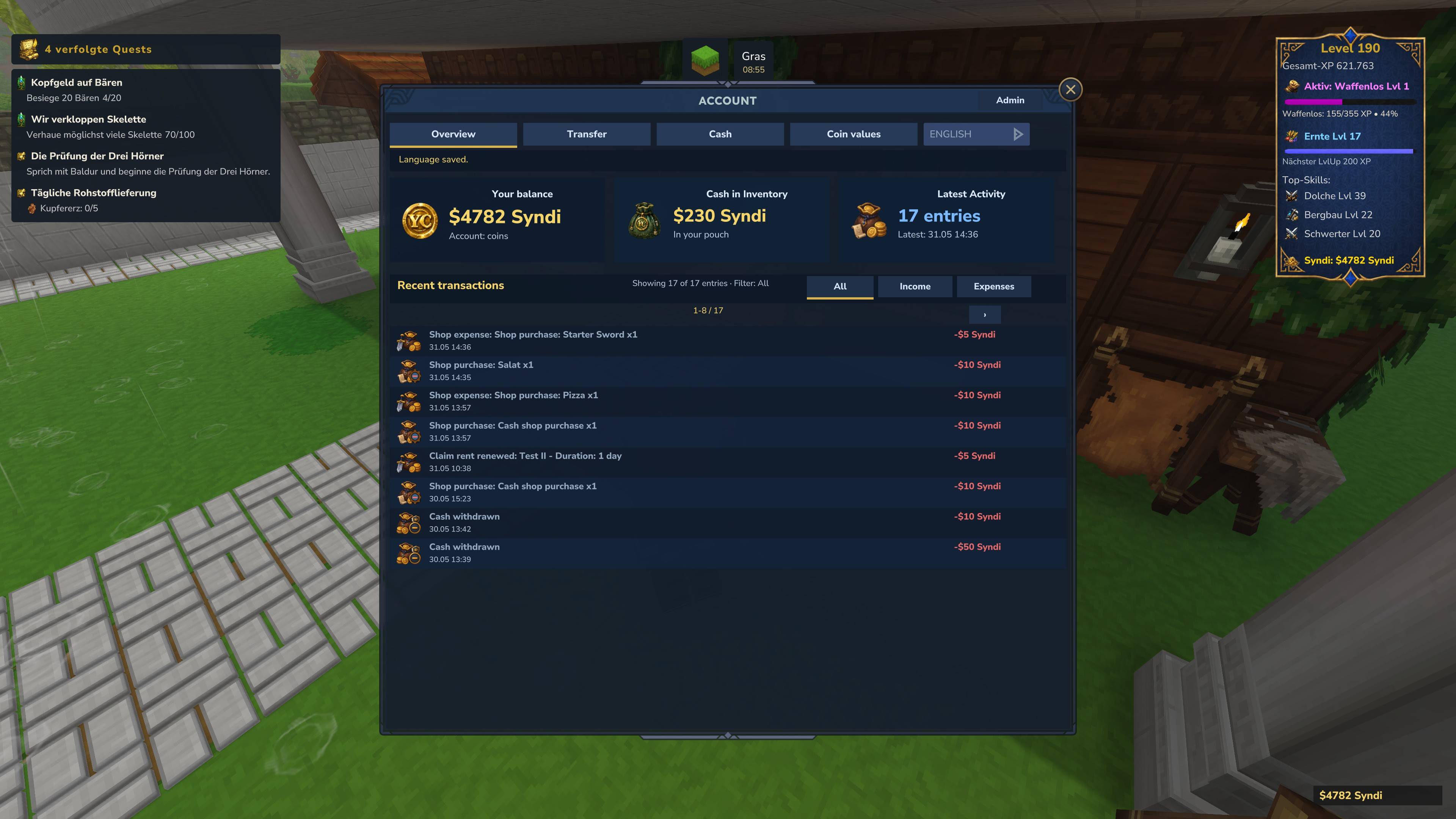
- Configurable wallet UI where players can view balance, cash information, transaction history, and HUD settings.
- Balance HUD with per-player positioning, offsets, display options, icons, and selectable backgrounds.
- Transaction history with income and expense filtering.
- Filtered transaction totals for easier tracking of income and outgoing payments.
- Admin tools for managing balances, inspecting transactions, configuring cash, maintaining the economy, reviewing money flow, checking storage health, and running migrations.
- Starting balance support for new players.
- Configurable currency name, symbol, labels, and optional symbol visibility.
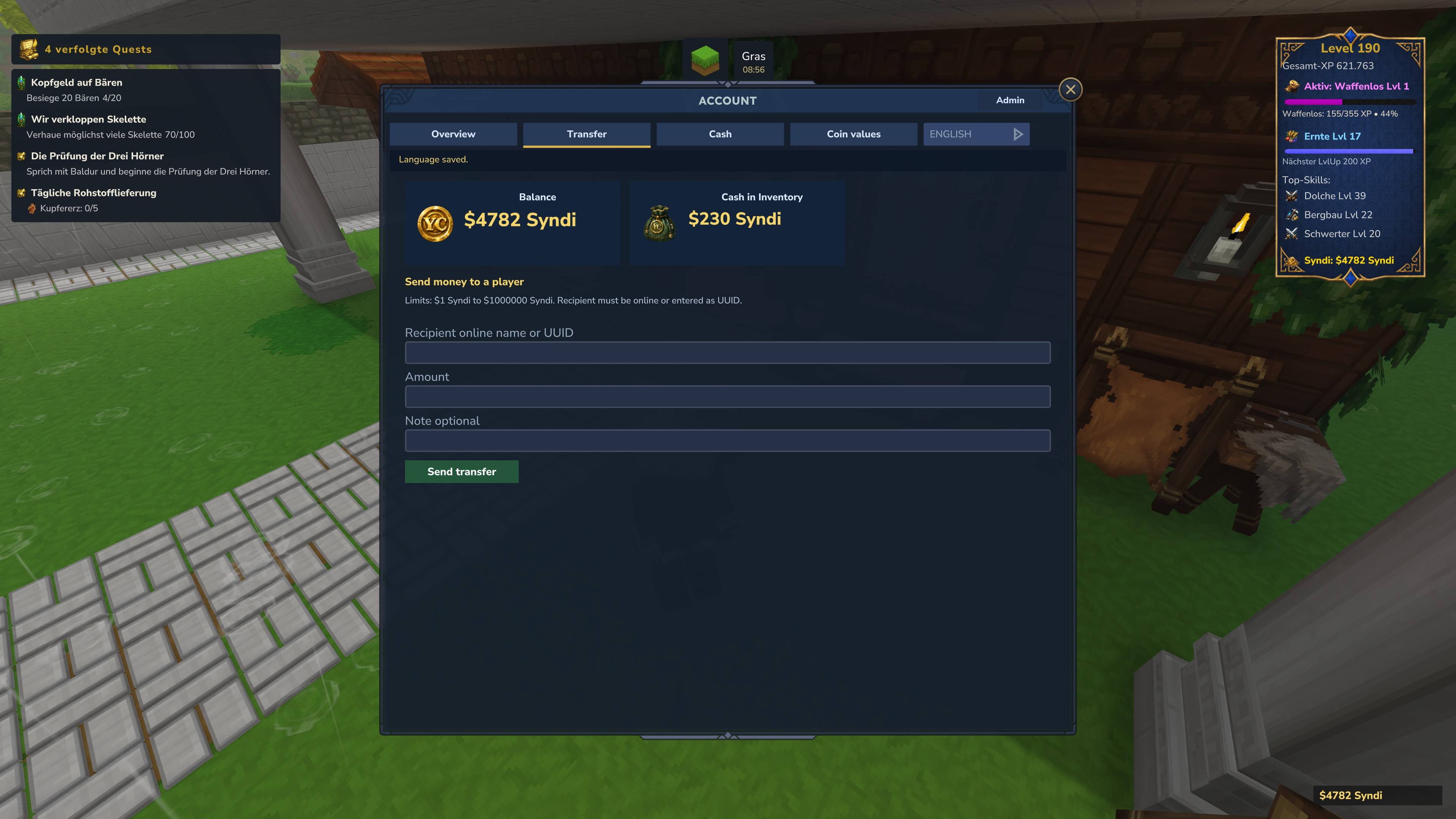
- Player transfers with configurable limits and transaction logging.
- Cash tender and change handling for physical cash payments.
- Dynamic cash item names and descriptions using per-stack item display metadata.
- QuestLines integration for digital requirements, physical cash requirements, actions, rewards, and text variables.
- QuestLines Claims support for claim purchases, rent, renewal, and readable economy tracking.
- VaultUnlocked support for compatible economy bridge scenarios.
- Multilingual support with English and German localization.
- Public plugin API v4 for other mods to interact with balances, cash, fees, previews, transaction contexts, HUD behavior, and transaction history.
- Optional shop integration support for systems such as YetAnotherShop.
Digital Currency
- Store player balances directly on the server.
- Use configurable currency keys, display names, symbols, and labels.
- Optionally hide the currency symbol completely for cleaner server-specific economy names.
- Support deposits, withdrawals, transfers, rewards, payments, corrections, and admin adjustments.
- Track every relevant balance change through transaction history.
- Use server-side validation to prevent invalid, negative, or unaffordable transactions.
- Use configurable transfer limits for player-to-player payments.
- Use fees and taxes for transfers, shop purchases, PlayerShop payments, QuestLines rewards, and claim payments.
- Provide a clean base economy system for shops, quests, rewards, commands, jobs, NPC systems, claims, and custom server features.
Physical Cash
- Supports physical cash-style payments where configured cash items are available.
- Allows servers to create more immersive economy systems based on carried money or cash items.
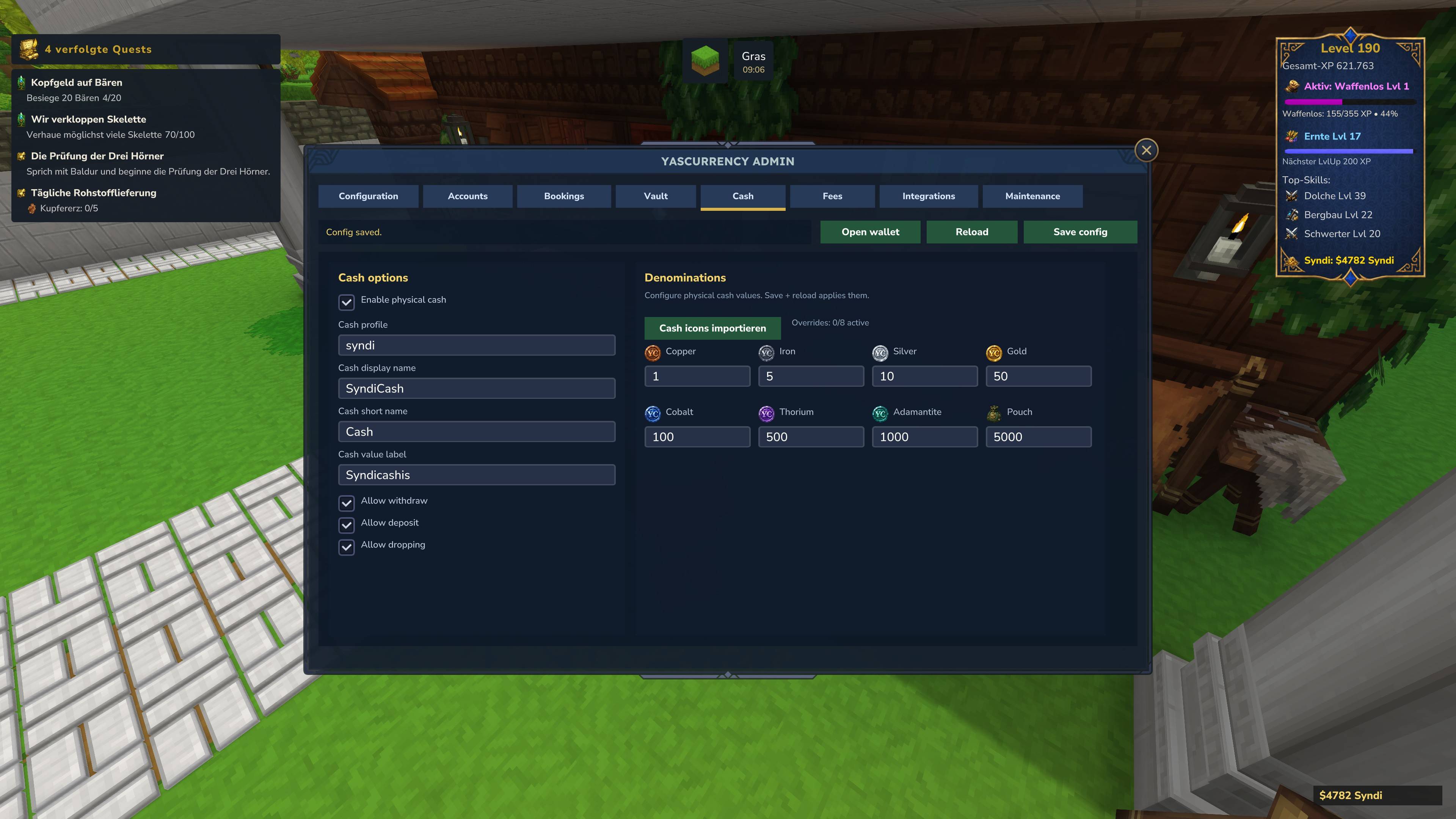
- Configurable cash profile, display name, short name, and value label.
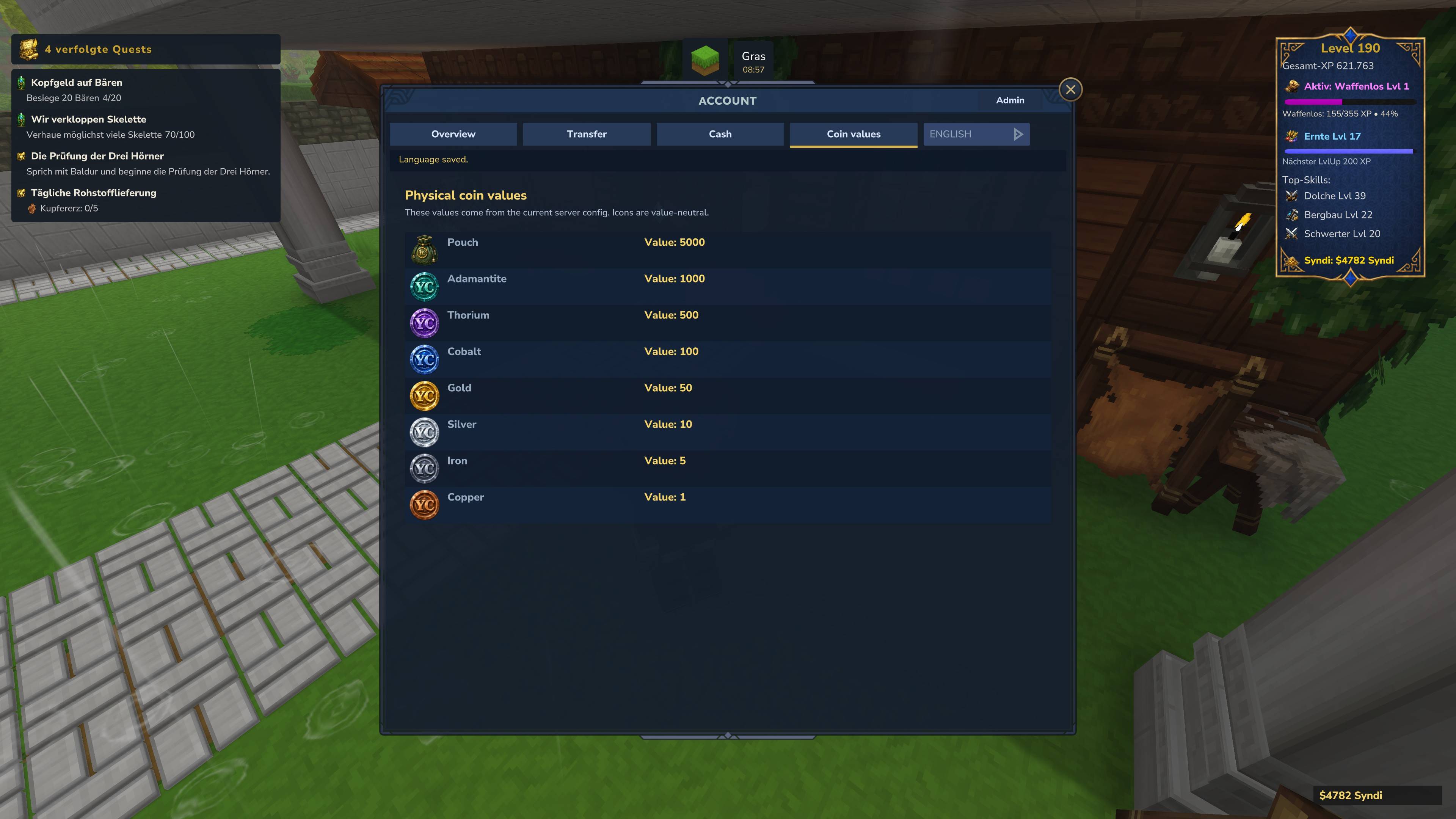
- Configurable cash denominations and cash item values.
- Supports cash tender handling and change handling.
- Supports deposit, withdrawal, cash spending, cash grants, cash exchange, and cash optimization.
- Supports cash-specific fees for deposit and withdrawal flows.
- Cash payments can be used by compatible shop, quest, or economy integrations.
- Useful for roleplay servers, market stalls, player trading hubs, survival economies, and physical economy setups.
Note: YASCurrency controls official YASCurrency cash flows. Server owners should ensure that other plugins do not create or duplicate cash items outside the supported economy pipeline.
Economy Monitoring & Security
- Transaction monitoring is enabled by default.
- Monitor money creation, money destruction, transfers, warnings, and total economy supply.
- Review large transactions and suspicious money movement.
- Inspect transactions by player, source, type, amount, reason, and external ID.
- Open a transaction source as a filter.
- Open a player directly in the account management tab from a transaction.
- Review player-specific transaction history.
- Use warnings and risk levels to identify suspicious activity faster.
This system is designed to help server owners understand where money enters the economy, where it leaves the economy, and which systems are responsible for major changes.
Rollback & Blocking Tools
- Rollback creates a safe counter-transaction instead of deleting history.
- Blocking can block a transaction source or external ID.
- Admin confirmation dialog prevents accidental rollback or blocking actions.
- Rollback and block actions are designed for economy investigations and administrative corrections.
- Ledger history remains traceable, making the economy more auditable.
YASCurrency does not silently erase financial history. Instead, it keeps the transaction trail understandable and reviewable.
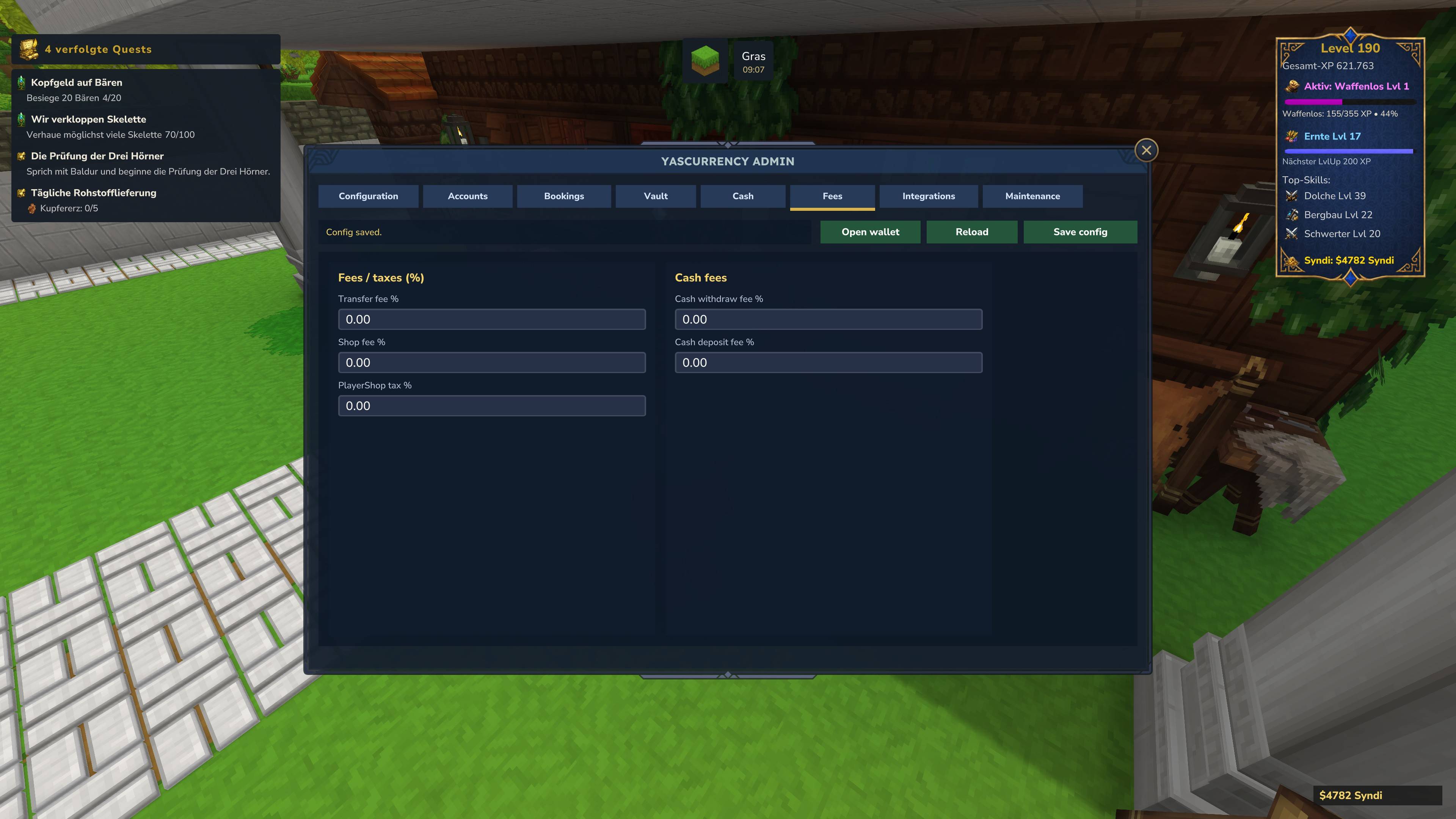
Fees & Taxes
YASCurrency supports configurable fees and taxes for multiple economy flows.
- Transfer fee
- Shop fee
- PlayerShop tax
- Cash withdrawal fee
- Cash deposit fee
- QuestLines reward fee
- Claim purchase fee
- Claim rent / renewal fee
Fees can be shown in player-facing transaction history when transaction metadata includes the fee information. This helps players understand why a payment, reward, claim purchase, or rent action changed their balance by a specific amount.
Inflation Control
YASCurrency includes optional inflation-control features for larger or more complex server economies.
- Global daily money creation limit.
- Daily money creation limit per player.
- Large-transaction warning threshold.
- High daily-gain warning threshold.
- Target money supply value.
- Reward scaling min/max factor.
- Optional hard control modes for reducing or blocking money creation.
Inflation control is optional. Servers that want a simple currency setup can leave it disabled while keeping transaction monitoring active.
Wallet & Transaction History
- Players can open a native wallet UI to view their current balance.
- The wallet shows digital balance, physical cash in inventory, active cash profile, and recent activity.
- Dedicated HUD tab for player-specific Balance HUD settings.
- Recent transactions are displayed in a readable history list.
- Income and expense filters help players understand where money came from and where it was spent.
- Filtered totals show summed income or outgoing payments for the selected view.
- Technical audit entries are hidden from normal player-facing transaction history.
- Shop transactions can display cleaner labels when the source plugin provides structured transaction reasons.
- Fees can be displayed in the transaction history when the transaction contains structured fee metadata.
Admin Tools
- Inspect and manage player balances.
- Open detailed account views for individual players.
- Review player-specific transaction history with pagination.
- Review economy activity through admin-facing transaction views.
- Filter transactions by player, transaction ID, type, source, amount, warnings, blocked status, or duplicates.
- Inspect transaction details such as source, reason, status, risk level, external ID, and metadata.
- Rollback selected transactions through safe counter-transactions.
- Block suspicious sources or external IDs.
- Adjust balances for rewards, corrections, testing, or server administration.
- Configure core economy behavior such as currency labels, start balance, transfer limits, and symbol visibility.
- Configure physical cash behavior, cash profile names, cash labels, cash values, and cash actions.
- Configure fees and taxes for digital, cash, shop, QuestLines, and claim flows.
- Enable or disable the Balance HUD globally.
- Use maintenance tools for journal and economy cleanup tasks.
- Check the active storage backend and storage health.
- Run SQLite to MariaDB migration when needed.
- Designed to help server owners maintain a clear and manageable economy.
QuestLines Integration
- YASCurrency can be used in QuestLines requirements, actions, and text variables.
- Digital balance requirement:
yascurrency:canafford:<amount>
- Physical cash requirement:
yascurrency:cancashafford:<amount>
- Digital withdrawal action:
yascurrency:take:<amount>:<label>
- Physical cash withdrawal action:
yascurrency:takecash:<amount>:<label>
- Digital balance text variable:
{ycurbalance} - Physical cash balance text variable:
{ycurcashbalance} - Quest rewards can use configurable reward fees when routed through the structured YASCurrency economy flow.
QuestLines Claims Support
- Supports claim-related economy flows when compatible QuestLines Claims integration is enabled.
- Claim purchases can use a configurable claim purchase fee.
- Claim rent and renewal can use a configurable claim rent / renewal fee.
- Claim transactions can be shown in the transaction journal with readable source, reason, and external ID information.
- Admin tools can inspect, filter, and review claim-related money movement.
Shop & Plugin Integration
- YASCurrency provides an API for other mods to perform payments, deposits, withdrawals, cash checks, and balance checks.
- Compatible integrations can provide structured transaction reasons for cleaner player history.
- Supports account-based payments and physical cash-style payment flows where implemented by the integrating plugin.
- Works well as an economy backend for shops, reward systems, quests, claims, server jobs, NPC systems, and custom gameplay systems.
- YetAnotherShop can use YASCurrency for digital payments, physical cash payments, readable shop transaction history, and fee-aware payment previews.
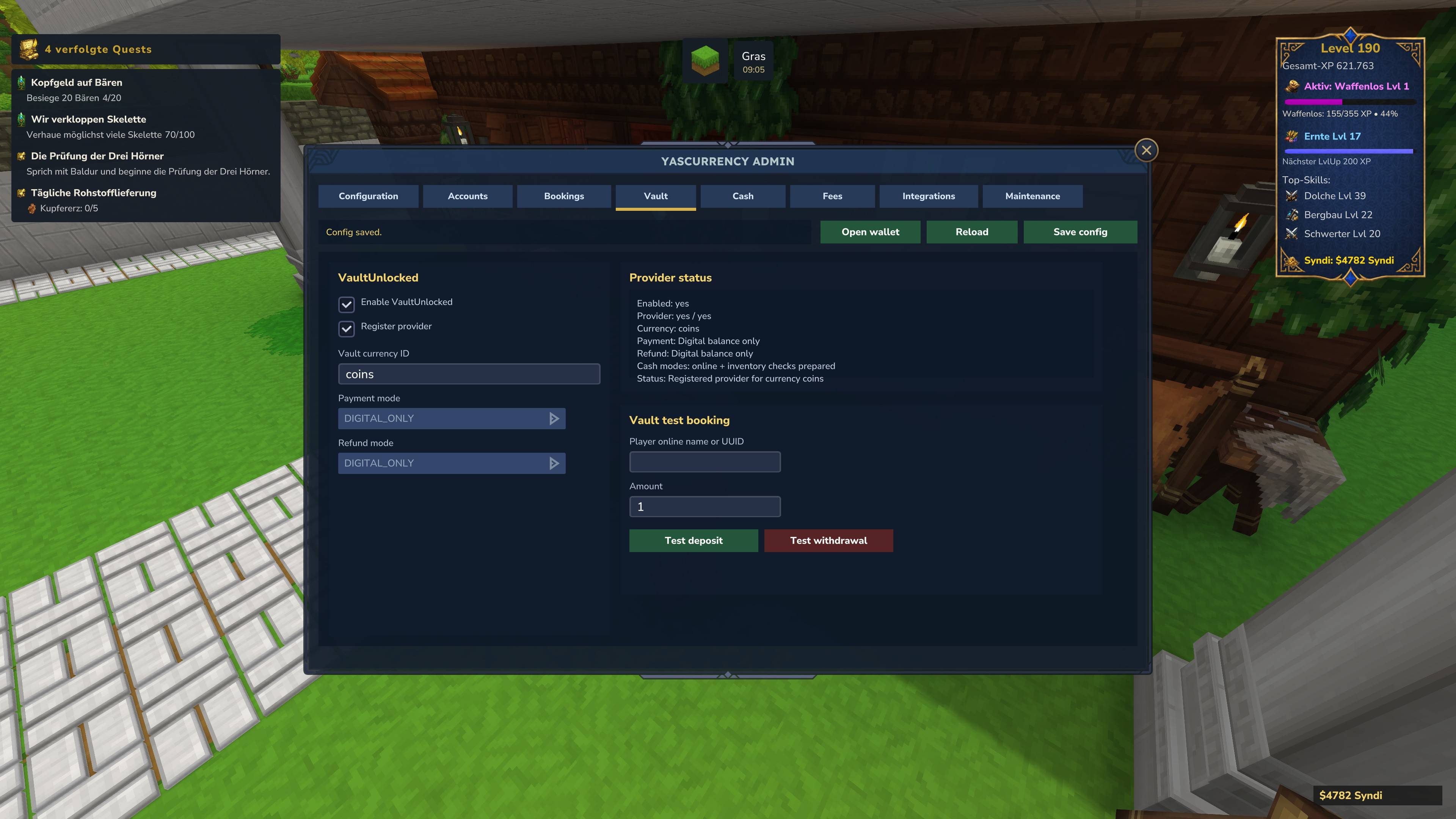
VaultUnlocked Support
- VaultUnlocked can be used as a bridge for compatible economy scenarios.
- VaultUnlocked remains a proper mod name and is shown as VaultUnlocked in the admin UI.
- Supports configurable payment and refund modes where available.
- Useful for servers that want YASCurrency to participate in broader economy compatibility flows.
API & Developer Support
YASCurrency includes a public API for plugin developers and server-side integrations.
- Public API v4 for balance checks, cash checks, deposits, withdrawals, transfers, cash spending, cash grants, previews, results, HUD helpers, feature flags, and transaction handling.
- Feature flags allow integrations to check available functionality.
- Supports digital balance formatting and physical cash balance formatting.
- Supports Balance HUD refresh and player HUD setting helpers.
- Supports structured transaction reasons so external systems can pass readable context such as shop, offer, item, quantity, reward source, claim ID, quest ID, fee policy, or payment reason.
- Useful for shops, quests, jobs, rewards, NPC systems, claims, server commands, and custom integrations.
- API and End User Docs are available here: https://api-yas-currency.web.app/
API v4 Highlights
- TransactionContext for structured transaction metadata.
- FeePolicy for explicit fee handling.
- TransactionPreview for showing players the final cost before charging.
- YasCurrencyTransactionResult for rich success/failure responses.
- TransactionStatus for better integration logic.
- Preview methods for deposit, withdraw, and transfer operations.
- Context-aware methods for deposit, withdraw, transfer, cash grant, and cash spend operations.
API v4 is designed so integrations no longer need to rely only on plain reason strings. Instead, they can pass source, category, external ID, display reason, metadata, and fee policy in a structured way.
Example: Quest Reward Context
TransactionContext ctx = YasCurrencyAPI.questRewardContext(
    questId,
    questName,
    "QuestLines"
);

TransactionPreview preview = YasCurrencyAPI.previewDeposit(playerUuid, rewardAmount, ctx);
YasCurrencyTransactionResult result = YasCurrencyAPI.deposit(playerUuid, rewardAmount, ctx);
Example: Claim Rent Context
TransactionContext ctx = YasCurrencyAPI.claimRentContext(
    claimId,
    claimName,
    durationDays,
    "QuestLines Claims"
);

TransactionPreview preview = YasCurrencyAPI.previewWithdraw(playerUuid, rentAmount, ctx);
YasCurrencyTransactionResult result = YasCurrencyAPI.withdraw(playerUuid, rentAmount, ctx);
Example: Shop Purchase Context
TransactionContext ctx = TransactionContext.builder()
    .source("YetAnotherShop")
    .category(TransactionCategory.SHOP_PURCHASE)
    .feePolicy(FeePolicy.SHOP_BUY)
    .externalId(orderId)
    .displayReason("Shop purchase: " + itemName)
    .metadata("item", itemName)
    .metadata("quantity", String.valueOf(quantity))
    .build();

TransactionPreview preview = YasCurrencyAPI.previewWithdraw(playerUuid, price, ctx);
YasCurrencyTransactionResult result = YasCurrencyAPI.withdraw(playerUuid, price, ctx);
Localization
- English and German language files included.
- Configurable default language.
- Player-facing wallet, transaction, HUD, QuestLines, and admin text is localized where supported.
- Designed for multilingual Hytale servers.
- The admin UI is designed to use language files instead of hardcoded visible UI text.
Compatibility Notes
- YASCurrency can be used as a standalone economy system.
- SQLite is included as the default local storage backend.
- MariaDB is optional and requires a prepared MariaDB database and user.
- Physical cash functionality depends on configured cash items and compatible integrations.
- Readable shop transaction details depend on the integrating plugin passing structured transaction information.
- Fee display depends on transactions containing fee metadata or being created through the structured API flow.
- VaultUnlocked support depends on the available VaultUnlocked environment and compatible usage.
- QuestLines and QuestLines Claims support are optional and only apply when those integrations are present and enabled.
- Other plugins can integrate through the public API documented here: https://api-yas-currency.web.app/
Why YASCurrency?
YASCurrency is built for Hytale servers that need more than a simple balance number.
It combines account-based currency, physical cash support, dynamic cash item tooltips, player wallet UI, configurable Balance HUDs, transaction history, QuestLines support, VaultUnlocked support, admin tools, localization, optional MariaDB storage, storage diagnostics, migration tools, and a public integration API into one native server economy system.
With the Economy Control update, YASCurrency also gives server owners tools to monitor money flow, review transaction sources, configure fees and taxes, inspect player account history, rollback suspicious transactions through counter-bookings, and protect the economy from uncontrolled money creation.
Whether you are building a simple shop economy, a roleplay cash system, a player marketplace, a quest-driven RPG server, a claim-based land economy, or a custom server network economy, YASCurrency provides a flexible and powerful foundation for your server.
Recent Changes
- Added optional MariaDB storage backend.
- SQLite remains the default storage backend.
- Added storage backend abstraction for SQLite and MariaDB.
- Added MariaDB configuration options.
- Added automatic MariaDB table creation when the database already exists.
- Added storage diagnostics commands.
- Added SQLite to MariaDB migration command.
- Added SQLite backup creation before migration.
- Added migration comparison checks for account count, transaction count, and total money supply.
- Improved admin storage health performance with cached storage snapshots.
- Improved admin UI performance when switching tabs.
- Improved MariaDB setup error messages.
- Improved startup logging for active storage backend.
- Added MariaDB setup and migration documentation.
- Added major Economy Control update.
- Added transaction monitoring dashboard.
- Added economy security tools for reviewing money flow.
- Added detailed admin transaction journal.
- Added transaction detail inspection.
- Added transaction row highlighting for selected entries.
- Added rollback support through safe counter-transactions.
- Added source and external-ID blocking tools.
- Added player account detail view in the admin accounts tab.
- Added player-specific transaction history with pagination.
- Added configurable fees for QuestLines rewards.
- Added configurable fees for claim purchase.
- Added configurable fees for claim rent and renewal.
- Added fee display support for transaction history when metadata is available.
- Added optional inflation-control settings.
- Added optional dynamic reward-scaling settings.
- Added public API v4 with TransactionContext, FeePolicy, TransactionPreview, and YasCurrencyTransactionResult.
- Added context-aware deposit, withdraw, transfer, grantCash, and spendCash API flows.
- Added API helpers for QuestLines rewards and claim payments.
- Improved admin localization handling.
- Improved VaultUnlocked naming consistency.
- Improved physical cash naming and display handling across wallet and HUD views.
- Added dynamic cash item names and descriptions using Hytale item stack display metadata.
- Added QuestLines support for physical cash checks and cash spending.
- Added QuestLines text variable for physical cash balance.
- Improved handling of physical cash values, cash labels, and formatted cash balance output.
- Improved Balance HUD settings inside the player wallet.
- Added Balance HUD background selection: Standard, RPG, and RPG light.
- Added Balance HUD display options for digital balance, physical cash balance, and currency icon.
- Added per-player HUD position and offset settings with live preview.
- Reduced HUD positions to stable corner placements: top left, top right, bottom left, and bottom right.
- Added optional currency symbol visibility setting.
The YAS Currency Team