


Server Hide Settings
- By
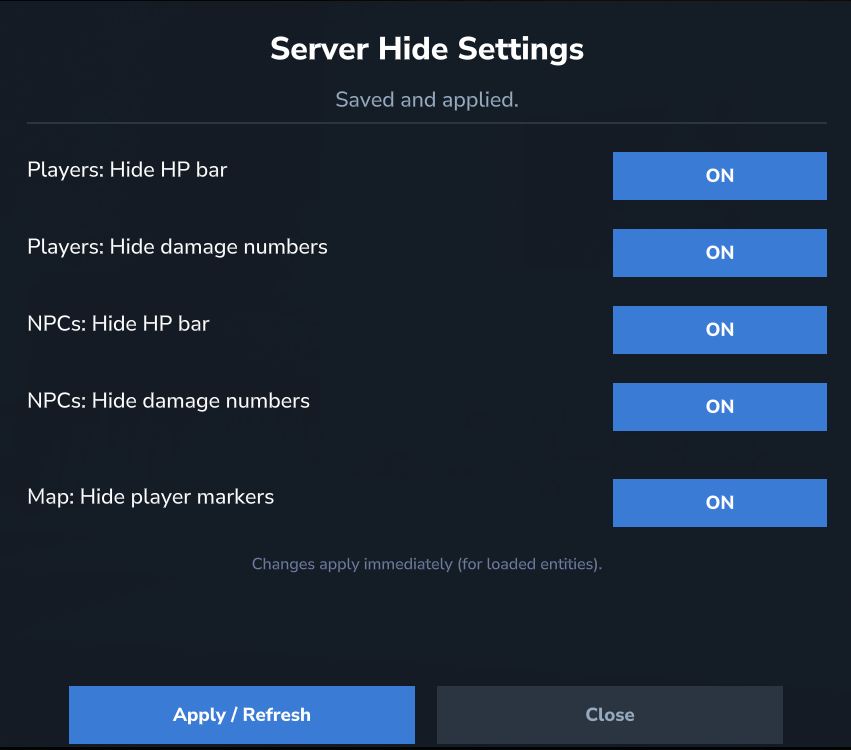
A server-side mod/plugin for Hytale that hides HP bars above entities and (optionally) damage/heal numbers. It can be controlled in-game via an admin UI dashboard and also supports a disk-based config.
HytaleClient_aLvquNMNfC.png
Description
Server Hide Settings (Hytale Server Mod/Plugin)
Server Hide Settings is a server-side Hytale mod/plugin that reduces visual clutter by hiding overhead combat UI (HP bars + combat text) and optionally hiding player markers on the world map. Everything is controlled in-game via an admin Dashboard UI, and all settings are persisted to a disk-based config that can be applied live (refresh) — no client mod required.
Goal: reduce visual clutter and keep server visuals cleaner — without requiring any client-side modifications.
If you have any problems with the mod, please contact me in Discord/Telegram:
artur_hatoka
Why this plugin exists
Overhead UI is useful, but on busy servers it quickly becomes noisy:
- large fights fill the screen with HP bars and damage numbers,
- crowded hubs become visually “busy” even when nothing important is happening,
- PvP/PvE events may want a cleaner, more cinematic presentation.
Server Hide Settings lets you enforce a cleaner look server-wide while still keeping the game fully playable.
Features
- ✅ Hide overhead combat UI above entities (HP bars + combat text)
- ✅ Works for:
- Players (
players) - NPCs (
npcs)
- Players (
- ✅ Hide player markers on the world map
- ✅ In-game admin Dashboard UI (ON/OFF toggles)
- ✅ Saves settings to a file and applies them live (refresh)
- ✅ Server-side implementation:
- modifies an entity’s
UIComponentListso clients render less overhead UI - overrides the map icon provider (hides player markers)
- modifies an entity’s
How it works (high level)
This plugin is fully server-side and focuses on what the server replicates to clients:
Overhead combat UI:
- The server controls which overhead UI elements exist via an entity’s
UIComponentList. - The plugin filters/removes specific overhead components, so the client simply has less to draw.
- The server controls which overhead UI elements exist via an entity’s
World map player markers:
- The plugin overrides the world map icon provider logic and suppresses player markers.
This approach is lightweight, does not require client changes, and applies consistently to everyone connected.
Use cases
PvP events / arenas
- Cleaner fights, less visual noise, more focus on movement and positioning.
Roleplay servers
- Removes “gamey” overlays for a more immersive look.
Stream / cinematic servers
- Cleaner footage and screenshots without asking players to install anything.
Minigames
- Reduce information overload and simplify the presentation.
Notes (Important)
On some server/client builds, hiding HP may also hide combat text even if configured separately. The Dashboard UI reflects the effective behavior observed on your build.
Compatibility depends on the current Hytale Server API build. If a game update changes internal UI component IDs, the plugin may require an update.
Requirements
- Hytale Server (compatibility depends on the Server API build)
- Java 25
Installation (Server)
- Build the plugin
.jar(see Build below) or use a prebuilt release. - Place the mod into your server folder (commonly
mods/— depends on your setup). - Start the server.
- Join with an account that has the
serverhidesettings.adminpermission (or equivalent admin role). - Open the dashboard:
/hid ui
After the first start, the config file will be created:
mods/ServerHideSettings/config.json
Commands
Base command: hid
/hid help— show help/hid info— show mod info and current settings/hid ui— open the admin dashboard/hid reload— reload config from disk (admin) and refresh live settings
Permissions
serverhidesettings.admin— access to the Dashboard UI and admin functions
Make sure your server permission system grants this permission to the correct role/player.
Configuration
File: mods/ServerHideSettings/config.json
Example JSON:
{ "enabled": true, "players": { "hideHealthBar": true, "hideDamageNumbers": true }, "npcs": { "hideHealthBar": true, "hideDamageNumbers": true }, "map": { "hidePlayerMarkers": true } }
Config fields
enabled- Master switch for the plugin.
players.hideHealthBar- Hide overhead HP bars for players.
players.hideDamageNumbers- Hide overhead combat text / damage numbers for players.
npcs.hideHealthBar- Hide overhead HP bars for NPCs.
npcs.hideDamageNumbers- Hide overhead combat text / damage numbers for NPCs.
map.hidePlayerMarkers- Hide player icons/markers on the world map.
Tip: Use the Dashboard UI for quick toggling, then persist by saving/reloading the config.
Support / Contacts
- Discord / Telegram:
artur_hatoka
The Server Hide Settings Team

