Restock & Roam

Save a personal expedition kit, link your base chests, then crouch and use any linked chest to store new loot and restock.
Restock & Roam is a mod for solo worlds, friend-hosted worlds, and dedicated servers. You save a personal kit, link the chests at your base, then crouch and use any of those chests when you leave and when you come back.

Standing up and opening a chest is still vanilla. The mod only runs when you crouch and interact with a linked chest after a kit is active for that base.

Please see Documentation for more infos.

Features

  • Personal kits: equipment layout plus optional extra supply totals
  • Linked chest network with guest access; each player keeps their own kit and trip
  • Deposit only items gained since departure; refill food, potions, ammo, and saved gear
  • Overflow stays with you if a loot chest is full
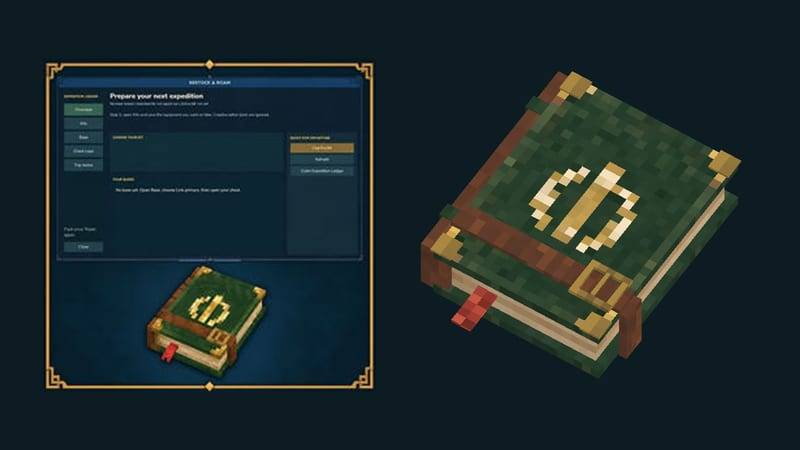
  • Expedition Ledger item (spellbook animation) or /eprep to open the GUI
  • Optional BetterClaim chest-interact check

How to use

  1. Type /eprep. Aliases: /expedition, /restock, /rr. The Overview page opens.

  2. Click Claim Expedition Ledger. It is free, cannot be crafted, and is ignored by kits. If you already have one, the menu tells you. Hold the Ledger and use secondary action to open Restock & Roam without typing a command.

  3. Open Kits. Put on the armor, tools, utility items, hotbar, inventory, and backpack you want for the trip. Creative editor tools and the Ledger are ignored.

  4. Type a kit name (1-24 letters, numbers, spaces, - or _). Click Save full kit. Items stay on you; the mod only stores a snapshot. You can keep up to 12 kits. Saving over an existing name asks you to click again to confirm.

  5. Optional kit edits: click a listed item, set Desired quantity, then Set quantity or Remove item. Add held supplies adds the item in your active hotbar slot as a total to restock (not a specific slot). Delete kit asks for a second click and does not move items.

  6. Open Base. Click Link primary. The menu closes. Open your main storage chest within 30 seconds. Chat confirms the link. That chest starts as role BOTH and is the fallback.

  7. Optional extra storage: click Link additional, then open another chest within 30 seconds. It must be within 16 blocks of the primary (3D distance). One player owns one base. Extra chests can be unlinked; removing the primary requires Delete network (second click to confirm).

  8. Optional Chest rules: select a chest in the list. Set role to SUPPLY, LOOT, or BOTH. Priority is -1000 to 1000. Filters are OR, comma-separated: item:ItemId, category:CategoryId, resource:ResourceId. Leave filters empty for fallback. Filtered chests are tried before fallback; higher priority first, then link order. The primary always stays first in the list.

  9. Optional guests: on Base, type the player name and click Add guest. They must have joined at least once so the name is unique. Guests use their own kits and trip tracking on your chests. Select a guest and Remove guest to drop them.

  10. Back on Overview (or Kits), select the kit and click Use this kit. Chat says the kit is active. The help line on Overview then tells you to crouch.

  11. Leave: crouch and interact with any linked chest. The chest window must actually open. First use on that trip prepares the kit from SUPPLY/BOTH chests and takes a departure snapshot. Stand up to loot or dump items by hand as usual.

  12. Return: come back to the same base, crouch, and interact with any linked chest again. The mod deposits only the extra items you gained since departure into LOOT/BOTH chests that accept them, then pulls missing kit items from SUPPLY/BOTH. Items you already had when you left are not treated as loot. If a chest is full, leftovers stay on you and show as pending on Trip status.

  13. Open Trip status any time to see world, return base, kit name, and the last report (Loot: N deposited. Kit: N supplied, N missing, N conflicts.). Abandon trip needs a second click. It only clears tracking. It never moves items. Changing the active kit does not rewrite the snapshot of a trip that already started. A trip belongs to its origin world and base; finish or abandon it before using another.

Chest roles in short: SUPPLY only gives items to refill the kit. LOOT only receives new finds. BOTH does both. Empty filters mean fallback after filtered chests.

If BetterClaim is installed, linked chests also respect its chest interact permission.

Installation

  1. Requires Hytale 0.6.0+
  2. Download RestockAndRoam-1.0.0.jar from the Files tab
  3. Place the JAR in mods/ (global UserData/Mods or per-save mods/)
  4. Start the world. Config at mods/durkz_RestockAndRoam/config.json
  5. Run /eprep and follow How to use above
  6. (Optional) Install BetterClaim if you want claim chest permissions applied to linked chests

Commands

/eprep
/expedition
/restock
/rr

/expedition cancel cancels a pending 30-second chest link. Chat shortcuts /expedition bind, /expedition save <name>, and /expedition prepare <name> exist; the GUI is the normal path.

Found a bug? Issues

Permissions

  • expeditionprep.admin: inspect another player's trip, reset tracking, and receive update notices. Base owners still manage chests and guests themselves.

Recommended

  • Stock SUPPLY or BOTH chests with the food, ammo, and spare tools your kit expects before the first crouch.
  • Crouch every time you want Restock & Roam. A normal chest open does nothing extra.
  • If a turnaround stops early, open Trip status, check your inventory, then Abandon trip before trying again. Abandon never moves items.
  • Set checkForUpdates to false in config.json if you do not want operator update chat.

License: MIT

The Restock & Roam Team

profile avatar
  • 2
    Followers
  • 8
    Projects
  • 1.4K
    Downloads

More from DurkzPRGView all

  • QuantumHy project image

    QuantumHy

    QuantumHy is a server-side FPS mod for Hytale. It adjusts each player's chunk view radius and entity stream radius to local load, while letting each player keep or disable those adjustments persistently.

    • 355
    • September 2, 2026
  • BetterClaim project image

    BetterClaim

    Territory claiming with interactive map GUI, party protection, allies, homes, admin tools, SQLite persistence, and granular permissions for server owners.

    • 388
    • September 2, 2026
  • LeanCore project image

    LeanCore

    LeanCore is server-side memory governor for Hytale. Unloads idle map regions, trims view radius under heap pressure, and learns which zones get revisited so it keeps the ones you actually use.

    • 296
    • August 28, 2026
  • EventBooster project image

    EventBooster

    Timed global XP boost events for Hytale servers. Start 2x XP (or more) with EventBooster!

    • 110
    • August 27, 2026
  • QuantumHy project image

    QuantumHy

    QuantumHy is a server-side FPS mod for Hytale. It adjusts each player's chunk view radius and entity stream radius to local load, while letting each player keep or disable those adjustments persistently.

    • 355
    • September 2, 2026
  • BetterClaim project image

    BetterClaim

    Territory claiming with interactive map GUI, party protection, allies, homes, admin tools, SQLite persistence, and granular permissions for server owners.

    • 388
    • September 2, 2026
  • LeanCore project image

    LeanCore

    LeanCore is server-side memory governor for Hytale. Unloads idle map regions, trims view radius under heap pressure, and learns which zones get revisited so it keeps the ones you actually use.

    • 296
    • August 28, 2026
  • EventBooster project image

    EventBooster

    Timed global XP boost events for Hytale servers. Start 2x XP (or more) with EventBooster!

    • 110
    • August 27, 2026