Pick Up Stations
- By
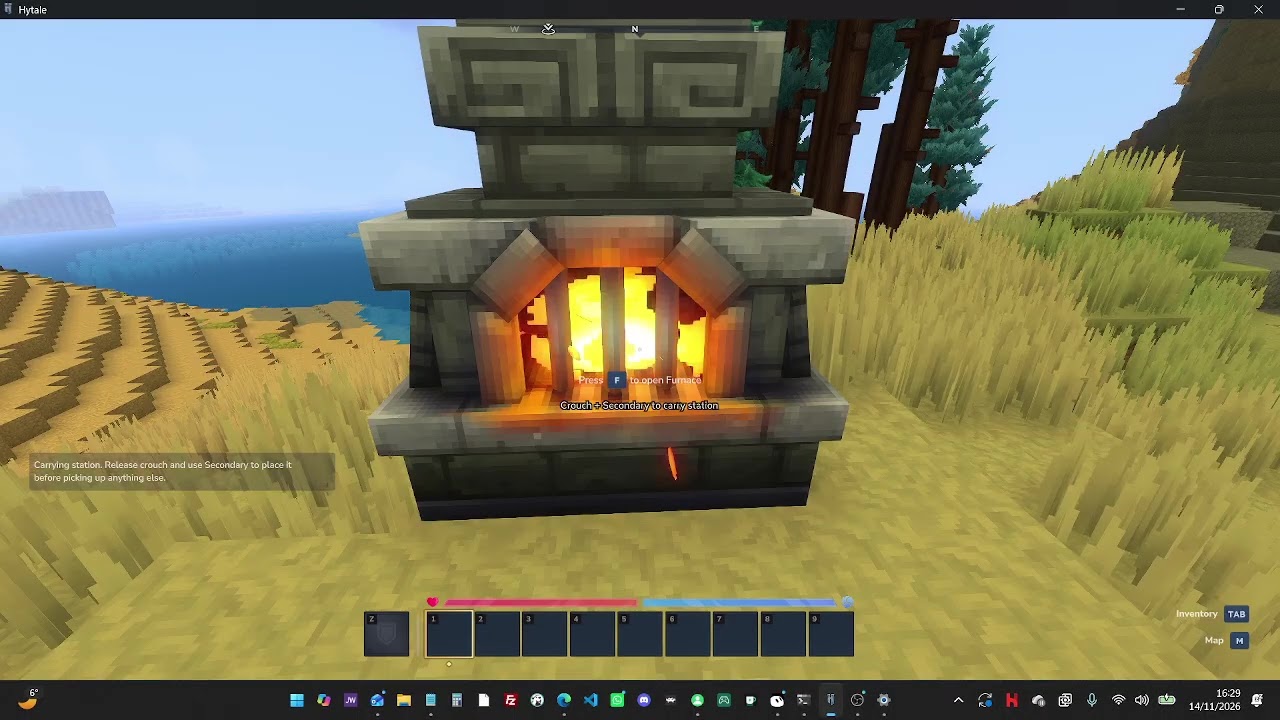
Move workbenches and crafting stations with their upgrades intact. Crouch + F to pick up; release crouch and right-click to place. Personal carry settings included.
Description
Rearrange your workshop without breaking down every station.
Pick Up Stations lets you crouch and interact with a closed workbench or crafting station to lift it with its upgrades and stored state intact. Carry it to its new home, release crouch, and use Secondary to place it down.
Options
To open options, use /pickupstations. Options:
| Option Name | Option Values |
|---|---|
| Pick up controls | Ctrl + F / Ctrl + Right Click |
| Pick up mode | Hold in hands / Inventory |
Gameplay video
Watch the Pick Up Stations gameplay demo on YouTube.
Features
- Carry in your hands: The default mode carries one station using Hytale's native placement preview, even when your inventory is full.
- Keeps upgrades: Stations keep their saved block data, including their upgrade tier and the materials used to upgrade them.
- Optional inventory mode: Store picked-up stations as items in free inventory slots, then place them like any other block.
- Personal settings: Use
/pickupstationsto choose your carry mode and either Crouch + Interact or Crouch + Secondary. No operator permission needed. - Native controls: Follows your rebound Hytale actions. Default pickup is CTRL + F; default placement is right-click after releasing crouch.
- All the workstations: Supports the Workbench and the other vanilla crafting stations: Alchemy, Arcane, Armory, Armour, Builders, Campfire, Cooking, Farming, Furnace, Furniture, Loom, Salvage, Tannery, Trough and Weapon benches, including upgraded tiers. Does not affect chests or barrels.
Controls
With Hytale's default key bindings:
| Action | Controls |
|---|---|
| Pick up a closed station | Hold CTRL (Crouch) and press F (Interact). |
| Place a station carried in your hands | Release CTRL, aim at a valid location, then right-click (Secondary). |
| Open a station normally | Press F without crouching. |
| Change your personal settings | Enter /pickupstations in chat. |
In /pickupstations, you can switch pickup to Crouch + Secondary (CTRL + right-click by default). With that option selected, F opens stations even while crouching.
You can also choose Inventory mode. Pick up the station using your selected gesture, then select its item in your hotbar and place it normally.
Rebound keys work too: the mod follows Hytale's Crouch, Interact, and Secondary actions rather than hard-coding these keys.
Installation
Requires Hytale 0.7.7. Dedicated servers also require Java 25.
For single-player, put the release JAR in your Hytale UserData\Mods folder and enable PickUpStations in the world's mod list. On Windows, this is normally %APPDATA%\Hytale\UserData\Mods.
For a dedicated server, stop the server, put the JAR in its mods folder, and restart. Players do not need a separate client plugin; the included assets are supplied by the server.
Before moving valuable stations
- Back up your world and test the mod on a disposable save first, especially with upgraded stations or ones that are processing items.
- Close the station before picking it up, and stay within five blocks.
- Put down a carried station before changing settings or logging out. Death and disconnect use Hytale's native carried-block handling.
- While carrying in your hands, collecting items and using tools are blocked until you place the station.
- Place all picked-up stations before uninstalling this mod.
- Protection systems must implement Hytale's relevant use/break events; compatibility with custom protection mods needs testing.
By MugHeadStudios. Not affiliated with or endorsed by Hytale.
Pick Up Stations Team