Screenshot 2026-10-24 104446.png

Screenshot 2026-10-24 104313.png
Description



OpticalRTP – Random Teleport for Hytale
Explore the world. Discover new places. Teleport with style!
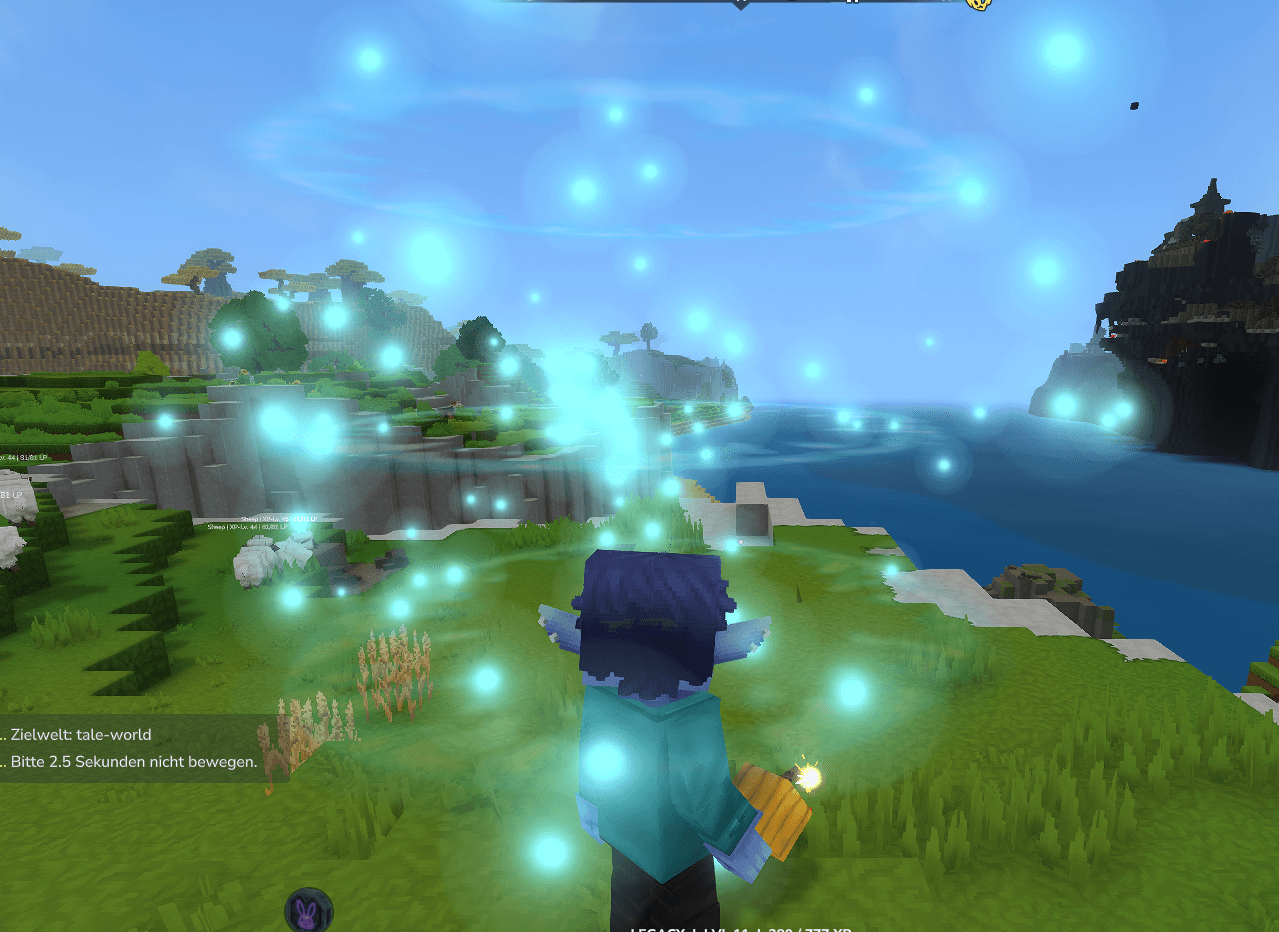
OpticalRTP is a configurable random teleportation plugin for Hytale servers, featuring visual teleportation effects, world restrictions, biome/zone filtering, and optional random spawn and respawn mechanics.
Whether you're running a survival server, an RPG adventure, or a large multiplayer community, OpticalRTP makes exploring your world easier and more exciting.
✨ Features
- 🌍 Random Teleportation – Teleport players to random surface locations.
- ✨ Visual Teleport Effects – Enjoy teleportation particles and a visual charging effect.
- ⏳ Configurable Teleport Delay – Set how long players must wait before teleporting.
- 🚶 Movement Cancellation – Optionally cancel teleportation when a player moves.
- 🗺️ Multiple World Support – Configure which worlds allow random teleportation.
- 🌲 Zone Filtering – Restrict destinations to specific world zones or exclude unwanted areas.
- 💧 Water Spawn Handling – Configurable handling of teleport destinations above water.
- 💀 Random Respawning – Optionally respawn players at random locations after death.
- 🏕️ Random Initial Spawn – Optionally give new players a random starting location.
- 🛠️ Admin Teleportation – Teleport other players to random locations.
- ⚙️ Server Configuration – Customize teleport radius, worlds, zones, timing, and more.
📜 Commands
| Command | Description |
|---|---|
/rtp |
Teleport yourself to a random location. |
/rtp help |
Display OpticalRTP command help. |
/rtp <player> |
Randomly teleport another player. |
/rtp <player> <world> |
Randomly teleport a player in a specific world. |
Examples
/rtp
/rtp help
/rtp Steve
/rtp Steve default
Note: Teleporting other players is intended for administrators. This version uses the same permission node for the /rtp command rather than a separate admin permission.
🔐 Permissions
| Permission | Description |
|---|---|
opticalrtp.rtp |
Allows access to OpticalRTP commands. |
The configuration also provides an rtp_op_only setting to restrict RTP usage to operators.
⚙️ Configuration
OpticalRTP provides a JSON configuration file for server administrators.
Configuration location:
mods/DerFriesn_OpticalRTP/config.json
Important Configuration Options
| Setting | Description |
|---|---|
enable_random_respawn |
Enable random respawning after death. |
enable_random_initial_spawn |
Enable random initial spawning. |
range_radius_blocks |
Set the random teleport radius in blocks. |
fallback_center_x |
Fallback center X coordinate. |
fallback_center_y |
Fallback center Y coordinate. |
fallback_center_z |
Fallback center Z coordinate. |
restrict_to_worlds |
Restrict teleportation to selected worlds. |
enabled_worlds |
List of allowed worlds. |
restrict_to_zones |
Enable zone-based destination restrictions. |
enabled_zone_groups |
Allowed zone groups. |
excluded_zone_names |
Excluded zones. |
rtp_timer_seconds |
Delay before teleportation. |
rtp_cancel_on_move |
Cancel teleportation when moving. |
rtp_op_only |
Restrict RTP to operators. |
debug_zone_messages |
Enable zone-related debug messages. |
spawn_above_water |
Control spawning above water. |
Example Configuration
The following example is intended as a starting point for a general survival server.
{
  "enable_random_respawn": false,
  "enable_random_initial_spawn": false,
  "range_radius_blocks": 2000,
  "fallback_center_x": 0,
  "fallback_center_y": 0,
  "fallback_center_z": 0,
  "restrict_to_worlds": true,
  "enabled_worlds": ["default"],
  "restrict_to_zones": false,
  "enabled_zone_groups": ["Zone1"],
  "excluded_zone_names": [
    "Oceans",
    "Zone1_Shallow_Ocean"
  ],
  "rtp_timer_seconds": 2.5,
  "rtp_cancel_on_move": true,
  "rtp_op_only": false,
  "debug_zone_messages": false,
  "spawn_above_water": true
}
Important: Adjust enabled_worlds to match your server's actual world names.
The plugin's original defaults include world and zone restrictions designed for its original server environment. Review the configuration before using it on a new server.
📦 Installation
- Download the OpticalRTP
.jarfile. - Place it inside your Hytale server's
modsfolder. - Start or restart your server.
- Locate the generated configuration file.
- Adjust the settings to match your world.
- Restart the server after changing the configuration.
- Use
/rtpin-game to test random teleportation.
No additional plugin dependencies are declared in the mod manifest.
🧭 Perfect For
- Survival Servers – Help players discover new building locations.
- RPG Servers – Encourage exploration beyond the starting area.
- Adventure Servers – Send players to random destinations.
- Community Servers – Give players a quick way to explore large worlds.
- Custom Worlds – Control where random teleportation is allowed.
🔧 Compatibility
- Game: Hytale
- Plugin Version: 1.0.14
- Declared Server Compatibility: Hytale 0.7.0 up to, but not including, 0.9.0
- Plugin Type: Server-side
- Dependencies: None declared
Compatibility is based on the mod manifest and does not guarantee functionality with every future Hytale update.
💜 Developed by DerFriesn
OpticalRTP is developed by DerFriesn, creator and developer of the Tale-World Hytale server.
🌐 Website: https://tale-world.com
🎮 Tale-World Server: play.tale-world.com
Teleport. Explore. Discover.
Made for Hytale communities and server owners.
OpticalRTP – Random Teleport Team