OpenDialogues
- By
Dialogue trees for Hytale. Write conversations that remember players’ answers, straight from the Asset Editor, and show them your way.
Description
OpenDialogues
💬 Dialogue trees for your Hytale server. Give your NPCs and items something to say, let players answer, and make every answer count.
No code required. Write dialogues in the Asset Editor, drop the plugin in mods/, and talk.



A speaker with a name, a title and a portrait, answers with icons and colours, and a story that remembers what you said last time.
📦 Want to see it in action ? Install OpenQuests Examples: The strange plush chapter hands you a hungry goblin plush that talks, begs for ore and changes its tune once fed.
✨ What you get
📝 Everything in the Asset Editor. Dialogues, speakers and routers are assets, checked as you type. Nest a whole conversation in a single file, or split it as you like.
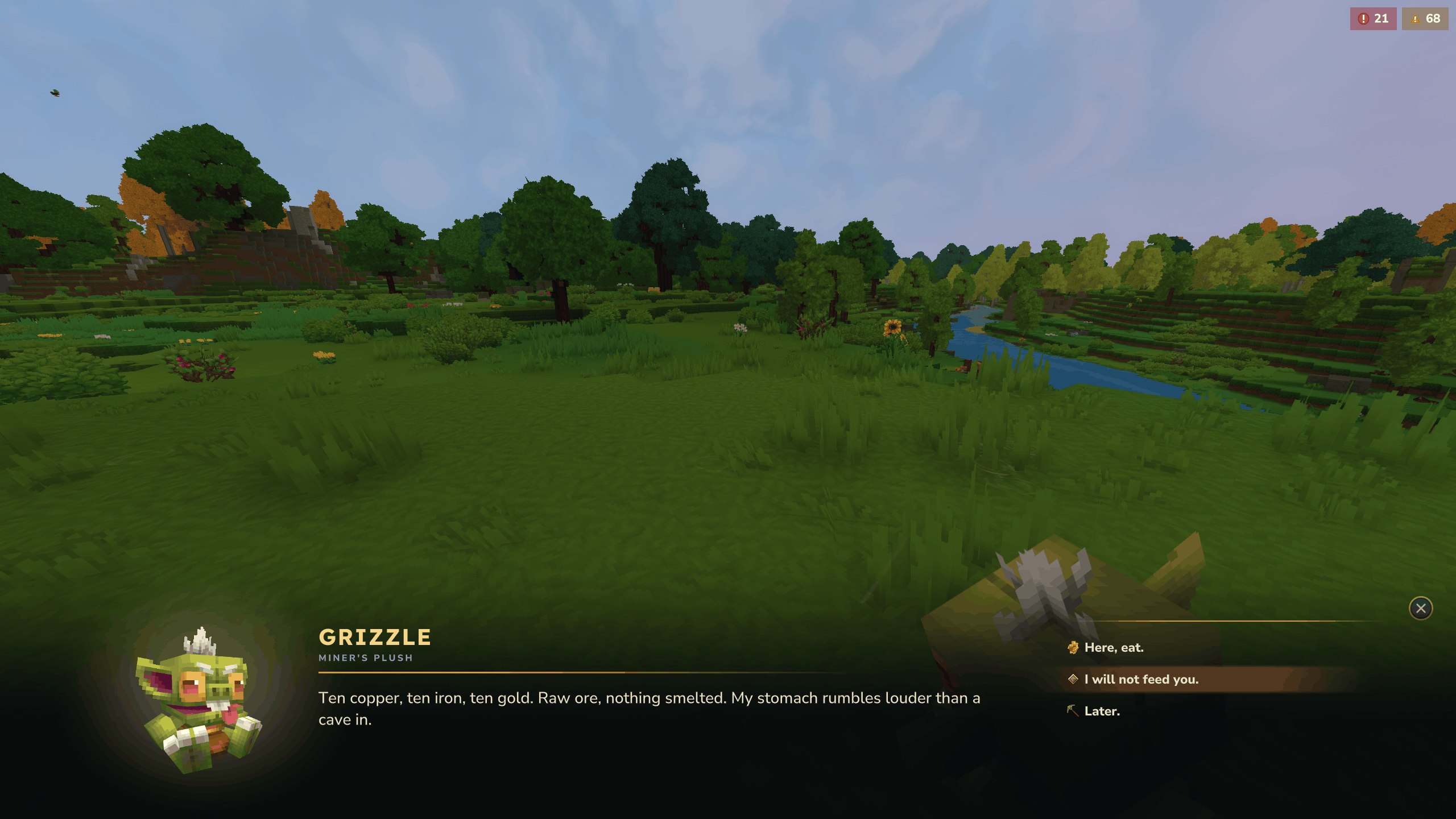
🎭 Three ways to show a dialogue, and yours. A framed panel, a cinematic band across the bottom of the screen, or plain chat. Each dialogue picks its own, the server owner has the last word, and a mod can add a display matching its server's UI.
🗣️ Speakers. A name, a title and a portrait, written once and shared by every dialogue they speak.
📄 Pages and answers. Several pages read one after the other, then answers that close the dialogue, open the next one or run a command.
🔍 Answers that show when they make sense. An answer can ask for an item in hand, enough ore in the bag, a permission, or a choice made earlier. Otherwise it stays hidden.
🧠 A memory per player. Every dialogue opened and every answer picked is saved with the player, so a character greets a newcomer and a regular differently.
🔀 Routers. One id, many dialogues: the first whose condition holds, or one drawn at random by weight.
🖱️ Opened from the world. Press F on an NPC, use an item, run a command: each opens a dialogue.
🛡️ Checked at boot. A missing dialogue or a router going round in circles is logged when assets load, not met by a player hours later.
🈯 Translatable. Every line is a translation key.
🎭 Displays
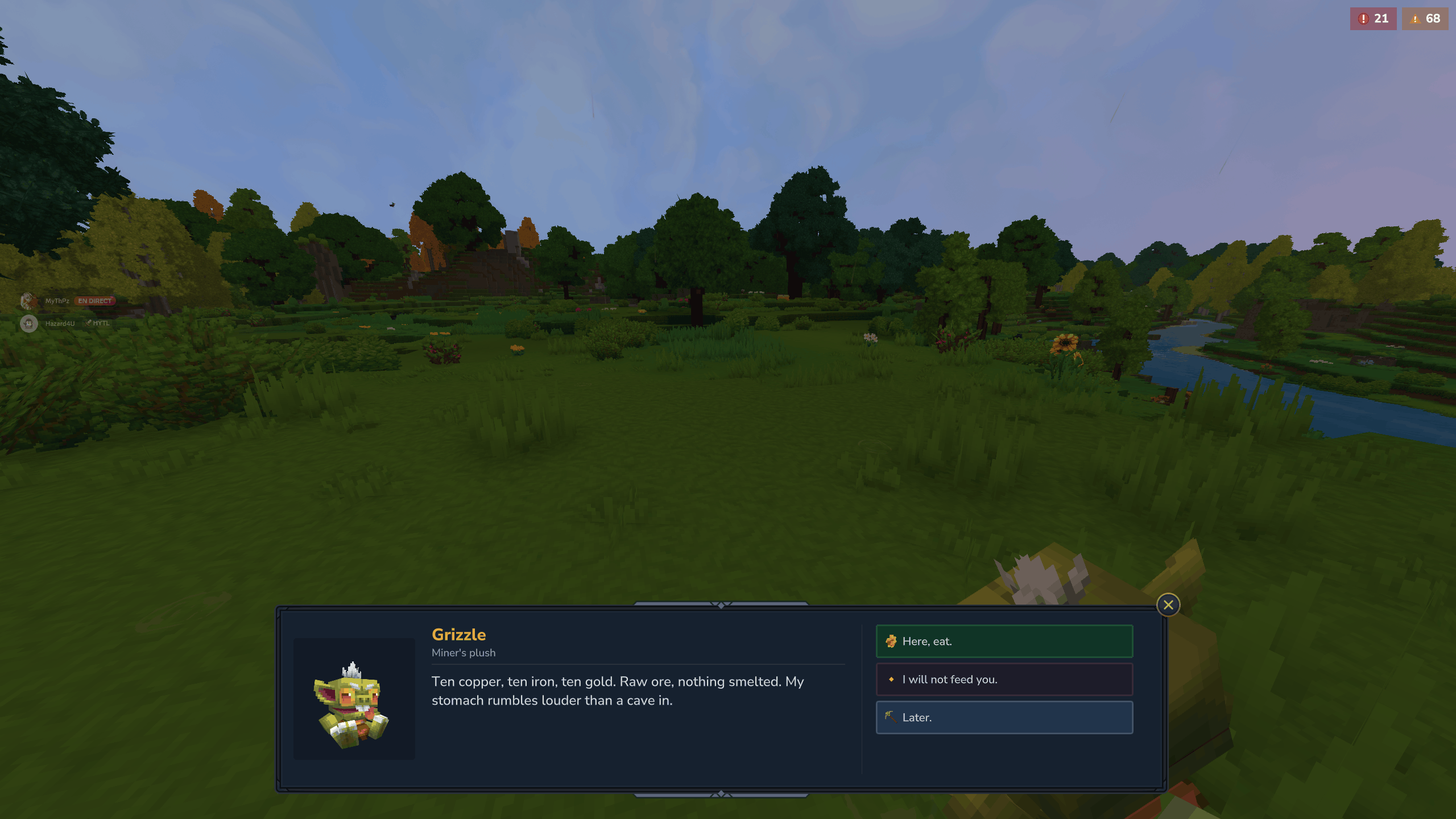
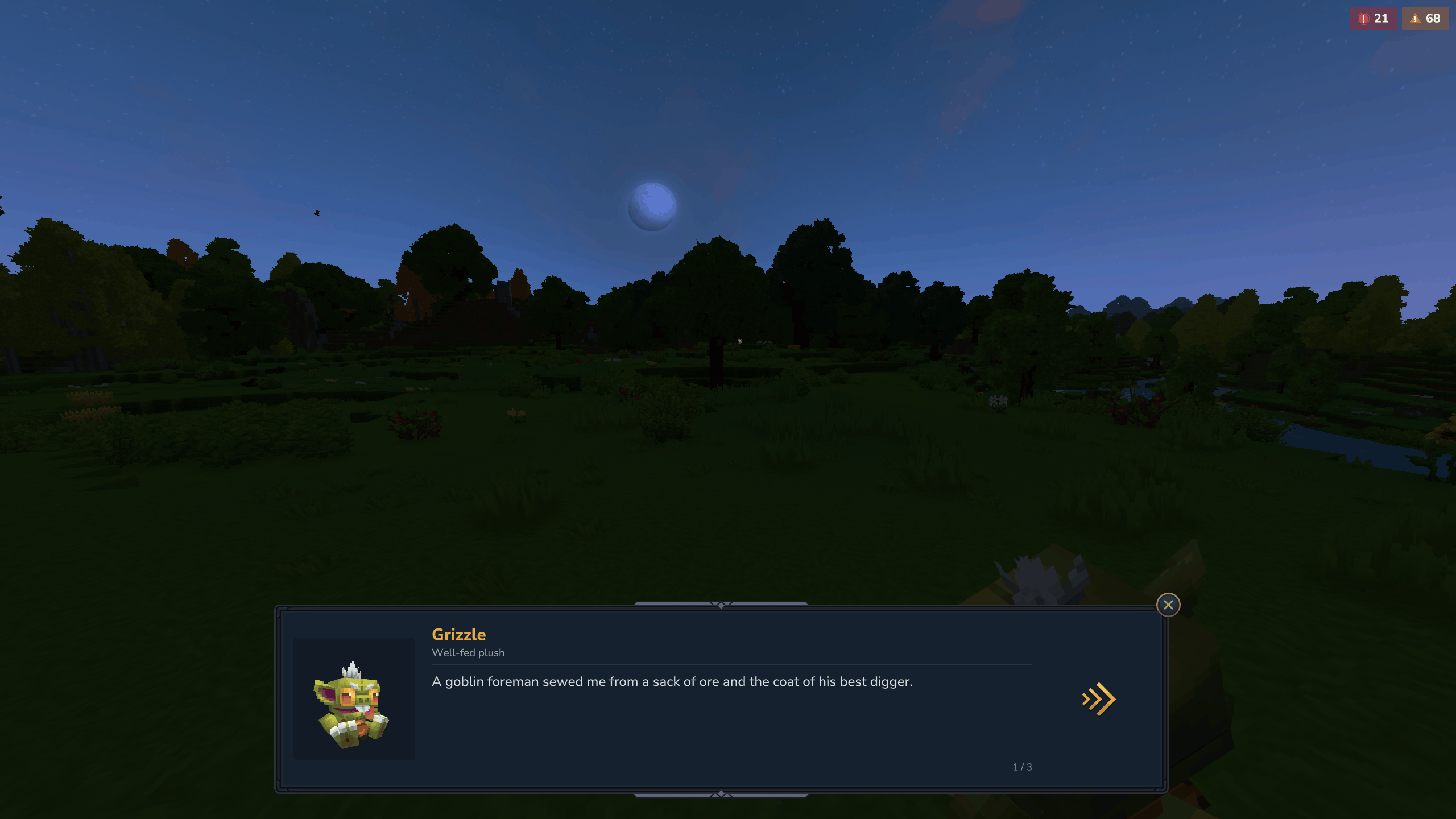
🖼️ Default

A framed panel in the game's own style. Each answer is a button you can colour and give an icon.

Long texts are cut into pages, with an arrow to turn them and a counter of where you are.
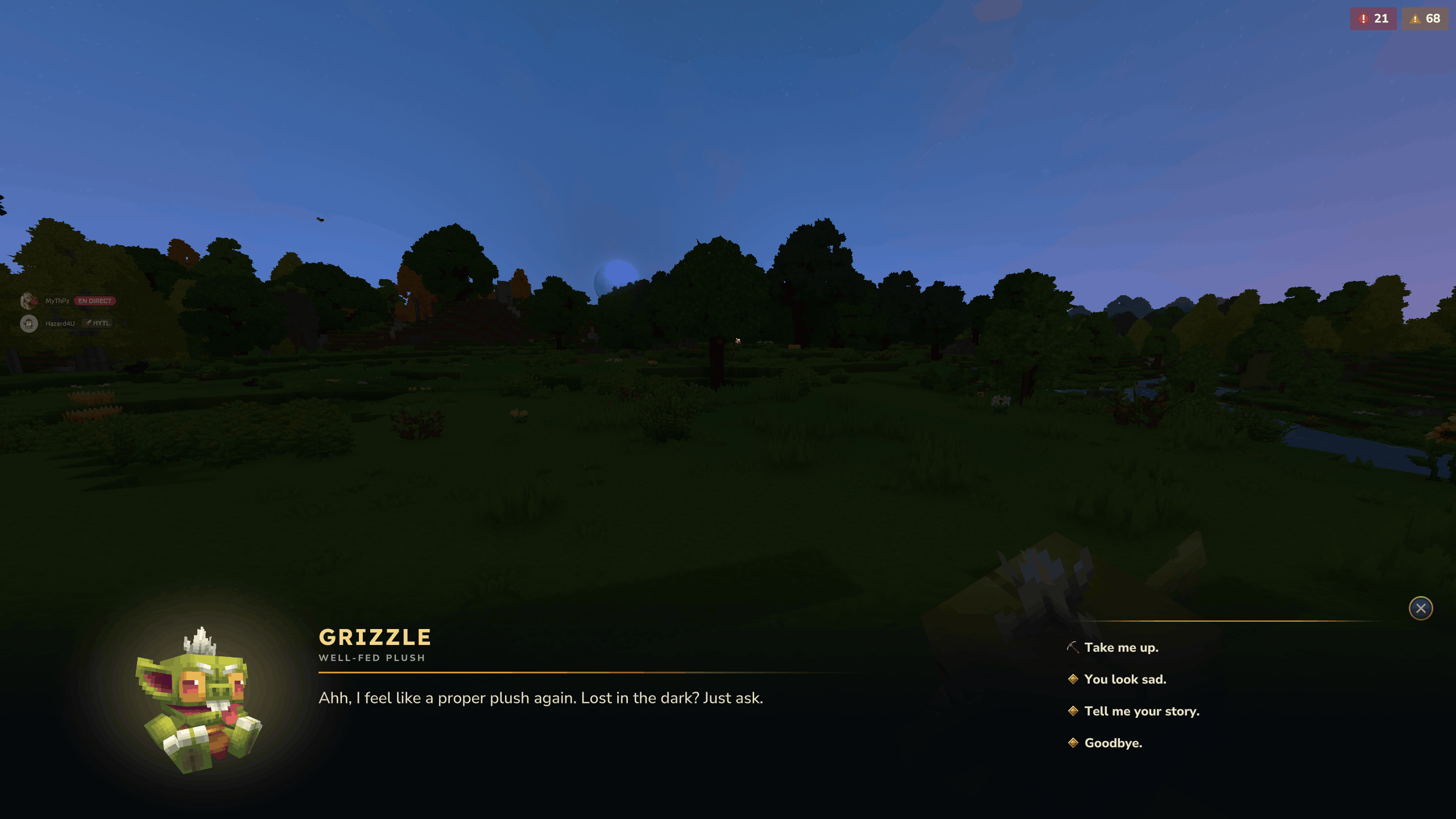
🎬 Cinematic

The speaker's portrait, large, over a band darkening the bottom of the screen, and the answers on the right. The world stays in view: made for characters you meet.
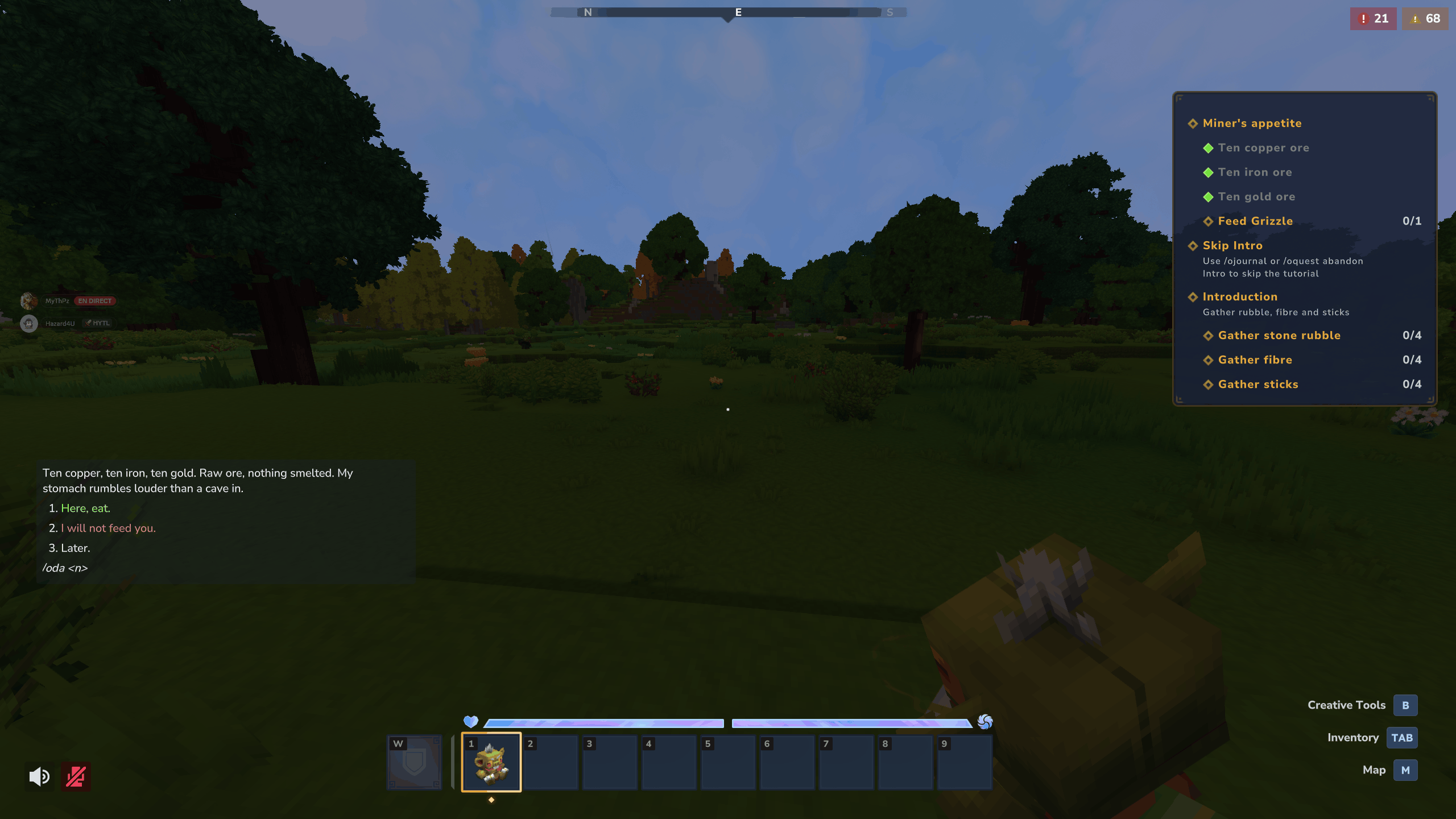
💬 Chat

The text and numbered answers straight in the chat, picked with /oda <n>. Nothing opens, nothing stops the game.
A dialogue names its display. Server owners can override it for one dialogue, for a tag, for a whole pack or for everything, without touching the files.
🎨 Your own
Your server has its own look ? Give its dialogues the same. A display is a plugin's few lines: point the panel at your
own .ui files, or draw dialogues any way you like, and register it under a name. Dialogues then name it like any
other.
🔀 Conditions and routers
| Condition | Holds when |
|---|---|
Opened |
A dialogue was opened a number of times |
Answered |
An answer of a dialogue was picked a number of times |
Holding |
The item in hand matches |
Inventory |
The inventory holds enough of an item, a resource or a tag |
HasPermission |
The player has a permission |
Composite |
All of its conditions hold, or one of them |
Every condition can be turned around with "Not": true. Put one in an answer's When to show it only when it holds,
or in a router to pick the dialogue.
| Router | Picks |
|---|---|
Sequence |
The first route whose condition holds, else a default |
Weighted |
One entry drawn at random, by weight |
Routers lead to dialogues or to other routers, so a character's whole personality can hang on a single id.
🎬 Answer actions
| Action | Effect |
|---|---|
Close |
Ends the dialogue |
Open |
Moves on to another dialogue, or to what a router picks |
Command |
Runs a command as the player |
ConsumeInventory |
Takes items from the player, all of them or none |
⚔️ With OpenQuests
Install the OpenQuests Dialogues bridge next to OpenQuests and dialogues and quests talk to each other:
- A
Dialoguequest type: open a dialogue, or pick one of its answers, a number of times. "Talk to the merchant" is one quest. - Answers that hand out quests with
AssignQuest, or end them withSetQuestState. - A
RequiresQuestcondition: an answer that only shows while a quest is running, or once it is done.
🛠️ For server owners
Installing
Drop OpenDialogues in mods/. It needs nothing else.
Writing a dialogue
A dialogue is a JSON asset under Server/OpenDialogues/Dialogues/, edited in the Asset Editor:
{
  "Title": "grizzle.name",
  "Speaker": "MyPack_Grizzle",
  "Display": "Cinematic",
  "Pages": [
    { "Text": "grizzle.hungry.text" }
  ],
  "Responses": [
    {
      "Text": "grizzle.hungry.feed",
      "Icon": "Icons/ItemsGenerated/Ore_Gold.png",
      "Color": "#7aff81",
      "When": { "Type": "Inventory", "Item": { "ItemId": "Ore_Gold" }, "Min": 10 },
      "Actions": [
        { "Type": "ConsumeInventory", "Items": [{ "Item": { "ItemId": "Ore_Gold" }, "Quantity": 10 }] },
        { "Type": "Open", "Dialogue": "MyPack_GrizzleFed" }
      ]
    },
    { "Text": "grizzle.hungry.later", "Actions": [{ "Type": "Close" }] }
  ]
}
To open it in game, add the OpenDialoguesOpen action to an NPC role's interaction, or the OpenDialoguesOpen
interaction to an item.
Commands
| Command | Effect | Granted to |
|---|---|---|
/oda <n> |
Picks an answer of the dialogue open in the chat | Everyone |
/odialogues open <id> |
Opens a dialogue or a router, also /od |
World editors |
/odialogues display default <display> |
Sets the display of dialogues naming none | Admins |
/odialogues display set <target> <display> |
Forces a display on a dialogue, a tag, a pack or everything | Admins |
/odialogues display which <dialogue> |
Tells where a dialogue will open, and why | Admins |
/odialogues history reset <player> |
Forgets what a player said, so everyone greets them anew | Admins |
💻 For developers
Other mods plug in through OpenDialoguesPlugin.get().getRegistry(): answer actions, conditions, router selectors
and whole new displays are one line each. DialogueEvent.Opened, Answered and Closed tell you what players do.
A display in your server's style reuses the panel with your own layout, the way Cinematic does:
public class MyDialoguePage extends DialogueCustomPage {
    public MyDialoguePage(PlayerRef player, DialogueSession session, DialogueService dialogues) {
        super(player, session, dialogues, "MyMod/Dialogue/Page.ui", "MyMod/Dialogue/Answer.ui");
    }
}

OpenDialoguesPlugin plugin = OpenDialoguesPlugin.get();
plugin.getRegistry().registerDisplay("MyModPanel", new PageDisplay(plugin.getDialogueService(), MyDialoguePage::new));
Keep the element ids of the bundled .ui files and style the rest freely. For something else entirely, implement
DialogueDisplay: show and close, and every answer goes back through DialogueService.answer.
Declare "MartelStudios:OpenDialogues" in your manifest.json.
Source and documentation: https://github.com/MartelStudios/OpenQuests
MIT licensed.
OpenDialogues Team