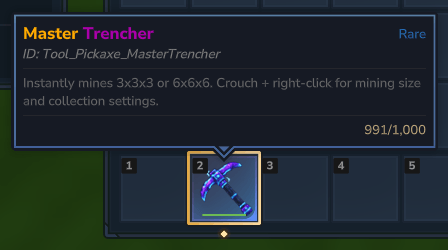
Screenshot 2026-10-17 164902.png
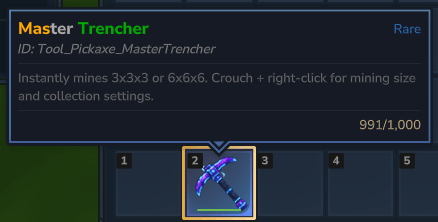
Screenshot 2026-10-17 170042.png
Description
🎨 ItemRenamer
Your gear. Your name. Your style.
Give your favorite sword a legendary name or keep your tools organized with a personal touch. ItemRenamer lets you rename items with colorful text, bold lettering, and italics using one simple command.
✨ Features
- Custom names — personalize the items in your hotbar.
- 16 preset colors — from golden yellow to icy blue.
- Custom hex colors — pick the exact shade you want.
- Bold & italic text — combine formatting to create your own style.
- Easy name resets — restore an item’s default name anytime.
- Permission support — choose which players or ranks can use the mod.
⚔️ How to Use
Select an item in your hotbar, then enter:
/ir &6&lGolden Sword
/ir &b&oFrost Blade
/ir &#FF8800&l&oEmber
Prefer a plain name? Simply type:
/ir My Favorite SwordRenaming applies to the entire selected hotbar stack. Names support up to 64 visible characters.
🖌️ Formatting Guide
| Code | Effect |
|---|---|
&0–&9, &a–&f |
16 preset colors |
&#RRGGBB |
Custom hex color |
&l |
Bold |
&o |
Italic |
&r |
Reset color and formatting |
&& |
Display an & symbol |
Combine codes before your name—for example, &6&l creates bold gold text. Bold and italic styles remain active through color changes until you use &r.
💬 Commands
| Command | Description |
|---|---|
/ir <name> |
Rename your selected hotbar stack |
/ir --reset |
Restore its default name |
/itemname <name> |
Full version of /ir |
/itemname --reset |
Restore its default name |
🔐 Permissions
Give a player or rank this permission through your permissions manager:
itemrenamer.useThis controls access to both renaming and resetting names.
With Hytale’s built-in permission system, administrators can grant a player access using:
/perm user add <player-uuid> itemrenamer.use📦 Installation
- Stop your server.
- Place the mod JAR in the server’s
modsfolder. - Start the server.
- Grant
itemrenamer.useto your chosen players or ranks.
Game version: Hytale 0.7.2
Item Renamer Team