GlymeraVault
- By
A purely command-based mega-chest — no item to craft, no block to place, nothing to break. Type /gmc to open your own 1080-slot vault (~1 billion items): search, one-click deposit, auto-sort. Admins grant access per player.
Unbenannt_1.jpg
Unbenannt_2.jpg
Description
Short description (CurseForge field, <=230 chars)
A purely command-based mega-chest — no item to craft, no block to place, nothing to break. Type /glc to open your own 1080-slot vault (~1 billion items): search, one-click deposit, auto-sort. Admins grant access per player.
Don't miss my other exciting projects — take a look at GlymeraCraft's Profile Discord: https://discord.gg/s5NRFWfxgy
GlymeraVault — A Mega-Chest That Lives in a Command
What is GlymeraVault?
GlymeraVault is mass storage with nothing to place. There is no block to craft, no item to set down, and therefore nothing that can ever be broken, stolen, griefed, or lost. Every authorized player simply types one command — /glc — and their own personal vault opens on the spot.
Each vault holds 1080 virtual slots across 10 pages of 108, and each slot stores up to 999,999 items by default — roughly a billion items per player. One vault per player, tied to the player's account (so the contents survive name changes), backed by a crash-safe server-side file.
Purely command-based by design. Unlike a traditional storage block, there is no physical object in the world. Nothing to mine, nothing to blow up, nothing to misplace when you redecorate. Your vault is always exactly one command away, from anywhere.
Access is admin-controlled
A vault is a privilege you hand out. Out of the box nobody can open one except operators — and an admin decides who else gets access:
/glc give <player>— unlock the vault for a player/glc take <player>— revoke that access again (their stored items are kept safe for next time)/glc list— see who currently has access- Operators always have access.
The whitelist is a small self-managed file (plugins/GlymeraVault/access.json). No external permission plugin, no setup — the plugin works out of the box.
Opening your vault
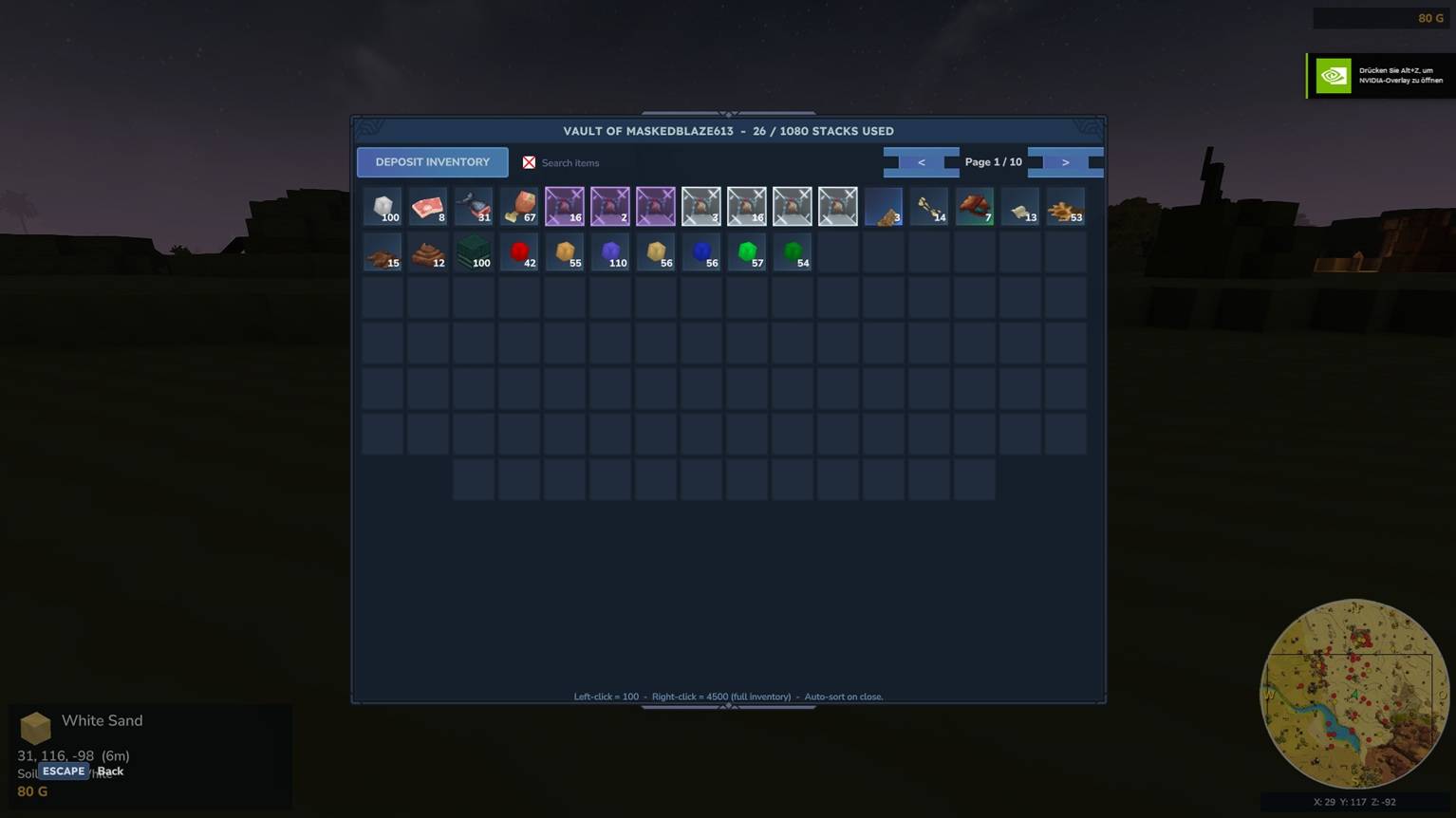
Type /glc. The Custom UI opens with:
- Title bar showing your name and how many of the 1080 slots are in use
- Header: a "Deposit Inventory" button, a live search field, and page navigation (
<1 / N>) - Slot grid: 108 slots per page, each with item icon, quantity, and a durability percentage when an item is below full durability
- Footer: a short hint about the controls
Putting items in (Deposit Inventory)
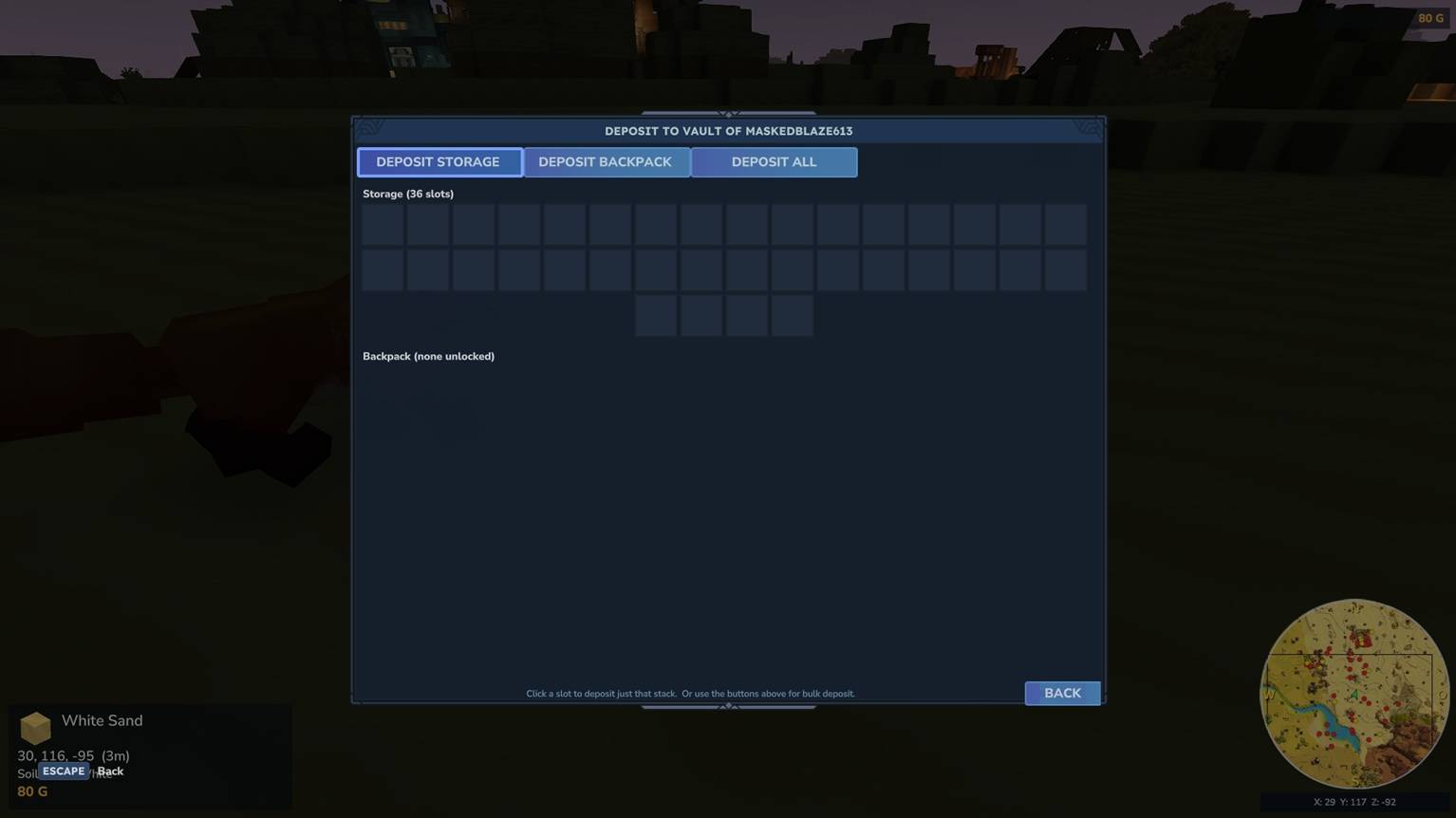
Click Deposit Inventory to open a deposit manager. From there you can deposit a single slot with one click, or dump an entire container with Deposit Storage, Deposit Backpack, or Deposit All. Your hotbar is never touched, so equipped weapons and tools stay where they are. Matching stacks merge automatically, and if anything fails to leave your inventory the vault entry is rolled back — duping is impossible.
Taking items out
- Left-click a slot: takes 100 items (one normal stack)
- Right-click a slot: takes 4500 items (a full empty inventory's worth)
- Anything that doesn't fit simply stays in the vault
Search & auto-sort
Type in the search box to filter by item — it understands friendly terms (search wood, essence, iron and it matches the technical item ids for you). When you close the vault it auto-sorts itself: matching stacks merge and everything is laid out alphabetically.
Commands
/glc— open your personal vault (requires access)/glc give <player>— grant a player access (OP)/glc take <player>— revoke a player's access (OP)/glc list— list players with access (OP)/glc reload— reload the config and access list (OP)
Features
- 🗝️ No block, no item — 100% command-driven storage; nothing to place, break, or lose.
- 👤 One vault per player — tied to the account, survives name changes.
- 📦 1080 slots, ~1 billion items — 10 pages × 108, up to 999,999 per slot.
- 🔐 Admin-controlled access — grant or revoke per player; operators always in.
- 🔍 Smart search — friendly terms match the underlying item ids.
- 🖱️ One-click deposit — single slot or whole containers; hotbar stays equipped.
- 🧹 Auto-sort on close — merges stacks and tidies everything alphabetically.
- 💾 Crash-safe — atomic saves; vaults survive restarts and crashes.
- 🚫 Dupe-proof — every transfer is rolled back if it can't complete.
- ⚙️ Configurable — slots per page, page count, and per-slot stack cap.
Configuration & storage
Everything lives under plugins/GlymeraVault/, created automatically on first run:
config.json—commandName(glc; rename the open command if it ever clashes with another plugin),slotsPerPage(108),pages(10),maxStackPerSlot(999999)access.json— the player whitelistvaults/<uuid>.json— one file per player's storage
GlymeraVault keeps its own data and its own UI, so it coexists happily with GlymeraMegaChest — run the block-based chest and the command-based vault side by side.
Part of the Glymera collection for Hytale.
GlymeraVault Team