GlymeraBlueStone
- By
A complete redstone-style automation system for Hytale — wires, pistons, hoppers, repeaters, observers, torches, pressure plates, ejectors, applicators and more.
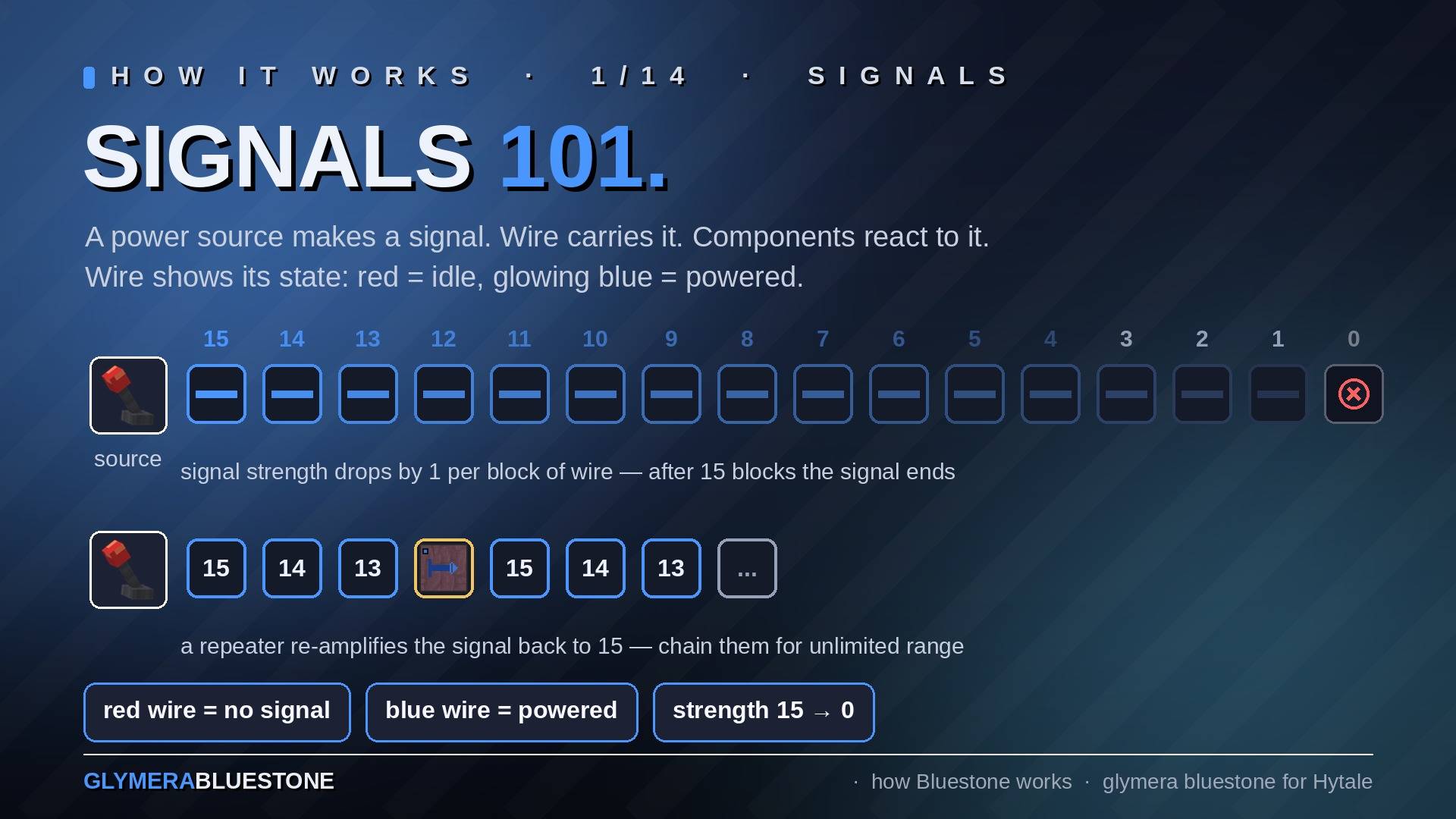
e01_signals.jpg
e02_sources.jpg
e03_repeater.jpg
e04_torch.jpg
e05_walls.jpg
Description
⚡ Bluestone ⚡ A full redstone-style automation system for Hytale
Don't miss my other exciting projects — take a look at GlymeraCraft's Profile Discord: https://discord.gg/s5NRFWfxgy
What is Bluestone? Bluestone brings the power of signal-based automation to Hytale. Build machines, automate item transport, create hidden doors, piston contraptions, timed circuits and much more — just like you know it, but in Hytale.
Everything is included in a single plugin. Wire signals, push blocks with pistons, detect changes with observers, invert signals with torches, count pulses with the signal counter, detect players with pressure plates, transport items with hoppers, feed furnaces and processing benches automatically, switch lighting on and off with lamps, automate actions with applicators — and now: run driverless minecarts on signal-controlled rails, switch circuits by real daylight, let the Applicator plant your fields and water them, burn your surplus in the Incinerator, stretch a Beam Sensor tripwire of light across a corridor, turn any pulse into a signal of 15 seconds to 10 minutes with the Timer, and make your machines play music with the Note Block. Everything you need to build machines in Hytale — and every component has its own unmistakable 3D look, so you can read a circuit at a glance.
The signal rules
- Signals travel up to 15 blocks through wire before fading.
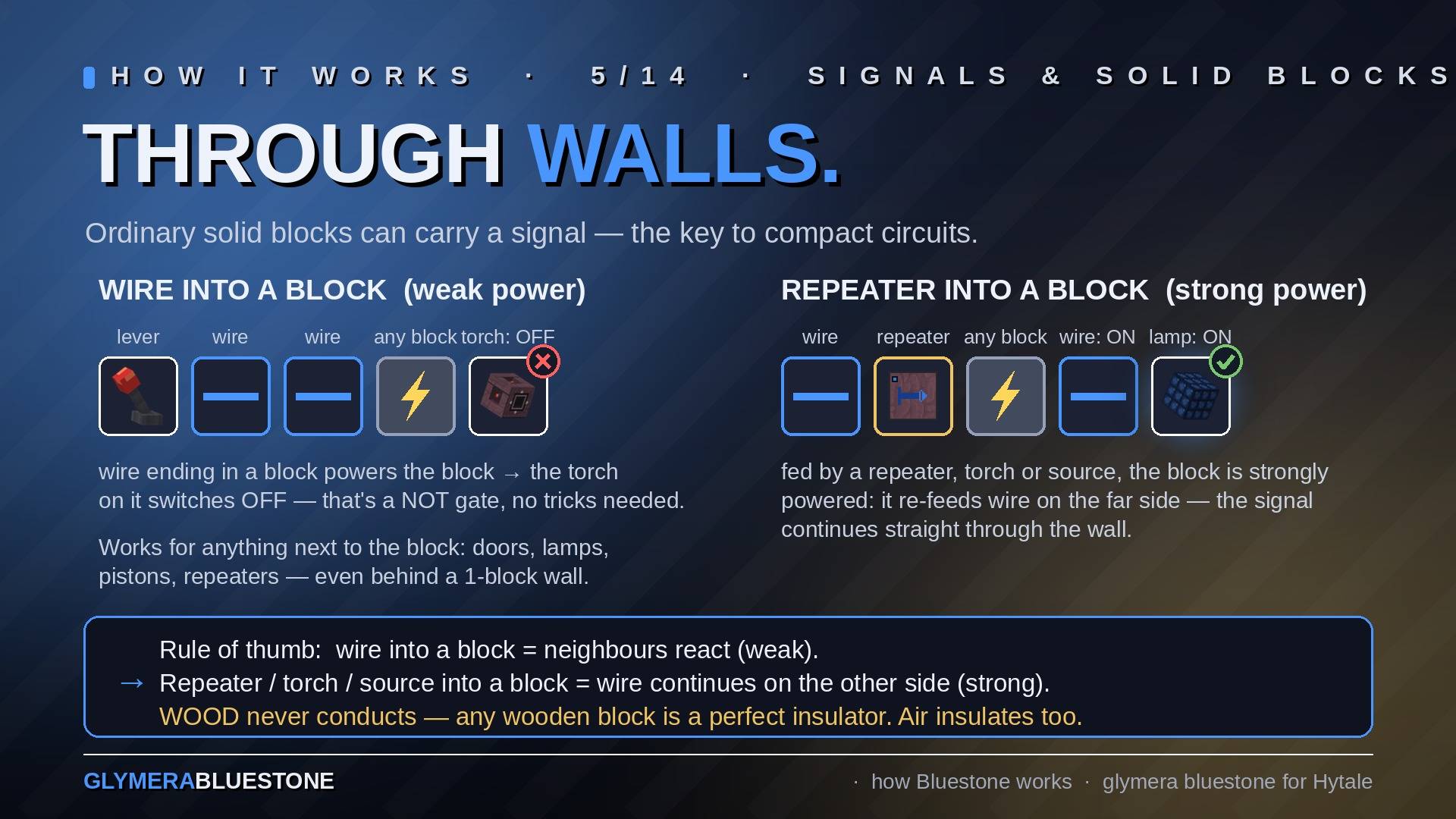
- A powered wire also powers the solid block its line runs into (and the block beneath it) — so a torch on that block switches off, and doors, lamps or pistons behind a 1-block wall respond. Blocks fed by a repeater output or an active source even re-feed wire on their far side, letting you route signals through walls.
- Wood insulates. Signals pass through stone, but never through wood — planks, trunks, beams, wooden stairs, even wooden furniture. Use any wooden block to cleanly separate two lines or shield a machine from a neighbouring circuit.
- Air insulates too: a signal never jumps across a gap.
Your builds are protected Every Bluestone block remembers who placed it. Other players cannot break your components, cannot open your Ejectors, Hoppers or Applicator magazines, and cannot change your settings (repeater delay, counter target, pulse speed, filters, piston orientation). Your carts are protected too: nobody else — and no TNT, and no mob — can smash a cart you placed. Operating is deliberately public: anyone may pull your levers, press your buttons and walk over your pressure plates — so public doors and machines work for everybody. Server admins bypass the protection.
The Bluestone Blocks
Bluestone Wire Transmits signals from a power source to connected components. Wire is a real pipe network: octagonal conduits that grow arms only toward actual connections, junction cubes where lines meet, couplings along long runs, and a glowing dashed core line — red when idle, blue when carrying a signal. Free pipe ends are capped. The pipes have true hitboxes and selection outlines: you aim at what you see, and you can walk over low runs.
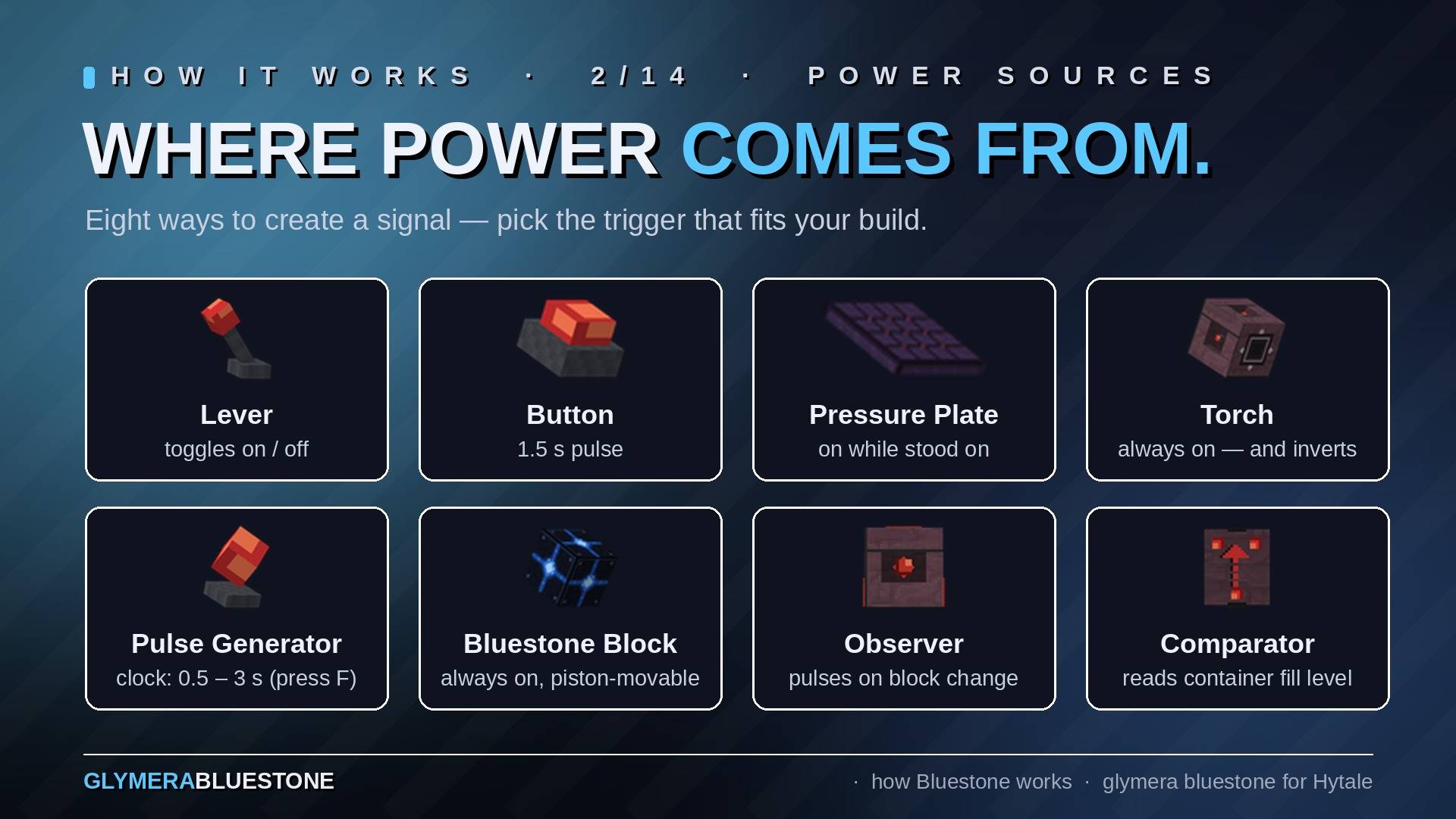
Lever A toggle switch. An armored cage block with a window on every side — inside you see the actual lever flip and its knob light up. Corner markers: squares, glowing red (off) or blue (on) on every face. Right-click to switch. When active, it sends a permanent signal to all adjacent wires and components.
Button A momentary switch in the same cage design — the press-cap inside visibly retracts while pressed. Corner markers: triangles. Right-click to send a short pulse (1.5 seconds) to adjacent components. Perfect for triggering one-shot actions.
Pressure Plate A real flat plate that visibly sinks when stepped on — walking across it triggers it. Detects players and creatures and emits a signal as long as something is on top (sent in all directions except upward). Perfect for automatic doors, traps, and player-triggered mechanisms.
Pressure Block The pressure plate as a full solid block: a stone-textured cube with the plate on top. Stand or walk on it and it emits a full-strength signal on all six sides — into wire, lamps, doors or a piston directly below — for as long as something is on it; the plate lights blue and a blue band runs around the sides. Build it into floors, stairs and walls where a flat plate would look out of place, or use the downward output to drive machinery hidden beneath the floor.
Beam Sensor A tripwire made of light. Place two sensors facing each other on the same row — up to 15 blocks apart, horizontal only — and a thin red beam spans between them, humming quietly. Any creature, player or object whose body crosses the beam breaks it: the beam vanishes for a moment, both sensors glow and output a full-strength signal from their back face for as long as the line is blocked. Detection uses real hitboxes against the beam line, so the height you mount the sensors at decides what triggers: on the ground everything does, one block up a chicken walks underneath while a cow or a player does not, two blocks up only the big ones. Any block between the sensors breaks the line (no beam, no signal); water does not. Sensors pair automatically when placed, survive restarts, and nothing else is filtered — no creature type, no distance, no damage. What you build behind it is up to you.
Daylight Sensor A flat plate with a sun engraving that lights up golden while the sensor emits. It measures the real light in the cell directly above itself — not just the clock: the signal strength is the brighter of sky light × sun position and artificial block light. Full daylight = 15, dawn and dusk = less, night = 0 — but a torch next to it keeps it lit at night, and covering it with any solid block forces it to 0. Glass and leaves let light through, so it works under a glass roof. "Lamps on at night" is just this sensor plus a torch inverter; light-threshold switches come free via signal strength.
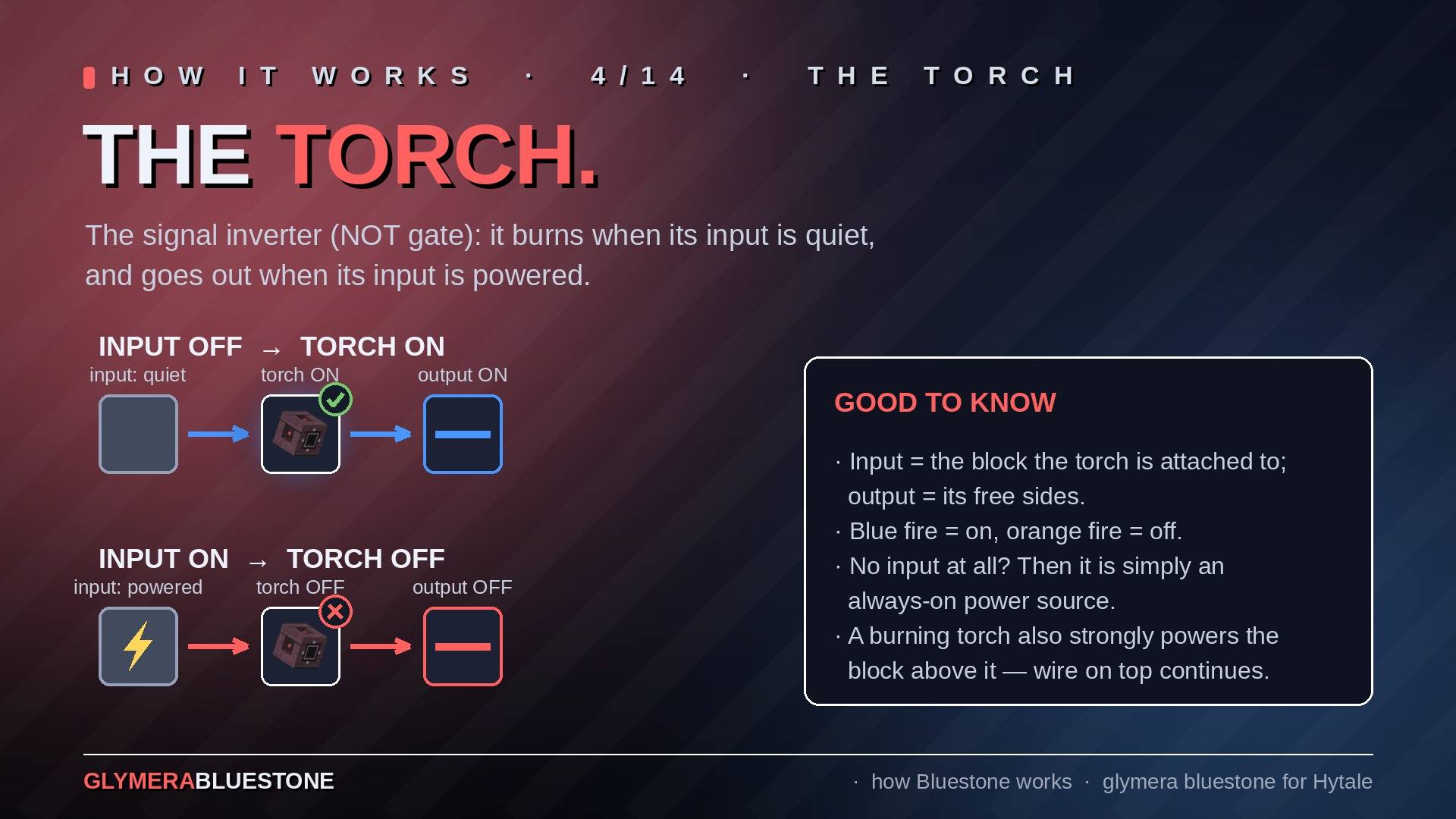
Torch An inverter (NOT gate). A solid masonry block with recessed fire bowls on five sides and an engraved socket on its input side. When the input side receives a signal, the Torch turns off. When the input side has no signal, the Torch burns and emits a signal from its five bowl sides. Blue fire (with real light) when active, orange fire when inverting. Essential for logic gates, toggle circuits, and signal inversion.
Logic gates without pistons: the block a Torch reads takes any number of wire inputs, so every gate is wire, stone and torches. NOT = a Torch. OR = wires that meet. NOR = two or more wires running into one stone with a Torch on it (lamp on only while every input is off). AND = invert each input with its own Torch, let both Torches feed one stone, and put a third Torch on that stone — the classic three-torch AND. Repeaters lock each other from the side, which gives you memory cells and clocks on top.
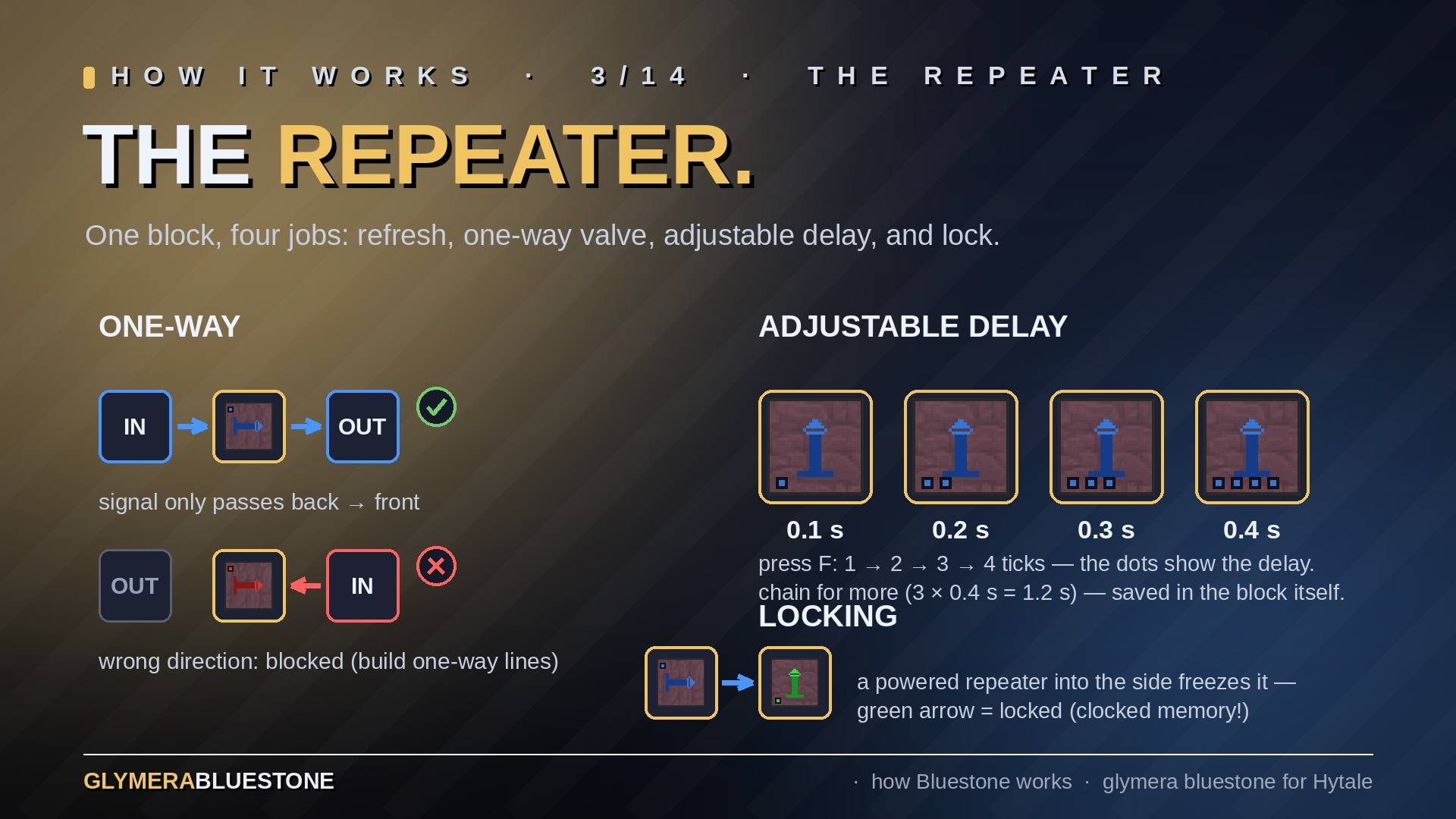
Repeater A flat circuit board with an engraved direction arrow. It receives a signal from the back and outputs it to the front after an adjustable delay: press F to cycle 1, 2, 3 or 4 ticks (0.1–0.4 s) — the second glow-stub on the board physically moves backward with the delay, so you can read the setting from across the room. The delay is stored in the block itself and survives restarts and being moved. Chain repeaters for longer delays — pulses keep their length through any chain. Repeaters are directional and can lock each other: a powered repeater pointing into the side of another freezes it, shown as a green cross-bar meeting the locking repeater (the classic building block for clocked memory circuits).
Signal Counter The newest board in the family: six little lamps on top, and the number of burning lamps is the setting. One burning lamp = every pulse passes straight through; three lamps = only every third pulse gets through; up to six. Press F to cycle the target (stored in the block). Strictly directional: it counts pulses arriving at its back and fires exactly one pulse out the front when the target is reached — the burning lamps flash white — then starts over. The killer combo: point an Observer at a crop and put a Counter behind it (carrots change 3 times while growing, wheat/corn/potatoes/pumpkins 4, tomatoes up to 6) and your farm circuit fires exactly when the crop is ripe.
Timer A circuit board with a real hourglass on it. A pulse arriving at its back starts the countdown, and the front outputs a full-strength signal for exactly the set time — 15, 30, 45, 60, 120, 180, 300 or 600 seconds; press F to cycle, the number is engraved on the board and stored in the block. One shot: pulses arriving while it runs are ignored, and a signal still standing when the time is up does not restart it — the timer fires again only after the input has dropped and risen once more. A running timer survives server restarts and chunk reloads and continues where it left off; the countdown pauses while no player is near the machine. While it runs, the sand sits in the upper glass and the trace on the board glows. Strictly directional like the Repeater and Counter (input back, output front); the three chain directly. Turns a button press into a 30-second door, an observer pulse into a 2-minute pump run, or a pulse generator into a slow, clean clock.
Note Block A wooden sound box with a glowing Bluestone note on its sides. Every rising edge of a signal next to it plays one note; press F to open its panel and set the pitch (25 notes, two octaves F#3 to F#5) and the volume (10–100 %) with sliders — every move plays the note, so you tune by ear. The full block underneath picks the instrument, Minecraft style: wood planks or trunks = bass, stone = bass drum, sand / gravel / dirt / grass / mud / snow = snare, mushroom block = guitar, gold bricks = bell, crystal blocks = chime, ice = hi-hat, bone block = xylophone, anything else = harp. Every one of them is a native full block you can get in adventure mode. Notes carry 45 blocks with distance falloff, the note glyph lights up with every note, and the pitch is stored in the block itself. Feed a repeater chain into a row of note blocks and your machine plays a melody; a pulse generator into a bass-drum block is the simplest metronome.
Piston A true animated 3D piston — base, metal arm and head — that physically extends on a signal and retracts when the signal drops. The extended head is a solid block you can stand on and that blocks movement. On a signal it pushes a row of up to 12 blocks, and it behaves the way you expect: creatures in the path are pushed along, plants break and drop their items, farmland moves intact (the crop on top pops off), and chests, furnaces and other containers stop the piston so their contents are never lost. Bedrock can't be moved. Bluestone components are piston-proof — a piston simply refuses to move them, so no circuit can be torn apart — with two deliberate exceptions that move and keep working: the Lamp and the Bluestone Block.
Sticky Piston Works like the piston above, but also pulls the block back when the signal is removed. Essential for hidden doors and retractable builds — and a vertical sticky-piston column lifts you like an elevator.
Observer A crystal eye recessed in a face plate. It watches the block directly in front of its eye and emits a short pulse from its five other sides whenever that block changes — the watched face itself never emits, so no accidental feedback loops. Detects every block change including crop growth stages. Great for farms, player activity, or triggering chain reactions.
Pulse Generator The clock for your machines, in the cage design: inside floats the clock crystal — a tip-standing cube that blinks red/blue with every pulse. Outputs a repeating signal on all sides at a configurable speed: press F to cycle through 7 settings (0.5 s, 1 s, 1.5 s, 2 s, 2.5 s, 3 s, off). Since 143 it is one block whatever direction you look while placing it. Corner markers: diamonds.
Comparator The repeater's sibling board with three lamps in the classic layout. It reads the fill level of the container behind it and outputs a signal proportional to how full it is: empty = no signal, full = maximum 15-block range. Lamps show red while it outputs nothing, blue while it outputs a signal. Double chests are read correctly from both halves. You can also mount it flat on top of a container or hanging underneath one — place it while a container is directly below/above the target spot. Perfect for sorting systems and storage monitors. It reads carts, too: point it at a rail cell and it outputs the fill level of the cart standing there — plain cart = 15, container cart = proportional to its used slots, empty container cart = 0.
Hopper, Funnel & Pipes The Bluestone Hopper is two things in one block, depending on how you place it:
Upright Funnel (placed looking down) — opens upward, automatically collects dropped items nearby (radius: 10.5 blocks), pulls items from containers above, and pushes them down. The classic collector.
Pipe (placed looking ahead) — a metal conduit with flanged ends. This is a full pipe-transport system:
- Auto-connecting fittings: a pipe looks at its neighbours and reshapes itself automatically — straight run, a rounded elbow around corners, T-junction, 4-way cross, and a capped end piece. Nothing to configure; just build, and it forms the right shape (and re-forms when you add or remove a neighbour). Lay several straight pipes in a row and they read as one continuous, flange-coupled pipeline. A small arrow on top shows the flow direction. All pipe shapes have real hitboxes and selection outlines.
- Item distribution at junctions: when a pipe feeds several outgoing branches, the next item goes to a random branch — 2 ways ≈ 50/50, 3 ≈ 33% each, 4 ≈ 25% (a funnel under a cross counts as a 4th outlet). Items never bounce backwards, and a straight pipe filled from above always sends everything forward along its arrow.
- Per-block Whitelist / Blacklist filter: hold an item and right-click a pipe or funnel to open the Filter window, then click an item from your inventory to set a Whitelist (only that item passes) or — with the mode button — a Blacklist (everything except that item). No filter = everything passes. Give each branch its own filter and you have a complete sorting system. (Right-click with an empty hand opens the block's normal container instead.) Filters are saved across restarts and chunk reloads, and so are items in transit inside the pipes.
Underneath all of that, the hopper still does the classic job: pulls items from a container at its input side and pushes them into a container at its output side — the backbone of any item transport system.
Hoppers also feed and empty processing benches — Furnace, Campfire, Salvage Bench and Tannery — for fully automatic, hands-free smelting and processing, just like a furnace + hopper setup. The hopper's position decides which slot it fills: feeding a bench from above inserts ingredients/material, feeding it from the side inserts fuel, and a hopper pulling from a bench only ever takes the finished output (never your fuel or raw materials). A full output simply pauses the bench and restarts it the moment a hopper clears space. This works with double chests and the two-block-tall furnace from any side, and a mis-routed item is never lost — it just stays in the hopper. (Crafting benches such as Workbench, Weapon, Armour or Alchemy can't be automated: they have no internal storage and only craft through the open menu.)
Ejector Drops one item from its internal container into the world when it receives a signal. A full block with a deep ejection funnel on its output side — black cone, thin white spiral winding to the outlet. Triggered by wires, repeaters, pulse generators, levers, buttons, or observers. Use it to build item dispensers and automated delivery systems.
Applicator The most powerful automation block, styled as a machine chuck: a working aperture with a red energy core and four gripper claws reaching toward the target cell. When triggered by a signal, it uses the item in its container as if a player right-clicked with it. Can place blocks, use tools, and interact with the world — and it does so whether its owner is logged in or not.
It handles tools the way you do. Shears harvest leaves, vines, bushes and seagrass as blocks, a bark scraper strips a trunk in place, a pickaxe on gravel yields its proper drops. Tools wear exactly as they would in your hand (soft blocks cost no durability at all), and a tool that breaks stays in the magazine for repair — the Applicator simply skips it and picks the next intact one, or stops if there is none. Server owners can switch wear off entirely in the config.
And it farms: with seeds in its magazine and tilled farmland in front of it, a signal plants the crop — every seed bag in the game works (field crops and their Eternal variants, grass, sunflower and all tree seed bags), because the applicator reads the target straight from the seed item, and the alchemy seeds correctly demand crystal soil. Sapling items get planted on normal soil the same way. Buckets are used like a player uses them: a filled bucket places a source per pulse, respecting content and charges, and the empty bucket stays in its slot for refilling by pipe; if the magazine holds nothing but empty buckets, it picks a source back up instead. It is deliberately conservative: if the ground or the target cell doesn't fit, nothing happens — it never wastes a seed and never places your bucket as decoration. Pipes for seed supply in the back, a harvester of your choice at the front, and the whole field cycle runs hands-free.
And it harvests: leave the magazine empty and a signal harvests the ripe plant in front of it exactly as you do with F — apples on the tree, berry bushes and eternal crops drop their harvest and keep growing; wheat, corn and the other one-shot crops drop theirs and are cleared for replanting. Unripe plants are left alone, so an observer under an apple can fire freely. Blocks a player simply picks up with F — grown alchemy plants, rubble piles, shells — are collected the same way (block removed, drops in front); chests, furniture and doors are never touched. "Empty" means empty: with anything in the magazine (even a broken tool) the Applicator behaves as before, so a tool still clears plants when that is what you want.
The magazine is read slot by slot, lowest first, so in a mixed magazine the front-most usable item decides what happens.
Incinerator The trash can for your sorting lines. A heavy stone furnace with a riveted frame and an ember plate behind it, which destroys everything pipes, funnels and ejectors push into it. There is no inventory to open and nothing that can clog: an incoming item is gone the moment it arrives, so all six sides can deliver at once without backing up — no burn time, no queue, no hidden storage.
The embers show the load. Five stages from cold to full glow: every delivery heats it one step, and it cools one step every 0.6 seconds, so a busy incinerator sits at full glow and a forgotten one goes dark on its own. The glow is real light (radius 4 / 7 / 11 / 15) — a working incinerator lights the room like a lamp that runs on rubbish. At full glow it throws sparks, shimmers with heat and crackles within 7 blocks. All of that is client-side, so a glowing incinerator costs the server nothing, and a cold one stops running entirely. After a restart it starts cold.
Point the overflow branch of your sorting line at it and your storage system stops backing up when a chest is full.
Rails & Carts Driverless minecart logistics on the game's normal rails — the server drives the carts, nobody has to sit in them. Carts travel at a steady 5 blocks/s through straights, curves and slopes; any number of carts can share a track and any number of stations can share a line. Everything survives restarts and chunk unloads, inventory included, and destroyed carts always drop their item and spill their contents — nothing is ever lost.
Four signal rails control the traffic:
- Booster Rail — start and stop. While powered, carts on it depart or roll through; unpowered it is a station: every arriving cart parks until you power the rail again.
- Sensor Rail — the detector. Glows and emits a full-strength signal (15) while any Bluestone cart is on it. Feed it into wire, lamps, doors, or a station circuit.
- Switch Rail — junction control. Unpowered, carts run straight; powered, they take the branch. Flip the signal and the traffic re-routes instantly.
- Activator Rail — sets the Hopper Cart's intake: driving over a powered activator switches intake off, an unpowered one switches it on. It sets a state instead of toggling, so several activators in a row are deterministic — the last one wins.
Three carts, each with its own look and job:
- Bluestone Cart — the plain runner. No inventory; it trips Sensor Rails along its route, making it a travelling trigger, a patrol clock, or a cheap test vehicle.
- Chest Cart (golden, open-box body) — 27 slots of rolling storage. Passive by design: load and unload it with Hopper blocks at the track.
- Hopper Cart (steel-blue) — 9 slots and hungry: while its intake is on, it pulls from a chest above the track and dumps into a chest below it — through one solid support block in both directions, exactly like the classic under-track hopper trick. With Activator Rails you decide precisely where along the line it loads and where it delivers.
Hopper blocks interact with carts directly (fill a cart from a hopper, drain it into one), and the Comparator reads a cart's fill level right off the rail — "wait until unloaded, then depart" is a three-block circuit.
Lamp A redstone-style light block, the same on all six sides. It stays dark until it receives a signal — directly from a button, lever, pulse generator, repeater, comparator, counter, pressure plate or torch, or through wire — then it lights up in a clean blue glow and illuminates the surrounding area at full brightness. Remove the signal and it goes dark again. Perfect for switchable lighting, status indicators and decorative builds. Driven purely by signal edges, so even large lamp arrays stay cheap.
Bluestone Block A placeable constant power source — the counterpart of Minecraft's Block of Redstone. It permanently emits full signal strength (15) on all six sides: it feeds wire, activates any adjacent device and powers neighbouring solid blocks. Pistons can push it (and sticky pistons pull it) and it keeps working at its new position — the foundation for T-flip-flops and movable activators. Its glowing energy core shines in the same blue as an active wire.
Plot-world friendly On servers running GlymeraPlotWorld, the block-moving devices automatically respect plot borders: pistons and the Applicator never push, place or break blocks onto the road, across the plot edge, or into a neighbouring plot, and the plot's own border can't be pushed away (merge-aware — everything still works across the opened seams of merged plots). On servers without GlymeraPlotWorld, they simply work everywhere as usual.
Block Orientation All directional blocks (Repeater, Counter, Timer, Piston, Sticky Piston, Observer, Hopper, Ejector, Applicator, Torch) use smart placement (the Pulse Generator is not directional and feeds all six sides):
Horizontal direction (N/S/E/W) is determined by the direction the player is facing when placing the block. Vertical direction (Up/Down) follows where you look when placing the block: look steeply upward and the block faces up, look steeply downward and it faces down, look roughly level and you get a horizontal block in your facing direction. (The Hopper is down-only and has no up-facing variant.) The Comparator is container-anchored instead: place it with a container directly below the target spot and it sits on top of it; with a container directly above, it hangs underneath; otherwise you always get the normal floor board. There is no need for commands or settings — just look where you want the block to point and place it!
Bluestone Bench Your own crafting station, two blocks wide like the Workbench, in the Bluestone look: masonry pedestals, an iron top with rivets and a glowing signal strip, a back rail with three signal lights, and a lamp, a repeater board, a coil of wire and a wrench on the table. Every Bluestone part is crafted here, all in one tab, no Workbench tier required. The Bench is built at the Workbench (Crafting tab) from 6x Wood Trunk, 4x Rock and 3x Greater Essence of Life.
How to Get the Blocks All Bluestone blocks are crafted at the Bluestone Bench (see recipes below) and available in the Hytale creative mode item menu or via the server give command. The block names are:
GlymeraBluestoneBench — Bluestone Bench (the crafting station)
BluestoneWire — Signal wire BluestoneLever — Toggle switch BluestoneButton — Momentary switch BluestonePressurePlate — Pressure plate BluestonePressurePlateBlock — Pressure block (full block, signal on all six sides) BluestoneTorch / BluestoneTorchUp / BluestoneTorchDown — Signal inverter BluestoneRepeater / BluestoneRepeaterEW — Signal repeater BluestoneCounter — Signal counter BluestoneTimer — Timer (15 s – 10 min one-shot signal) BluestoneNoteBlock — Note Block (plays a note on every rising edge) BluestonePiston / BluestonePistonUp / BluestonePistonDown BluestoneStickyPiston / BluestoneStickyPistonUp / BluestoneStickyPistonDown BluestoneObserver / BluestoneObserverUp / BluestoneObserverDown BluestonePulse (BluestonePulseUp / BluestonePulseDown are legacy ids from versions before 143; they keep working and behave like the normal Pulser) BluestoneComparator / BluestoneComparatorUp / BluestoneComparatorDown BluestoneHopper / BluestoneHopperDown BluestoneEjector / BluestoneEjectorUp / BluestoneEjectorDown BluestoneApplicator / BluestoneApplicatorUp / BluestoneApplicatorDown BluestoneIncinerator — Item incinerator BluestoneLamp — Signal-controlled light block BluestonePowerBlock — Bluestone Block (constant power source) BluestoneDaylightSensor — Daylight sensor plate BluestoneRailBooster — Booster rail (start/stop, stations) BluestoneRailSensor — Sensor rail (cart detector) BluestoneRailSwitch — Switch rail (junction control) BluestoneRailActivator — Activator rail (hopper-cart intake) BluestoneCart — Plain cart BluestoneCartChest — Chest cart (27 slots) BluestoneCartHopper — Hopper cart (9 slots)
Recipes Crafting Station: Bluestone Bench (no tier needed) Crafting Time: 3 seconds The Bench itself: Workbench, Crafting tab — 6x Wood Trunk, 4x Rock, 3x Greater Essence of Life. (Config benchRecipeEnabled=false removes that recipe at the next server start; placed benches keep working.)
Block Ingredients Wire 2x Ore_Iron, 2x Ore_Copper, 1x Charcoal Button 1x Ore_Iron, 1x Ore_Copper, 1x Stick Lever 1x Ore_Iron, 2x Stick, 1x Fibre Repeater 2x Ore_Iron, 2x Ore_Copper, 1x Fibre Counter 2x Ore_Iron, 2x Ore_Copper, 1x Charcoal Timer 2x Ore_Iron, 2x Ore_Copper, 1x Soil_Sand Note Block 2x Bluestone Wire, 4x Wood_Hardwood_Planks Piston 3x Ore_Iron, 2x Stick, 1x Wood_Oak_Trunk (oak log) Sticky Piston 3x Ore_Iron, 2x Stick, 2x Tree_Sap Observer 2x Ore_Iron, 1x Ore_Copper, 1x Bone_Fragment Torch 1x Ore_Iron, 2x Charcoal, 1x Stick Pressure Plate 2x Ore_Iron, 2x Ore_Copper, 1x Wood_Oak_Trunk (oak log) Pressure Block 1x Bluestone Pressure Plate, 4x Wood_Oak_Trunk (oak log) Pulse 2x Ore_Iron, 1x Charcoal, 1x Fibre Comparator 2x Ore_Iron, 1x Charcoal, 1x Bone_Fragment Hopper 3x Ore_Iron, 2x Ore_Copper, 1x Ore_Gold Ejector 2x Ore_Iron, 1x Powder_Boom, 1x Fibre Applicator 2x Ore_Iron, 1x Powder_Boom, 1x Stick Incinerator 4x Rock_Stone_Cobble, 2x Ore_Iron, 1x Fire_Essence (4 s crafting time) Lamp 4x BluestoneWire, 1x Rock_Crystal_White_Block Bluestone Block 5x BluestoneWire Daylight Sensor 2x BluestoneWire, 2x Ore_Copper, 1x Bar_Iron Beam Sensor (x2) 1x Bluestone Observer, 2x Ore_Copper, 1x Crystal_Red Booster Rail (x2) 2x Rail, 2x BluestoneWire Sensor Rail (x2) 2x Rail, 2x BluestoneWire, 1x Bar_Iron Activator Rail (x2) 2x Rail, 2x BluestoneWire, 1x Bar_Copper Switch Rail 3x Rail, 2x BluestoneWire Cart 6x Bar_Iron, 2x BluestoneWire Chest Cart 1x BluestoneCart, 6x Wood Planks (any) Hopper Cart 1x BluestoneCart, 1x BluestoneHopper
Installation Stop your Hytale server Copy GlymeraBluestone.jar into your server's mods/ folder Start your server Verify the plugin loaded successfully in the server log No additional dependencies required — everything is included in the single JAR file.
Technical Details Feature Value Signal range 15 blocks (wire-to-wire) Insulators wood (all wooden blocks) and air Repeater delay adjustable, 1–4 ticks (0.1–0.4 s), press F to cycle Counter target adjustable, 1–6 pulses, press F to cycle Timer duration 15 / 30 / 45 / 60 / 120 / 180 / 300 / 600 s, press F to cycle; one-shot, pauses while no player is nearby Note Block 25 pitches (F#3–F#5) and volume 10–100 % via F panel (sliders, live preview); 9 instruments chosen by the full block below (wood, stone, soil, mushroom, gold bricks, crystal, ice, bone, other = harp); audible up to 45 blocks Piston push limit 12 blocks Button pulse duration 1.5 seconds Observer scan interval 500ms Pressure Plate scan interval 250ms Pressure Block scan interval 250ms (same scanner as the plate; output on all six sides) Hopper pickup radius 10.5 blocks Hopper transfer interval 200ms Pulse Generator frequencies 0.5s / 1.0s / 1.5s / 2.0s / 2.5s / 3.0s Comparator scan interval 200ms Daylight Sensor scan interval 500ms Beam Sensor up to 15 blocks, 50ms detection, only while a player is nearby Cart speed 5 blocks/s, server-driven (no rider needed) Cart inventory Chest Cart 27 slots / Hopper Cart 9 slots (durability preserved across restarts) Cart transfer up to 16 items per cell crossing, through 1 support block above/below Incinerator ember stages 5 (light radius 0 / 4 / 7 / 11 / 15), +1 per delivery, -1 every 0.6 s Incinerator throughput unlimited — items are destroyed on arrival, all six sides at once Lamp light level 15 (full brightness) Ownership protection breaking / containers / settings owner-only, operating public, admins bypass — carts included Engine event-driven, 100 ms tick — idle circuits cost (nearly) nothing All autonomous blocks persist across server restarts.
Sleeping World (v108+) Bluestone follows the familiar chunk rules you know from other sandbox games: machinery only runs while a player is nearby (~6 chunks / 192 blocks). When the last player leaves the area, pipes, scanners, pulse generators and carts freeze exactly where they are — nothing is lost, nothing keeps ticking in an empty world — and everything resumes seamlessly the moment someone comes back into range. Items stay in their pipe segments, carts keep their order, spacing and inventories. Since v144 a circuit also sleeps while any of its chunks is not loaded at all (nobody in view distance): nothing is read or written there, so Bluestone never drags unloaded chunks back into memory, and on the next chunk load every part gets its correct state re-applied. Tip: a machine that lives inside one chunk wakes up as one piece; a machine spanning several chunks waits until its last chunk is loaded (usually a few blocks of walking later).
Build tip: keep machines whose component timing matters (clocks driving sorters, synchronized piston stages, etc.) compact — ideally within a single chunk. A machine that sprawls across many chunks can wake up piece by piece as a player approaches from far away; the parts behave like carts at a station (they queue and catch up safely), but tight builds wake as one unit. Use the chunk grid overlay of your server (e.g. /grid) to plan placement. For unattended 24/7 operation, pair Bluestone with a chunk loader plugin.
Builder tools: copy, paste, cut, prefabs (v145+) Circuits can be copied. Builder-tool copy/paste, cut, fill, undo and prefab pastes are picked up by Bluestone on their own — no command, no re-placing. A pasted circuit starts working about half a second after it appears; a circuit copied while it was running keeps running. Everything travels with the copy: facing, repeater delay, timer length, counter target, note pitch, pulser speed, note block volume, counter count, the rest time of a running timer and pipe/hopper filters. The player who pastes owns the copy. Parts removed by cut, fill or undo are forgotten cleanly. In worlds built before v145, parts receive this ability the first time their chunk loads after the update.
Pipe connections (v109+): pipes connect to other pipes on any touching side (as the flanges show). Chests, benches and other containers are only served through a pipe's mouth (its facing) — a chest sitting beside or below a passing line is ignored. To fill a chest, point the last pipe segment at it, or place a standing funnel above it. Keep independent pipe runs at least 1 block apart, since touching pipes merge into one network. Since v111 the connection is also visible: a pipe run extends all the way to the container it serves, while sideways neighbours get no arm — what you see is exactly what connects.
Support Having issues or questions? Leave a comment or visit our Discord!
Developed by GlymeraCraft
The GlymeraBluestone Team
GlymeraBlueStone Team