

File Details
DiscordFantastic V1.jar
- R
- May 31, 2026
- 18.48 MB
- 5
- 0.5
File Name
DiscordFantastic.jar
Supported Versions
- 0.5
[](https://discord.gg/qJqGKBMgM8)
# 💬 DiscordFantastic
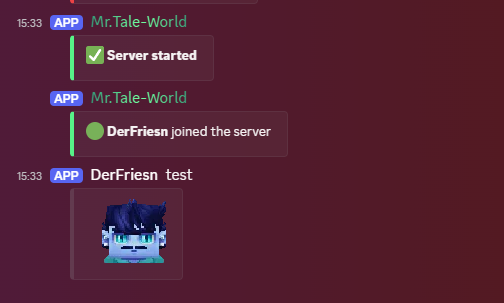
**DiscordFantastic** is a lightweight Discord relay mod for **Hytale servers**.
It connects your Hytale server chat with a Discord channel and allows players to communicate between **Discord** and the game.
---
## ✨ Features
- 💬 Ingame chat to Discord
- 🎮 Discord chat to ingame
- 🟢 Join and leave messages
- 🚀 Server start and stop messages
- 🪝 Webhook support for player names
- 🧑 Hytale player avatars via Crafthead
- 🖼️ Avatar fallback as Discord embed thumbnail
- ⚙️ Configurable channels
- 📝 Configurable message formats
- 📄 Simple YAML configuration
---
## 🪝 What does the Webhook do?
The Discord bot token is used to connect the bot and read messages from Discord.
The webhook is used for ingame chat messages going to Discord.
With a webhook, **DiscordFantastic** can display ingame messages like this:
```text
PlayerName: Hello everyone!
```
instead of:
```text
DiscordFantastic: **PlayerName**: Hello everyone!
```
The webhook allows **DiscordFantastic** to use the player's name as the message sender.
It also adds the player's Hytale avatar as an embed thumbnail.
---
## ⚙️ Setup
### 1️⃣ Create a Discord Bot
1. [Go to the Discord Developer Portal.](https://discord.com/developers/home)
2. Create a new application.
3. Add a bot to the application.
4. Copy the bot token.
5. Invite the bot to your Discord server.
6. Make sure the bot has permission to read and send messages.
The bot needs the following permissions:
- 👀 View Channels
- 💬 Send Messages
- 📜 Read Message History
- 😀 Use External Emojis
- 🔗 Embed Links
You also need to enable the **Message Content Intent** in the Discord Developer Portal.
---
### 2️⃣ Get your Discord Channel ID
1. Enable **Developer Mode** in Discord.
2. Right-click your Discord chat channel.
3. Click **Copy Channel ID**.
4. Paste the ID into the config.
---
### 3️⃣ Create a Webhook
The webhook is needed for better looking ingame chat messages in Discord.
1. Open your Discord server.
2. Right-click the channel where ingame chat should appear.
3. Click **Edit Channel**.
4. Go to **Integrations**.
5. Open **Webhooks**.
6. Click **New Webhook**.
7. Choose the correct channel.
8. Click **Copy Webhook URL**.
9. Paste the URL into the config.
Your webhook URL looks similar to this:
```text
https://discord.com/api/webhooks/123456789012345678/xxxxxxxxxxxxxxxxxxxx
```
⚠️ **Do not share your webhook URL publicly.**
---
## 📄 Example Config
```yaml
Discord:
Token: "Discord Developer Portal Token"
ChatChannelId: "Channel ID"
JoinLeaveChannelId: "Channel ID"
StatusChannelId: "Channel ID"
Webhook:
Enabled: true
Url: "Right-click on the channel/Edit Channel/Integrations/Add Webhook
"
AvatarUrlFormat: "https://crafthead.net/hytale/avatar/%uuid%/64"
Features:
ChatToDiscord: true
DiscordToChat: true
JoinLeave: true
ServerStatus: true
Formats:
DiscordToGame: "[Discord] %user%: %message%"
GameToDiscord: "**%player%**: %message%"
Join: ":green_circle: **%player%** joined the server"
Leave: ":red_circle: **%player%** left the server"
ServerStart: ":white_check_mark: **Server started**"
ServerStop: ":octagonal_sign: **Server stopped**"
Debug:
Enabled: false
```
---
## 🔍 Config Explanation
### 💙 Discord
```yaml
Token: ""
```
Your Discord bot token.
```yaml
ChatChannelId: ""
```
The Discord channel ID used for chat messages.
```yaml
JoinLeaveChannelId: ""
```
The Discord channel ID used for join and leave messages.
If empty, the chat channel is used.
```yaml
StatusChannelId: ""
```
The Discord channel ID used for server start and stop messages.
If empty, the chat channel is used.
---
### 🪝 Webhook
```yaml
Enabled: true
```
Enables webhook messages for ingame chat.
```yaml
Url: ""
```
Your Discord webhook URL.
```yaml
AvatarUrlFormat: "https://crafthead.net/hytale/avatar/%uuid%/64"
```
The avatar URL format used for Hytale player avatars.
Available placeholders:
```text
%uuid% Player UUID
%player% Player name
```
---
### ✨ Features
```yaml
ChatToDiscord: true
```
Sends ingame chat messages to Discord.
```yaml
DiscordToChat: true
```
Sends Discord messages to the ingame chat.
```yaml
JoinLeave: true
```
Sends join and leave messages to Discord.
```yaml
ServerStatus: true
```
Sends server start and stop messages to Discord.
---
### 📝 Formats
You can customize the text of all messages.
Available placeholders:
```text
%player% Hytale player name
%user% Discord username
%message% Chat message
%uuid% Player UUID
```
Example:
```yaml
DiscordToGame: "[Discord] %user%: %message%"
```
---
## 🔐 Important Security Notice
Never share your Discord bot token or webhook URL.
Do not upload your real config file with your token or webhook URL to CurseForge, GitHub, Discord, or any public place.
If you accidentally shared your token or webhook URL:
1. Reset your bot token in the Discord Developer Portal.
2. Delete the old webhook in Discord.
3. Create a new webhook.
4. Update your config with the new values.
---
## 🛠️ Troubleshooting
### ❌ Discord messages do not appear ingame
Check:
- The bot token is correct.
- Message Content Intent is enabled.
- The bot is invited to your Discord server.
- The bot can read the selected channel.
- `DiscordToChat` is set to `true`.
---
### ❌ Ingame messages do not appear in Discord
Check:
- `ChatToDiscord` is set to `true`.
- `ChatChannelId` is correct.
- The webhook URL is correct.
- The bot and webhook both use the correct Discord channel.
---
### 🖼️ Avatars are not shown as profile pictures
Discord can be strict with webhook avatar URLs.
DiscordFantastic also adds the Hytale avatar as an embed thumbnail so the player's avatar is still visible in the message.
---
## 🙌 Inspiration
This mod was inspired by **Relay Mod**.
***
## ❤️ Support
If you enjoy this mod, consider leaving a ⭐ on CurseForge!
***
## 🔗 Check Out My Other Hytale Projects
Take a look at my other Hytale mods and projects here:
👉 [DerFriesn CurseForge Projects](https://www.curseforge.com/members/derfriesn/projects)
***
# Tale-World German Community 
* **IP:** play.tale-world.com
* [https://tale-world.com/](https://tale-world.com/)