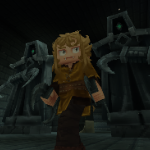
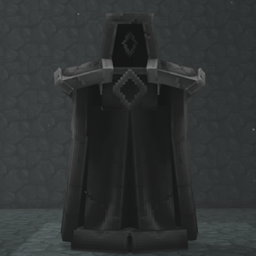
Dark Statues is a amall mod adding decorative objects - variations of Dark Temple Gaia statue, currently found in the game.
- The original Dark Temple Gaia statue found in the game is asymetrical, and unlike Statue of the Watcher (also found in vanilla Hytale), has no eyes, so inspired by both the Watcher statue and big statues guarding the Dark portal in World of Warcraft, I added some variations, with more to come!
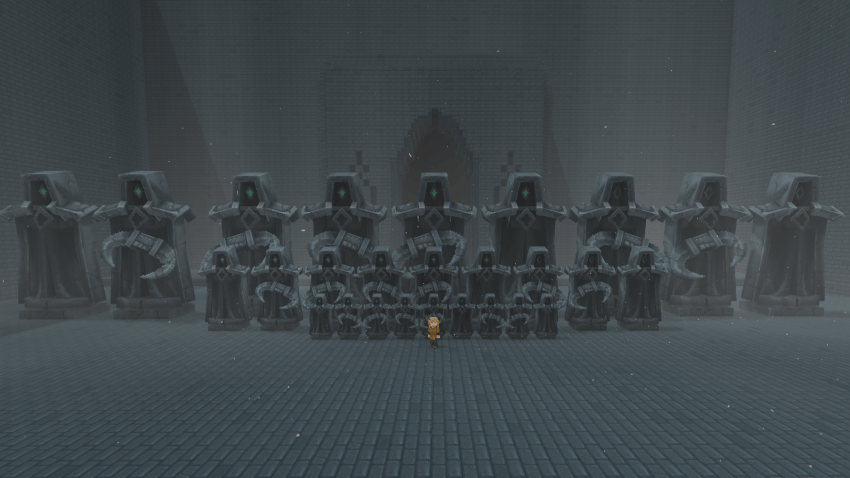
- Here in the preview you'll see medium and big sizes of the statue model, as well as examples of the models and variations.
- The statues can be active - with a green glowing gem in the eye socket and emit slight light, or default Hytale texture when Inactive.
- The mod adds 3 sizes, variations and models:
- The statues come in normal size, big (2x bigger than normal) and very big (4x bigger than normal)
- The statues also have 3 models: default/right handed (same as Dark Temple Gaia), left handed variation and version with no weapon - the goal of these models is to make your builds look better, allowing you to place them on both sides of doors, gates, bridges, ect.
- And lastly, the statues come in 3 variations: activatable, always active or always inactive - if you are creating a multiplayer map or prefab, you may want the statues to be always active, or you just wanted a mirrored / bigger version of default model - there's always inactive just for that case. And if you want to incorporate these models into your mod, you may choose to use activatable (on interraction) statues (like activate both statues, by clicking or by using a key on them to open a door or light a portal or summon a boss).
- This mod is aimed at creative users and map makers, so you can use it as you wish, just credit me if you use my content in a mod :)
Mod Installation guide:- Download the .zip file
- Move the .zip file to the game mods folder
%AppData%\Roaming\Hytale\UserData\Mods("%AppData%\Roaming" may be different if you chose a custom install location of the game)
Setup for custom mod configuration / manual mod update:
- In Mods folder create "DarkStatues" folder and extract the zip file inside it.
(It should be Mods\DarkStatues and inside it you shold have folders "Common", "Server" and files "Manifest.json" and "Manifest.json.bak".) - When game (Hytale) updates, it may throw error that one or more mods are outdated, but this mod should not break. In case Hytale updates, you can either disable mod validation, look if I have updated the mod on curseforge, change server version in the asset editor (open any world in creative mode, use /op self command to enable use of asset editor (creative tools > assets tab, in inventory view), open asset editor, select the Dark Statues mod in top left (By default it will show "Hytale:Hytale (Read-Only)", if the name of the mod is "DeRookie:Dark Statues (Read-Only)" and not "DeRookie:Dark Statues" it means you will have to extract the mod from .zip to a folder to allow changes, check if you don't have both .zip and extracted version present in mods folder), press 3 dots (. . .) near the title, press "Edit Pack" and near "Server Version" select "Current" or change ServerVersion to the current version (shown in launcher) in manifest.json, found in the mod zip/folder.
- In Mods folder create "DarkStatues" folder and extract the zip file inside it.
- The statues have the same name both in-game and in Asset Editor.
The statue items (ones you place / hold in inventory) are found at: Server/Item/Items/Animated_Dark_Statue.json (File explorer view) Server/Item/Item/Animated_Dark_Statue.json (Asset Editor view) - The states in variants of Haunted_Statue_(Mirrored/Armed)_(Big/VeryBig) are found:
In the file > Block > State > BlockType > State > Definitions - Interractions (only changes state between active / inactive by default) are found:
In the file > Block > Interactions > Use > Interactions > ChangeState - If you wanted to remove Light from the statues, in activatable statue it's in Active state, and in Always Active statue, it's in:
In the file > Block > Rendering > BlockLight - When you want to interract with the statue, it asks you to pay respects to it. If you want to change or remove this interraction message, you can find it in:
IsUsable flag is found here too ^ _ ^In the file > Block > Behavior > BlockType > Interaction Hint
In the future I am planning to:
- Make gem texture emissive.
- Add more color variations.
- Add more texture/model variations.
- Add togglabe variant - to allow user to interract with the statue to cycle through each model / state so you would not need to look for specific one in the inventory.
- Add crafting recepies
The Dark Statues Team