Chat Interactions Plugin
Chat plugin for Hytale featuring Global/Local chat, private messaging, admin tools, a configurable local chat radius, an optional chat lockdown mode (allowlist), and a configurable periodic chat-mode warning.
Requirements (Dependencies)
- ChatInteractions has no required dependencies to run.
- TinyMessage / TinyMsg (Optional) If installed, it enables better colors and formatting in chat. Just drop
tinymessage-*.jarintomods/.
Features
Global and Local chat channels
Local chat filtered by distance radius (same world)
Private messages with
/msg(message is fully pink). Private messages can be disabled via/chatdisable msg.Admin command to clear the chat (Global + Local)
Admin command to inspect/debug chat variables (mode, locks, admin/op, warning, ping)
Admin-only local radius setting (persists after restart)
Per-channel chat disable:
/chatdisable global|local|msg(alias:/cdb)Chat Admin allowlist: only ChatAdmins can talk while chat is disabled; they can also use
/chatdisableand/chatwarning(even without admin/op)Periodic chat-mode warning (per-player):
- Sends a private reminder telling the player whether they are in LOCAL or GLOBAL
- Fully colored when TinyMessage/TinyMsg is installed
- Clean plain-text fallback when TinyMessage is not present
- Configurable interval (or disabled) via
/chatwarning//cw
Optional TinyMessage/TinyMsg support for better colors/formatting
Installation
Build the plugin and get the generated
.jar.Move the plugin
.jarto:mods/
(Optional, recommended) Install TinyMessage/TinyMsg:
- Move
tinymessage-*.jartomods/
- Move
Restart the server.
With TinyMessage/TinyMsg installed, chat colors and formatting look better.
How It Works
- When a player joins, their default chat channel is Local.
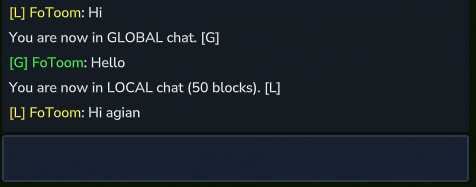
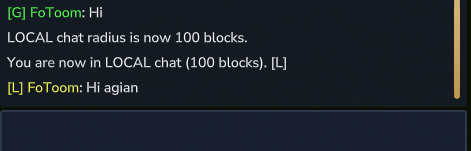
Local chat is only delivered to players:
- in the same world
- within the configured radius (in blocks)
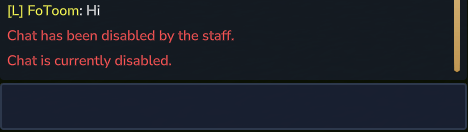
When chat is disabled via
/chatdisable global|local|msg(alias:/cdb), only ChatAdmins can send messages for that channel (Global/Local/Msg)./chatdisable msgblocks only private messages (/msg).Important security note:
/chatdisable(/cdb) requires Admin/Op (console allowed). ChatAdmins can also execute it without admin/op.Periodic chat warning (optional):
- Each player can receive a private reminder message every X minutes.
- ChatAdmins can change the interval or disable it using
/cw <minutes>even without admin/op. Admins/Ops can also execute it.
]
"Mini" Tutorial
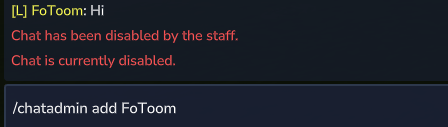
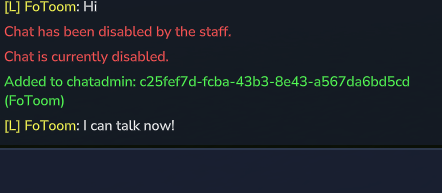
Commands
Everyone (no permission required)
/g- Switches you to the Global chat channel.
/l- Switches you to the Local chat channel (distance-based).
/msg <player> <message...>- Sends a private message to another player (fully pink).
- Example:
/msg player2 hi how are you?
Staff commands (Admin/Op; console allowed)
All commands below require Admin/Op unless noted. ChatAdmins can also use /chatdisable and /chatwarning even without admin/op.
/localradius <number>- Admin/Op only.
- Sets the Local chat radius in blocks.
- Default is
50. - This value is saved/persistent after restart.
- Example:
/localradius 80
/clearchat- Admin/Op only.
- Clears the game chat for all online players (Global + Local).
- Alias:
/cc
/chatdebug- Displays debug information / variables related to the server chat (useful for verifying current settings/state).
- Alias:
/cdg
/chatdisable global|local|msg- Toggles chat lockdown per channel (Global, Local, or private messages).
- Usable by Admin/Op or ChatAdmin.
- Alias:
/cdb - Examples:
/chatdisable global,/chatdisable local,/chatdisable msg
/chatadminAdmin/Op only (console allowed).
Manages the Chat Admin allowlist (players who can talk while chat is disabled).
Variants:
/chatadmin add (<Player> or <UUID>)Adds chat-admin permission to the chosen player (allow to talk even if chat is disabled).
Example:
/chatadmin add PlayerNameExample:
/chatadmin add 123e4567-e89b-12d3-a456-426614174000/chatadmin remove (<Player> or <UUID>)Removes chat-admin permission from the chosen player.
/chatadmin listLists all players (and their UUIDs) who currently have chat-admin permission.
/chatwarning <minutes>Executable by Admin/Op and ChatAdmins (chatadmins do not need admin/op).
Configures the periodic chat-mode warning (private reminder).
<minutes>is the interval in minutes.Use
0to disable the warning.Alias:
/cwExamples:
/cw 5(send every 5 minutes)/cw 0(disable)
Permissions / Access
This plugin uses these access levels:
Everyone (permission zero):
/g,/l,/msg
Admin/Op (and console):
- Required for all other commands
ChatAdmin (allowlist):
- Can use
/chatdisable(/cdb) and/chatwarning(/cw) even without admin/op - Only ChatAdmins can talk when chat is disabled
- Can use
Additionally:
- Chat Admin (allowlist) is managed via
/chatadmin add/remove/list.
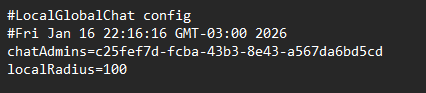
Persistence (Local Radius / Chat Admins / Warning Interval)
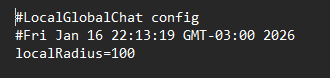
Settings are saved to a config file and persist after a restart.
Default fallback path: ./plugins/com.example_ChatInteractions/localglobalchat.properties
Stored keys example:
localRadius=50chatAdmins=<uuid1>,<uuid2>,...chatWarningMinutes=5
Notes
Local chat filtering:
- Same world
- Distance ≤ configured radius
The plugin automatically uses TinyMsg if installed (otherwise clean plain text is used).
Chat Interactions Plugin Team