Boss Arena
- By
BossArena is a Hytale server mod that adds configurable boss arenas, NPC contract shops, and per-player loot chest rewards.
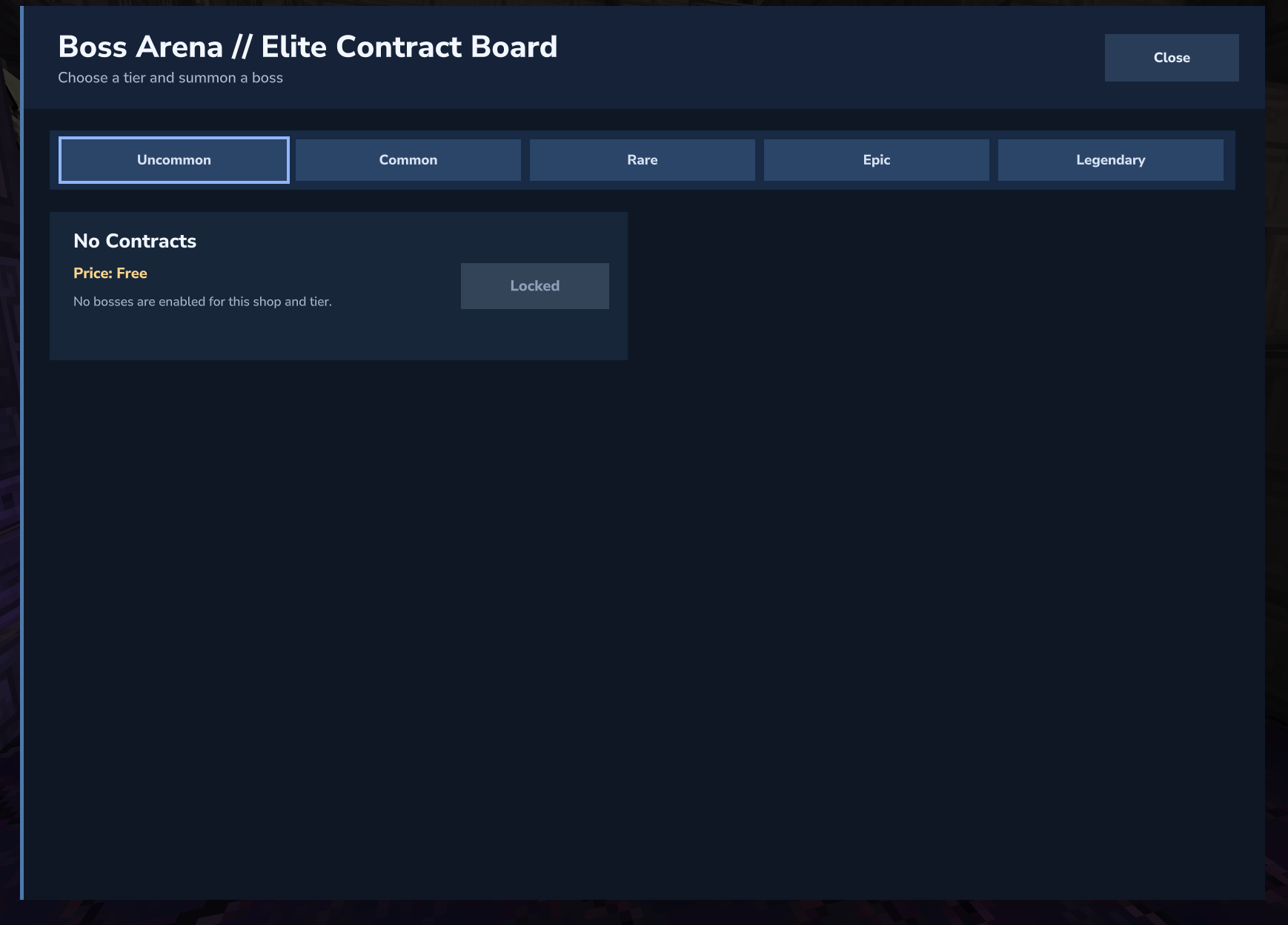
Boss Arena Shop
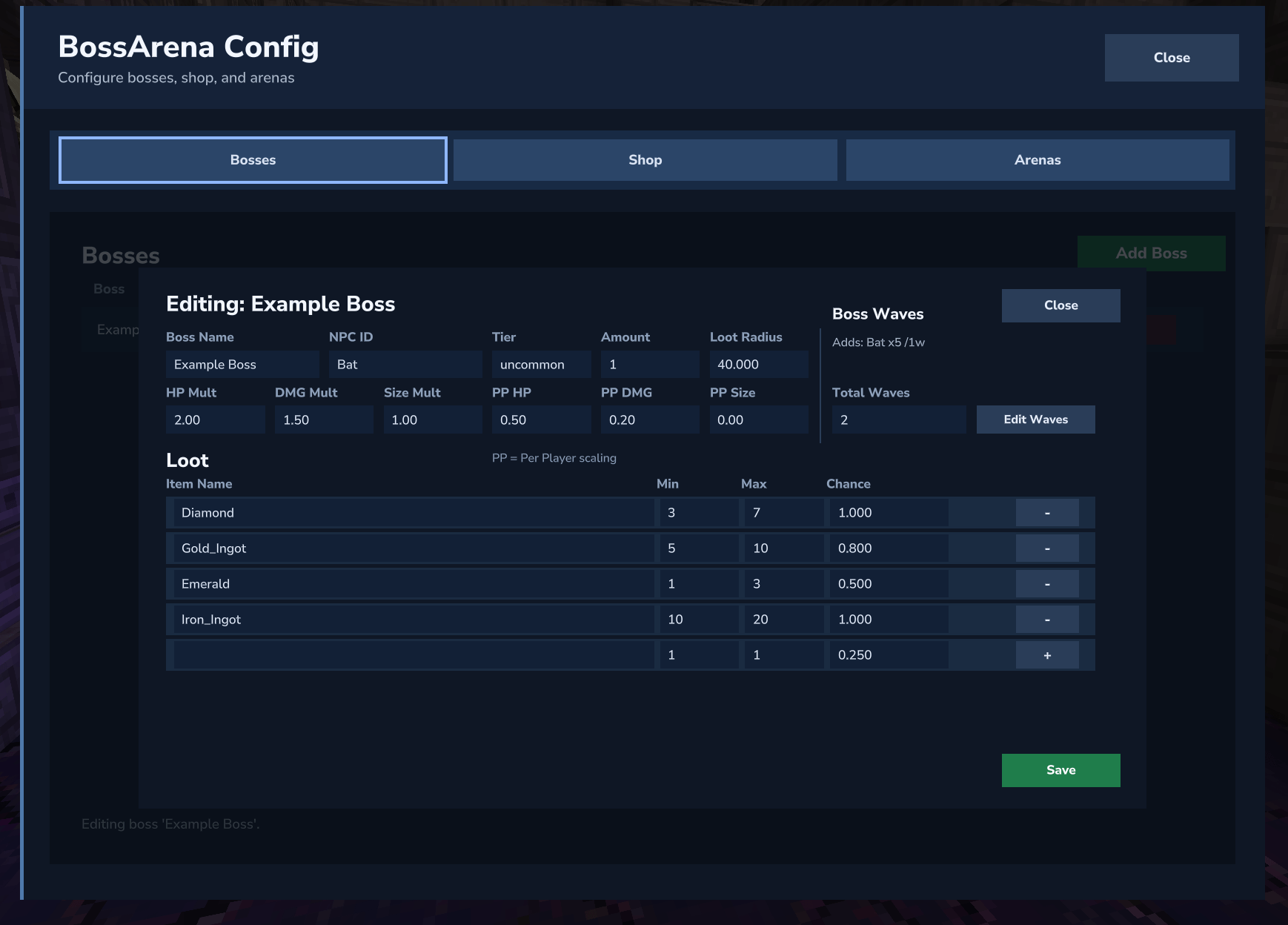
Boss Editing
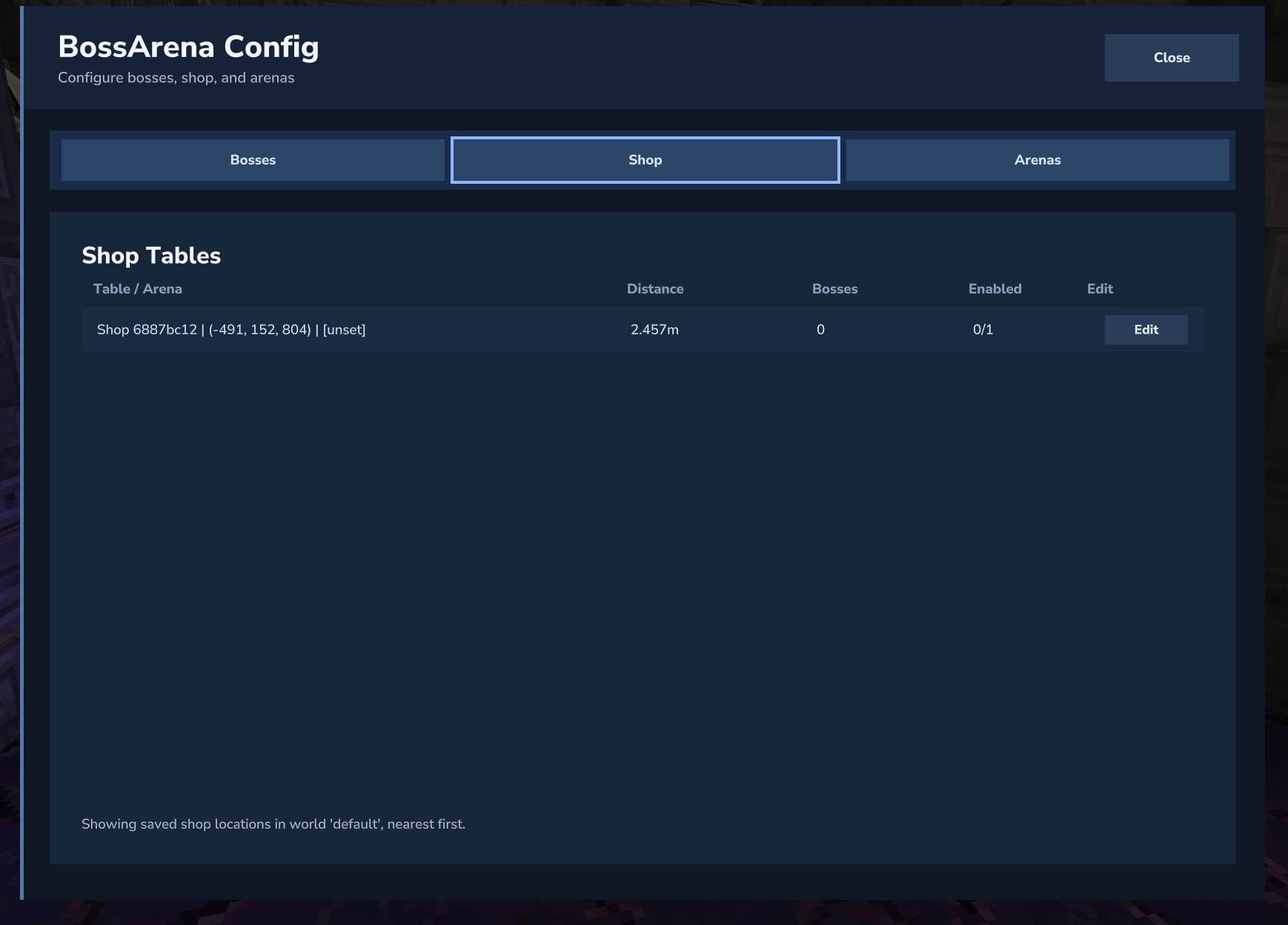
Shop Config

Creating the arena with /ba arena create <name>
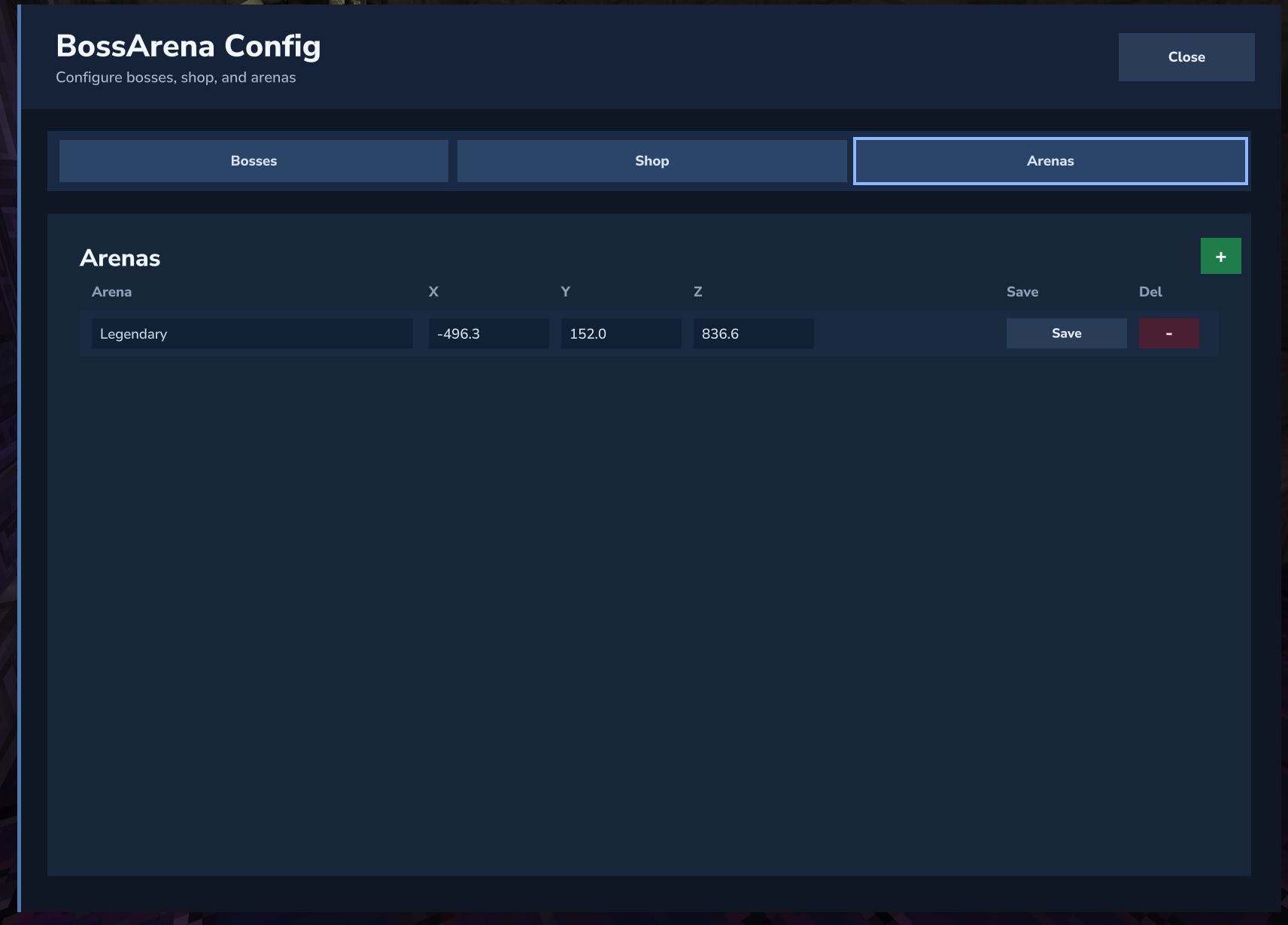
Arena Config
Description
BossArena – Configurable Boss Arenas, Shops, and Loot
BossArena is a Hytale server mod for building replayable boss encounters with proper arenas, NPC shops, timed events, and per‑player loot.
Admins design bosses and arenas entirely in‑game, while players trigger fights via contracts or simply by walking into a danger zone. When a boss dies, each eligible player gets their own loot chest and a damage summary, turning boss fights into proper “events” instead of one‑off spawns.
Overview
Design boss fights, not just mobs
- Create arenas, configure bosses with waves/adds and stat scaling, and link everything together via timed events and proximity triggers.
Player‑driven encounters
- Players can start fights using shop contracts or by entering a configured proximity arena, so you don’t have to constantly run commands.
Per‑player rewards and tracking
- Every encounter tracks its bosses and adds, shows a banner HUD, persists loot chests, and prints a damage chart when it’s over.
In‑game configuration
- Almost everything can be managed through
/ba config– bosses, arenas, loot, shops, timed spawns, proximity, and more.
Key Features
Configurable Bosses
- Define bosses in
bosses.jsonor via/ba config:- Identity:
BossID,NPC ID,tier(common,uncommon,rare,epic,legendary). - Stats: HP, damage, size, movement, attack rate, etc.
- Per‑player scaling: extra HP/damage/size per additional player in range.
- Level override (with RPGLeveling): force a spawn level per boss.
- Identity:
- Tiers and modifiers let you build anything from mini‑bosses to raid‑style encounters.
Arenas & Notification Radius
- Arenas are simple anchor points where:
- Bosses spawn.
- Loot chests appear.
- Event banners are centered.
- Each arena has:
arenaId,worldName,x,y,z.notificationRadius(blocks) – who sees the boss event HUD.
- Manage arenas through
/ba config→ Arenas tab or with commands:/ba arena create <arenaId>/ba arena delete <arenaId>/ba arena list
Waves & Adds
- The Waves overlay lets you configure:
- Boss spawn timing:
- After all pre‑boss adds die.
- After a fixed number of seconds from encounter start.
- Wave triggers:
- Before boss, on spawn, after spawn, since last wave, boss HP% thresholds.
- Wave content:
- Multiple rows of adds with:
- NPC ID
- Quantity
- Repeat counts / repeat intervals
- HP / damage / size multipliers
- Legacy simple
addsare automatically migrated into the structured wave format, but you can keep editing waves purely from the UI.
Timed Boss Spawns
- Timed rules live in
mods/BossArena/config.json→timedBossSpawns[]:bossIdandarenaIdfor each rule.spawnIntervalHours/spawnIntervalMinutes.preventDuplicateWhileAliveto avoid stacking bosses.- Optional
despawnAfterHours/despawnAfterMinutes. - Announcement controls:
announceWorldWideannounceCurrentWorldworldAnnouncementTextwith placeholders.
Player‑online gating:
- Timed spawns only fire when at least one player is online in the target world.
- If the timer elapses while empty:
- The rule is deferred and retried on a short interval.
- The next eligible attempt spawns one boss.
Timed spawns are ideal for scheduled events (hourly, daily, etc.) that should feel special and predictable.
Per‑Boss Proximity Spawns (3.0.0+)
BossArena also supports per‑boss proximity behavior, configured per boss in the Waves overlay (not in config.json).
For each boss you can set:
- Proximity Spawn (true/false)
- Arena ID – center point used for proximity.
- Radius (blocks) – how close a player must be to trigger/gate the boss.
- Cooldown (s) – minimum seconds between proximity spawns for that boss+arena.
Proximity is used in two key ways:
Pure proximity auto‑spawn (no timed rule required)
- A background loop periodically checks each boss with proximity enabled.
- If a player is within radius of the configured arena, and:
- No matching boss is currently alive in that arena, and
- The per‑boss proximity cooldown has elapsed since the last proximity spawn,
then BossArena spawns the boss immediately at that arena.
- While proximity is enabled for a boss, any timed rules for that boss are ignored – proximity takes over as the trigger.
Proximity gating for manual and shop spawns
- The same per‑boss proximity settings also gate:
/ba spawn <bossId> <arenaId>(and, where applicable,here).- Shop contracts that spawn that boss.
- If no player is in range when the spawn is attempted, BossArena refuses to spawn the boss and logs why.
- The same per‑boss proximity settings also gate:
This lets you create encounters like:
- A boss that only appears when players approach a dungeon entrance, with a 30‑minute cooldown between spawns.
- Shop/admin spawns that won’t fire unless someone is actually at the fight location.
NPC Shop & Boss Contracts
- Place a “guard” NPC that opens a BossArena shop via the standard
Use(F) interaction. - The shop sells boss contracts bound to specific arenas, with:
- Per‑tier entries.
- Per‑boss enabled flags per location.
- Per‑location contract prices.
Currency providers:
HyMarketPlusEconomySystem- Fallback item currency when no economy plugin is present.
You choose the provider in shop.json.currencyProvider (auto, hymarket, economysystem, item).
Players don’t need admin permissions to use the shop NPC – only to configure it.
Per‑Player Loot Chests & Inline Commands
- When an encounter ends, BossArena spawns one or more loot chests at the arena.
- Loot is per‑player:
- Each eligible player has their own loot “instance”.
- Chests are backed by
loot_chests_state.json, so unclaimed loot survives restarts.
Loot tables in loot_tables.json:
bossNamelootRadius(who is eligible when the boss dies)items[]with:itemIddropChance(0.0–1.0)minAmountmaxAmount
Inline cmd: actions:
- In addition to normal item rewards, BossArena supports inline command actions like
cmd: /give $Player Ingredient_Bar_Iron --quantity=5. - These are executed when the reward triggers and can be parameterized with context (boss, arena, player).
- Examples:
- Grant ranks or permission nodes for beating a boss.
- Trigger cosmetics, titles, or other plugin features.
- Start chained events or broadcasts when loot is claimed.
This makes BossArena a bridge between boss fights and the rest of your server’s systems.
Boss Event HUD & Damage Chart
Event banner HUD
- Appears for players within the arena’s notification radius.
- Text and format are configured in
config.json.eventBannerwith placeholders: - Boss name, alive counts, wave context, countdown timers, etc.
Damage chart
- When the boss event ends and loot spawns, any player inside the loot radius receives a chat summary:
- Top 10 players by total damage to the boss and adds.
- Optional extra line if more than 10 players contributed.
- Shown in chat only – no modal UI, so players can keep moving.
In‑Game Configuration (/ba config)
A full GUI editor to avoid manual JSON editing:
Bosses tab
- Core stats, tier, level override.
- Waves/adds and proximity settings.
- Loot rows and other extras.
Waves overlay
- Boss spawn trigger.
- Wave triggers and adds.
- Proximity Spawn, arena, radius, cooldown.
Timed Spawns overlay
- Inline editor for
timedBossSpawns[].
- Inline editor for
Shop tab
- Shop NPC locations.
- Enabled bosses per location.
- Contract pricing and currency settings.
Arenas tab
- Arena ids, world, coordinates, notification radius.
- Add/delete at player position.
Commands & Permissions
Base:
/bossarenaand/baare equivalent.
Admin commands (require bossarena.admin):
/ba arena create <arenaId>/ba arena delete <arenaId>/ba arena list/ba spawn <bossId> <arenaId|here>/ba config/ba shop open/ba shop place/ba shop delete/ba reload/ba cleanup
Permission:
bossarena.admin– required for all admin commands.- Regular players:
- Use shop NPCs (if allowed).
- Fight spawned/timed/proximity bosses.
- Open and loot their own chests.
Files & Persistence
All runtime data is under mods/BossArena/:
config.json– global configuration, timed spawns, map markers, event banner templates.bosses.json– boss definitions, stats, waves/adds, per‑boss proximity and cooldown.arenas.json– arenas and their notification radii.loot_tables.json– loot tables and drop chances.shop.json– shop definition, currency provider, locations, contracts.loot_chests_state.json– internal loot chest persistence (don’t edit manually).
Boss tracking and loot are persisted across restarts. /ba cleanup can be used to remove stuck bosses/adds and orphaned chests.
Integrations
RPGLeveling (Zuxaw:RPGLeveling) – optional
- Auto‑detected; BossArena makes tracked HP scaling compatible.
levelOverrideper boss to force encounter level, cleaned up when the event ends.
Economy mods – optional
HyMarketPlusEconomySystem- Or pure item currency.
Requirements & Notes
- Target server build:
2026.02.19-1a311a592. - No required runtime dependencies; works standalone.
- Avoid placing arenas or loot chests directly on snow blocks; use solid ground.
- For best results:
- Use
/ba configinstead of editing JSON by hand. - Keep
preventDuplicateWhileAliveand sensible despawn timers on timed bosses. - Use proximity cooldowns to avoid overly spammy encounters when players idle in one area.
- Use
If you want, I can also draft a “Getting Started” section (5–6 bullet steps) for the bottom of the CurseForge page.
Boss Arena Team