BetterGravestone
- By
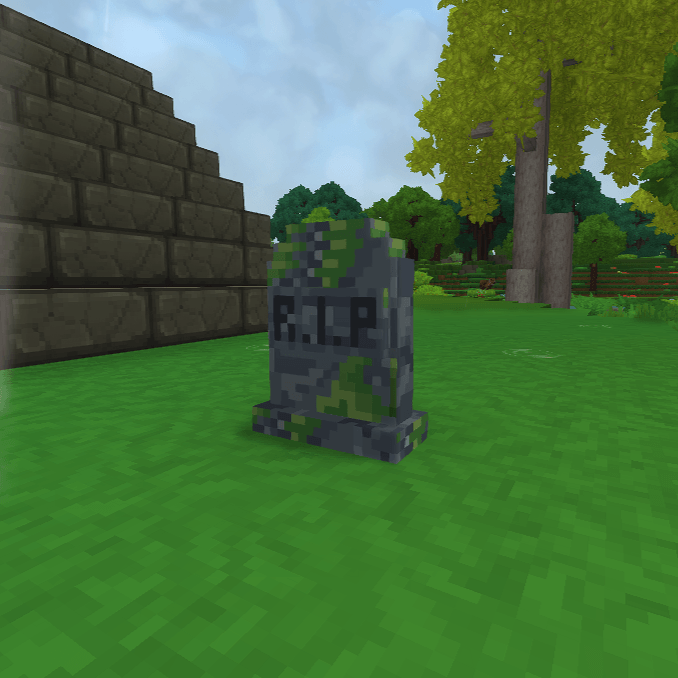
Spawn a gravestone when player dies and take control of death points. UPDATE 6 Ready.
bettergravestones.png
Screenshot 2026-09-15 170607.png
Screenshot 2026-09-15 170746.png
Description
🪦 BetterGravestone - Lightweight Death Item Protection
BetterGravestone is a lightweight and efficient mod that spawns a gravestone when a player dies, safely storing their dropped items inside it. And clears up annoying death points from your map. No schedulers, no databases - everything is stored directly in the block.
Graves are placed without destroying what you died on, and never vanish because the block beneath them was mined.
Perfect for survival servers that want a clean and fair way to recover items after death without clutter or performance impact.
⚠️ Requires Hytale Server 0.6.0 or newer.

✨ Features
- 🪦 Spawns a gravestone at the player's death location
- 📦 Stores dropped items directly inside the grave
- 🧱 Never replaces the block you died on - chests, stairs and furniture survive
- ⏱️ Items are retrievable for a configurable amount of time (default 30 minutes)
- 🔒 Only the owner can access their gravestone (configurable with permissions)
- 🧭
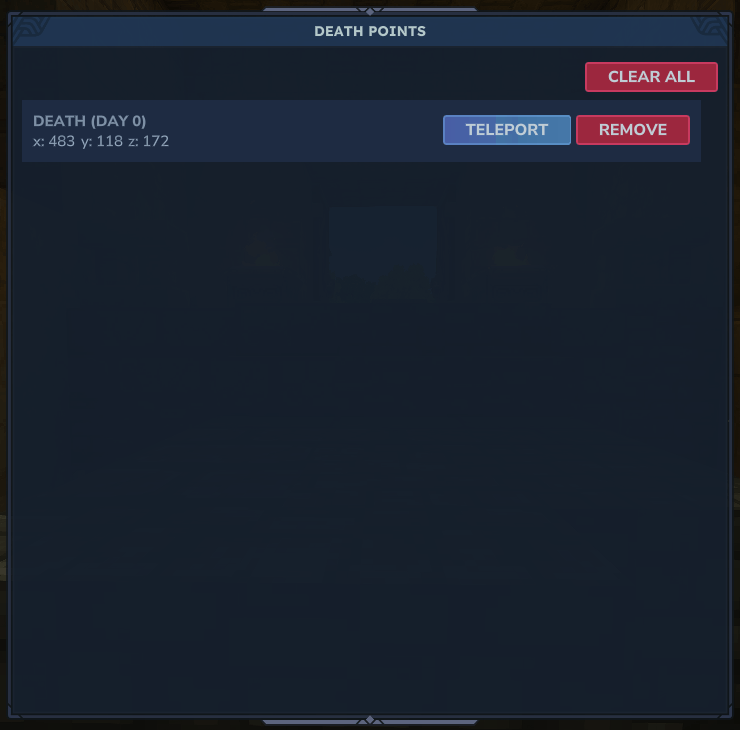
/deathpoint- browse, remove or clear your death markers - ✈️ Optional teleport to a death point, behind its own permission
- 🧹 Death markers clear themselves when you walk back to them (5 blocks, configurable)
- ⚙️
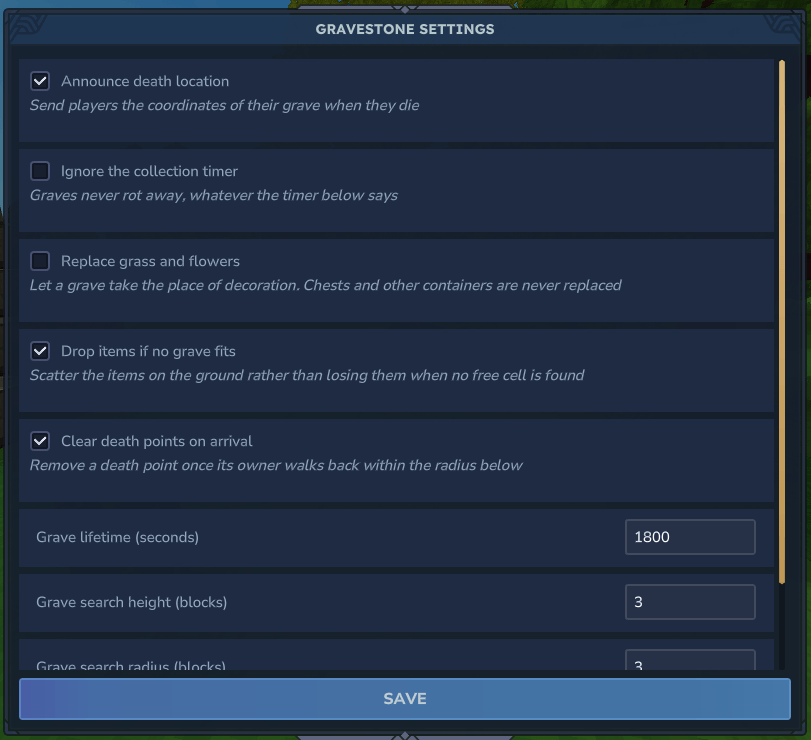
/gravestone- in-game admin settings menu, no file editing needed - 💬 Fully customizable messages using TinyMsg formatting
- ⚡ Extremely lightweight – no external storage or schedulers
🎮 Commands
| Command | Permission | Description |
|---|---|---|
/gravestone (alias /gs) |
gravestone.admin |
Opens the admin settings menu. Edit every option in-game and save straight to the config |
/deathpoint (alias /deathpoints) |
- | Lists your death markers in the current world. Remove one, clear all, or teleport |
🔑 Permissions
| Permission | Default | Description |
|---|---|---|
gravestone.admin |
op | Access the /gravestone settings menu |
gravestone.deathpoint.teleport |
- | Shows the teleport button in /deathpoint |
gravestone.break.others |
- | Break or loot other players' gravestones |
gravestone.ignore.time |
- | Bypass the collection time limit |
All four node names are configurable.
⚙️ Configuration
BetterGravestone uses a simple JSON configuration file. All messages support TinyMsg formatting, including colors and placeholders.
📄 Config Options
| Option | Type | Default | Description |
|---|---|---|---|
TimeToCollectGraveInSeconds |
Number | 1800 |
Time (in seconds) a gravestone can be looted before it expires |
SendDeathLocation |
Boolean | true |
Sends the player their death coordinates |
MessageDeathLocation |
String | - | Message sent to the player showing death coordinates |
MessageGraveExpired |
String | - | Message shown when a grave has expired |
MessageGraveNotOwner |
String | - | Message shown when another player interacts with the grave |
BreakOthersPermission |
String | gravestone.break.others |
Permission required to break other players' gravestones |
IgnoreTimeToCollect |
Boolean | false |
Ignores the time limit on gravestone collection |
IgnoreTimePermission |
String | gravestone.ignore.time |
Permission used to bypass the time limit for gravestone collection |
GraveSearchVerticalRange |
Number | 3 |
How many blocks above the death spot to search for a free cell |
GraveSearchHorizontalRange |
Number | 3 |
How many blocks sideways to search once the column is exhausted |
GraveReplaceSoftBlocks |
Boolean | false |
Allow a grave to replace grass and flowers. Containers are never replaced |
GraveFallbackDropItems |
Boolean | true |
Drop items on the ground if no free cell is found, instead of losing them |
AutoRemoveDeathMarkers |
Boolean | true |
Clear a death marker when its owner walks back within the radius below |
AutoRemoveDeathMarkerRadius |
Number | 5 |
Radius in blocks for automatic death marker removal |
AdminPermission |
String | gravestone.admin |
Permission required to use /gravestone |
DeathPointTeleportPermission |
String | gravestone.deathpoint.teleport |
Permission that reveals the teleport button in /deathpoint |
ConfigVersion |
String | 1.2 |
Managed automatically - do not edit |
📝 Default Configuration
{
  "TimeToCollectGraveInSeconds": 1800,
  "SendDeathLocation": true,
  "MessageDeathLocation": "<color:red>You have died at</color><color:white>:</color> <color:gray>{x}, {y}, {z}</color><color:white>.</color>",
  "MessageGraveExpired": "<color:red>This gravestone has been placed for a long time</color><color:white>.</color> <color:red>Your items have rotted away</color><color:white>.</color>",
  "MessageGraveNotOwner": "<color:red>This gravestone belongs to another player</color><color:white>.</color> <color:gray>Its items rot away in </color><color:white>{time}</color> <color:gray>seconds</color><color:white>.</color>",
  "BreakOthersPermission": "gravestone.break.others",
  "IgnoreTimeToCollect": false,
  "IgnoreTimePermission": "gravestone.ignore.time",
  "GraveSearchVerticalRange": 3,
  "GraveSearchHorizontalRange": 3,
  "GraveReplaceSoftBlocks": false,
  "GraveFallbackDropItems": true,
  "AutoRemoveDeathMarkers": true,
  "AutoRemoveDeathMarkerRadius": 5,
  "AdminPermission": "gravestone.admin",
  "DeathPointTeleportPermission": "gravestone.deathpoint.teleport",
  "ConfigVersion": "1.2"
}
💬 Support
Need help or want to report an issue?
**Support: https://discord.gg/veUKtz2cg4**
⭐Kinetic Hosting

BetterGravestone Team