Automatic Storage
- By

Drop all expedition resources in ONE spot to auto-store everything. Plug & Play. Mods compatibility, flexible options & individual preferences, edit recipes, simple UI, and full localization support.
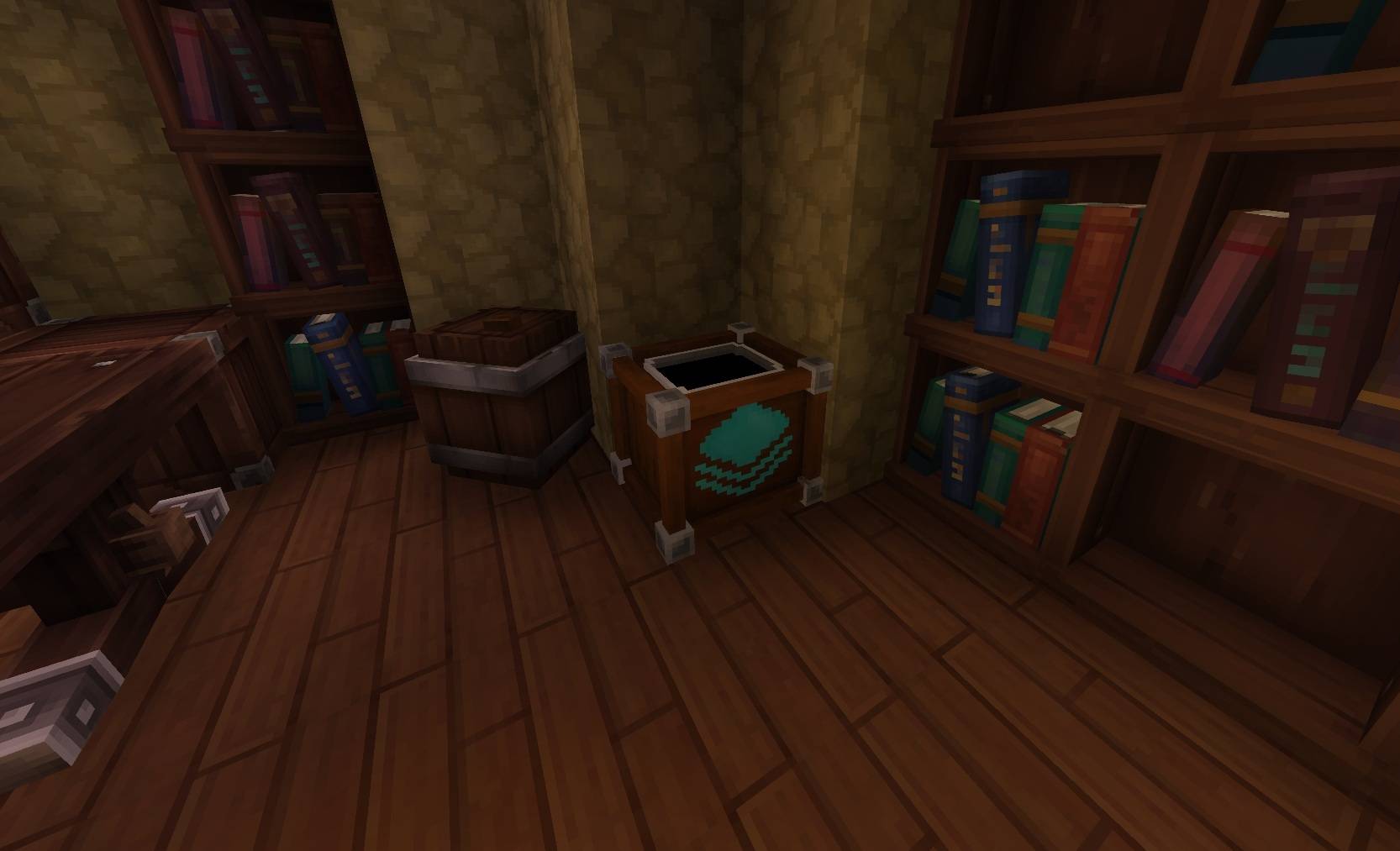
This shows how looks like the storage crate in your chest room
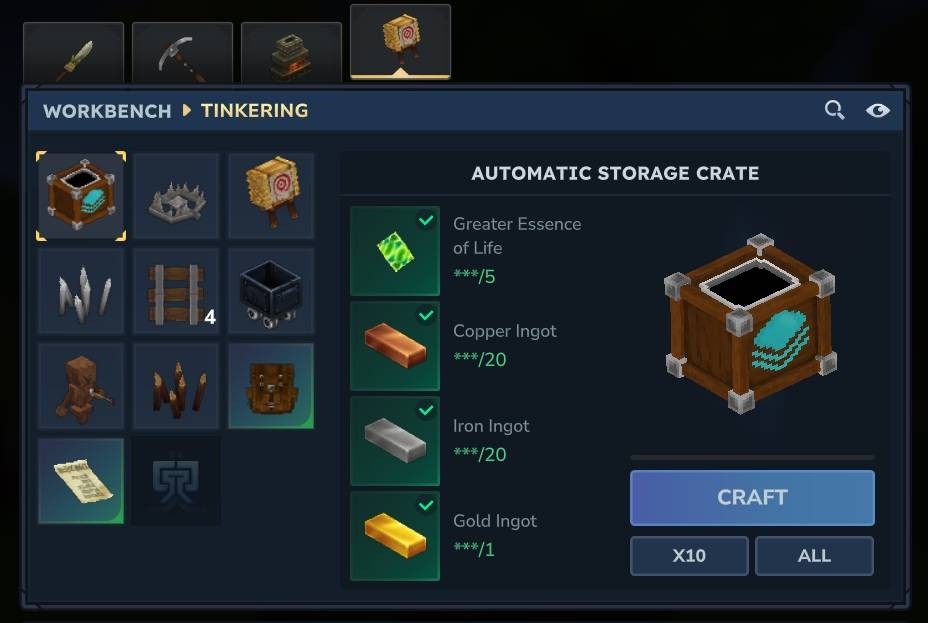
Show the craft
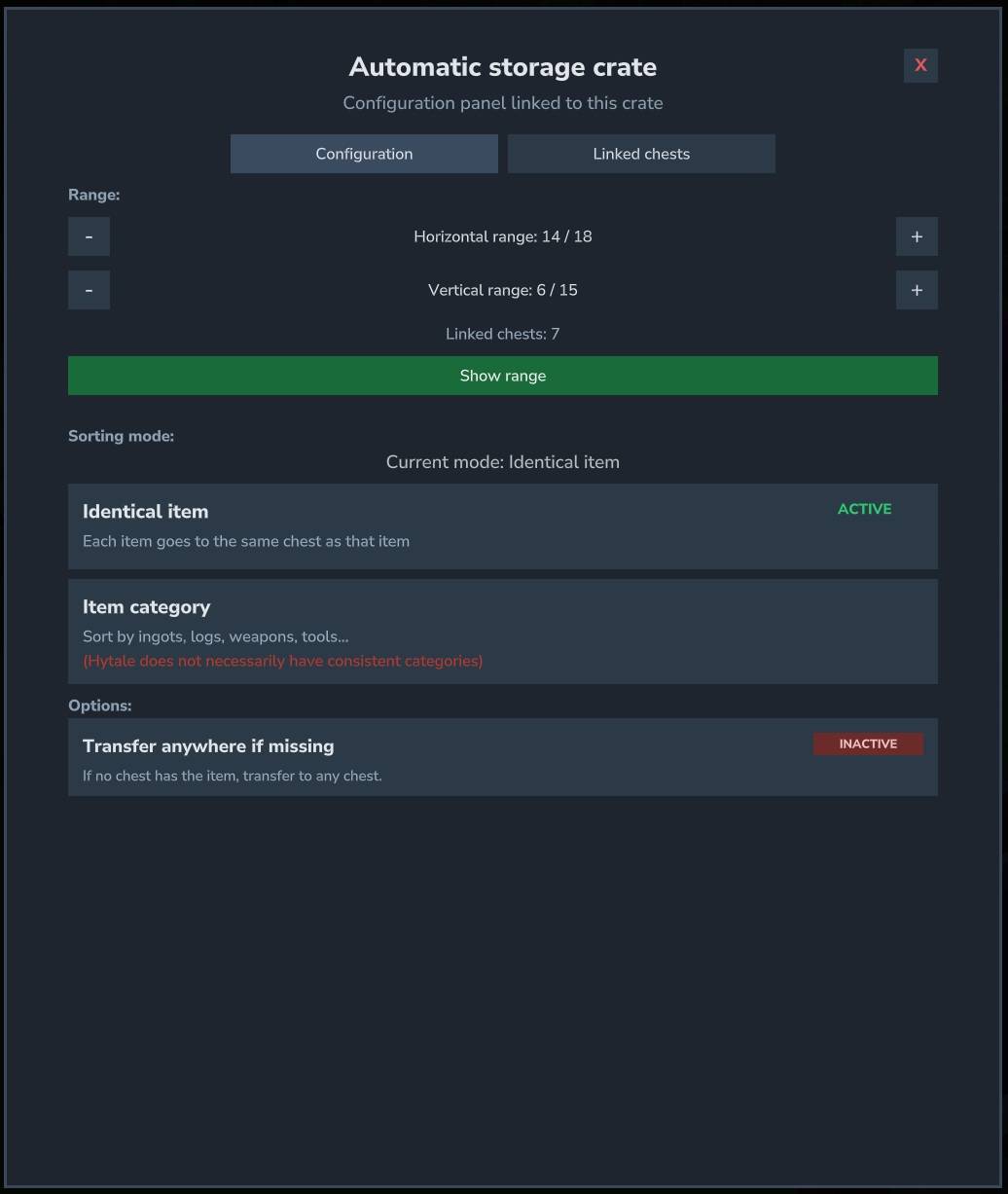
Edit your preference
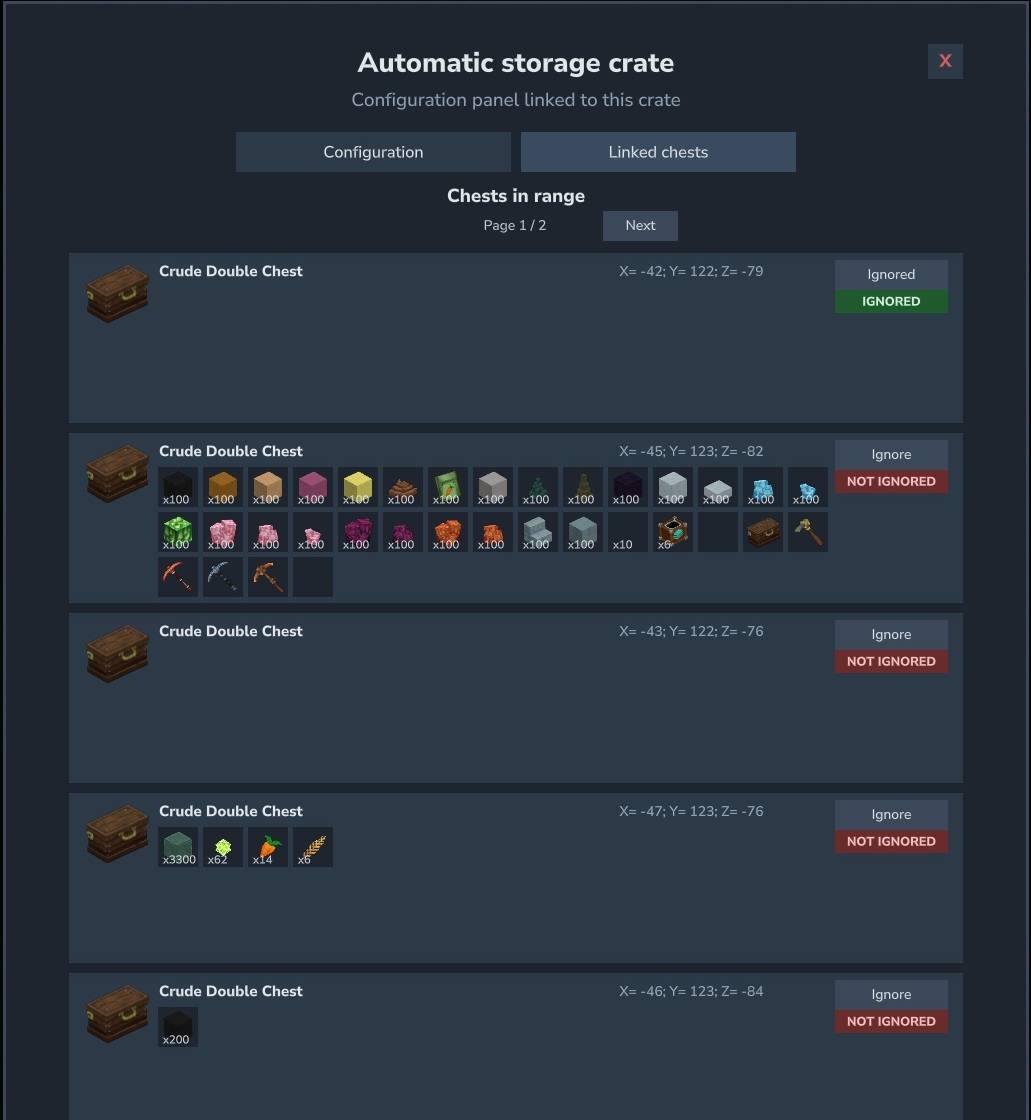
Everything you need to know and some you can also ignore
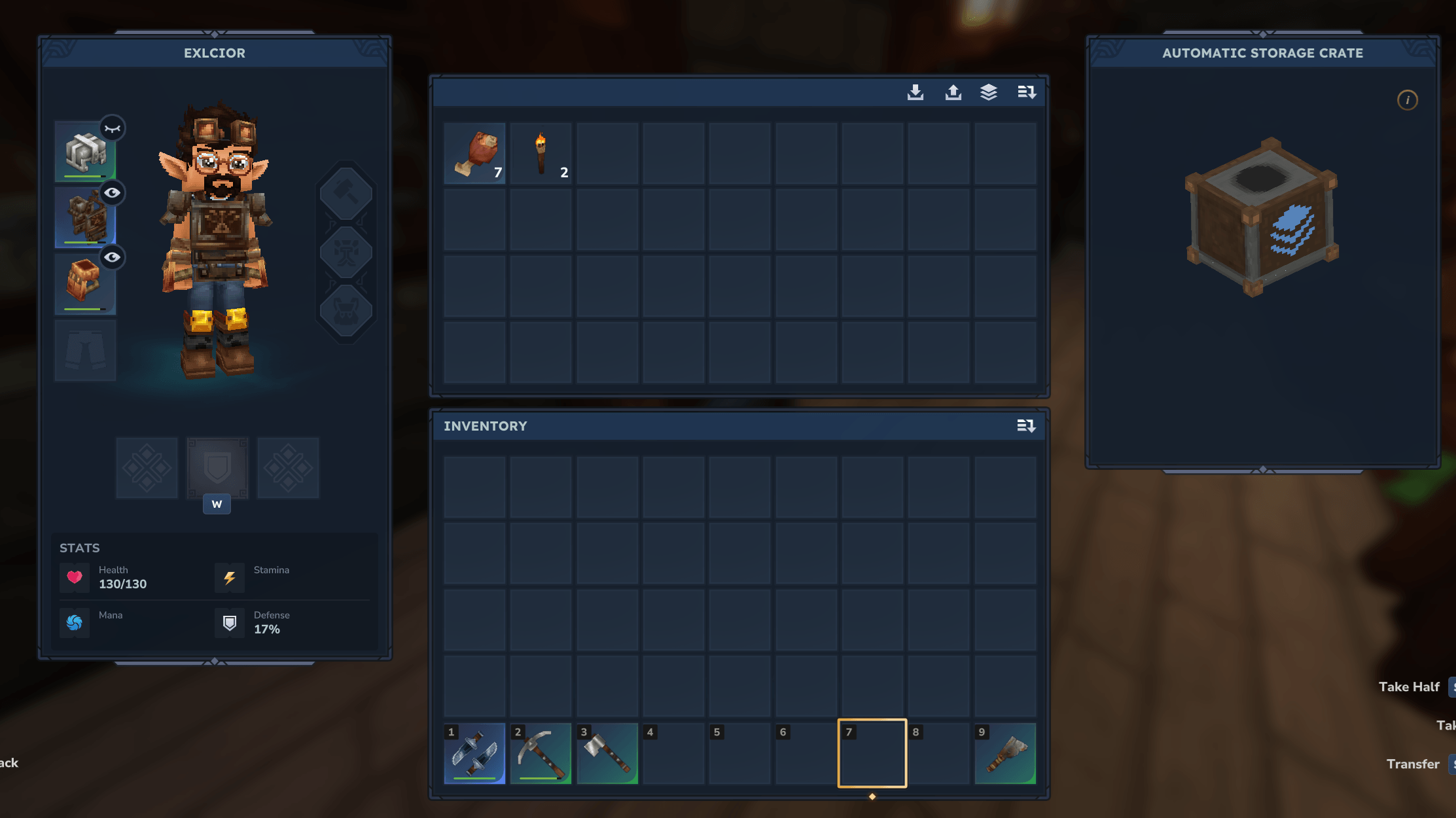
Deposit all your expeditions stuffs in it to automaticly store everything
Description
📦 Automatic Storage: Fast & Easy to Use
AutoStorage is a lightweight, efficient, and powerful mod that automatically sorts items between chests. Drop all your expedition resources in one place, and AutoStorage will handle the rest.
🚀 How It Works
- Craft the Automatic Storage Crate at a Tier 2 Tinkering Workbench.
- Place it in your base.
- Put items inside. The AutoStorage crate will distribute them to compatible nearby chests.
- Configure it by crouching and pressing Interact (F) while looking at the crate.
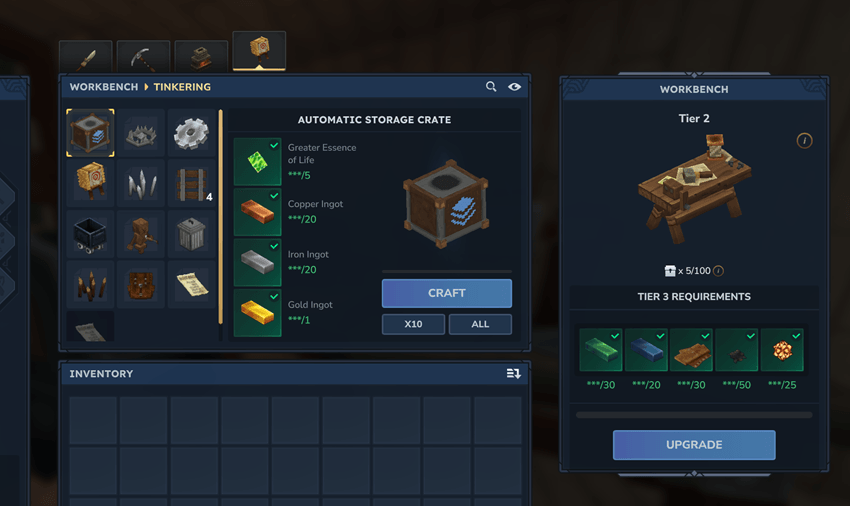
The crafting recipe can be changed in the configuration file.
✨ Features
- 📦 Automatically distributes items to nearby chests (including compatible containers added by other mods)
- 🧠 Smart targeting: items are sent to chests that already contain the same item type
- 🧩 Two sorting modes: exact item ID or item category
- ⏱️ Server-configurable transfer rate, measured in stacks or individual items
- ⚡ Event-driven architecture with event-driven with bounded safety watchdogs and retries, keeping server load to a minimum
- 🧱 Intelligent transfers that respect your chest organization: existing stacks are filled before empty slots
- 🖥️ In-game UI for configuring each crate (Crouch + F)
- 🎛️ Per-crate sorting mode
- 🔧 Per-crate options such as Transfer anywhere if missing and Ignore this chest
- 📏 Per-crate horizontal and vertical range controls with + and − buttons
- 🔗 Live linked-chest count and range visualization
- ⚙️ Extensive configuration options for both small and large servers
- 📝 Advanced filtering to control which container block IDs may or may not receive items
- 🛡️ Built-in safeguards against item duplication, optimized for low CPU usage
- 🟢 Compatibility with the SimpleClaims mod to help prevent griefing, and other mods like StorageDrawers.
- 🌍 Localized UI and item names: AR / BG / CS / DE / EL / EN / ES / PE / ET / FR / IT / NL / PL / PT / RU / SK / SV / TR / UK
(Translations are AI-assisted; corrections are welcome!)
🐞 Bug Reports & Suggestions
Found a bug, have an idea, or want to request a feature?
- ✅ Best option: Join my Discord and post in the appropriate channel.
🧰 Commands
| Command | Description |
|---|---|
/autostorage reload |
Reloads the plugin configuration. Alias: /as reload |
🔐 Permissions
| Feature | Permission | Default |
|---|---|---|
| Use and configure AutoStorage | autostorage.use |
Allowed |
| Craft AutoStorage when permission-based crafting is enabled | autostorage.craft |
Denied |
| Configure crates belonging to another player | autostorage.config.any |
Denied |
⚙️ Configuration
The configuration file is organized into sections.
Every setting can be customized to match your server's needs.
radius
The in-game UI allows players to adjust each AutoStorage crate's range up to the server-defined maximum values.
| Key | Description | Default | Range |
|---|---|---|---|
horizontalRadiusMax |
Maximum horizontal range, in blocks | 18 |
1 to 200 |
verticalRadiusMax |
Maximum vertical range, in blocks | 15 |
1 to 200 |
defaultHorizontalRadius |
Default horizontal range when an AutoStorage crate is placed | 14 |
1 to 200 |
defaultVerticalRadius |
Default vertical range when an AutoStorage crate is placed | 6 |
1 to 200 |
Default range per crate
- ↔️ Horizontal: 14 blocks
- ↕️ Vertical: 6 blocks
🔁 transferConfig
Controls how and when items are transferred.
| Key | Description | Default | Range |
|---|---|---|---|
transferImmediate |
When true, transfers begin immediately after the source container changes. When false, the plugin waits for the configured delay after the last interaction. |
true |
true / false |
transferAfterLastInteractionInSeconds |
Delay after the last interaction, in seconds. Requires transferImmediate = false. |
3 |
0 to 60 |
transferOnlyWhenClose |
Transfers items only when the chest is closed. | false |
true / false |
transferMode |
Transfer unit: STACKS moves stacks per iteration; ITEMS moves up to a specified number of individual items per iteration. |
STACKS |
STACKS / ITEMS |
transferAmountPerTransfer |
Number of stacks or items moved during each transfer iteration | 1 |
1 to 1000 |
transferIntervalMs |
Cooldown between successful transfers, in milliseconds | 1000 |
250 to 5000 |
🧩 Sorting Settings
| Key | Description | Default | Range |
|---|---|---|---|
defaultSortingMode |
Global default sorting mode: ITEM_ID matches exact items; ITEM_CATEGORY groups items by category. |
ITEM_ID |
ITEM_ID / ITEM_CATEGORY |
idleRetryMs |
Retry interval when no items are moved, in milliseconds | 5000 |
1000 to 60000 |
idleRetryBackoffMaxMs |
Maximum retry interval after an AutoStorage crate has been idle for a long time, in milliseconds | 60000 |
1000 to 60000 |
targetScanCacheMaxAgeMs |
Maximum age of the cached target-container scan, in milliseconds | 15000 |
1000 to 60000 |
onlyStorageOwnerCanConfig |
When enabled, only the player who placed the AutoStorage crate can open its configuration UI. | false |
true / false |
🛠️ Crafting
| Key | Description | Default |
|---|---|---|
itemIsCraftable |
Enables or disables crafting for the AutoStorage item | true |
craftRequiresPermission |
Requires a permission to view and craft AutoStorage | false |
craftRequiresPermissionName |
Permission node used when permission-based crafting is enabled | autostorage.craft |
craftOutputQuantity |
Number of AutoStorage crates produced per craft | 1 |
🧪 recipeOverride (Optional)
Optionally overrides the AutoStorage crafting recipe for item ID Furniture_AutoStorage.
When enabled, the plugin generates an item override file and reloads the item asset.
| Key | Description | Default |
|---|---|---|
enabled |
Enables the recipe override | false |
timeSeconds |
Crafting duration, in seconds | 2.0 |
input |
Ingredient list containing itemId and quantity |
— |
benchRequirement |
Workbench requirements containing id, type, categories, and requiredTierLevel |
— |
🎯 targetFilter
Controls which target containers are considered valid.
Filters are evaluated in the following order:
- Deny by exact block ID
- Deny when the ID contains a specified token
- Allow by exact block ID
- Allow when the ID contains a specified token
| Key | Description | Default |
|---|---|---|
allowBlockIdsEnabled |
Enables or disables the allowBlockIds filter |
false |
denyBlockIdsEnabled |
Enables or disables the denyBlockIds filter |
false |
allowIdContainsEnabled |
Enables or disables the allowIdContains filter |
false |
denyIdContainsEnabled |
Enables or disables the denyIdContains filter |
true |
allowBlockIds |
Exact block IDs to allow | [] |
denyBlockIds |
Exact block IDs to deny | [] |
allowIdContains |
Allows a container when its block ID contains one of these tokens | ["chest", "drawer", "storage"] |
denyIdContains |
Denies a container when its block ID contains one of these tokens | ["autostorage", "salvage", "campfire", "furnace", "tannery"] |
📜 Mod Compatibility
| Key | Description | Default |
|---|---|---|
claimModCompatibility |
Enables or disables compatibility with claim-protection mods | true |
📐 Sorting Rules
AutoStorage follows these rules when distributing items:
- ✅ By default, items are transferred only to chests that already contain the matching item type. This behavior can be changed with the Transfer anywhere if missing option.
- ✅ AutoStorage crates never transfer items to one another.
- ✅ Existing stacks are filled before empty slots.
- ✅ Chests containing the largest quantity of the matching item are prioritized.
- ✅ Item stack limits are always respected.
- ✅ If the primary target is full, AutoStorage tries another compatible target.
- ✅ Item condition is preserved: pristine items remain with pristine items, and damaged items remain with damaged items.
🖥️ User Interface
🔓 Opening the UI
Crouch (sneak) and press Interact (F) while looking at an AutoStorage crate to open its configuration UI.
When
onlyStorageOwnerCanConfigis enabled, only the player who placed the AutoStorage crate can open this UI.
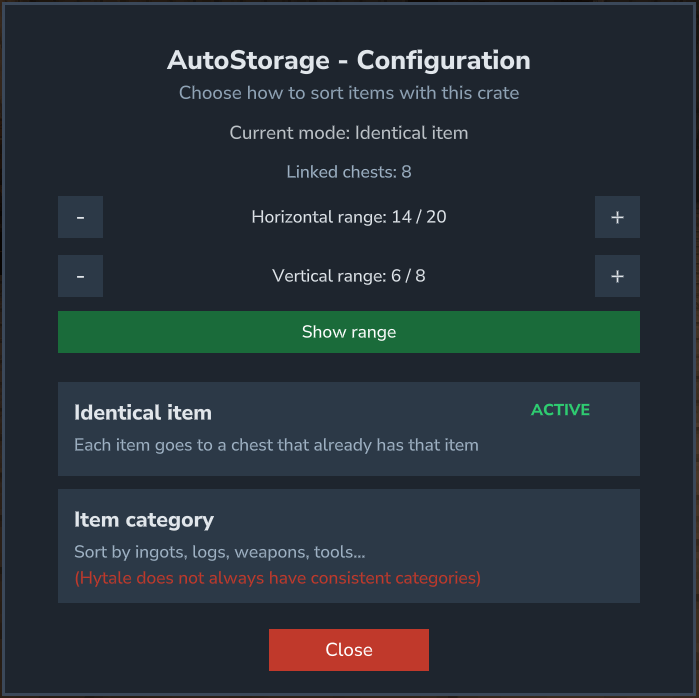
↔️ Show Range
🧾 Sorting Modes
| Mode | Description |
|---|---|
| Identical Item | Sorts by exact item ID using strict matching |
| Item Category | Sorts by category, such as weapons, tools, or armor. The UI warns that some item categories may be inconsistent. |
📏 Range Controls
Each AutoStorage crate has its own search range:
- ↔️ Horizontal range: 1 to
horizontalRadiusMaxblocks (default: 14) - ↕️ Vertical range: 1 to
verticalRadiusMaxblocks (default: 6)
Use the + and − buttons in the UI to adjust these values. Changes are saved automatically.
✅ The selected sorting mode and range values are saved per crate and override the global defaults.
💾 Persistence
📌 Tracked Crates
Tracked crates are automatically saved to tracked_autostorage.db. The following settings are stored for each crate:
- World and coordinates
- Owner UUID
- Claim access UUID
- Sorting mode
- Horizontal and vertical range
- Ignored target containers
- Transfer anywhere if missing option
🧪 Default Crafting Recipe
✅ Every value can be changed in the configuration file.
| Property | Value |
|---|---|
| Crafting Time | 2 seconds |
| Workbench | Tinkering Bench (Tier 2+) |
| Storage Capacity | 54 slots |
| Maximum Stack Size | 2 |
📜 Ingredients
- 5× Concentrated Life Essence
- 20× Copper Bar
- 20× Iron Bar
- 1× Gold Bar
🌍 Language Files
The plugin provides localized item names and UI text.
It automatically detects the language selected in your game.
(Translations are machine-assisted; corrections are welcome!)
🧩 Check Out My Other Mods
If you enjoy Automatic Storage, you may also like my other mods:
👉 I try to keep my mods easy to use, lightweight, configurable, and server-friendly.
The Automatic Storage Team