Katies Recipe Config Plugin
- By
This mod in addition to HyTalor makes a single config file that allows players and servers to modify recipes of each craft able object in the game
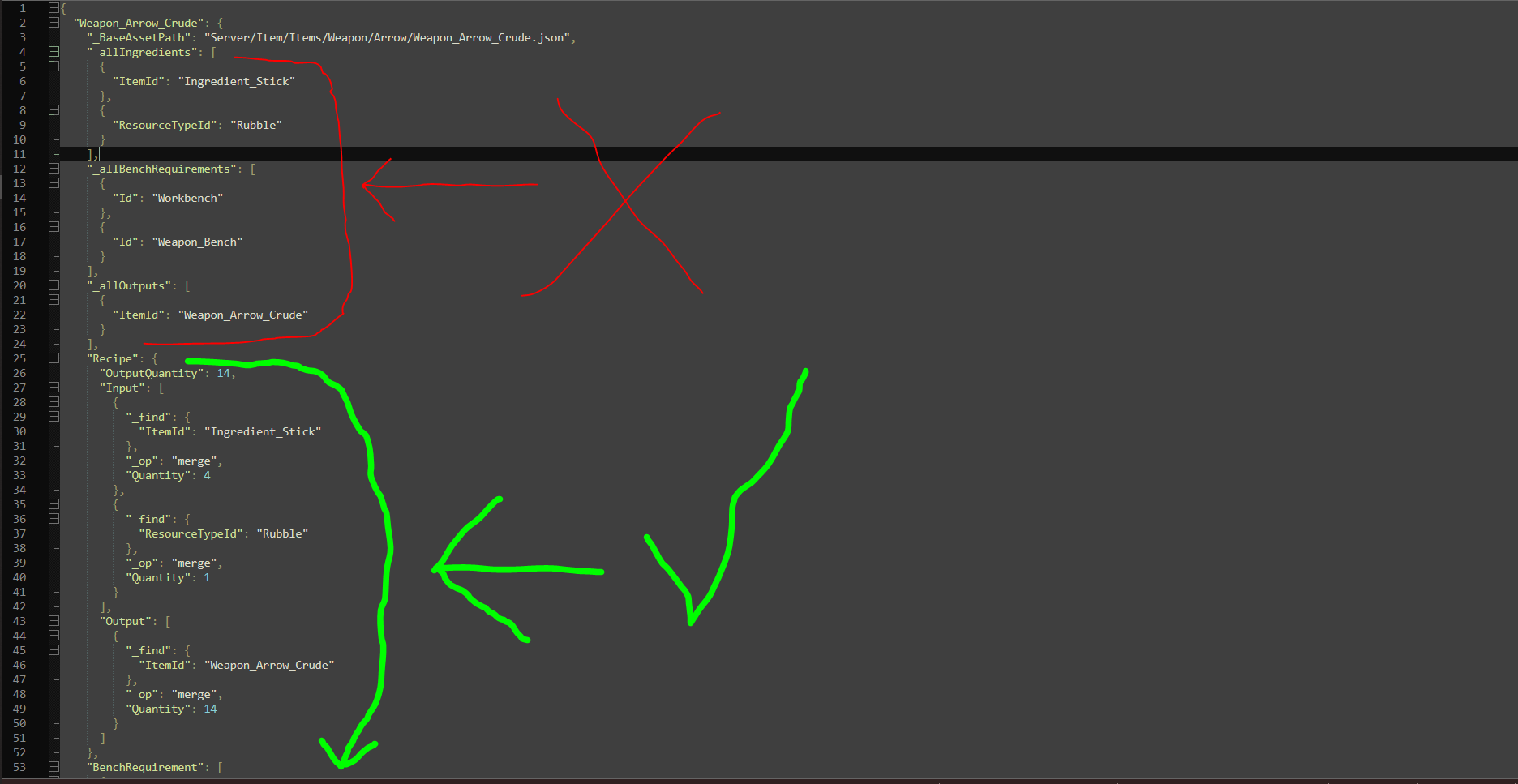
Capture.PNG
Description
Katie's Recipe Config
[NOTE: Hytalor is needed for this mod to work!! this mod does NOTHING without Hytalor]
A Hytale server plugin that lets you customize crafting recipes without touching any game code. On first launch, it automatically generates a config snapshot of every craftable item in the game — ingredients, quantities, and crafting bench requirements — and saves them as easy-to-edit files. Simply modify the config to add, remove, or swap ingredients, then restart the server to apply your changes.
Built on top of Hytalor's patch system, changes are applied cleanly at boot. New items added by future updates are automatically merged into the config without overwriting your existing customizations.
Features:
- Auto-generates a full recipe config on first run
- Modify ingredients and crafting bench requirements via JSON
- Non-destructive: new items merge in without resetting your edits
- Katie's BlocksNTrees mod support built-in
Requires: Hytalor ≥ 2.2
Katies Recipe Config — Usage Example
This example walks through the full flow of using the mod: from first launch,
to finding a specific item, to making changes and reloading the save.
The goal: make Crude Arrows craftable at the **Fieldcraft** bench, and increase
the output from **4 to 16 arrows** per craft.
Step 1 — First Launch
Start your Hytale server with the mod installed. On the very first launch the
mod has no config yet, so it scans every craftable item in the game and writes
two files to your save\{saveName}\mods data folder:
- `recipes_config.json` — one entry per craftable item (~1269 entries)
- `item_search.json` — used to filter which items appear in the config
Vanilla recipes are active this launch. No changes are applied yet.
Step 2 — Use item_search.json to Narrow Down
Opening `recipes_config.json` with 1269 entries is overwhelming. Use
`item_search.json` to limit it to only the items you want to edit.
Open `item_search.json` and add the item ID you want to work with:
{
"$instructions": [
"Add item IDs here to limit the config to only those items.",
"Example: [\"Weapon_Arrow_Crude\", \"Weapon_Sword_Crude\"]",
"Leave 'items' empty to include ALL craftable items (default).",
"Changes take effect on the next server start."
],
"items": ["Weapon_Arrow_Crude","Weapon_Sword_Crude",[ext..]]
}
Step 3 — Restart the Server
On restart the mod reads your search filter and trims `recipes_config.json`
down to only `Weapon_Arrow_Crude`. The file now looks like this, reflecting
the vanilla arrow recipe exactly as the game defines it:
{
"Weapon_Arrow_Crude": {
"_BaseAssetPath": "Server/Item/Items/Weapon/Arrow/Weapon_Arrow_Crude.json",
"_allIngredients": [
{ "ItemId": "Ingredient_Stick" },
{ "ResourceTypeId": "Rubble" }
],
"_allBenchRequirements": [
{ "Id": "Workbench" },
{ "Id": "Weapon_Bench" }
],
"_allOutputs": [
{ "ItemId": "Weapon_Arrow_Crude" }
],
"Recipe": {
"OutputQuantity": 4,
"Input": [
{
"_find": { "ItemId": "Ingredient_Stick" },
"_op": "merge",
"Quantity": 4
},
{
"_find": { "ResourceTypeId": "Rubble" },
"_op": "merge",
"Quantity": 1
}
],
"Output": [
{
"_find": { "ItemId": "Weapon_Arrow_Crude" },
"_op": "merge",
"Quantity": 4
}
]
},
"BenchRequirement": [
{
"_find": { "Id": "Workbench" },
"_op": "merge",
"Categories": [ "Workbench_Survival" ]
},
{
"_find": { "Id": "Weapon_Bench" },
"_op": "merge",
"Categories": [ "Weapon_Bow" ]
}
]
}
}
**Do not edit** `_BaseAssetPath`, `_allIngredients`, `_allBenchRequirements`, or `_allOutputs`.
These are read-only reference fields the mod uses internally.
Step 4 — Make Your Changes
Edit `recipes_config.json` to apply the changes you want.
In this example:
`OutputQuantity` changed from `4` to `16`
`Quantity` in the `Output` array updated to match
`Fieldcraft` added to `BenchRequirement` with category `Tools`
[You can add or remove ingredients too just not shown in this example, same consept]
{
"Weapon_Arrow_Crude": {
"_BaseAssetPath": "Server/Item/Items/Weapon/Arrow/Weapon_Arrow_Crude.json",
"_allIngredients": [
{ "ItemId": "Ingredient_Stick" },
{ "ResourceTypeId": "Rubble" }
],
"_allBenchRequirements": [
{ "Id": "Workbench" },
{ "Id": "Weapon_Bench" }
],
"_allOutputs": [
{ "ItemId": "Weapon_Arrow_Crude" }
],
"Recipe": {
"OutputQuantity": 16,
"Input": [
{
"_find": { "ItemId": "Ingredient_Stick" },
"_op": "merge",
"Quantity": 4
},
{
"_find": { "ResourceTypeId": "Rubble" },
"_op": "merge",
"Quantity": 1
}
],
"Output": [
{
"_find": { "ItemId": "Weapon_Arrow_Crude" },
"_op": "merge",
"Quantity": 16
}
]
},
"BenchRequirement": [
{
"_find": { "Id": "Workbench" },
"_op": "merge",
"Categories": [ "Workbench_Survival" ]
},
{
"_find": { "Id": "Weapon_Bench" },
"_op": "merge",
"Categories": [ "Weapon_Bow" ]
},
{
"_find": { "Id": "Fieldcraft" },
"_op": "merge",
"Categories": [ "Tools" ]
}
]
}
}
Step 5 — Restart the Server
On the next restart the mod reads your edited config, writes a Hytalor patch
file, and applies the changes. Crude Arrows are now craftable at the Fieldcraft
bench and yield 16 arrows per craft instead of 4.
Reference — What You Can Change
| Field | What it does
| `Recipe.OutputQuantity` | How many of the item are crafted |
| `Recipe.Input` | Ingredient list — delete or add an entry to change recipe |
| `BenchRequirement` | Bench list — delete an entry to remove that bench, add a new entry to add a bench |
## Reference — What You Cannot Change
- Recipes for items that have no recipe in vanilla
- The primary crafted item (a recipe always produces the item it belongs to)
- `_BaseAssetPath`, `_allIngredients`, `_allBenchRequirements`, `_allOutputs` — read-only, do not edit
Katies Recipe Config Plugin Team