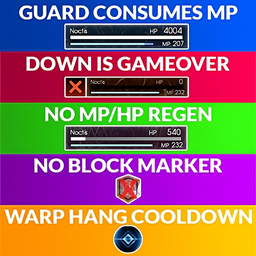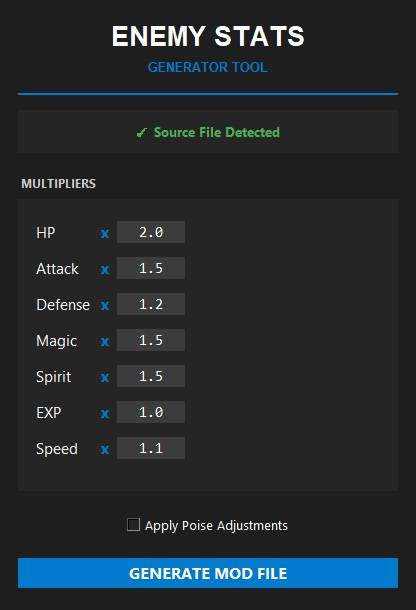
Preview of Custom Enemy Stats Multiplier application
Description
HARD DIFFICULTY
Join to FFXV Modding Discord to learn, create or just to see the new mods on the go!
- Exineris (FFXV Modding Discord) – https://discord.gg/7cNNwwJKsJ
Flagrum Installing Options
You need to install the mod with Flagrum – https://github.com/Kizari/Flagrum/releases
- Hard Difficulty: Hard enemies.
- Hard Difficulty+: Very hard enemies.
- Hard Difficulty++: Extremely overpowered enemies.
- Hard Difficulty (No speed/poise): Hard enemies. No speed & poise increased.
- Hard Difficulty+ (No speed/poise): Very hard enemies. No speed & poise increased.
- Hard Difficulty++ (No speed/poise): Extremely overpowered enemies. No speed & poise increased.
Hard Difficulty
- Max HP multiplier ≈ 3
- Physical Power multiplier = 1.5
- Magical Power multiplier = 2
- Physical Resistance multiplier = 1.5
- Magical Resistance multiplier = 3
- Enemy EXP = 1.5
- Speed = 1.2
- Poise = 1 tier increased
Hard Difficulty+
- Max HP multiplier ≈ 4
- Physical Power multiplier = 3.5
- Magical Power multiplier = 4.5
- Physical Resistance multiplier = 3.5
- Magical Resistance multiplier = 4.5
- Enemy EXP = 5
- Speed = 1.2
- Poise = 1 tier increased
Hard Difficulty++
- Max HP multiplier ≈ 7
- Physical Power multiplier = 23
- Magical Power multiplier = 20
- Physical Resistance multiplier = 8
- Magical Resistance multiplier = 10.5
- Enemy EXP = 60
- Speed = 1.2
- Poise = 1 tier increased
Custom Stats Multiplier
-
Download and extract the downloaded ZIP file to a folder.
https://github.com/Ethzal/ffxv-tooling-suite/releases/tag/custom-stats -
IMPORTANT: Keep the data folder and the .exe in the same directory.
-
Run FFXV_Enemy_Stats.exe.
-
Enter your desired multipliers (e.g., 2.0 for HP, 1.5 for Attack).
-
Click GENERATE MOD FILE.
-
Save the file as resident-character.win32.bins.
Installation (Custom)
You can install the generated file using one of these two methods:
METHOD A: Using Flagrum (Recommended)
Requires the "Hard Difficulty" mod or any mod that modifies autobuild.earc installed via Flagrum.
-
Open Flagrum.
-
Select your mod in the list.
-
Expand the file tree: common > autobuild.earc.
-
Find the file: data/character/bin/resident-character.win32.bins.
-
Click the Pencil Icon (Edit) next to it.
-
Select the file you generated with my tool.
METHOD B: Manual Installation (ffxvScout)
Requires ffxvScout tool - https://sayhijon.wordpress.com/portfolio/project-earc/
-
Open ffxvScout.
-
Click on Create Archive and then on Open Archive.
-
Navigate to the data folder included inside my mod's ZIP.
-
Select the autobuild.earc file provided there.
-
Once loaded, find this path in the list:
data/character/bin/resident-character.win32.bins -
Left-click on that file and select Replace File.
-
Select the file you generated with my tool (resident-character.win32.bins).
-
Click on Save Archive.
-
Save the file as autobuild.earc (save it to your Desktop or a temporary folder first).
-
Go to your game installation folder: .../FINAL FANTASY XV/datas/common/
-
BACKUP your original autobuild.earc.
-
Copy your new autobuild.earc into that folder.
Notes
- Not all mobs's HP are perfectly multiplied due to complexity of the formula in this game, but the result is very close.
Credits
This mod is possible thanks to:
- Flagrum – https://github.com/Kizari/Flagrum/releases
- Exineris (FFXV Modding Discord) – https://discord.gg/7cNNwwJKsJ
- Rinual, who lit the way when I was most lost.
- GachiOnFire, mist77 and ermitanovj. This mod is based on their work.
Hard Difficulty Team