pic2.png
pic1.png
Description
ZT Minimap Buttons
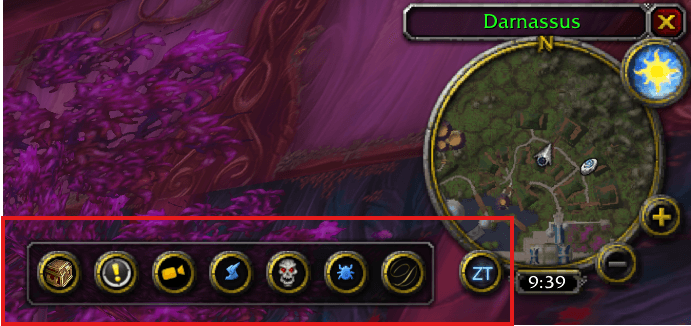
ZT Minimap Buttons is a clean, lightweight, and modern utility addon for World of Warcraft Classic Era / Hardcore. It declutters your Minimap by gathering all those messy, scattered addon buttons into a single, elegant icon.
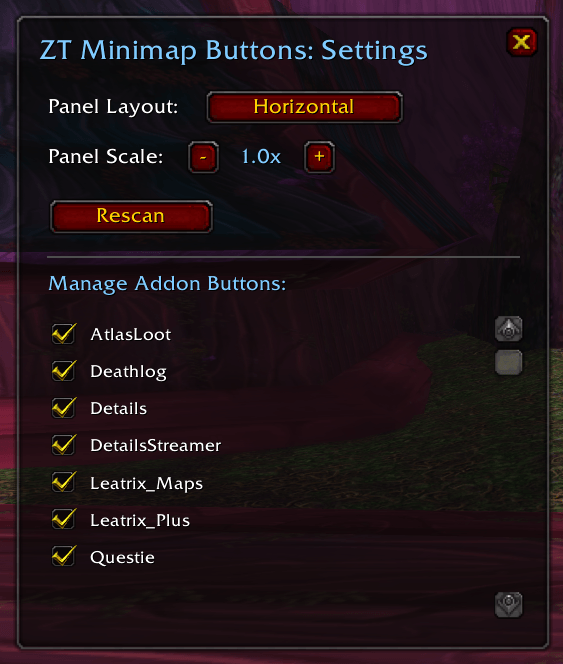
With a simple left-click, you can expand or collapse a sleek popout panel containing all your buttons. With a right-click, you can customize the layout, scale, and managed buttons using an in-game settings panel.
✨ Features Consolidated Panel: Automatically gathers addon buttons (including those registered via LibDBIcon-1.0 or parented to the Minimap) and places them into a single expandable panel.
Sleek Ice-Blue Aesthetics: Styled with a custom-designed, circular-masked, neon-glowing ice-blue "ZT" logo. In-Game Settings GUI: Right-click the main button or type /ztbc to open a centered settings dashboard. Layout Orientation: Swap between Horizontal and Vertical panel alignments instantly. Scale Adjuster: Resize the panel dynamically from 0.6x to 2.0x to fit your UI scaling needs. Manage Addon Buttons: Choose which buttons to consolidate and which to keep on the main minimap using a scrollable list of checkboxes. Dynamic Prefix Stripping: Automatically removes ugly technical prefixes like LibDBIcon10_ from displayed button names. Zero Layout Snapping: Prevents target addons from forcefully snapping their buttons back onto the Minimap edge. 🛠️ Slash Commands Use /ztbc or /consolidate in chat to toggle the settings panel or configure options:
Command Action /ztbc Opens the graphical Settings menu and lists gathered buttons in chat. /ztbc orient Toggles the layout direction (Horizontal or Vertical). /ztbc scale <number> Adjusts the panel scale (e.g., /ztbc scale 1.2). /ztbc ignore <buttonName> Keeps a button out of the consolidation panel (restores its native placement). /ztbc unignore <buttonName> Restores a button back into the consolidation panel. /ztbc rescan Forces a scan to capture newly loaded addon buttons.
💾 Installation
Download the latest release .zip file.
Extract the folder into your World of Warcraft directory: Interface\AddOns
Ensure the folder name is exactly zt-minimap-buttons.
Log into the game and enjoy a clean, clutter-free Minimap!
Created by Zerotier.
The ZT Minimap Buttons Team