ZEUS
- By
Power your allies. Hand out buffs across Azeroth with a key, mouse wheel, or macro.
Screenshot 2026-10-11 080817.png
Description
ZEUS — Zero Effort Utility Spamming
By SpankyQuest · 0.5.4 · World of Warcraft: Forever
Power your allies. Crush your enemies.
Buffing strangers while you level is one of the nicest things a caster can do, and one of the most tedious. ZEUS turns it into one button. Press your Buff Key (or scroll the mouse wheel, or spam the macro) and ZEUS finds the next player nearby who's missing your buff, targets them and casts it. Keep pressing and it works through everyone around you.
ZEUS is for buffing out of combat: in town, at the flight master, while your group gathers. It does nothing while you're in combat and picks up again once you're out.
It's as close to auto-buffing as the game allows. Blizzard doesn't let addons cast by themselves, so each buff still takes a press. ZEUS does the rest: the targeting, picking the right rank, and remembering who already has it. Works for any class that can buff: Mages, Priests, Druids, Paladins, Warlocks, and Shamans.
In your language
- Deutsch · deDE (German): Buffen auf Knopfdruck für WoW Forever: Drück deine Taste, und ZEUS schnappt sich den nächsten Spieler in der Nähe, dem dein Buff fehlt, nimmt ihn ins Ziel und bufft ihn. Ideal in der Stadt, beim Flugmeister oder vor dem Dungeon – und nur außerhalb des Kampfes. Klassen: Magier, Priester, Druide, Paladin, Hexenmeister, Schamane.
- Español · esES (Spanish, Spain): Bufea a todo el mundo con un solo botón en WoW Forever: pulsas tu tecla y ZEUS pilla al siguiente jugador cercano que no tenga tu buff, lo selecciona y se lo lanza. Perfecto en la ciudad, en el maestro de vuelo o antes de una mazmorra, y solo fuera de combate. Clases: Mago, Sacerdote, Druida, Paladín, Brujo, Chamán.
- Español · esMX (Spanish, Latin America): Buffea a todos con un solo botón en WoW Forever: presionas tu tecla y ZEUS encuentra al siguiente jugador cercano que no tenga tu buff, lo selecciona y se lo lanza. Súper práctico en la ciudad, con el maestro de vuelo o antes de entrar a un calabozo, y solo funciona fuera de combate. Clases: Mago, Sacerdote, Druida, Paladín, Brujo, Chamán.
- Français · frFR (French): Buffer tout le monde en un seul bouton sur WoW Forever : tu appuies sur ta touche et ZEUS trouve le prochain joueur à côté qui n'a pas ton buff, le cible et le lui lance. Parfait en ville, chez le maître de vol ou avant un donjon, et seulement hors combat. Classes : Mage, Prêtre, Druide, Paladin, Démoniste, Chaman.
- Português · ptBR (Portuguese, Brazil): Buff pra galera toda com um botão só no WoW Forever: aperta sua tecla e o ZEUS acha o próximo jogador por perto que está sem o seu buff, seleciona e já manda o buff. Perfeito na cidade, no mestre de voo ou antes da masmorra, e só fora de combate. Classes: Mago, Sacerdote, Druida, Paladino, Bruxo, Xamã.
- 简体中文 · zhCN (Simplified Chinese): 《魔兽世界:无限》(WoW Forever)一键上Buff:按下按键,ZEUS(宙斯)就会找到附近下一位缺你Buff的玩家,自动选中并施放。主城、飞行点、进本前都超好用,只在脱战时工作。支持职业:法师、牧师、德鲁伊、圣骑士、术士、萨满祭司。
What it does
- Auto-targeting. Your target comes first, then the players around you, lowest level first, with the class order you set breaking ties (or class order first, if you'd rather). Each buff goes to the classes that use it: Arcane Intellect to mana users, Might to warriors and rogues, and so on.
- The right rank. Low-level players get a rank they can take, and anyone with a weaker rank of your buff gets an upgrade. Under Advanced you can let ZEUS cast a lower rank to save mana; learn a new one at your trainer and it switches to it.
- All your buffs at once. A player gets everything you've ticked before ZEUS moves on.
- Fast enough for flight paths. ZEUS has the next buff ready before you press, so buffing is quick enough that players flying overhead on a flight path are easy to buff, as long as they pass within range above you.
- Rebuffs on time. You pick how low a buff gets before ZEUS tops it up.
- Doesn't get stuck. Players behind a wall wait until everyone in sight is done. If the game says "A more powerful spell is already active", ZEUS works out which buff got in the way and leaves that player alone until it's gone.
- Stays out of PvP trouble. Skips PvP-flagged players while you're not flagged.
- Buff-hours.
/zeus reportadds up how much buff time you've handed out. - See who buffed you. Hover one of your own buffs to see who gave it. Left-click it to whisper them a thank-you.
- Buff them back. Hover one of your own buffs and press your Buff Key or the Buff macro: ZEUS buffs whoever gave it, if they need one of your buffs and are in range. It still works for a few seconds after you move the mouse away, so you can click the macro on your action bar.
- Your language. English, Deutsch, Español, Français, Português (Brasil) and 简体中文.
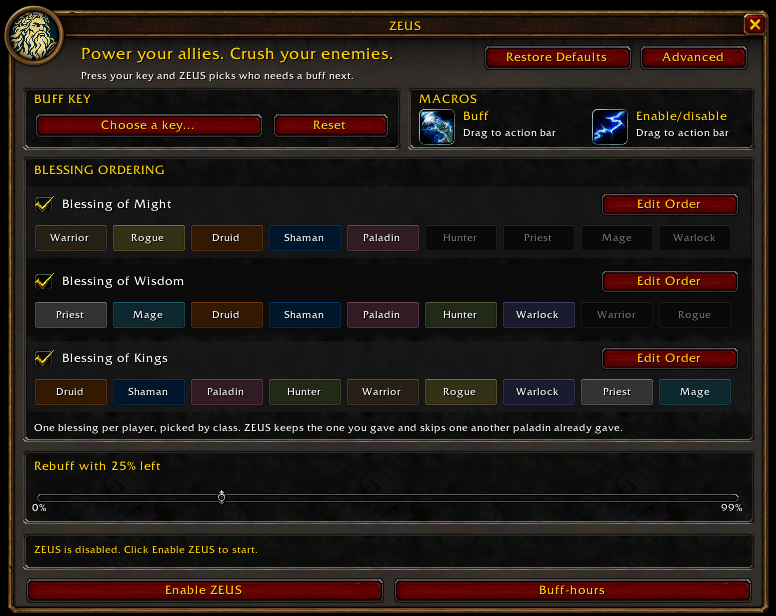
Paladins hand out one blessing per player, picked by class: Might for warriors and rogues, Wisdom for casters, Kings for hunters, druids, shamans and other paladins. Blessings from different paladins stack, so if someone already gave that one, ZEUS gives the next one instead. A blessing you gave yourself, by hand or with ZEUS, stays put and gets refreshed.
Only want to buff your Olympus guildmates? Get ZEUS Olympus instead.
Getting started
- Install ZEUS with the CurseForge app, or unzip it into
Interface/AddOnsso you end up withInterface/AddOns/ZEUS/ZEUS.toc. - In game, type
/zeus. - Click Choose a key… and press the key you want, or click a mouse button or scroll the wheel. (Or drag the Buff icon onto your action bar.)
- Click Enable ZEUS. It switches on friendly nameplates (the game's Shift+V, unless you've changed that key), because that's how it sees the players around you.
- Head somewhere busy and press your key.
Tip: bind the mouse wheel and you can buff a whole town just by scrolling. While ZEUS is enabled, scrolling the other way won't zoom your camera; disable ZEUS to get your zoom back.
Tip: the Buff macro works with ZEUS disabled too. Spam it and ZEUS is enabled (with friendly nameplates on) while you're pressing, then disabled again a few seconds after you stop. Your Buff Key keeps its normal job the whole time.
Commands
| Command | What it does |
|---|---|
/zeus |
Settings (or left-click the minimap button) |
/zeus toggle |
Enable or disable ZEUS (or right-click the minimap button) |
/zeus report |
Your buff-hours: total, today, and per buff and rank |
/zeus blockers |
Buffs ZEUS has learned get in the way of yours; /zeus blockers clear forgets them |
/zeus auras |
Every buff on your target (or on you), with its spell ID and who cast it |
/zeus debug |
Info for bug reports |
Settings
The settings window (/zeus) closes by itself when a fight starts, and can't be
opened again until the fight is over.
- Buffs: tick the ones you want handed out.
- Class order and rank: click Edit next to a buff, then drag the class tiles (leftmost goes first) or right-click one to skip that class. With Enable lower rank buffs ticked under Advanced, a buff with ranks lists them under the tiles: pick the one ZEUS casts (the strongest you know, to begin with). Ranks you haven't learned are greyed out with the level your trainer teaches them from. Click Lock when you're done; closing the window locks it too.
- Rebuff slider: how much of a buff should be left before ZEUS refreshes it (25% to begin with). At 0% it waits until the buff runs out.
- Restore Defaults (top right, beside Advanced): puts every setting back the way it was when you installed ZEUS and closes Advanced. Click it twice to confirm. Your buff-hours are kept.
- Advanced (top right corner) opens a drawer beside the window with the
other boxes. Click it again, or close the window, to put them away.
- Sort by class / Lower-level players first: the order of the buffing queue, which decides who gets buffed next. By default the players around you are lined up by level, lowest first, with the class tiles only breaking ties. Tick Sort by class to let the class tiles decide first, and untick Lower-level players first to start with the highest levels.
- Skip AFK players: on by default. Players flagged AFK get their buffs once they're back.
- Skip level 1 players: on by default, for the fresh alts and bank characters parked in town.
- Instant buff-back: off by default. When another player buffs you, they go first in the queue for a minute: your next press of the Buff Key or the Buff macro buffs them back (targeting them first if ZEUS has to), if they need one of your buffs. Needs Track buffs given to me.
- Enable lower rank buffs: off by default. Lets you pick a lower rank of a buff to save mana, under its class tiles when you click Edit. Off, ZEUS casts your strongest rank.
- PvP protection: on by default. While it's off, a warning under the box says that buffing PvP-flagged players can flag you too.
- Minimap button: untick it to hide the button;
/zeusstill opens settings. - Track buffs given to me: the "Given by" line on your buffs and the left-click
whisper. Untick it to turn both off. The game only says who cast a buff while
it can see them, so strangers are only named with friendly nameplates on (ZEUS
turns them on while it's enabled). The givers it knows are remembered through a
/reloador logging out and back in, for as long as their buffs last. Buffing them back (hover a buff, press your key) needs this on too. - Protect buffs from right-click: off by default. When it's on, right-clicking one of your buffs (or a weapon enchant) doesn't remove it straight away: its tooltip says "Right-click to confirm removal", and a second right-click within 5 seconds removes it. After 5 seconds it's back to normal. It works in combat too.
- Show queue window: off by default. A see-through window, like the chat window, that lists who ZEUS buffs next, one player a line from the top: class icon, level and name in class colour, in your chat window's font and size (grey for players out of sight, who come last). Drag it to move it and drag its bottom-right corner to resize it: a taller window shows more names. When there's no queue it says why (disabled, no nameplates, in combat). Out of mana, the queue stays listed under an "Out of mana" line.
Buff-hours
/zeus report shows how many hours of buffs you've given out. Only the time a cast
actually adds counts: topping up a 30-minute buff that still has 99% left adds 18
seconds, not 30 minutes. Buffs you cast yourself count too, and a group buff counts
once for each person it reaches. Buffs on yourself don't. The numbers are kept on
your computer only. It also breaks them down by buff and by rank. The details are in REPORTING.md
(included with the addon).
Good to know
- ZEUS is made for WoW Forever. It isn't built for Retail or Classic Era.
- It never casts by itself, and it's for out-of-combat buffing only: your Buff Key and the macro do nothing while you're in combat.
- ZEUS starts off each time you log in. Nameplates it switched on go back off; nameplates you turned on yourself stay on.
- With the gamepad UI on, ZEUS takes a break and comes back when you switch to mouse and keyboard.
- Installed both ZEUS and ZEUS Olympus? Only ZEUS Olympus runs, and a popup reminds you to remove one.
- Found a bug? Report it on GitHub (link at the bottom) with your ZEUS version, your
class, what happened, the
/zeus debugoutput and any Lua error.
License
MIT, © 2026 SpankyQuest. The bundled libraries keep their own licenses; see THIRD_PARTY.md (included with the addon).
Source code
ZEUS is open source. The code is on GitHub at github.com/spankyquest/ZEUS, and bug reports go to its Issues page.
ZEUS Team