


Zenith
- By
Zenith
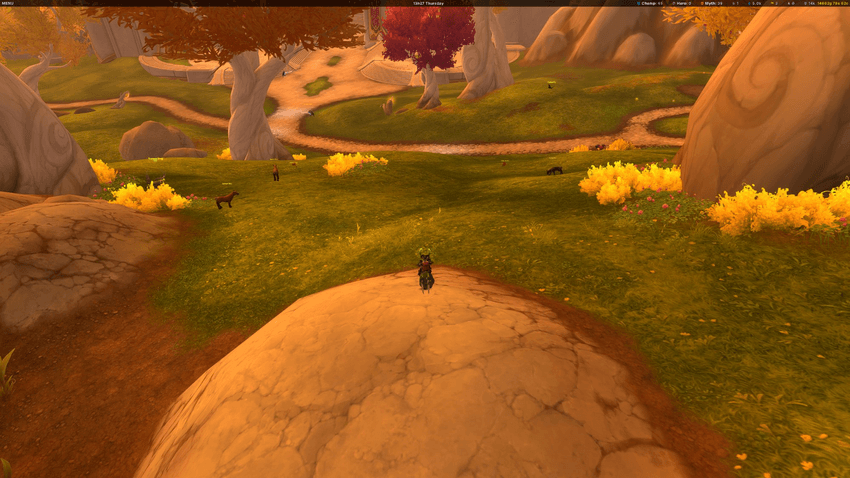
A clean, modern information bar for World of Warcraft. Zenith sits at the top of your screen and shows what matters — no clutter, no WoW-textured backgrounds, no excessive nesting.



At a Glance
Zenith is a single semi-transparent bar with three customizable zones:
- Left — Game menu as a hamburger dropdown or inline icon row — hide Blizzard's default micro menu entirely
- Center — Server clock in four formats
- Right — Gold tracking (per-char or realm total) and 19 Midnight currencies with per-currency display modes
Every module can be moved, reordered, or disabled via right-click context menus.
Modules
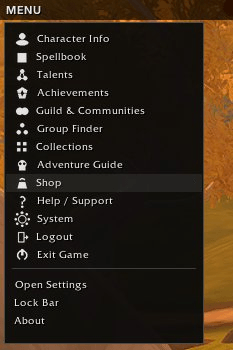
MicroMenu — Two display modes. Hamburger mode shows a clean dropdown with icons for every game panel (Character, Spellbook, Talents, Collections, etc.) plus quick access to Zenith settings, bar lock, and about info. Inline mode spreads 13 compact icons across the bar.
Clock — Server time with four format options via right-click: 9h52m, 09:52, 9:52 AM, 9h52m Wednesday.
Gold — Abbreviated (14k) or full (14862g 78s 62c) display. Tooltip shows session gain/loss and all alts on the realm. Toggle between current character and realm total.
Currency — 19 Midnight currencies (Valorstones, Myth/Hero/Champ crests, Coffer Keys, and more). Each currency can be shown or hidden individually, with three display modes: text label, colored icon, or icon + text.
Bar Customization
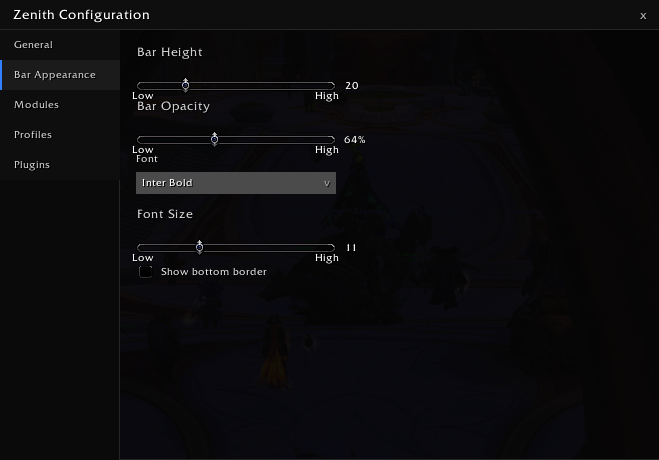
- Height: 18–28px
- Opacity: 50–90%
- Background color picker
- Font: ships with Inter; supports any LibSharedMedia font
- Font size: 9–16px
- Text color picker
- Optional bottom border
Settings
Modern tabbed config panel — not a dropdown menu. Open with /zenith, right-click the bar, or from the hamburger menu.
Profiles
- Create, rename, delete named profiles
- Auto-switch per character or per specialization
- Import/export as compressed text strings — share your setup
Plugin API
Third-party addons can register modules on the Zenith bar:
Zenith:RegisterPlugin(config)— full lifecycle hooks (OnUpdate, OnClick, OnTooltip, etc.)- LibDataBroker auto-import — existing LDB data sources appear on the bar automatically
- Dedicated Plugins tab in settings
Planned
- Location module (zone + coordinates)
- Latency and FPS modules
- Drag-and-drop module reordering
- Theming presets
- More built-in modules (Durability, Bag Space, iLvl, Loot Spec)
Installation
Drop the Zenith folder into your Interface/AddOns directory, or install via CurseForge app.
No required dependencies — all libraries are bundled.
Slash Commands
/zenith— Open settings
Feedback & Issues
Found a bug or have a feature request? Open an issue on the project page or leave a comment below.
Zenith Team
