1.0.png
Description
YiboAutoOpen — Safe Container Opening
YiboAutoOpen safely opens container items that you explicitly add to its catalog. It uses a clear allowlist instead of relying on inconsistent client-side "openable" flags, so catalogued items such as Nomi's Treats can be handled consistently.
Features
- Opens catalogued containers one at a time.
- Scans existing bags after login by default.
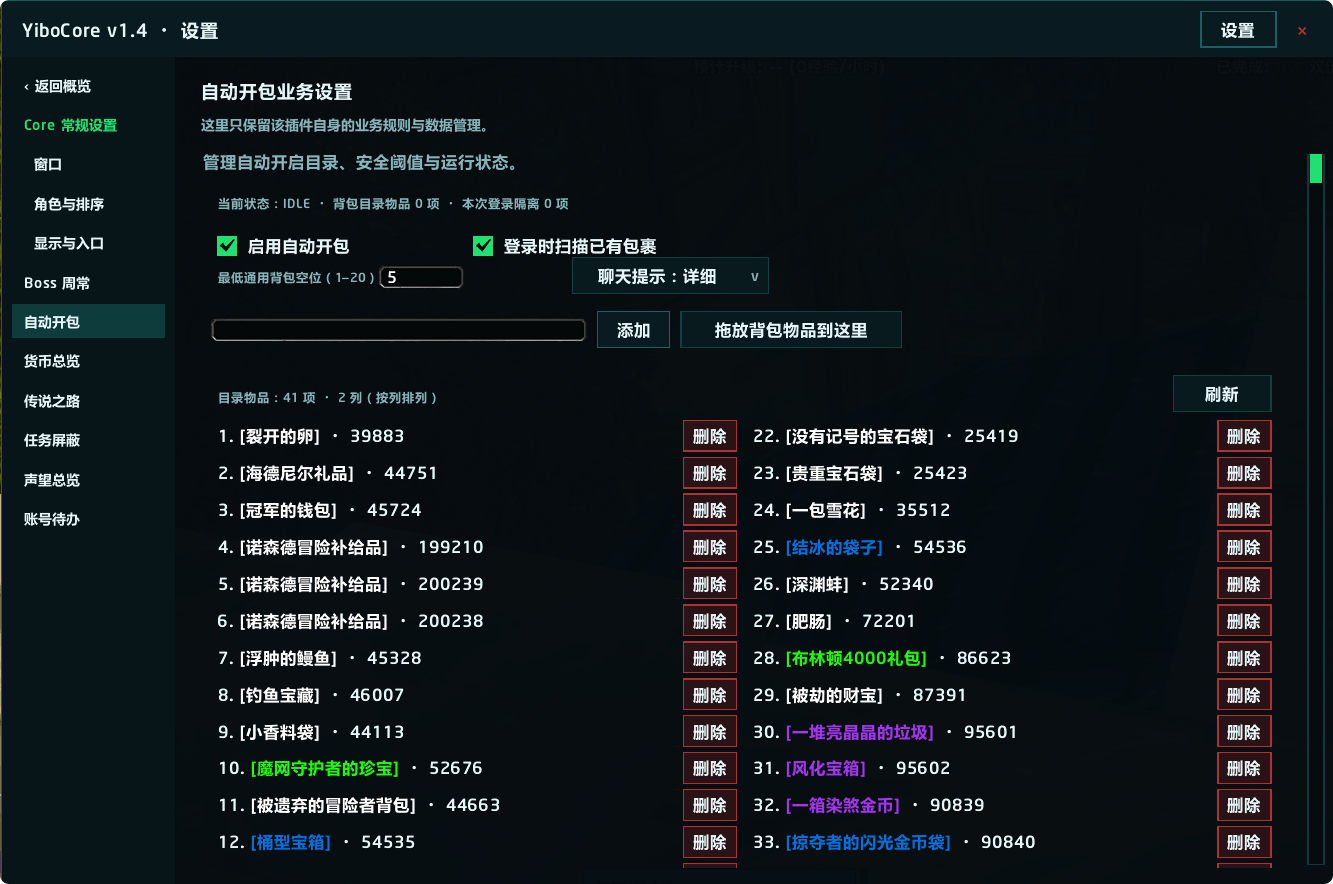
- Lets you add items by link, item ID, name, or drag-and-drop in the settings panel.
- Provides a paged catalog with item-name refresh and per-session retry reset.
- Supports optional YiboCore integration for the unified settings workbench.
- Works without YiboCore through slash commands.
Safety First
YiboAutoOpen pauses instead of taking risky actions while you are in combat, dead, in a vehicle, casting, viewing loot, using sensitive interfaces such as merchants or banks, or below the configured generic-bag free-space threshold.
It does not change Auto Loot, click confirmation dialogs, choose rewards, or discover and open unknown containers. If one catalogued item fails twice in a row, it is skipped only for the current login session.
Commands
/yao add <item link, ID, or name>— add an item to the catalog./yao del <item link, ID, or name>— remove an item from the catalog./yao list [page]— show catalogued items./yao status— show the current state, next eligible item, and session isolation status.
Optional YiboCore Integration
YiboCore is optional and is not included in this download. Without it, all automatic opening and /yao commands remain available. With a compatible YiboCore installed, YiboAutoOpen appears in the shared settings workbench, where you can manage the catalog, safety threshold, login scan, and chat notifications.
Yibo 自动开包 — 安全开启容器
Yibo 自动开包只会开启你主动加入目录的容器物品。它使用明确的允许列表,而不依赖客户端不稳定的“可开启”标记,因此目录中的诺米的点心等物品也能按同一规则处理。
功能
- 逐个开启目录中的容器物品。
- 默认在登录后扫描背包中已有的目录物品。
- 支持通过物品链接、ID、名称,或设置页拖放背包物品加入目录。
- 目录提供分页、物品名称刷新,以及手动清除本次登录隔离。
- 可选接入 YiboCore 的统一设置工作台。
- 未安装 YiboCore 时仍可通过 Slash 命令完整使用。
安全机制
战斗、死亡、载具、施法、拾取窗口、商店/银行等敏感界面,或通用背包空位低于设定阈值时,插件会暂停,不会冒险操作。
插件不会修改自动拾取设置、点击确认框、选择奖励,也不会猜测或开启未加入目录的未知容器。单个目录物品连续失败两次后,只会在本次登录期间跳过。
命令
/yao add <物品链接、ID 或名称>:加入目录。/yao del <物品链接、ID 或名称>:从目录移除。/yao list [页码]:查看目录。/yao status:查看当前状态、下一个可开启物品与本次登录隔离状态。
可选接入 YiboCore
YiboCore 不是必需依赖,也不包含在本下载包中。未安装 Core 时,自动开包与 /yao 命令仍完整可用;安装兼容的 YiboCore 后,可在统一设置工作台管理目录、安全阈值、登录扫描和聊天提示。
The YiboAutoOpen - 自动打开 Team