
Yapi
- By
Tools including floating reward table, tooltip enhancements, entering and exiting combat alert
4.png
4.1.png
Description
Intro
- Floating Icon Reward Table: A movable floating icon that shows a table on mouse hover, including reward information for M+, Raids, and Delves.
- Enter/Exit Combat Alert: Displays text alerts when entering or exiting combat.
- Chat Danmaku: Shows chat messages as danmaku(bullet comment).
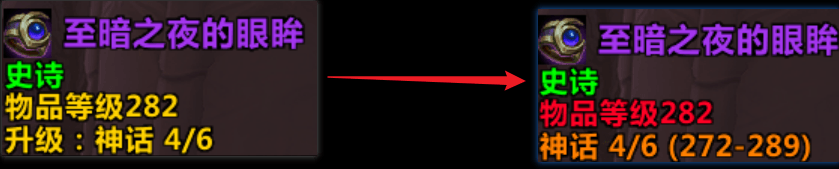
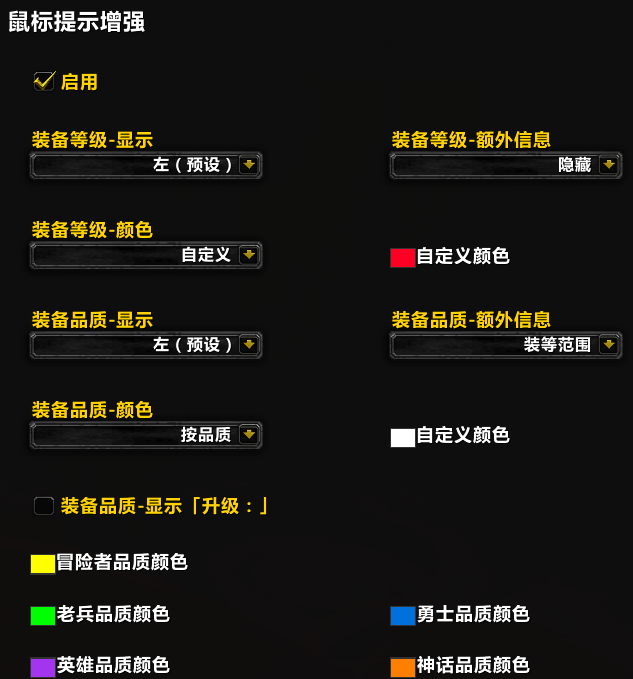
- Enhanced Mouse Tooltips: Adds more info to gear tooltips, including changing color for item level text, minimum and maximum item level of corresponding item track, and crest count for upgrading to full level.
How to Open Settings
- Menu > Options > Addons > Yapi
- Chat input: /yapi
Notes
- The floating icon defaults to the top-left corner. If being blocked by other elements, you may need to adjust the strata.
- Exit combat alert uses the setting of enter combat alert by default.
- Adjust upper/lower boundaries to set the display area (e.g., 50 lower boundary means no danmaku in bottom half of screen).
简介
- 悬浮图标装等表:可移动的悬浮图标,鼠标悬停时会显示表格,包含大米、团本、地下堡各层数/难度的掉落与低保信息
- 进战脱战提示:进入战斗和离开战斗时显示文字提示
- 聊天弹幕:将包括大脚世界频道在内的各频道聊天消息,以弹幕形式显示
- 鼠标提示增强:增加装备鼠标提示的显示信息,且可以修改颜色
设置打开方式
- 菜单-选项-插件-Yapi
- 聊天输入 /yapi
注意事项
- 悬浮图标默认在左上角,如果被其他东西遮挡了,需要在设置里提高图标的框体层级
- 脱战提示默认使用进战提示的设置
- 通过调整上边界和下边界来设置显示区域大小,例如下边界50=屏幕下半部分不会出现弹幕
Yapi Team
