
XPChronicle
- By
Description
XPChronicle


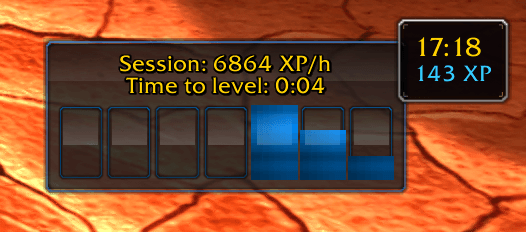
A lightweight WoW addon (Classic, Wrath, Retail, Season of Discovery, etc.) that tracks your experience gains and shows real‑time XP/hour together with a fully‑customisable bar graph.
Key Features
| Session & Lifetime stats | Instant XP/hour for the current session and all time (per‑character). |
| Leveling Report | A report showing leveling statistics. |
| Hourly Graph | 2‑24 rolling “buckets” with tool‑tips and optional prediction bars. |
| Prediction Mode | Forecast how long to level and overlay predicted XP bars. |
| History Window | Scrollable log by event / hour / day with one‑click export. |
| Options Panel | In‑game panel (minimap → Right‑click) for colours, locks, visibility, grid‑snap, resets, more. |
| Colour Pickers | Separate colours for history and prediction bars – live preview. |
| Drag‑anywhere UI | Frames remember position, lockable via right‑click or panel. |
| Minimap Button | Left‑click = History, Right‑click = Options (can be hidden or locked). |
| Zero Setup | Log in and play – everything is recorded automatically. |
Installation
Manual Installation
- Download the latest ZIP from the releases page.
- Extract
XPChronicleto your AddOns directory:- Windows:
World of Warcraft\_classic_\Interface\AddOns\ - macOS / Linux:
World of Warcraft/_classic_/Interface/AddOns/
- Windows:
- Run
/reloadin-game or restart the game.
CurseForge / Wago Installation
Search XPChronicle on either CurseForge or Wago and install it for automatic updates.
How to Use
Heads‑up Display
- Top line – Session XP/hour and ETA to level
- Bar graph – Recent hourly XP (blue) or future prediction (red)
- Hover a bar for exact XP and timestamp
Minimap Button
| Action | Result |
|---|---|
| Drag | Re‑position the button |
| Left‑click | Toggle History frame |
| Right‑click | Open Options panel |
Slash Commands
| Command | What it does |
|---|---|
/xpchron or /xpchronicle |
Show command list |
/xpchron options |
Open Options panel |
/xpchron history |
Toggle History frame |
/xpchron graph |
Toggle bar graph |
/xpchron minimap |
Show / hide minimap button |
/xpchron buckets <2‑24> |
Set number of graph buckets |
/xpchron reset |
Full data wipe (all chars) |
Tip: Session data clears on logout; lifetime data persists.
Compatibility
- Works on Retail, Classic Era, Wrath‑Classic, Cataclysm‑Classic and Season of Discovery.
- Localised dates / times – no external libraries required.
Screenshots
See the CurseForge or Wago gallery for the latest UI shots, including Prediction Mode and the Options panel.
FAQ
Does it support rested XP?
Yes. Rested XP is counted the same as normal XP – it still represents time saved, so it belongs in the rate.
Can I reset only the current session?
Yes – click Session Reset in the Options panel, or simply relog your character.
Why are my bars “snapped” to odd hours?
Use the Timelock option in the Options panel to align the graph buckets to any specific minute of the hour (e.g., :00).
Support & Contributions
- Bugs / ideas – open an issue on GitHub Issues.
- Pull Requests are welcome – follow the existing Lua style (79‑char width, comment rulers).
License
XPChronicle is released under the GNU GPL v3.0‑or‑later.
See the bundled LICENSE.md file for full terms.
XPChronicle Team
