


XPTracker Forever (Experience & Gold)
- By
1 Rastreador.png
2 minimizado.png
3 XP.png
4 gold.png
5 Farming sessions.png
Description
XP Tracker Forever
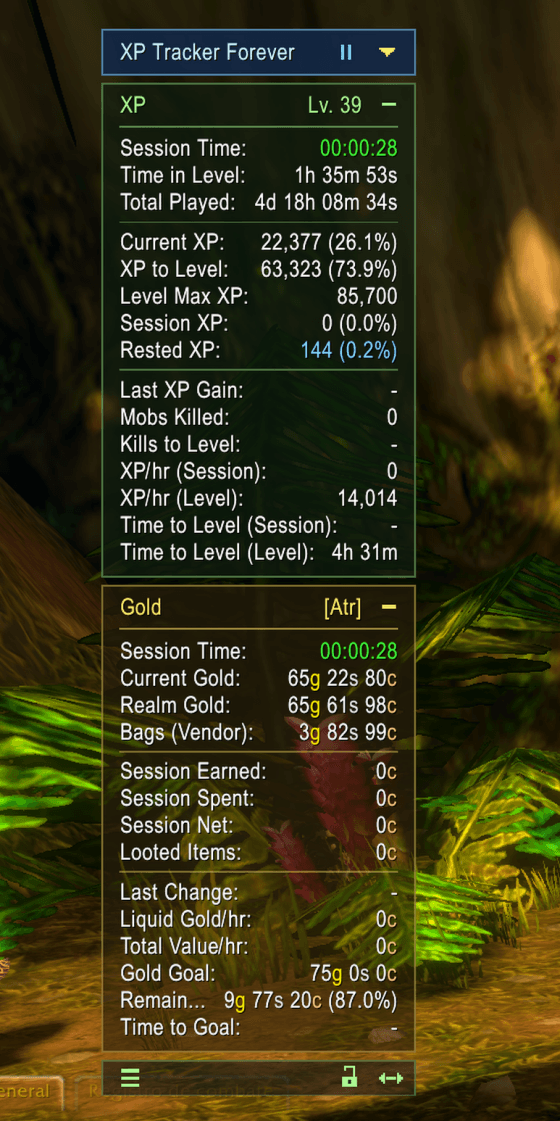
XP Tracker Forever is a lightweight, modular session tracker for World of Warcraft Classic & Retail that monitors your Experience (XP), Gold & Loot, Dedicated Farming Sessions, and Stats (Daily Progress, Daily Summary & Level Summary) — all in a clean, minimalist dark HUD.
Built to stay out of your way while giving you instant visibility into your leveling pace, farming efficiency, loot value, and multi-character progression.
Why XP Tracker Forever?
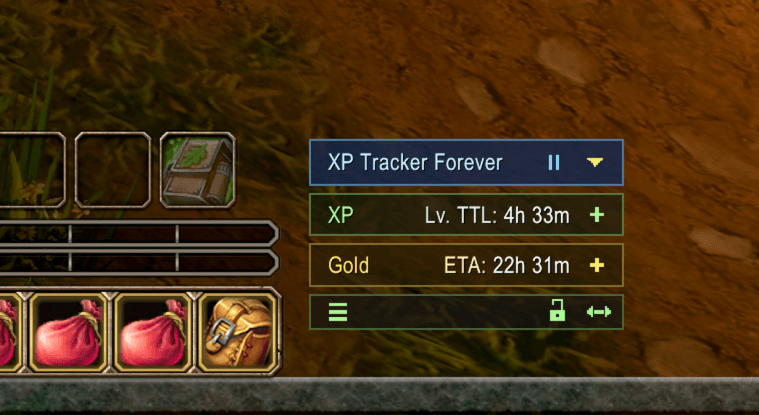
- Modular Stackable Cards: Expand only what you need or collapse modules into ultra-compact single-line strips (
XPin Emerald Green,Goldin Warm Gold). - Dedicated Farming Sessions (Parallel Log & Docked Bar): Benchmark your favorite farming spots across days and alts, and minimize active runs into a compact status bar below the tracker.
- Complete Stats Suite (
/xptf stats): Three integrated tabs — Daily Progress multi-alt charts, Daily Summary (enemies, PvP kills, deaths, and gold by source), and Level Summary (in-progress & completed level breakdowns). - Live Loot Chat Valuation: Automatically displays Auction House (
AH) orVendoritem prices right inside your loot chat messages. - Minimap Button & Full Customization: Quick access from the minimap icon, right-click themed context menus, full Options panel, and Blizzard AddOns integration.
- Bilingual Support: Full English (
enUS) and Spanish (esES/esMX) localization with automatic client detection.
Compact & Expandable HUD
Collapse any module into a single priority metric (such as Time to Level or Gold Goal ETA) to keep your screen clean next to your action bars, or expand them for full telemetry.
Experience (XP) Module
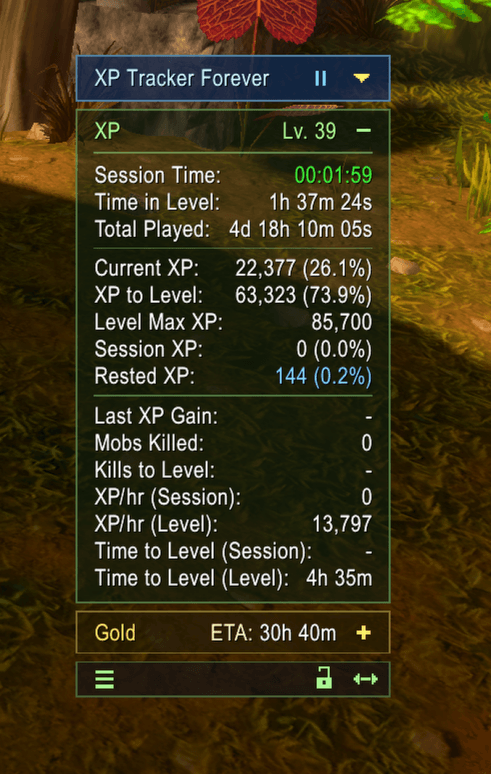
Track your exact leveling rhythm in real time with silent /played synchronization:
- Time Tracking: Session time, time played in current level, and total time played.
- XP Breakdown: Current XP & %, remaining XP & %, level max XP, session XP gained, and Rested XP pool.
- Combat & Quest Counters: Track Mobs Killed (Session & Level), Quests Completed (Session & Level), last XP gain, estimated kills to level, XP/hr (session & level), and Time to Level (TTL).
- Enemy XP Tooltip: Hover over attackable enemies to see estimated (
~) or calibrated exact XP and kills-to-level directly on the tooltip. - Level-Up Recap & History: Detailed chat summary (including quests completed & mobs killed), optional guild announcement, and persistent per-character level history.
Gold & Loot Module
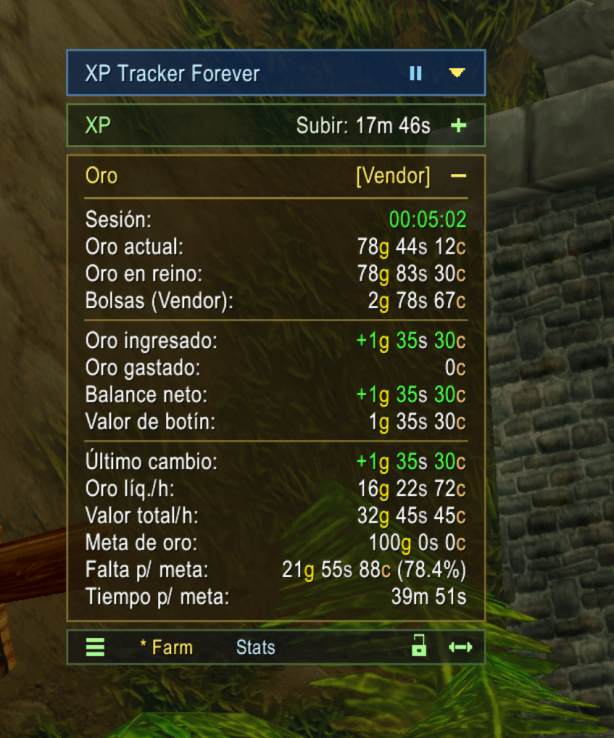
Keep complete control over your liquid gold, bag vendor value, auction loot value, and farming targets:
- Wallet & Realm Overview: Current character gold, automatic Realm Total Gold across tracked characters, and live Bags (Vendor) value.
- Cash Flow & Loot Valuation: Liquid gold earned, spent, net balance, and looted item value with an inspectable session Loot Log (
/xptf loot). - Loot Chat Price Annotations: Optionally append each looted item's AH Price (Default) or Vendor Price directly to your loot chat messages (or turn it off anytime).
- Smart Price Sources: Auto-detects TSM → Auctionator → Auctioneer → Vendor, or lets you force any specific source (grey, BoP, and quest items always use vendor price).
- Gold Goals & ETA: Set quick presets (
100g–10,000g) or custom gold goals with live remaining amount and ETA.
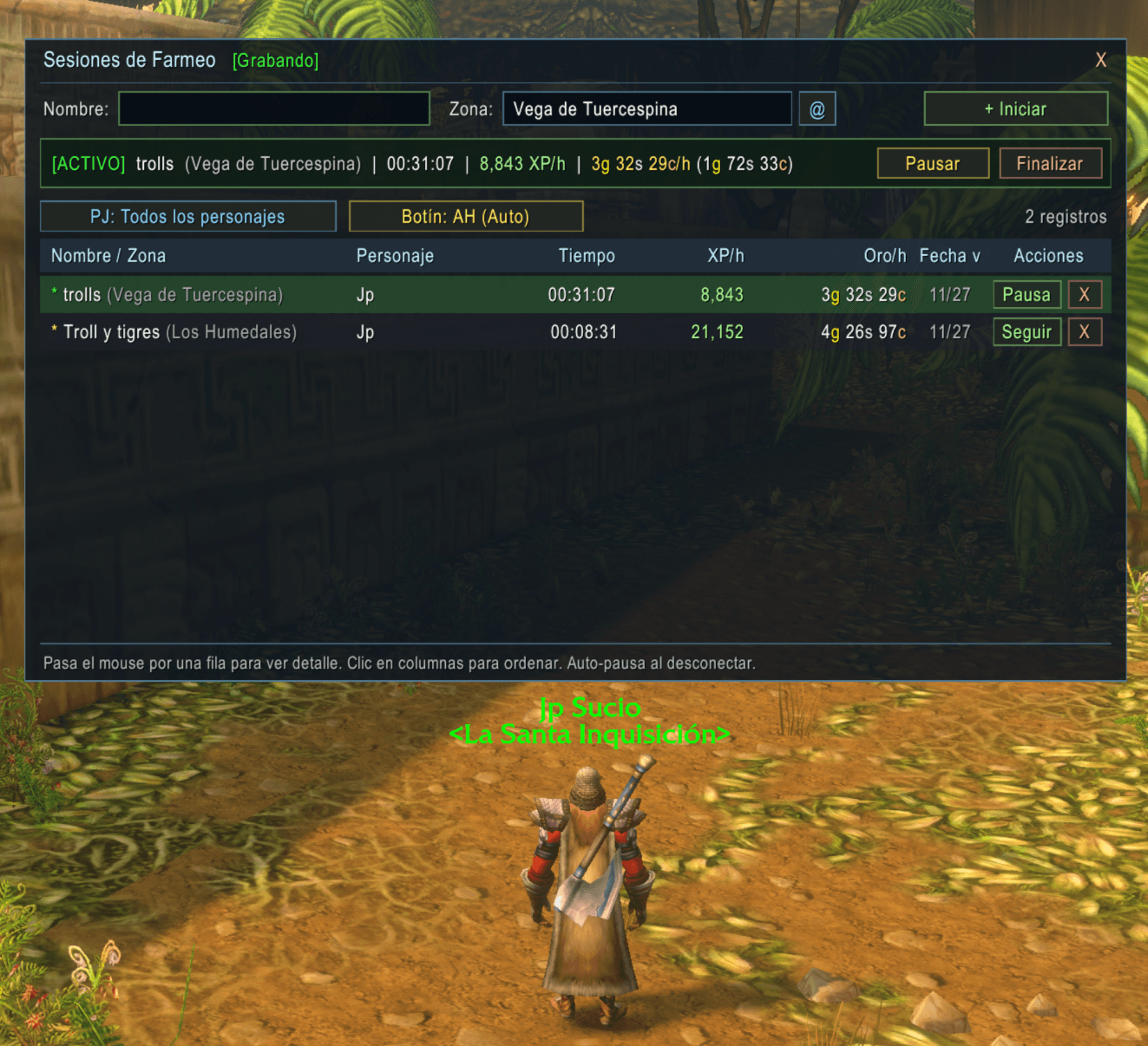
Dedicated Farming Sessions (/xptf farm)
Compare farming spots accurately — just like keeping a spreadsheet, but automatic and persistent across days:
- Runs in Parallel: Independent from your main XP/Gold cards so random activities never pollute your farm benchmarks.
- Custom Name & Auto-Zone: Name each farm run and auto-fill your current zone/subzone.
- Minimized Docked Farm Bar: Minimize the Farm Sessions window while a run is active or paused to show a compact Farming Status Bar right below your tracker with live duration and a right-click selectable 2nd indicator (
XP/h,Total XP,Gold/h,Total Gold, orNone). - Resizable Table & Auto-Fit Columns: Drag the corner grip to resize the window (double-click to reset), with auto-fitting columns and custom vertical/horizontal scrollbars.
- Pause, Resume & Continue Any Day: Auto-pauses safely on logout/disconnect so offline time is never counted. Resume any saved run whenever you return to that spot.
- Earned Gold Only (Vendor & AH): Tracks direct gold gained + loot value (ignoring repair/vendor expenses), storing both Vendor and AH/Auto values so you can toggle valuation mode across all historical runs anytime.
- Compare Across All Alts: Filter by character and sort by
Name / Zone,Character,Time,XP/h,Gold/h, orDate. Hover any row for a full breakdown.
Stats Window (/xptf stats / /xptf progress)
Explore your characters' long-term history across three dedicated tabs — zero manual logging required:
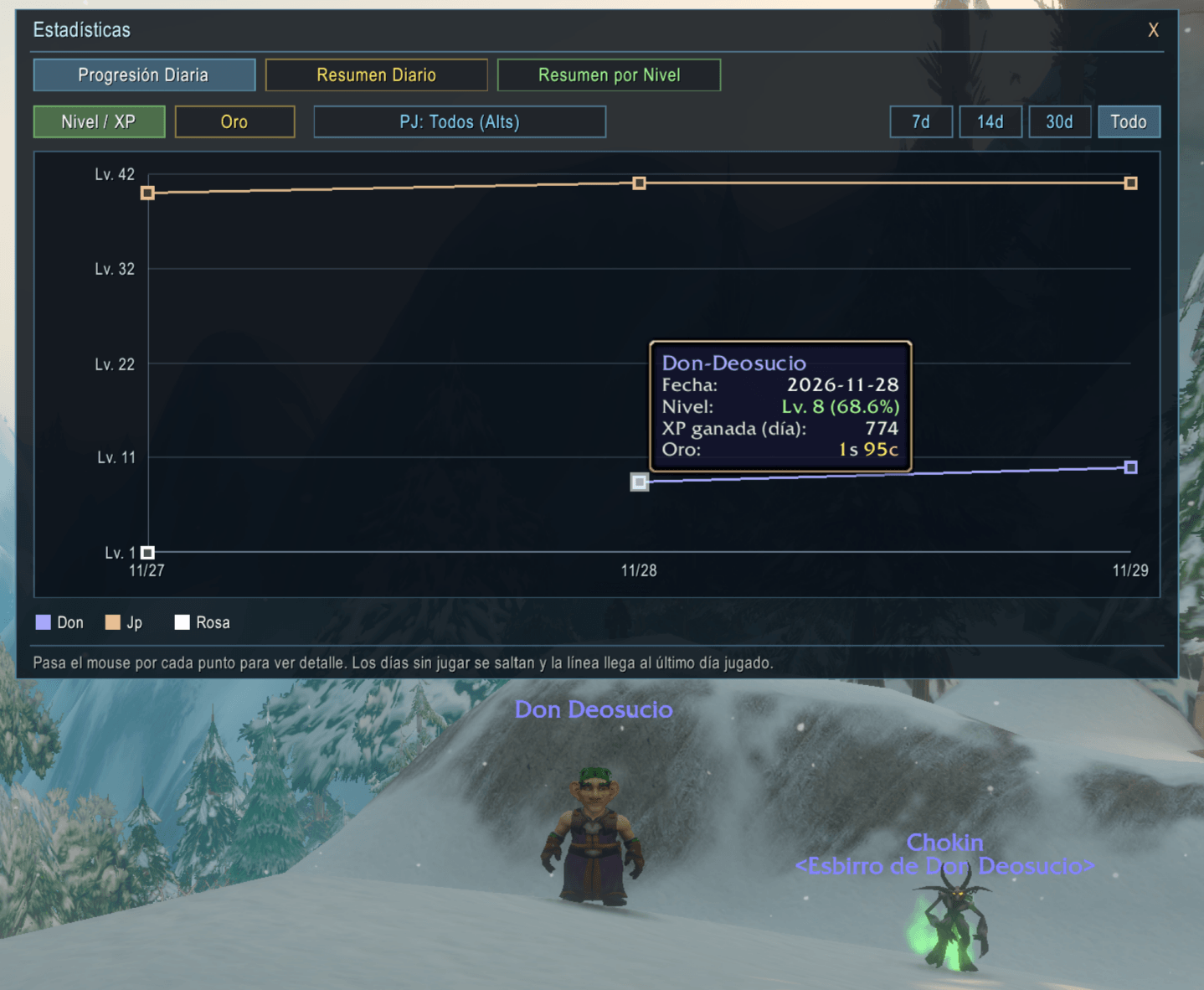
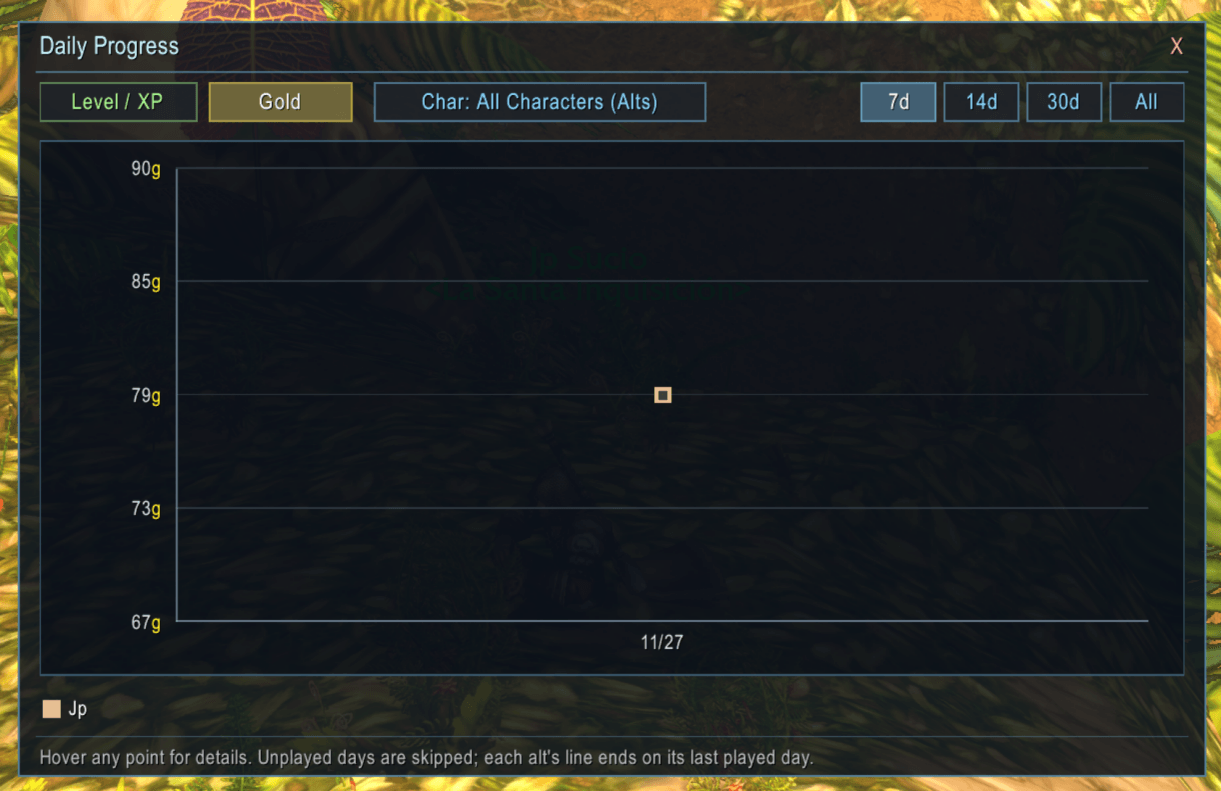
1. Daily Progress Charts
- Automatic Daily Snapshots: Silently records end-of-day Level (including % progress), daily XP gained, and Gold per character.
- Separate Level/XP & Gold Charts: Switch cleanly between Level progression and Gold evolution across
7d,14d,30d, orAll. - Multi-Alt Overlay & True Calendar Timeline: Compare All Characters (Alts) in WoW class colors, skipping unplayed days cleanly and stopping each alt's line on its last played day. Hover any point for exact daily stats and day-over-day deltas.
2. Daily Summary
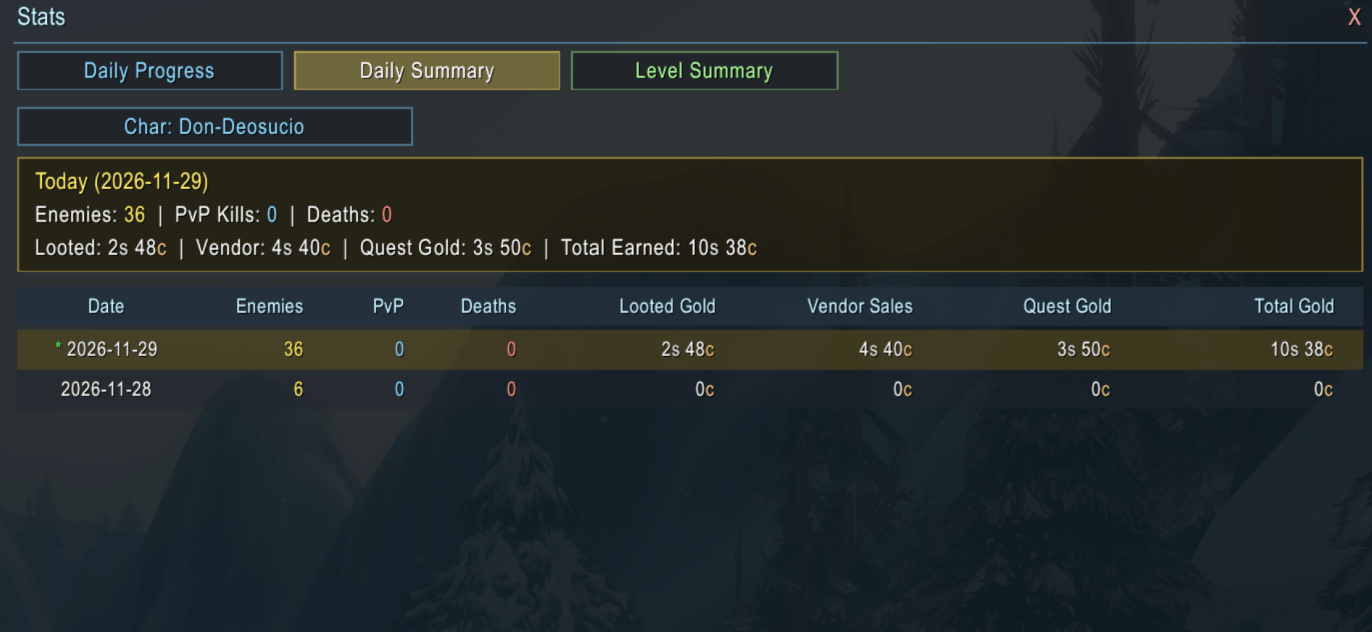
- Today / Last Active Day Card: Instant overview of enemies slain, PvP kills (World / BG), deaths, and gold earned.
- Day-by-Day Breakdown Table: Track per-character daily combat activity and gold earned split by source (Looted Gold, Vendor Sales, Quest Gold, Mail / AH, and Other), with full hover tooltips.
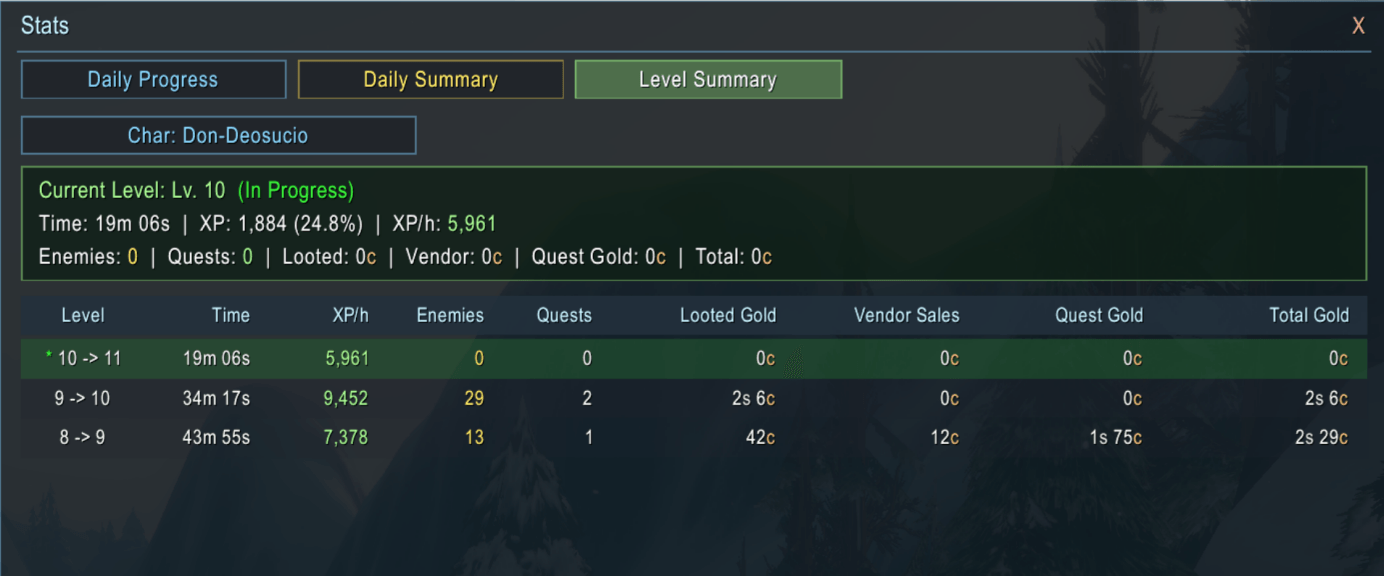
3. Level Summary
- Current Level Card: Live in-progress stats for your character's current level (time, XP %, XP/h, enemies, quests, and gold earned by source).
- Completed Levels History: Review every completed level in a structured table showing time in level, XP/h, enemies slain, quests completed, and detailed gold sources on hover.
Quick Controls & Slash Commands
Access everything from the Minimap Icon (click for main menu, drag to reposition), the bottom bar (≡ Options, Farm, Stats, Lock, Resize), or via /xptf (/xptracker):
| Command | Action |
|---|---|
/xptf |
Show or hide the main tracker |
/xptf options |
Open the full options window |
/xptf farm |
Open the Farming Sessions comparison window |
/xptf farm start <name> |
Start a new farm session immediately |
/xptf farm pause / resume / stop |
Control the active farm session |
/xptf progress (or stats / daily) |
Open the Stats window (Daily Progress, Daily Summary & Level Summary) |
/xptf loot |
Open the session looted items log |
/xptf goal <amount> |
Set a gold farming goal (0 to clear) |
/xptf pause |
Pause or resume general session timers |
/xptf resetsession |
Reset general session counters |
/xptf lock |
Lock or unlock dragging & resizing |
/xptf reset |
Center tracker on screen |
/xptf history |
Print level-up history in chat |
/xptf help |
List all commands in chat |
Feedback & Source Code
Found a bug or have a feature suggestion? Leave a comment here on CurseForge or open an issue on GitHub.
XPTracker Forever (Experience & Gold) Team
