Xiion's Cooldown Sound Manager
- By
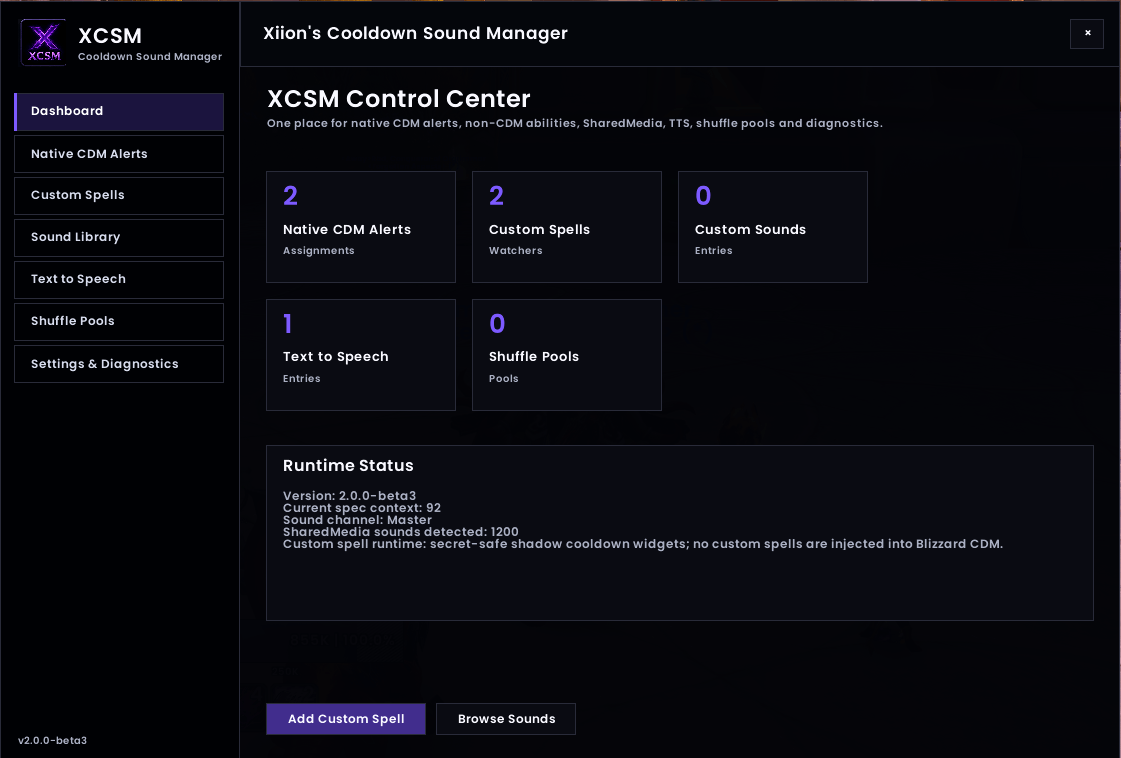
Revamped UX/UI
Description
Xiion's Cooldown Sound Manager (XCSM)
Hear your cooldowns. Stop staring at them.
Xiion's Cooldown Sound Manager is a powerful audio-alert and cooldown configuration addon built around World of Warcraft's native Cooldown Manager.
XCSM lets you create custom sounds, Text-to-Speech alerts, SharedMedia alerts, randomized sound pools, and even track abilities that Blizzard's Cooldown Manager does not normally expose — all from a modern in-game Control Center.
Version 2.0 is the largest update to XCSM yet, transforming it from a Cooldown Manager sound extension into a complete cooldown-audio management system.
Built for World of Warcraft Retail 12.1+.
XCSM 2.0
Full In-Game Control Center
XCSM now has its own complete configuration interface.
Open it with:
/xcsm
From one window you can manage:
- Blizzard Cooldown Manager alerts
- Custom spell tracking
- Custom sounds
- SharedMedia sounds
- Text-to-Speech
- Shuffle Pools
- General settings and diagnostics
You no longer need to dig through multiple Blizzard menus to configure your alerts.
Native Blizzard Cooldown Manager Integration
Prefer Blizzard's normal Cooldown Manager interface?
You can still configure XCSM directly from Blizzard's CDM.
XCSM adds its own searchable alert browser while preserving Blizzard's native workflow, so you can choose whichever interface you prefer.
XCSM does not replace the Cooldown Manager — it expands it.
Custom Spell Tracking
Some abilities are not available through Blizzard's Cooldown Manager.
XCSM 2.0 can track supported player and pet abilities independently through its Custom Spell system.
Search your spellbook, pet spellbook, spell name, or Spell ID and configure an audio alert without creating fake Cooldown Manager entries or modifying Blizzard's protected frames.
This makes XCSM useful for abilities that normally cannot be configured through CDM.
Searchable SharedMedia Browser
Large SharedMedia libraries can contain hundreds or even thousands of sounds.
XCSM includes a fast searchable browser with:
- Live search
- Sound preview
- Virtualized scrolling for large libraries
- Direct assignment
- SharedMedia support from other installed addons
No more scrolling through enormous dropdown menus.
Custom Text-to-Speech
Create your own spoken cooldown alerts.
Examples:
kickdefensiveinterrupt readycharge backcooldown ready
Each TTS entry can have its own:
- Spoken phrase
- Voice
- Speech rate
- Volume
- Overlap behavior
TTS alerts can be assigned directly to abilities or used inside Shuffle Pools.
Shuffle Pools
Don't want to hear the same alert every time?
Create reusable pools containing SharedMedia sounds and/or custom TTS entries.
Available modes:
Shuffle Bag
Every sound plays once before the pool reshuffles, with protection against immediate repeats between bags.
Pure Random
Selects a random member every time.
Sequential
Plays entries in order and loops.
Previewing sounds does not disturb the live playback order.
Supported Cooldown Manager Events
XCSM supports Blizzard Cooldown Manager events including:
- Cooldown Available
- On Cooldown
- Charge Gained
- Aura Applied
- Aura Removed
- Pandemic
XCSM includes additional runtime handling for cooldown and charge behavior while remaining compatible with WoW's protected combat environment.
Multiple Audio Sources
XCSM alerts can use:
- Blizzard SoundKit IDs
- FileData IDs
- Custom sound-file paths
- LibSharedMedia sounds
- Custom Text-to-Speech
- Shuffle Pools
Per-Specialization Configuration
Alert assignments are stored separately by specialization.
Your Restoration setup does not have to use the same cooldown alerts as Elemental.
Your Frost setup does not have to match Fire.
Configure each spec the way you want it.
Minimap Button
XCSM 2.0 includes an optional draggable minimap button for quick access to the Control Center.
The minimap button can be enabled or disabled at any time from XCSM's settings.
Designed for Modern WoW
Modern WoW protects and restricts portions of cooldown information while in combat.
XCSM's runtime is designed around those restrictions and keeps its custom alert system separate from Blizzard's protected Cooldown Manager data.
The goal is simple:
Enhance Blizzard's system without fighting it.
Commands
/xcsm Open the XCSM Control Center.
/xcsm cdm Open Native CDM Alerts.
/xcsm custom Open Custom Spells.
/xcsm sounds Open the sound manager.
/xcsm tts Open the Text-to-Speech manager.
/xcsm pools Open Shuffle Pools.
/xcsm minimap Show or hide the minimap button.
/xcsm status Display XCSM runtime information.
/xcsm test Test configured XCSM audio.
Upgrading to 2.0
Existing XCSM settings, alerts, TTS entries, Shuffle Pools, and assignments are preserved.
No SavedVariables reset is required.
Optional Dependency
LibSharedMedia-3.0 is optional.
XCSM works without it, but SharedMedia sounds require LibSharedMedia or another addon that provides compatible SharedMedia content.
Feedback & Bug Reports
XCSM 2.0 represents a major expansion of the addon.
If you encounter a problem, please include the Lua error and what you were doing when it occurred whenever possible.
Feedback and feature suggestions are welcome.
Xiion's Cooldown Sound Manager Team