
WTSMaster
- By
Stop typing the same WTS messages over and over again. Let WTSMaster handle the formatting for you!
WTSMaster is a lightweight and intuitive trading assistant designed specifically for World of Warcraft: Classic (TBC). It streamlines the process of posting your items in the Trade Channel by providing a dedicated UI for item management, pricing, and automated message formatting.
Stop typing the same WTS messages over and over again—let WTSMaster handle the formatting for you!
### Key Features
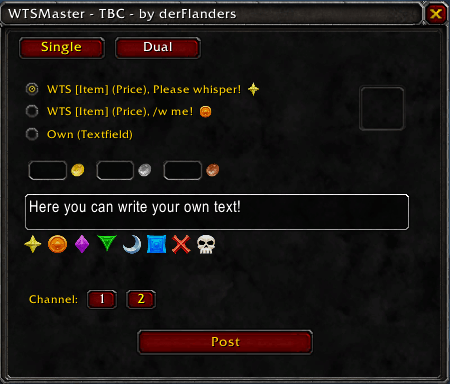
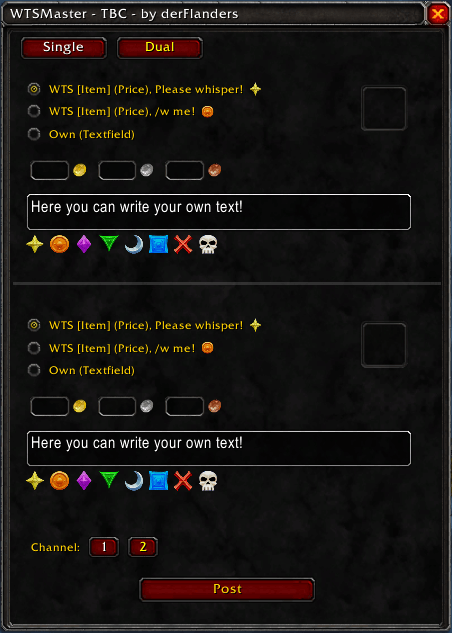
- Single & Dual Mode: Choose between a compact "Single" view for one item or a "Dual" view to manage and post two items simultaneously.
- Drag & Drop Interface: Easily assign items by dragging them from your bags into the UI slots, or use Right-Click from your inventory while the window is open.
- Automated Message Templates: Choose from pre-defined professional WTS templates or use the "Custom" field for your own personalized flair.
- Integrated Raid Icons: Automatically adds flair to your messages with Raid Icons ({rt1}, {rt2}, etc.) for better visibility in a crowded Trade Chat.
- Currency Support: Dedicated input fields for Gold, Silver, and Copper to ensure your prices are clearly displayed.
- Channel Switcher: Quickly toggle between Trade Channel 1 and 2 (or any other custom index) directly within the addon.
- Smart Reset: Automatically clears the item and pricing fields after posting to keep your workflow fast and efficient.
### How to Use
-
Open the Addon: Type
/wtsmin the chat to toggle the main window. -
Select Mode: Use the Single or Dual buttons at the top to fit your current trading needs.
-
Add Items: Simply Right-Click an item in your bags or drag it into the slot.
-
Set Price: Enter your desired Gold, Silver, or Copper values.
-
Choose Channel: Click the 1 or 2 button to select your target channel.
-
Post: Click Posten (Post) to send your formatted message to the chat. The UI will reset automatically for your next trade!
### Commands
/wtsm - Show/Hide the WTSMaster interface.
The WTSMaster Team

