
wqat_picture_1.png
wqat_picture_4.png
wqat_picture_3.png
wqat_picture_2.png
Description
WQA Turbo
WQA Turbo is a maintained, performance-first continuation of WQAchievements for Retail World of Warcraft.
It helps you find active World Quests that matter to you — including quests useful for achievements, mounts, pets, toys, reputations, currencies, profession recipes, equipment, custom goals, and other configured rewards.
WQA Turbo preserves the core idea and extensive tracking data of WQAchievements while modernizing its scanner, keeping it current with Retail and Midnight, and adding a significantly improved user interface.
What does WQA Turbo track?
WQA Turbo can alert you to World Quests relevant to:
- Achievements and achievement criteria
- Mounts
- Battle pets
- Toys
- Reputations and Renown
- Currencies
- Profession recipes and profession World Quests
- Equipment and upgrade rewards
- Gold
- Custom World Quests and rewards
- Other configured reward types
You decide what you want to track.
Performance-first World Quest scanning
The original WQAchievements could repeatedly perform broad World Quest and reward scans while Blizzard was still loading reward data.
WQA Turbo replaces that behavior with progressive, frame-budgeted processing.
Ready World Quests are shown immediately.
If another relevant World Quest is still waiting for Blizzard reward or item-link data, only that quest remains pending. It is processed later when the required information becomes available instead of forcing repeated global rescans.
Performance improvements include:
- Incremental, frame-budgeted reward scanning
- No repeated full scan because a single reward is still loading
- Progressive results while Blizzard data becomes available
- Cached World Quest results
- Cached and indexed mount/pet collection lookups
- Automatic updates when pending reward information becomes available
- Performance diagnostics through
/wqat perfand/wqat scan
Settings 2.0
WQA Turbo 1.0 introduces a major overhaul of the addon settings.
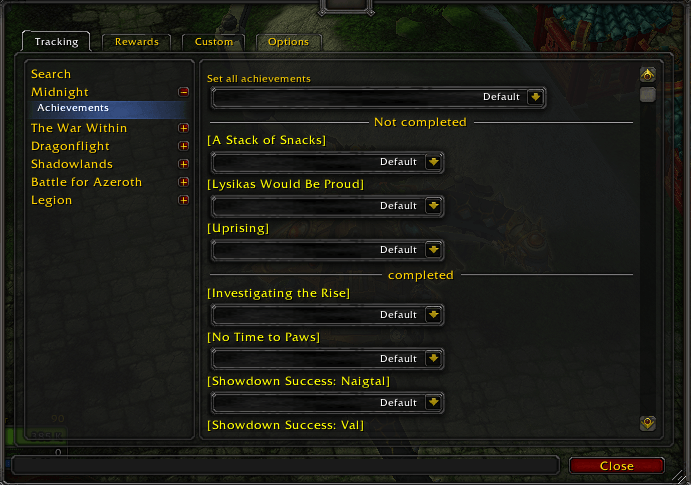
Easier navigation
Tracking and reward configuration is organized by expansion and category instead of being displayed as one enormous scrolling list.
Expansions are displayed newest-first, including Midnight.
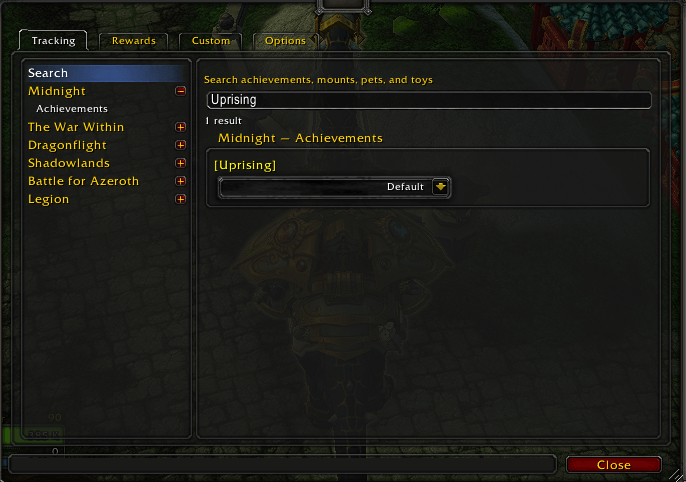
Search
Use the Tracking search page to quickly find tracked:
- Achievements
- Mounts
- Pets
- Toys
Search works by name or ID.
Bulk tracking controls
Entire categories or expansions can be changed at once.
For example, you can set:
- all Legion achievements
- all Midnight toys
- every supported collectible in one expansion
to:
- Don't track
- Default
- Always track
Individual overrides remain available afterward.
Native hover tooltips
Hover tracked achievements directly in Settings to see Blizzard's normal achievement tooltip, including description and criteria progress.
Mounts, pets, toys, and other supported collectibles also display their native tooltips.
Completed entries remain hoverable.
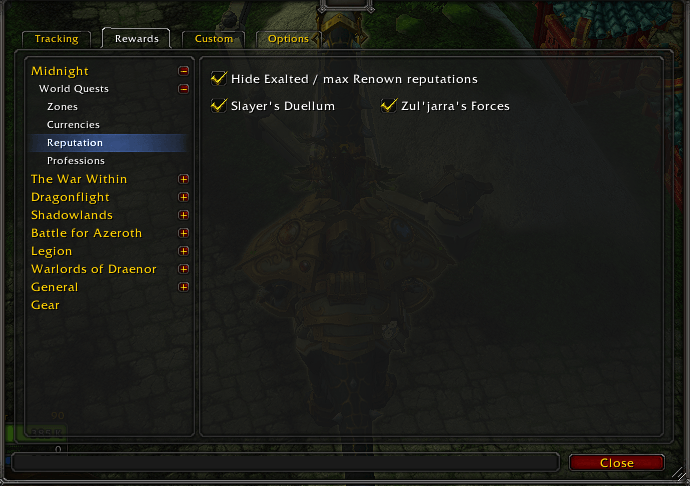
Improved reward and reputation filtering
WQA Turbo includes updated reward filtering for modern Retail content.
Reputation detection can use Blizzard's current World Quest reputation APIs rather than depending only on old hard-coded reward mappings.
This allows current Midnight reputations and future reputation rewards to be detected much more reliably.
You can also optionally hide reputations that are already complete, including:
- Exalted traditional reputations
- Maximum-Renown Major Factions
- Maxed friendship-style reputations
Changing tracking or reward filters automatically refreshes WQA Turbo after a short delay.
A manual Refresh now button is also available in Settings.
Midnight support
WQA Turbo includes dedicated support for current Midnight content.
This includes:
- Midnight zones
- Current achievement and World Quest mappings
- Midnight currencies
- Midnight reputation filters
- Modern reputation reward detection
- Profession World Quest support
- Updated World Quest type filtering
Supported Midnight reputation tracking includes current factions such as Silvermoon Court, Amani Tribe, Hara'ti, The Singularity, Slayer's Duellum, Zul'jarra's Forces, Captain Tokka, Ritual Sites, and others supported by the current data.
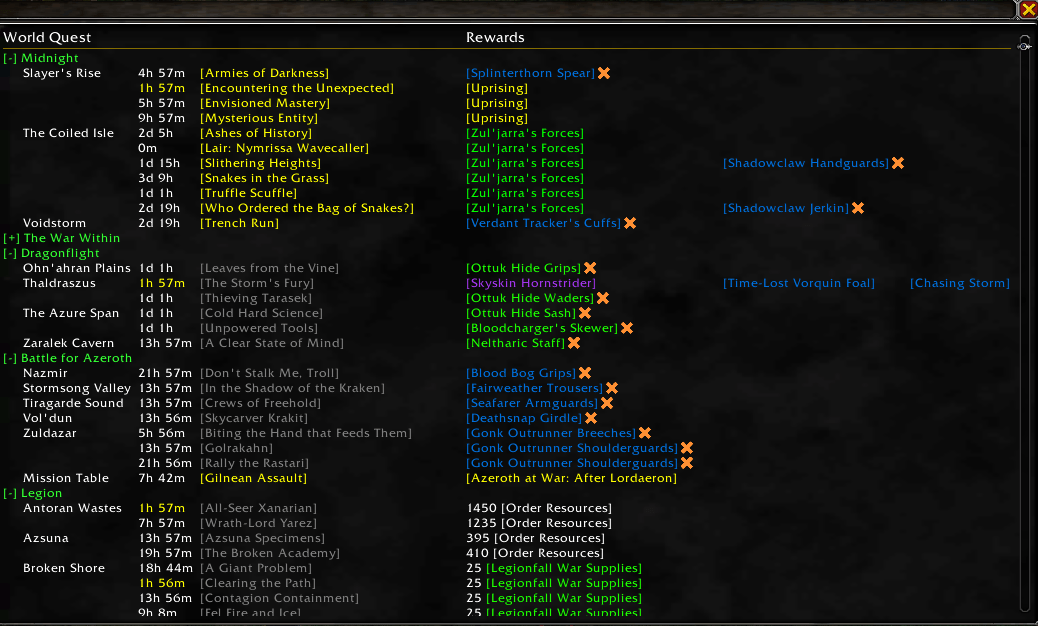
Improved World Quest popup
Long World Quest lists no longer need to extend off-screen.
The persistent World Quest popup supports:
- Scrolling
- A screen-height limit
- Collapsible expansion sections
- Remembered collapsed state
- Progressive updates when additional World Quest data becomes available
Open it with:
/wqat popup
or simply left-click the minimap icon.
Minimap controls
The minimap button provides quick access to WQA Turbo:
Left-click: Open the World Quest list
Right-click: Open WQA Turbo settings
Hovering the button shows these controls without opening the full World Quest list.
War Mode World Quests
WQA Turbo includes an option to:
Show PvP World Quests while War Mode is disabled
By default, PvP World Quests follow normal War Mode behavior.
Enabling this option lets WQA Turbo show interesting PvP World Quests even while War Mode is currently disabled.
Filtering improvements
WQA Turbo contains a number of fixes and improvements over the original filtering behavior.
For example:
- Pet Battle World Quests correctly respect the Pet Battle filter even when they are achievement-related.
- Disabled zones are respected regardless of why a World Quest was considered interesting.
- Profession World Quests can be identified using trade-skill information.
- Profession recipe rewards use the actual quest reward instead of accidentally classifying an item referenced inside the recipe tooltip.
- Current reputation rewards can be detected directly through Blizzard's APIs.
Commands
/wqat — show current cached results
/wqat refresh — explicitly rebuild World Quest data
/wqat popup — open the persistent World Quest popup
/wqat perf — show performance diagnostics
/wqat scan — show scanner status and diagnostics
/wqat import — import settings from WQAchievements
Migrating from WQAchievements
WQA Turbo can import your existing WQAchievements settings, including profiles, filters, popup preferences, minimap settings, and other configuration.
If WQAchievements is installed, WQA Turbo can offer to import its settings.
When necessary, the importer can temporarily enable WQAchievements so its SavedVariables are available, copy the configuration into WQA Turbo, disable the old addon again, and reload the UI.
You can also start migration manually with:
/wqat import
After migration, WQA Turbo uses its own SavedVariables and the original addon is no longer required.
Reporting bugs and requesting features
WQA Turbo is actively maintained.
If you encounter:
- a missing World Quest
- an incorrect tracking result
- an incorrect achievement or reward classification
- a Lua error
- a performance regression
- outdated Retail/Midnight data
please report it.
For performance-related reports, /wqat perf and /wqat scan output is especially useful.
You can find the WQA Turbo Discord through the links on this CurseForge project page. Bug reports, testing feedback, and feature requests are welcome.
Credits
WQA Turbo is derived from the Public Domain WQAchievements addon by Urtgard and contributors.
The original project's work and credits are preserved while WQA Turbo continues development with a new performance architecture, current-content support, bug fixes, and additional quality-of-life features.
WQA Turbo Team
