WoWLingo
- By
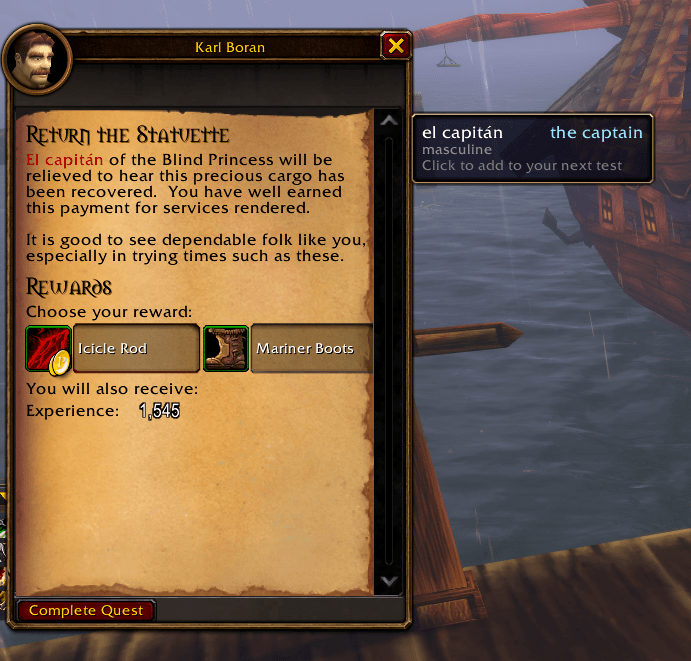
Quest Example - Can be multiple words per quest
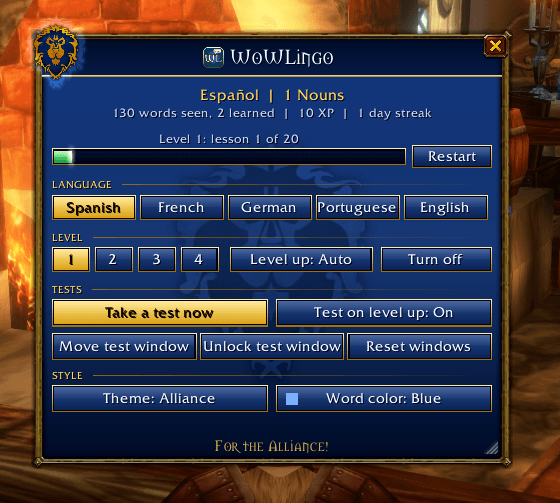
Alliance Theme
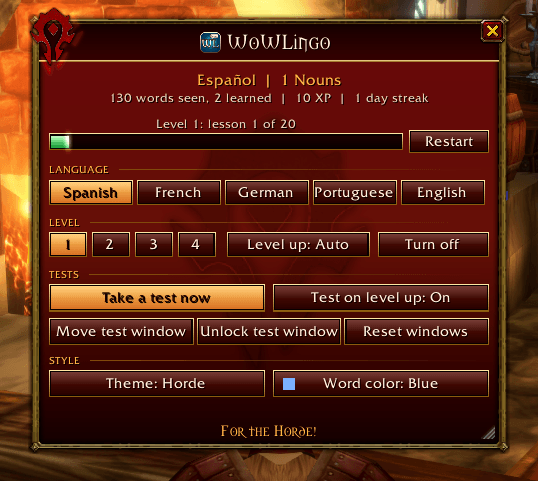
Horde Theme
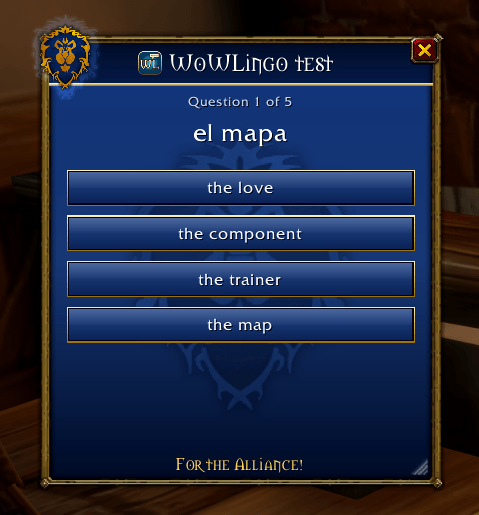
Screenshot 2026-11-13 101546.png
Description
Learn a language while you quest in WoW Forever.
WoWLingo turns quest text into a language lesson. As you read, words swap into Spanish, French, German, Portuguese or English. It works on every quest in the game with no translation pack to download.
Features
- Five languages, each with its own progress
- Four levels that build from nouns up to full sentence frames
- Real grammar at the phrase level: gender, plurals, adjective order ("the old sword" becomes "la espada vieja")
- Hover any swapped word to see what it means
- Click a word to add it to your next test
- Short lessons: a 5-question test every time you level up, or any time you want
- XP, a daily streak and a progress bar for your current level
- Horde and Alliance themes with your faction's crest
- Pick the color of swapped words
- Move and resize the windows
Setup
CurseForge app: search for WoWLingo, click Install, then restart the game.
Manual install:
- Download the zip.
- Unzip it into
World of Warcraft\_forever_\Interface\AddOns\. You should see a folder namedWoWLingoinside AddOns. - Restart the game. On the character select screen, click AddOns and make sure WoWLingo is checked.
Getting started
- Type
/lingoto open the settings window. - Pick your language.
- Close the settings window. WoWLingo runs in the background from here, so you don't need to keep it open. Type
/lingoagain any time you want to change something. - Open any quest. The colored words are in your new language.
- Hover a colored word to see the English. Click it to add it to your next test.
- Keep questing. Every time you level up, WoWLingo gives you a short lesson.
Tip: turn on Instant Quest Text in the game's Interface options so you can hover words right away.
Levels
- Nouns with their articles: "Kill the wolf" becomes "Kill el lobo"
- Adjectives, numbers, greetings: "the old sword" becomes "la espada vieja"
- Verbs and sentence frames: "You must find the key" becomes "Debes encontrar la llave"
- Connecting words: y, pero, ahora, aquí
Progress is slow and steady. Finish 20 lessons to clear a level. A lesson is any test you finish, so you never need a perfect score. Each lesson teaches 1 or 2 new words and reviews the rest. Words you miss come back at the end of the lesson until you get them right, and words you know come back later for a quick review. Every lesson earns XP, and doing one a day builds your streak. With Level up: Auto, you move to the next level on your own. With Level up: Stay, you remain where you are until you pick the next level.
Settings
Everything lives in /lingo:
- Language: switch any time. Each language keeps its own level.
- Level: jump to any level, choose Auto or Stay, or turn the addon off.
- Restart: the button next to the progress bar clears your current language and starts you over at level 1. Click it twice to confirm. Other languages keep their progress.
- Tests: take a test now, or turn off the level-up test.
- Test window: move it, lock it, or reset it.
- Theme: starts on your character's faction. One click switches to the other faction, one more switches back.
- Word color: Faction, Red, Blue, Green, Purple or Orange.
Drag the bottom-right corner of either window to resize it.
Commands
| Command | What it does |
|---|---|
/lingo |
Open settings |
/lingo test |
Take a 5-question test now |
/lingo move |
Show the test window so you can drag it |
/lingo lock / /lingo unlock |
Lock or unlock the test window |
/lingo reset |
Reset window sizes and test window position |
/lingo restart |
Clear progress for your current language and start over at level 1 |
/lingo 1 to /lingo 4 |
Set your level |
/lingo on / /lingo off |
Turn the addon on or off |
Good to know
- Learning English? Set your game text to Spanish, French, German or Portuguese. WoWLingo swaps those words into English.
- Already playing in the language you're learning? WoWLingo adds English hover translations to Blizzard's own text.
- Spanish, French, German and Portuguese need an English game client, or one set to that language.
- Chat, quest titles, the objective tracker and dialogue replacement addons like DialogueUI are not changed.
- Mixed text is the method here, not a full translation. Grammar is checked at the phrase level, so full sentences won't always sound native.
Free with no ads. Found a bug or want a word added? Leave a comment.
WoWLingo Team