


Weekly Tracker
- By
curseforge-screenshot-anonymized.png
Description
WoW Weekly Tracker
Stop guessing which alt to play next
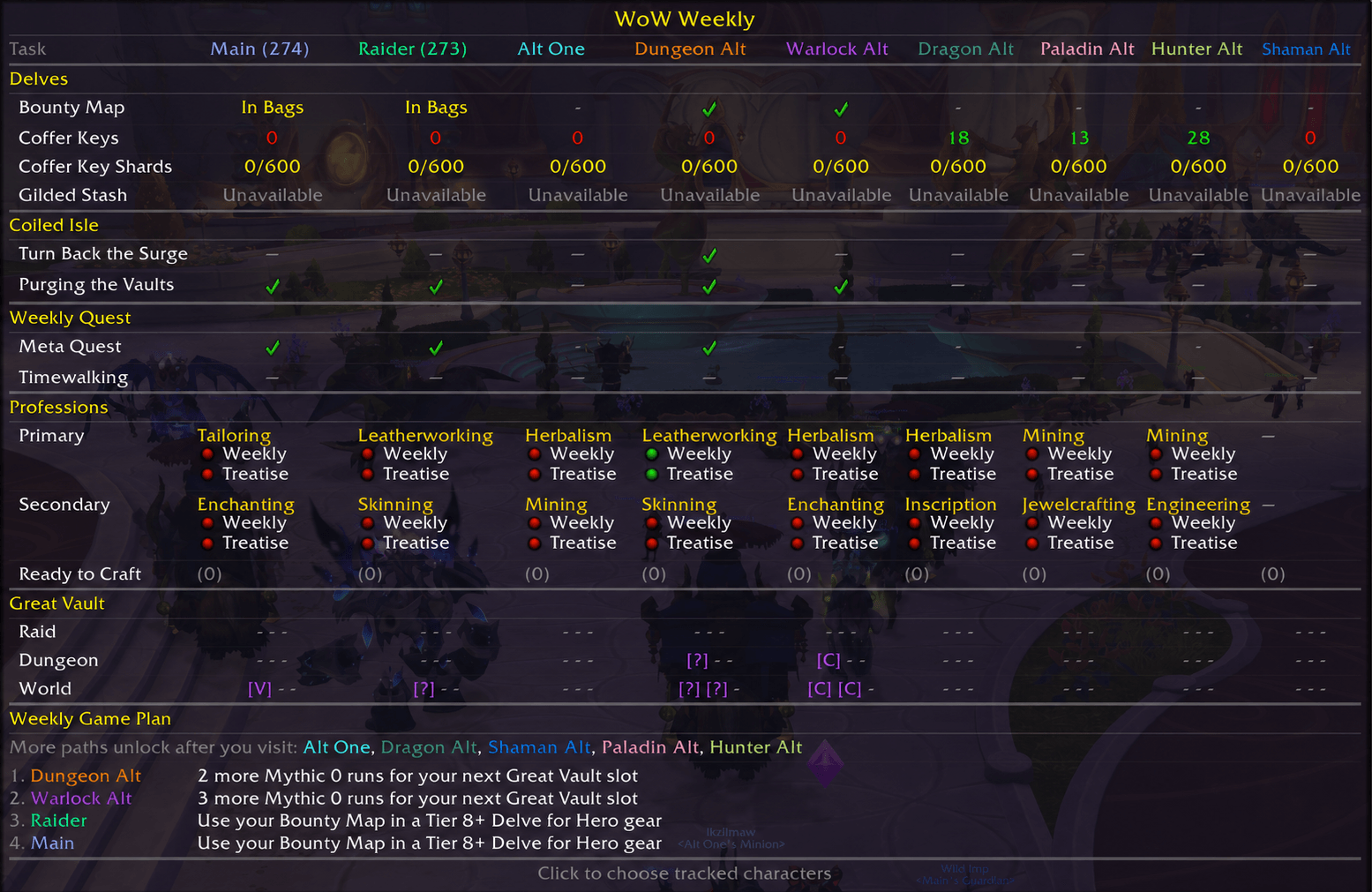
WoW Weekly Tracker puts every character’s important weekly progress into one compact grid—and builds a personalized Weekly Game Plan showing who to play and what to do next.
It learns which characters you use for Raid, Mythic+, Delves, and professions. It prioritizes activities already in progress and avoids recommending content an alt does not normally play.
One tooltip. Your whole warband. A clear next move.
Features
- See every tracked character side by side
- Get one practical next action for each character
- Rank mains and active characters before less-played alts
- Learn Raid, Mythic+, Delve, and profession habits over time
- See Great Vault reward tracks as compact
[V],[C],[H], and[M]badges - Automatically reset weekly progress
- Choose which characters and tracker rows appear
- Open from the minimap or Titan Panel
Your Weekly Game Plan
The Weekly Game Plan ranks your characters and recommends one concrete next step.
Examples include:
- 2 more Mythic 0 runs for your next Great Vault slot
- Use your Bounty Map in a Tier 8+ Delve for Hero gear
- Finish your weekly meta quest
- Complete your profession weekly
Recommendations improve as you play. The addon gradually learns which characters are mains, raiders, Mythic+ characters, profession alts, and casual Delve characters.
What It Tracks
Great Vault
- Raid
- Dungeon
- World
- Reward track for each unlocked slot
Delves
- Trovehunter’s Bounty Map
- Restored Coffer Keys
- Coffer Key Shards
- Weekly Gilded Stash
- Delve Great Vault progress
Coiled Isle
- Turn Back the Surge
- Purging the Vaults
Weekly Activities
- Rotating weekly meta quest
- Timewalking
- Normal, Hard, and Nightmare Prey
Professions
- Weekly profession knowledge quests
- Profession treatises
- Configurable Hero or Myth Mistcrest crafting readiness
Gear-Aware Recommendations
WoW Weekly Tracker considers whether an activity can still provide a useful upgrade. It also considers:
- Activities already started this week
- Recent Raid and Mythic+ participation
- Delve history
- Profession skill and engagement
- Current-season played time
- Character item level
Activity preferences persist across weekly resets and gradually decay when a character stops doing that content.
Great Vault at a Glance
[A]— Adventurer[V]— Veteran[C]— Champion[H]— Hero[M]— Myth-— Slot not unlocked
Getting Started
- Install the addon and log in.
- Click the minimap button or Titan Panel plugin.
- Log into each character once so the addon can capture its data.
- Open the configuration panel with
/ww config. - Choose which characters and activities you want to track.
Weekly progress resets automatically.
Made for players who want to spend less time checking alts and more time playing the right character.
The Weekly Tracker Team
