
WoW Level Checklist
- By
wow-level-checklist.jpg
wow-level-checklist2.jpg
Description
WoW Level Checklist
Track your max-level specs, races, alts, and playtime.
WoW Level Checklist is a lightweight alt-tracking and completion addon for World of Warcraft.
It builds a roster of your characters as you log into them and gives you an easy way to track your max-level progress, represented specializations, playable races, individual character playtime, total account playtime, and other account-wide statistics.
Whether you enjoy leveling alts, trying every specialization, filling out your race roster, or just want to know how much time you have spent across all of your characters, WoW Level Checklist keeps it all in one place.
Features
Character Tracking
• Automatically tracks characters as you log into them
• Supports characters across multiple realms
• Tracks character name, realm, level, class, specialization, race, and playtime
• Dedicated Characters tab for viewing your tracked roster
• Remove deleted, abandoned, or unwanted characters with the Forget option
• Character GUID tracking helps preserve character data when a character is renamed
• Characters with the same name on different realms are tracked separately
Specialization Checklist
• See which class specializations you currently have represented
• Track which specializations have reached the current max level
• Classes can be expanded to view their individual specs
• See which character currently represents each specialization
• View additional characters assigned to a spec through its tooltip
• Completed classes are clearly marked
A character represents the specialization that WoW Level Checklist most recently recorded that character using.
If that character changes specs, the addon automatically updates their recorded specialization rather than permanently counting the same character toward multiple specs.
Race Checklist
• Track which playable races you currently have represented
• See which races have reached max level
• Races are organized into Alliance, Horde, and Neutral groups
• Expand each faction group to view individual race progress
• View the character currently representing each race
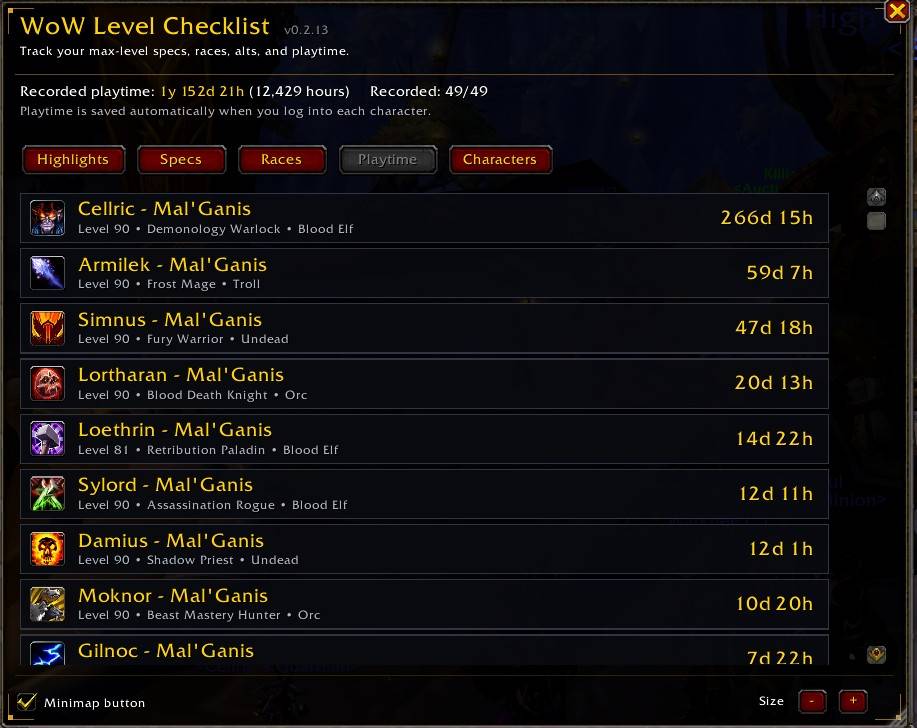
Playtime Tracking
• Records /played time for every tracked character
• Combines playtime across your entire tracked roster
• View total recorded playtime in years, days, and hours
• See your combined total in raw hours
• Compare individual characters by playtime
• Quickly see which characters have or have not supplied playtime data
Playtime information comes from World of Warcraft's own /played data and is stored locally for each tracked character.
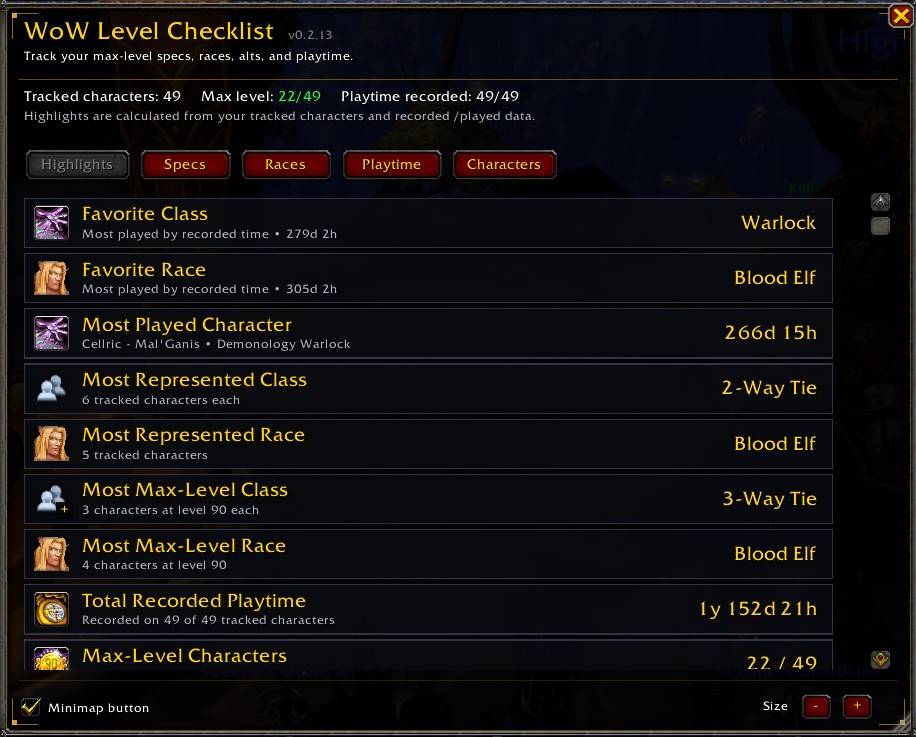
Account Highlights
The Highlights tab automatically calculates statistics from your tracked roster, including:
• Favorite Class — class with the most combined recorded playtime
• Favorite Race — race with the most combined recorded playtime
• Most Played Character
• Most Represented Class
• Most Represented Race
• Most Max-Level Class
• Most Max-Level Race
• Total Recorded Playtime
• Max-Level Characters
• Average Playtime
Hover over Highlight entries for additional information and Top 3 rankings where available.
Ties are supported rather than arbitrarily choosing a winner.
Interface
• Warcraft-inspired interface
• Highlights, Specs, Races, Playtime, and Characters tabs
• Movable main window
• Resizable interface
• Minimap launcher for quick access
• Drag the minimap button around the minimap
• Right-click the minimap button to hide it
• Blizzard AddOn Compartment support
• Saved window and minimap settings
Getting Started
WoW Level Checklist cannot automatically discover characters that have never been logged into while the addon is installed.
Simply log into each character you want included at least once.
As you visit your characters, WoW Level Checklist will gradually build your roster and update your:
• Character count
• Max-level count
• Specialization progress
• Race progress
• Playtime totals
• Highlights and account statistics
For the most complete results, log into each of your characters once after installing the addon.
Commands
/maxcheck
Open or close WoW Level Checklist.
/wlc
Open or close WoW Level Checklist.
/wlc refresh
Refresh tracked character information.
/wlc playtime
Request/update recorded playtime.
/wlc minimap
Show or hide the minimap launcher.
/wlc resetui
Reset the addon window position and size.
/wlc help
Display available WoW Level Checklist commands.
/wlc reset
Reset WoW Level Checklist's saved database.
Warning: /wlc reset permanently clears the addon's locally saved tracking data. Use it only if you intentionally want to start over.
Saved Data
WoW Level Checklist stores its database locally using World of Warcraft's SavedVariables system.
Your tracked characters and playtime are not included with the addon download and are not uploaded or shared by WoW Level Checklist.
Updating the addon normally preserves your existing tracked data.
Language Support
WoW Level Checklist is currently available in English only.
The addon has been designed with future localization support in mind, but translated interface text is not currently included.
Additional language support may be added in future updates. Community members interested in helping with translations are welcome to reach out.
Public Beta
WoW Level Checklist is currently in public beta.
The core tracking systems and interface have been tested extensively during development, but the first public releases may uncover character configurations, UI setups, localization situations, addon conflicts, or other edge cases that have not yet been encountered.
If you find incorrect character information, a tracking issue, UI problem, Lua error, or anything else that doesn't appear to be working correctly, please leave a comment with as much information as possible.
Feedback, bug reports, and suggestions are welcome.
WoW Level Checklist Team
