WoW Camera Tools
- By
A simple and powerful camera controller for screenshots, machinima and creative gameplay. Rotate, tilt, zoom, hide your character and create smooth cinematic movements with an easy to use UI.
Screenshot 2025-12-08 090929.png
Description
WoW Camera Tool
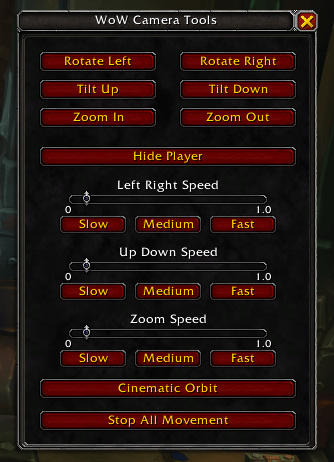
WoW Camera Tool adds an easy to use, movable interface for controlling your in game camera. It is designed for screenshot creators, content creators, roleplayers and anyone who wants more control over camera movement in retail WoW.
The addon provides rotation, tilt and zoom controls, speed sliders, presets and a cinematic orbit feature. Everything is available through a small UI panel or a minimap icon that behaves like other modern addons.
Features
Camera Controls
- Rotate Left and Rotate Right buttons
- Tilt Up and Tilt Down buttons
- Zoom In and Zoom Out buttons
- All movement buttons can be toggled on or off
- Works without restricting character movement
Speed Sliders
- Independent sliders for rotation speed
- Independent sliders for tilt speed
- Independent sliders for zoom speed
- Preset buttons for each slider: Slow, Medium, Fast
Cinematic Orbit Mode
- Automatically starts a gentle rotating orbit
- Adds a light upward tilt
- Slowly zooms the camera out
- Perfect for cinematic captures
- Click again to stop all motion
Hide Player
- One click option to hide or show your character model
- Ideal for clean screenshots and scenery shots
Minimap Button
- Uses a standard minimap icon framework
- Fully draggable on the minimap edge
- Left click to open the tool
- Right click to stop all camera movement
- Remembers its position between sessions
Slash Commands
/wcttoggles the UI/wct stopstops all camera motion/wowcameratoolalso toggles the UI
The WoW Camera Tools Team