


WorldOfWallStreet
- By
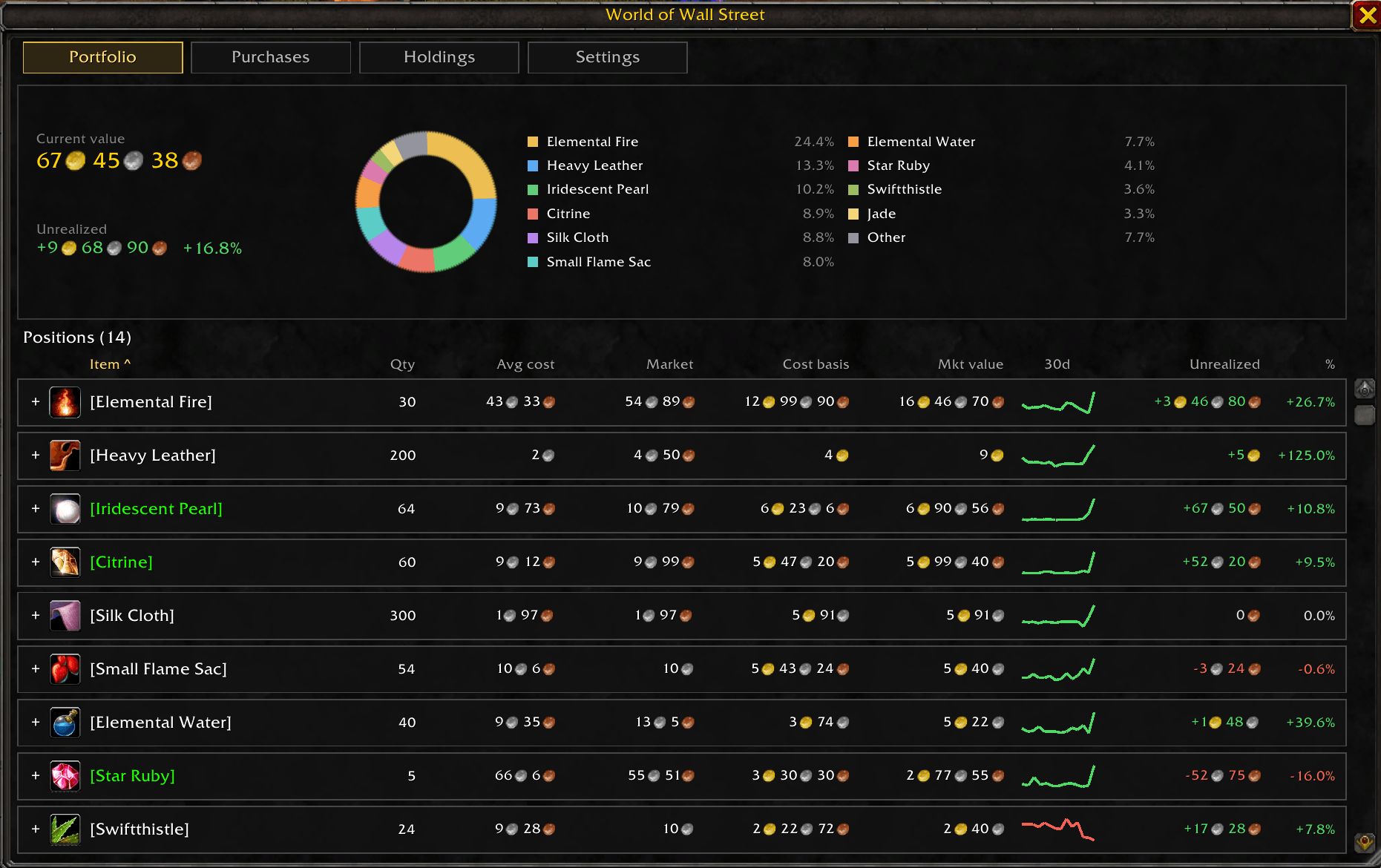
World of Wall Street records what you buy on the auction house and shows the buys you mark as a portfolio: what you paid, what it is worth now, and the unrealized gain or loss.
Open: Use the minimap button, /wows, or /wallstreet to open the addon window
Purchases: Recent auction house buys show up with quantity, cost, and time. Mark a purchase to add it to the portfolio. Unmarked history is trimmed as it grows. Marked investments are kept. Purchases are saved account-wide and labeled with the character that bought them.
Holdings: Add stock you already own. Bags covers the backpack, equipped bags, and the reagent bag. Bank lists the character bank after you open it once. Select an item, enter a quantity and an average cost per unit, and add the lot.
Portfolio: Marked buys are grouped by item. Each position shows quantity, average cost, market price, cost basis, market value, a 30-day price sparkline, and unrealized gain or loss. Expand a row to see the individual lots. The header shows current value, overall unrealized result, and how that value is split across your largest positions.
Settings: Choose between TradeSkillMaster or Auctionator to supply market data to this addon. TSM can use min buyout, market value, historical, or a region average. Auctionator uses its last scanned price, and its price history fills the 30-day line.
WorldOfWallStreet Team
