
World Buff Quest Tracker
- By
WoWScrnShot_062126_161427.jpg
Description
World Buff Quest Tracker
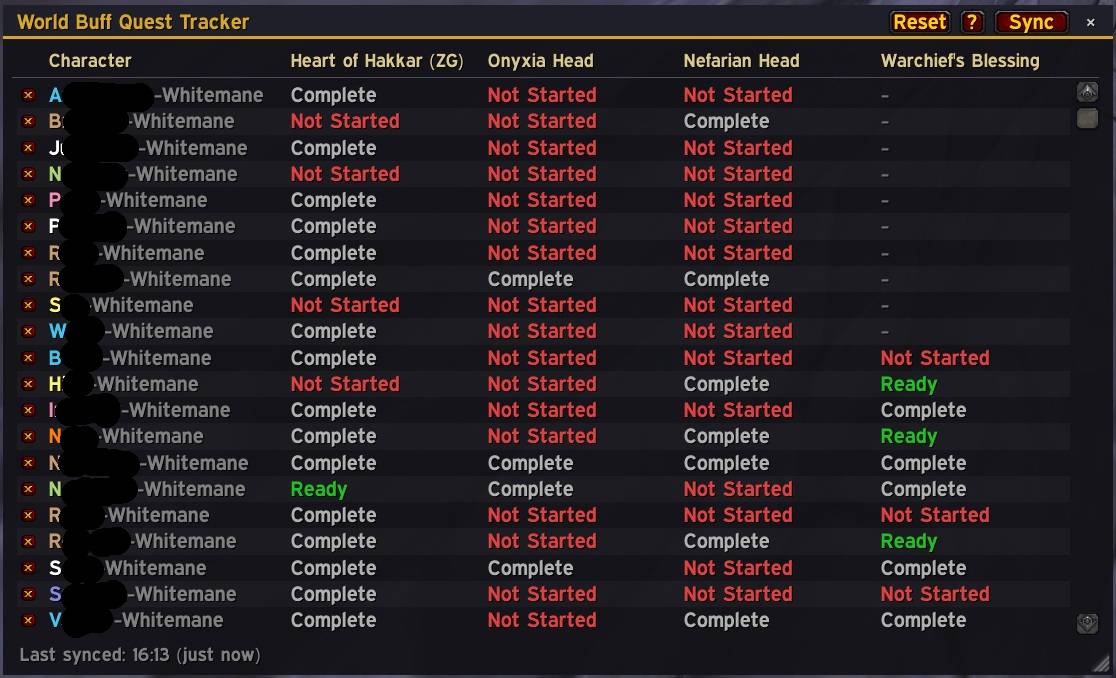
See at a glance which of your characters can still drop each world buff — without logging into every alt to check.
World Buff Quest Tracker (WBQT) keeps a tidy, colour-coded grid of every one of your level 60 characters and shows exactly where each one stands on the major world buff turn-in quests:
- Heart of Hakkar (Zandalar / ZG buff)
- Head of Onyxia (Onyxia buff)
- Head of Nefarian (Nefarian buff)
- Warchief's Blessing (the Rend kill quest)
Each character gets a row, and each quest gets a colour:
- 🟥 Not Started — this character hasn't done it yet and can still earn the buff
- 🟩 Ready — the quest is ready to turn in right now to drop the buff
- ⬜ Complete — already turned in; can't be done again on this character
- 🟧 On Quest — (Warchief's Blessing only) you've picked up the Rend quest but haven't killed him yet
No more guessing which alt still has an Onyxia head to hand in, or which character is sitting on a ready-to-drop buff.
Sync across all your WoW accounts
If your characters are spread across multiple WoW accounts, WBQT can pull them all into one combined view. Setup is quick:
- Make sure the addon is enabled on every account, then log into each of your level 60 characters once so their data is recorded.
- Log into one character of the same faction on each account.
- Open the Sync window and add those characters as Name-Realm.
- Press Sync Now on each account.
That's it — every character's data merges into a single list you can view from any of them. Even though the sync link is same-faction (a game limitation on addon communication), the data that travels includes all your characters, so your Alliance and Horde toons all show up together.
Features
- Clean, colour-coded grid of all your level 60 characters
- Class-coloured character names with realm shown
- Multi-account sync so you only need to check one window
- Alliance / Horde filters to quickly narrow the view to one faction
- Resizable window with a reset button
- Remove characters you no longer want to track
- Built-in Help & Legend window explaining every status and the sync setup
- Lightweight — your own data updates automatically as you play
Commands
/wbqt— open or close the tracker/wbqt sync— open the sync window/wbqt help— open the help and legend
Installation
Drop the WorldBuffQuestTracker folder into your World of Warcraft\_classic_era_\Interface\AddOns\ directory, or install via your addon manager. Then type /wbqt in game.
World Buff Quest Tracker Team
