WizzyWig
- By
A WYSIWYG-style chat editor for World of Warcraft roleplayers. See your full emote before sending it!
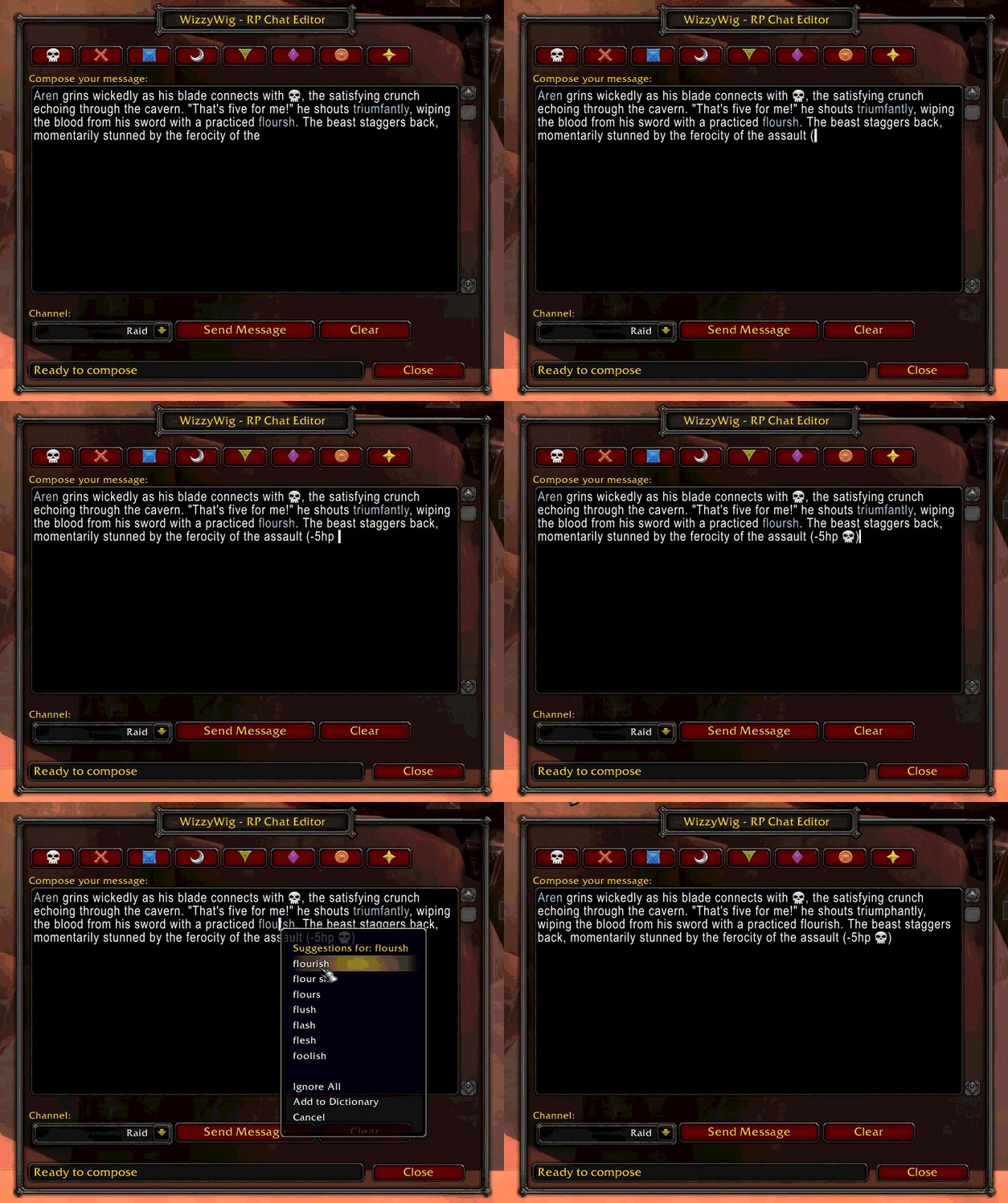
See the Mispelled and raid target icon support!
Description
WizzyWig - WYSIWYG Chat Editor for Roleplayers


WizzyWig is a What-You-See-Is-What-You-Get chat editor designed specifically for World of Warcraft roleplayers. Compose and preview your full emote or message before sending - see exactly what others will see!
🎬 See It In Action

Compose emotes with raid markers, catch typos with spell checking, and see exactly what you're sending before it goes live!
✨ Features
🎯 Visual Raid Marker Toolbar
- Click icons to insert raid markers ({rt1}, {rt2}, etc.)
- Preview exactly how they'll look in chat
- No more memorizing marker codes!
📝 Multi-Line Composition
- 15-line editing area for longer emotes
- Compose complex narratives without sending prematurely
- Edit and refine before hitting send
✂️ Built-in Message Splitting
- Automatic splitting for messages over 255 characters
- Smart word-boundary detection preserves readability
- UTF-8 safe (won't corrupt multi-byte characters)
- Character counter shows how many messages will be sent
- EmoteSplitter support: uses it if loaded, otherwise built-in splitting
🔤 Spell Checker Integration
- Automatic integration with Misspelled addon
- Real-time spell checking while composing
- Works seamlessly with built-in message splitting
💾 Draft Preservation
- Your text persists when closing the window
- Never lose your work from accidental closes
- Option to auto-clear after sending (disabled by default)
🎨 Multiple Channels
- Say, Emote, Party, Raid, and Raid Warning
- Quick channel switching dropdown
- Remembers your last-used channel
- Raid Warning requires raid leader or assistant role
📦 Installation
CurseForge (Recommended)
- Install via CurseForge app
- Search for "WizzyWig"
- Click Install
Manual Installation
- Download from CurseForge
- Extract to
World of Warcraft\_retail_\Interface\AddOns\ - Restart WoW
🎮 Usage
Commands
/wwor/wizzywing- Toggle main window- Minimap icon - Click to toggle window
Quick Start
- Click the minimap icon or type
/ww - Compose your message in the large text area
- Add raid markers using the toolbar
- Select your channel (Say, Emote, etc.)
- Click Send when ready!
🔧 Configuration
Access settings via:
/ww config- Interface → AddOns → WizzyWig
Options:
- Clear on Send: Automatically clear text after sending (default: off)
- Frame Position: Drag to reposition (saved automatically)
- Minimap Icon: Hide/show the minimap button
🤝 Recommended Addons
- EmoteSplitter - Alternative message splitter (WizzyWig will use it if present, otherwise uses built-in splitting)
- Misspelled - Spell checker integration
- Total RP 3 - Enhanced roleplay profiles
- MyRolePlay - Character description addon
🐛 Known Issues
- Multi-message sends use 0.5s delays between chunks to avoid spam throttling
- Text persists between sessions (feature, not bug!) but can be changed in settings
📝 Changelog
See CHANGELOG.md for version history.
🙏 Support & Feedback
- Issues: GitHub Issues
- Suggestions: Open a GitHub issue with [Feature Request] tag
- CurseForge: Leave a comment on the addon page
📜 License
This addon is released under the MIT License. Feel free to modify and redistribute!
🛠️ Development
Claude AI is used in development but this addon is primarily written by a human developer. Claude AI assists with:
- API reference lookups and WoW UI documentation
- Bug investigation and debugging
- Code review and architectural discussions (rubber duck debugging)
- Documentation clarification
The core logic, design decisions, and implementation are human-authored.
💖 Credits
Created by Kyle Lawhorn
Built with:
- Ace3 framework
- LibDBIcon for minimap integration
- Love for the WoW RP community
Enjoy composing your emotes with confidence! Happy roleplaying! 🎭
The WizzyWig Team