WindTools Minimap Pins Fix
- By
Hides the minimap icons of Questie and GatherMate2 that spill outside ElvUI WindTools' rectangular minimap, and keeps the game's own arrows inside it.
Description
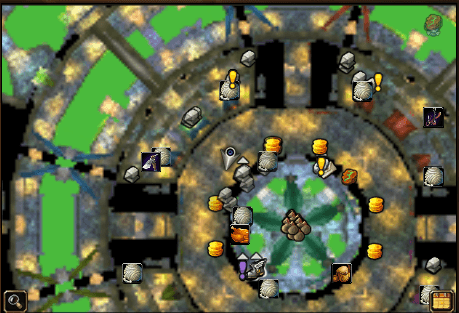
ElvUI WindTools' rectangular minimap hides the icons that fall outside the rectangle, but only those of the shared HereBeDragons library. Questie (its own copy of HereBeDragons) and GatherMate2 (its own nodes) escape it. WindTools Minimap Pins Fix applies the same hiding to them.
- No icon sticks out: an icon hides as soon as any part of it would show outside the rectangle, whatever its size.
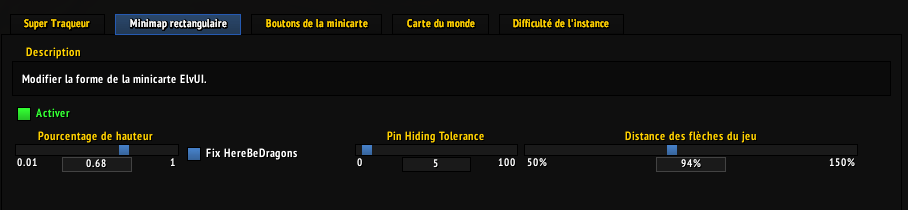
- Same settings as WindTools: follows its rectangular minimap switch, its Fix HereBeDragons switch and its Pin Hiding Tolerance (higher hides icons further from the edge; 0 to 10 is enough).
- Questie: quest givers, turn-ins and objectives.
- GatherMate2: herbs, ore veins, treasures and fishing spots.
- Icons come back as soon as they are inside again, with their fading. Hidden icons take no mouse clicks.
- Touches none of these addons' code.
The game's own arrows
The arrows the game draws at the minimap's edge (a quest's area, group members) are placed on the edge of the whole square, above and below the rectangle. WindTools Minimap Pins Fix keeps them inside it.
- Game Arrows Distance: a new slider in WindTools' own options (Maps, Rectangle Minimap). At 100%, the arrows sit on the rectangle's top and bottom edges. The arrows on the sides keep the same distance from the player, a little inside the side edges.
- Follows the rectangle's height, and lets the game's own edge back when the whole square shows.
Known limit: the herb and ore points of the game's own tracking (Find Herbs, Find Minerals) are drawn by the game, and no setting reaches them, so they can still show above and below the rectangle. GatherMate2's icons are hidden.
Requires: ElvUI WindTools, with the rectangular minimap enabled. Works with Questie, GatherMate2 or both.
Français
Masque les icônes de Questie et de GatherMate2 qui dépassent de la mini-carte rectangulaire d'ElvUI WindTools, avec les mêmes réglages que WindTools (activation, Fix HereBeDragons et tolérance de masquage : 0 à 10 suffit). Une icône se cache dès qu'une partie d'elle sortirait du rectangle, quelle que soit sa taille. Les flèches que le jeu pose au bord de la mini-carte (zone d'une quête, membres du groupe) restent dans le rectangle, à la distance choisie avec le nouveau curseur Distance des flèches du jeu, dans les options de WindTools (Cartes, Minimap rectangulaire). Limite : les points d'herbes et de minerais du pistage du jeu (Découverte d'herbes, Découverte de gisements) sont dessinés par le jeu et peuvent encore dépasser ; ceux de GatherMate2 sont masqués.
Nécessite ElvUI WindTools ; fonctionne avec Questie, GatherMate2 ou les deux.
WindTools Minimap Pins Fix Team