WhoDoesWhat
- By
A raid-assigments panel for TBC with hassle-free paladin assignments, syncs to pallypower and raid members.
Assign.jpg
Description
WhoDoesWhat
WhoDoesWhat is an addon for managing raider roles and assignments (with instant fixes for Paladin buff assignments) for WoW Classic and TBC!
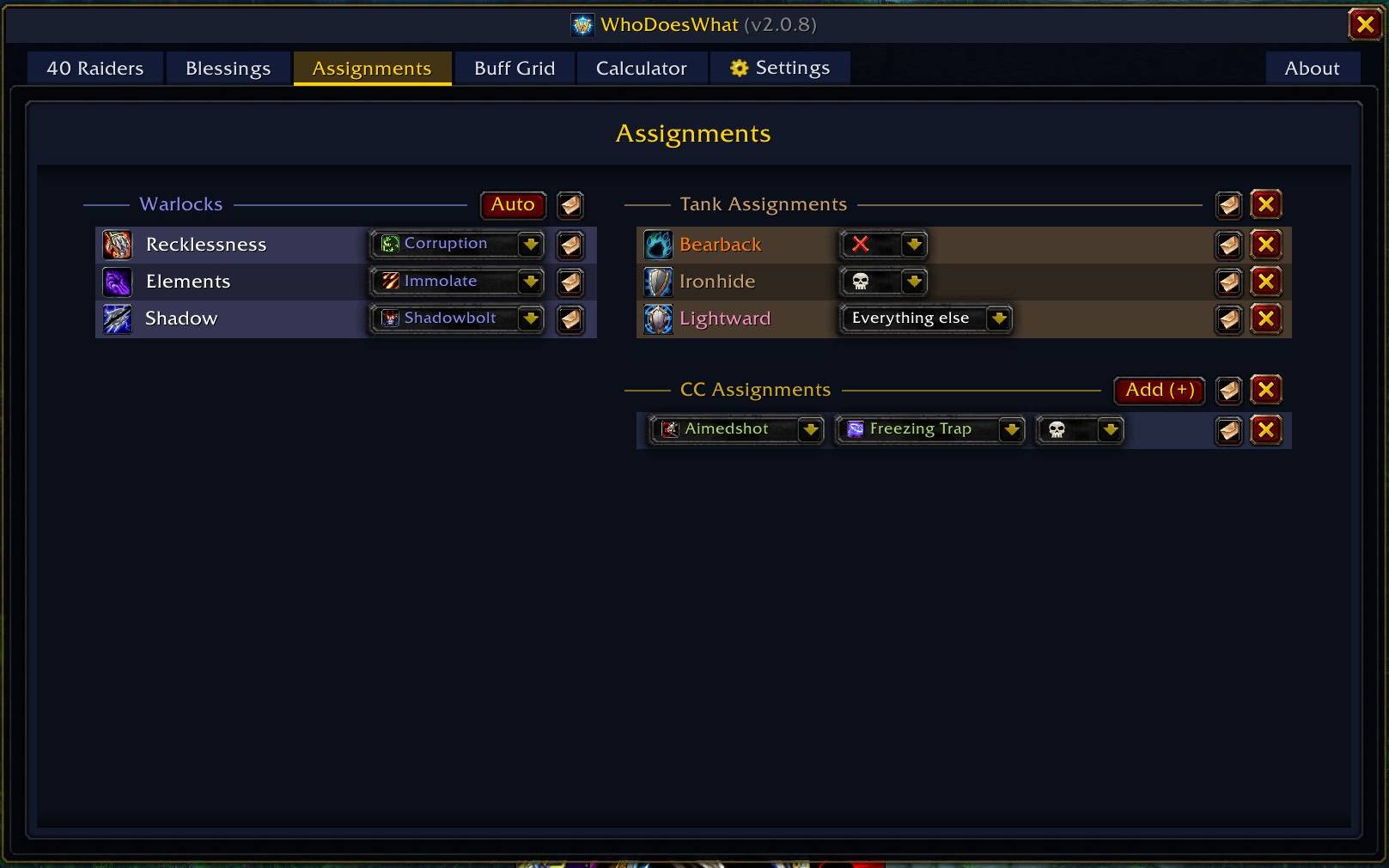
Open one window with /wdw to organize tanks, crowd control, misdirects, Warlock curses, and Paladin blessings. Permitted changes sync to everyone in the group running WhoDoesWhat, while built-in whisper buttons make it easy to brief players who are not.
WhoDoesWhat is in active beta. Features and interfaces may change as raid testing continues.
Watch the WhoDoesWhat overview and feature tour on YouTube.
Raid Assignments
- Tank assignments - assign tanks to raid markers, custom targets, or an "everything else" catch-all.
- Crowd control - assign supported, class-appropriate CC by marker or custom target.
- Misdirects - pair Hunters with tanks and optionally identify the pull by raid marker in TBC.
- Warlock curses - assign curses manually or automatically. TBC prefers an Affliction Warlock for Elements; Classic assigns Elements, Shadow, and Recklessness to separate Warlocks.
- Fast communication - whisper one player's full job list, one section, or the whole board.
- Unit-menu controls - set roles and manage tank, CC, and misdirect assignments from player right-click menus.
Warnings call out incomplete or conflicting assignments before the pull.
Automatic Paladin Blessings
WhoDoesWhat scans each Paladin's Improved Might, Improved Wisdom, Kings, and Sanctuary talents, then combines that information with every raider's role and blessing priorities to build an optimized plan automatically. Paladin coverage is derived from the current roster and is never stored as a pile of manual per-player assignments.
The default priorities cover standard specs and specialist roles such as Mage, Warlock, and Boomkin tanks. Priorities can be reordered, blessings can be disabled, and custom class-specific roles can be created for unusual raid strategies.
Raid-wide buff rules provide additional control: prioritize a blessing for a role or class, ignore it, or prefer a particular Paladin.
PallyPower Interoperability
- WDW mode uses WhoDoesWhat's computed blessing plan.
- PallyPower mode treats live or observed PallyPower assignments as the raid's active plan.
- One-click sync broadcasts the WDW plan over PallyPower's own protocol, even when the sender does not have PallyPower installed.
- Diff and Fix tools show meaningful coverage differences and repair the full plan or an affected player's assignments.
PallyPower clients normally accept assignments for other Paladins only from the raid leader or an assistant unless Free Assignment is enabled.
Buff Tracking and Buffing Buttons
Blessing progress is visible on the main window, the WDW Status bars, and the Buffing Grid. These views can also track raid buffs such as Fortitude, Mark/Gift of the Wild, Intellect, Shadow Protection, and Well Fed. Scanned Fortitude and Mark/Gift buffs warn when a stronger talented provider was available.
Optional TBC checks include Sated/Exhaustion and Tinnitus from drums. Active Hunter pets participate in the blessing plan, and their planned blessings and Well Fed status can be tracked.
The movable Paladin Buffing Bar is a secure alternative to PallyPower's buffing UI and works with either WDW or PallyPower assignments. Left-click casts assigned Greater Blessings; right-click cycles assigned Lesser Blessings, prioritizing missing or expiring buffs. PallyPower does not need to be installed.
Roles and Raid Setup
- Standard roles are detected from talents and follow respecs without overwriting deliberate manual choices.
- Roles can be changed from the Raid Members window or a player's right-click menu.
- Role changes update the blessing plan and can immediately repair the affected PallyPower assignments.
- The group leader is the single writer for other players' Blizzard role flags, preventing competing addons or assistants from fighting over them.
- Main-tank demotions are automatic. When Blizzard prevents addon-driven promotion, WhoDoesWhat highlights tanks awaiting promotion after the leader opens the Raid panel.
- Custom roles and per-role blessing priorities are saved between sessions.
Warlock Tools
WhoDoesWhat displays the available Improved Healthstone ranks and supports manual or one-click curse assignment.
The optional Details!-backed Curse Value Calculator estimates damage provided or missed by each raid curse. It supports Classic's three-curse setup and Ignite behavior, plus TBC Malediction and Blood Frenzy. These are estimates based on encounter data and the armor, uptime, and debuff assumptions shown in the calculator.
Sync and Permissions
The raid leader chooses who may edit the shared board: the leader, one named assistant, all assistants, or everyone. Other players receive a clean read-only view.
Permitted edits synchronize roles, tank targets, CC, misdirects, curses, blessing rules, and the raid's WDW/PallyPower mode. New arrivals automatically request the leader's current board, and compatible clients share talent information to populate roles and utility ranks faster.
Commands
| Command | Effect |
|---|---|
/wdw |
Toggle the main assignments window |
/wdw r |
Toggle the Buffing Grid |
/wdw sync |
Manually push the leader's board or request it from the leader |
Installation
Install WhoDoesWhat from CurseForge, use your preferred addon manager, or clone this repository into Interface\AddOns\WhoDoesWhat.
Supported clients:
- WoW TBC Anniversary
- WoW Classic Era
Feedback and Development
Report reproducible bugs through GitHub Issues, or message wallhackjack on Discord with questions and suggestions.
Contributor implementation notes live in DEVELOPMENT.md, and the network protocol is documented in SYNCING.md. Coding-agent instructions live in AGENTS.md.
WhoDoesWhat is written for Lua 5.1 and uses Ace3, LibClassicInspector, LibSerialize, and LibDeflate. Bundled libraries under Libs/ retain their original licenses.
License
MIT - see LICENSE.
WhoDoesWhat Team