
WhisperBind
- By
WhisperBind
This addon was written by Forbium and Rogolist.
Allows you to specify who to send what to, supports variables. Ability to divide binds into categories.
Warning: this addon is not made for raids, it will be inconvenient.
Usage:
To configure the whisper, you need to open the addon settings window by clicking on the "options" button, after
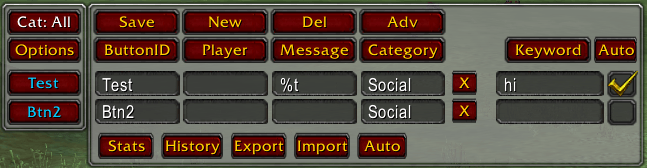
clicking it, a window will open in which there will be 4 columns:
1.ButtonID - display of the button name
2.Player - the player to whom the message will be sent
3.Message - the text of the message
4.Category - the category to which the message belongs (for convenient filtering)
there are also 4 buttons above the columns:
1.Save - saves all values from the fields in the settings window
2.New - adds another line with a button for a message
3.Del - shows/hides buttons for deleting lines
4.Adv - shows/hides buttons for advanced features, namely 5 buttons:
1.Stats - displays statistics about pressing current bindings (buttons) in the chat
2.History - displays the name of the pressed button and the time of pressing (only the last 10 presses)
3.Export - displays settings in the chat
4.Import - (information in the chat)
5.Auto - shows/hides the auto-reply setting.
Setting up an auto-reply is done using one input field (a word is entered that will be used as a sign for using
the answer) and a checkbox (enables and disables the auto-reply function (only messages that have a check mark
will be able to use the auto-reply))
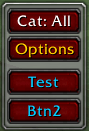
On the main window above the "settings" button there is a "categories" button ("Cat:") when you click on the
button the filter switches to the next category. By default there are 6 categories (All, Trade, Guild, Raid,
PvP, Communication) only these categories have their own distinctive colors that will be displayed on the button.
If you enter a missing category in the category field in the settings, a filter for it will also be added. When
you right-click on the "categories" button, a list of all available categories will be written out in the chat.
You can also use some variables in messages: %player%, %myname%, %time%, %zone%, %guild%, %level%, %class%
WhisperBind Team

