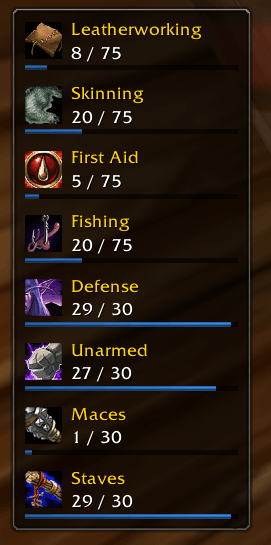
The default half-bars in a vertical layout
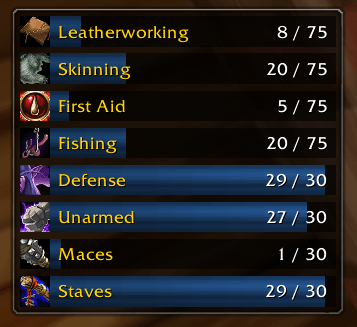
Alternative display mode with full bars and inlined text
Description
Whetstone
A floating bar showing the current rank and cap of your professions and weapon skills.
Built for Classic Era, where skills level slowly and caps depend on your rank and character level. Taintless, fast, and small!
Features
Skill Tiles
- One tile per profession, secondary skill, and weapon skill
- Current rank, cap, and bonuses from racials and gear, such as
(+5) - Compact tiles with a thin progress bar, or full-height bars with the text on top
- Horizontal or vertical layout, with a configurable number of tiles per line
Skill States
Each tile is coloured by the state of its skill:
- Levelling: below the current cap
- Ready: you meet the skill and level requirements for the next rank
- Capped: at the cap, and the next rank is still out of reach
- Maxed: nothing left to gain
Weapon Skills
- Defense is always shown
- Other weapon skills show while the weapon is equipped, or after gaining a point this session
- Unarmed shows while your hands are empty
- Optionally show every weapon skill at all times
Tooltips
- Points left until the cap and points gained this session
- The next rank, its skill and level requirements, and where to learn it
Alerts
- Flash on skill-up
- Sound and chat message when a skill becomes capped or ready to train
Configuration
Access the configuration panel via /whet, by right-clicking the bar, or through Options → AddOns.
Display
- Toggle icons, names, progress bars, and bonuses
- Hide secondary skills, weapon skills, maxed skills, or any individual skill
Appearance
- Scale, tile spacing, background opacity, and border
- Bar texture, font, and font size
Textures and fonts registered with LibSharedMedia show up in the lists. The library is optional.
Behaviour
- Drag the bar to move it, then lock it in place
- Hide in combat
Chat Commands
/whet: Opens the configuration panel/whet lock: Stops the bar from being dragged/whet unlock: Lets the bar be dragged/whet show: Shows the bar/whet hide: Hides the bar/whet reset: Moves the bar back to its default position/whet scan: Rescans your skills
/whetstone works as well.
Support & Connect
- GitHub: AvyAddons
- Twitter: @Avyiel7
- Patreon: Avyiel
- PayPal: https://paypal.me/lvienna
The Whetstone Team


Owner