
WhereIGathered
- By
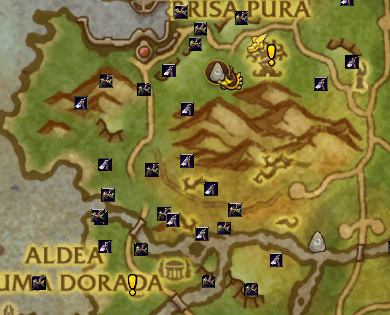
Lightweight, addon (fully ready for Midnight/TWW) that automatically records and displays mining veins and herbalism nodes you gather with your character on both the minimap and the world map, building a personal, local database.
617755233-bf8f586b-7082-4a90-ae4b-20859305e320.png
617755297-13f58dda-c1fd-439a-b8ba-b361250f3793.png
Description
WhereIGathered
WhereIGathered is a lightweight, modern World of Warcraft addon (fully ready for Midnight/TWW) that automatically records and displays mining veins and herbalism nodes you gather with your character on both the minimap and the world map, building a personal, local database.
Additionally, it features an intelligent navigation system that guides you through the optimal gathering route in your current zone.
Key Features
- Automatic Recording: Listens to your gathering spells cast in real-time and saves the exact coordinates.
- Local Database: Data is stored in your personal
SavedVariables, ensuring that your gathering database remains private and persistent. - False Nodes Filtering: Automatically excludes corpse-based herbalism (such as those in Midnight) to avoid registering invalid coordinates.
- Duplicate Cleanup: Built-in algorithm to automatically detect and remove duplicate or extremely close node records.
- Route Optimization: Uses the Nearest Neighbor algorithm to calculate the optimal gathering path starting from your current position, utilizing physical distance in yards.
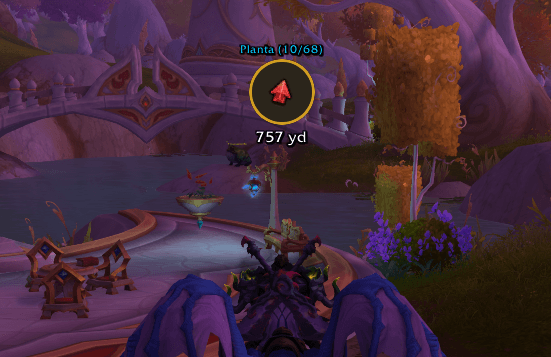
- Premium HUD Compass: A floating, dynamic arrow that rotates based on the direction your character is facing and shows the exact distance to the next node.
- Smart Map Highlights: The target pin of the active route is drawn twice as large with a bright, glowing golden border on both the Minimap and the World Map.
HUD Compass Interaction
- Move the HUD: Hold Left-Click on the compass and drag it anywhere on your screen. Its position will be saved automatically for future sessions.
- Skip Node: Right-Click on the compass to skip the current node and immediately point to the next one.
- Auto-Advance: When you get within 30 yards of your current target node, the compass will automatically advance to the next node in the route.
Chat Commands
Use /wig or /whereigathered in chat followed by an option:
/wig(no arguments): Toggles the visibility of all gathering icons on the maps./wig route: Generates and activates the gathering route for your current zone, showing the HUD compass on screen./wig route stop: Stops the active route and hides the HUD compass./wig route skip: Skips the current node in the route (equivalent to right-clicking the compass)./wig stats: Displays detailed statistics on the number of nodes saved in each map./wig cleanup: Removes duplicate or extremely close nodes from the database to optimize performance./wig reset: Deletes gathering records only for the current map/zone./wig reset all: Deletes the entire database of the addon./wig help: Displays an interactive guide with the list of available commands in chat.
WhereIGathered Team
