Untitled.png
Untitled2.png
Untitled3.png
Description
Where tf is square?
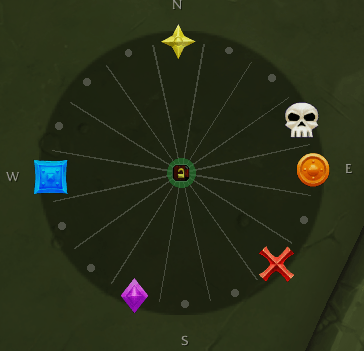
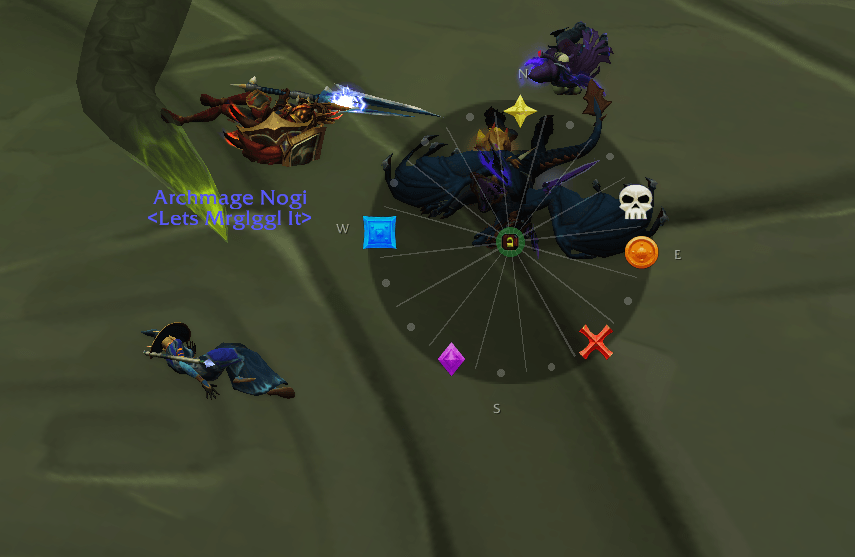
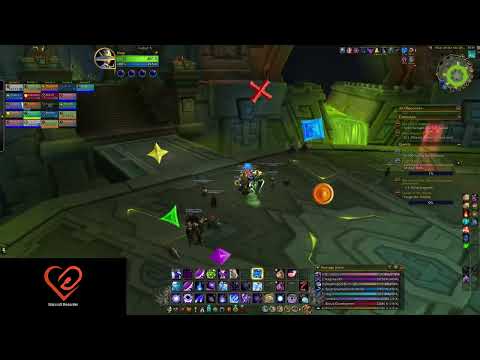
Raid markers on a ring that turns with your character. The marker at the top is the one you are facing.
The problem
Someone calls "square" and you are facing the wrong way. You do not think in north-east, you think in the square one, and working out which corner that is costs you the second you did not have.
This puts the room's markers on a small ring that rotates as you turn. Up is always where you are looking, so "square is behind me, star is on my right" is something you read rather than something you calculate.
What it does
- Sixteen segments, 22.5 degrees apart. Put a marker on any of them, leave the rest empty.
- Turns with your character. North stays north, so the segment at the top is the direction you face.
- Or does not turn at all, if you would rather have a fixed map. One checkbox.
- Out in the world the icons stay upright whichever way you are pointed, so they never have to be read sideways. Inside an instance the ring turns as a compass card and the icons turn with it - see below.
- Set up by clicking. No import strings, nothing to copy off a website.
- Or click straight through it once it is locked, so the ring can sit over your character without eating clicks meant for what is behind it.
- A minimap button and a proper window if you would rather click than type, and slash commands if you would rather type than click. The two do the same things.
- A profile per fight, saved and loaded by name.
- Works inside instances, where the game will not normally tell an addon which way you are facing.
The window
Left-click the minimap button.
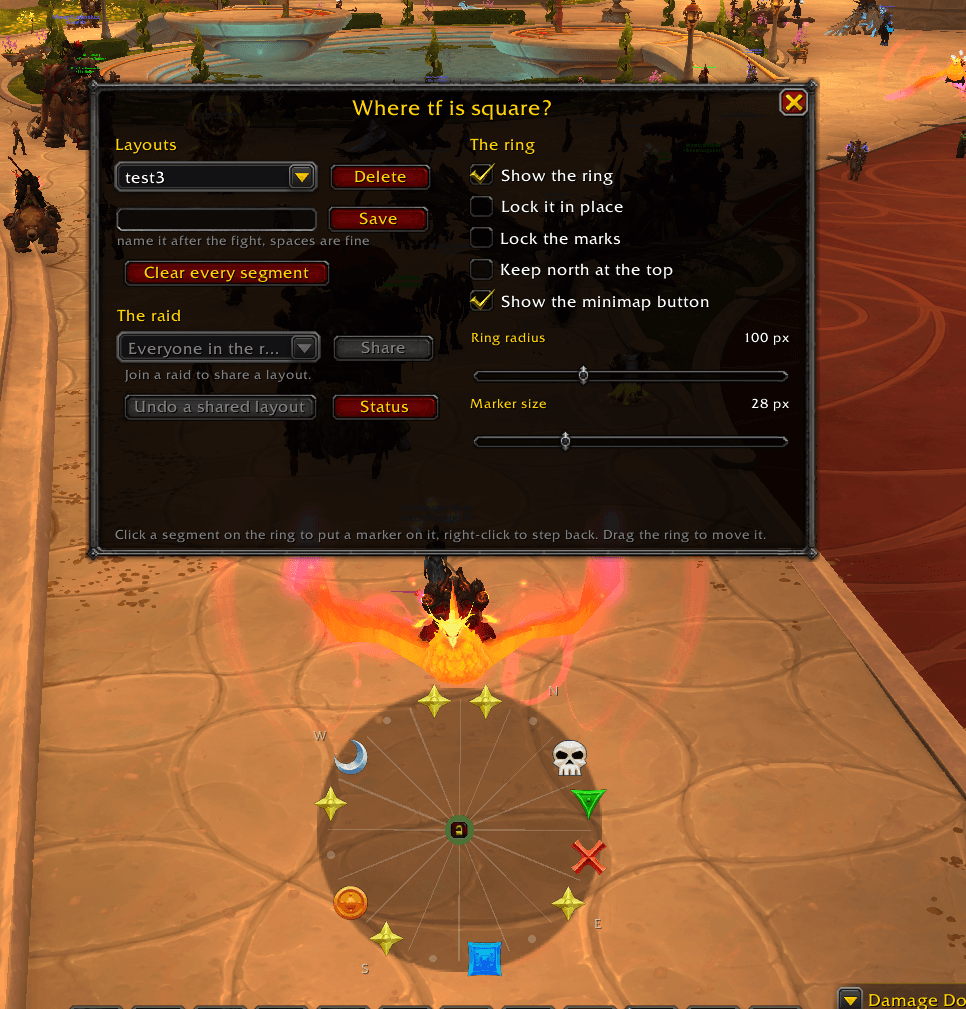
Everything is in there. On the right, the ring itself: show it, lock it, keep north at the top, let clicks pass through it, show or hide the minimap button, and sliders for the ring size, the marker size and how strongly the ring is shaded. On the left, your layouts and the raid: a dropdown of saved layouts that loads one the moment you pick it, a box to save a new one, delete behind a confirmation, and the sharing controls. Buttons to empty the ring, undo a shared layout, and print the diagnostic.
Right-click the minimap button to show or hide the ring without opening anything, shift-click it to lock or unlock. Drag the button to move it around the minimap. If your minimap is crowded, a checkbox in the window hides the button and /wtf ui still opens it - so does the game's addon compartment menu.
There is no separate options file and no settings to learn twice: every control runs the same code as the command it matches, so you can set the ring up with the window and share it with a command, or the other way round.
Setting it up
- Log in. The ring appears above your action bars, empty, with a faint dot on each of the sixteen segments.
- Click a segment to put a marker on it. Each click steps to the next marker, right-click steps back, and one step past skull leaves the segment empty again. Ctrl-click empties a segment outright, so changing your mind about a mark is one click rather than a lap through the other seven.
- Drag the ring wherever you want it.
- Click the padlock in the middle when the layout is right. Green and open means the marks can be changed and the ring can be dragged; dark and closed means neither, and the empty-segment dots disappear for a cleaner read.
/wtf lockand shift-clicking the minimap button do the same thing. /wtf save sszorakto keep it.
The cycle order matches the raid target menu: star, circle, diamond, triangle, moon, square, cross, skull, then empty.
Profiles
One layout per fight.
/wtf save sszorak     keep the current layout under that name
/wtf load sszorak     put it back
/wtf profiles         list what is saved
/wtf delete sszorak   throw one away
A profile holds the markers and the ring and marker sizes. The shading is a personal setting rather than part of a layout, so loading one never changes how your ring looks. Where the ring sits on screen and whether it is locked are deliberately not part of it, so loading a profile never drags your ring across the screen or unlocks the marks while you are moving.
/wtf save with no name re-saves whichever profile you loaded last, so tweaking one is two words rather than a name you have to remember.
Sharing to the raid
The layout is worth setting up once, not twenty times. As raid leader:
/wtf share            everyone in the raid who has the addon
/wtf share nogi       one player
/wtf share g3         one group, g1 to g8
It lands on their ring immediately and chat tells them who sent it, so nobody has to be watching for a popup while the boss is casting. /wtf undo puts their own layout back if they want it.
Only the raid leader can share, and that is enforced on the receiving end as well as the sending end - the addon checks the sender's rank in your raid before it touches your ring, so a payload from anyone else is dropped.
An incoming layout is not written to the recipient's profile list. It is applied live and nothing of theirs is overwritten on disk; /wtf save <name> keeps it if they want it.
About two seconds after sharing, the leader gets told who did not answer. Those are the people without the addon - the ones who still need telling in voice.
Two things worth knowing: the game blocks addon messages in some situations, so share between pulls rather than mid-cast, and the addon says so plainly when it is blocked. And a name in the "no answer" list means exactly that - usually no addon, occasionally just a slow connection.
Commands
| Command | What it does |
|---|---|
/wtf |
show or hide the ring |
/wtf ui |
the options window, the same as the minimap button |
/wtf show, /wtf hide |
the same, but tells it which way |
/wtf size N |
ring radius in pixels, 20 to 1000 |
/wtf icon N |
marker size in pixels |
/wtf disc N |
how strongly the disc and the lines behind the marks are drawn, 0 to 100 |
/wtf save <name> |
keep the current layout as a profile |
/wtf load <name> |
put that profile back on the ring |
/wtf profiles |
list what is saved |
/wtf delete <name> |
throw a profile away |
/wtf clear |
empty every segment |
/wtf north |
stop the ring turning, keep north at the top |
/wtf lock |
lock the ring: no dragging, no changing marks |
/wtf ghost |
let clicks pass through the ring once it is locked |
/wtf share |
raid leader only, put this layout on every ring in the raid |
/wtf share <who> |
the same to one player, or g1 to g8 for one group |
/wtf undo |
put your own layout back after someone shared theirs |
/wtf status |
what the facing reader sees |
/wheretf works as well, in case something else on your bars has claimed /wtf.
If you would rather it did not turn
Some people want the marks as a fixed map rather than a compass. Tick Keep north at the top in the window, or /wtf north, and the ring stops rotating - north stays up, the segment at the top is north, and the marks sit where they sit.
That also means the addon no longer needs to know which way you are facing, so it stops reading it and hands your Rotate Minimap setting straight back. If you only ever wanted a static layout, this is the way to run it and the addon never touches your minimap at all.
About Rotate Minimap
Worth knowing before you install, because it touches a setting of yours.
Inside instances the game does not tell addons which way you are facing. The one thing that still knows is the minimap's compass ring, which physically spins with you, and it only spins when Rotate Minimap is switched on. So the addon switches it on when it first needs it, tells you in chat that it did, and switches it back off when you log out.
Since patch 12.0 the game hands that rotation to an addon as a secret value: it can be passed straight back to the client, it cannot be read as a number. So inside instances the ring runs as a compass card. The client turns the icons around the middle of the ring, which means up is still the way you are facing, but the icons turn with the ring rather than staying upright. The segment lines and the N/E/S/W letters are there the whole time - one dial texture, turned in one piece - so north still reads as north and the ring looks the same in here as it does outside.
A turning ring cannot be clicked, so the padlock in the middle handles that: unlock the marks and the ring holds north with the segments sitting still under your cursor, lock them and it turns with you again.
Out in the open world the facing is available directly and your minimap is never touched.
When it cannot read your facing
A compass that quietly points the wrong way is worse than no compass, so this one says so instead. Two captions appear under the ring:
- turn once to confirm the facing reads in amber. A reading has arrived but has not been seen to change yet, so it could be stale. Turn your character and it clears.
- facing unreadable in red, with the segment lines turning red too. There is no facing at all and the ring is frozen. Run
/wtf status.
The usual cause of the second one is a minimap addon that hides the compass ring, since a hidden ring stops turning. /wtf status names any known minimap addon you have loaded, along with what the reader can actually see.
A third caption, ring unlocked - held north while you edit, is not a fault at all. It means the padlock is open inside an instance, so the ring is holding still to let you click the segments.
Notes
- Markers land on the nearest of sixteen segments, so a mark whose true bearing sits between two of them is drawn up to 11 degrees off. Which side of you it is on is always right.
- The segment lines and the compass letters are one texture that turns with the ring, so the letters lean with it and scale with the ring radius. Past a radius of about 400 they soften, since the texture is being stretched. The marks are separate and stay crisp at any size.
- Settings and profiles save per account, so all your characters share one set.
- Saved variables are written when you log out or
/reload. After building a layout you care about, a/reloadcommits it.
Made by Nogi.
Where TF is square? Team