Waypoint Sparks
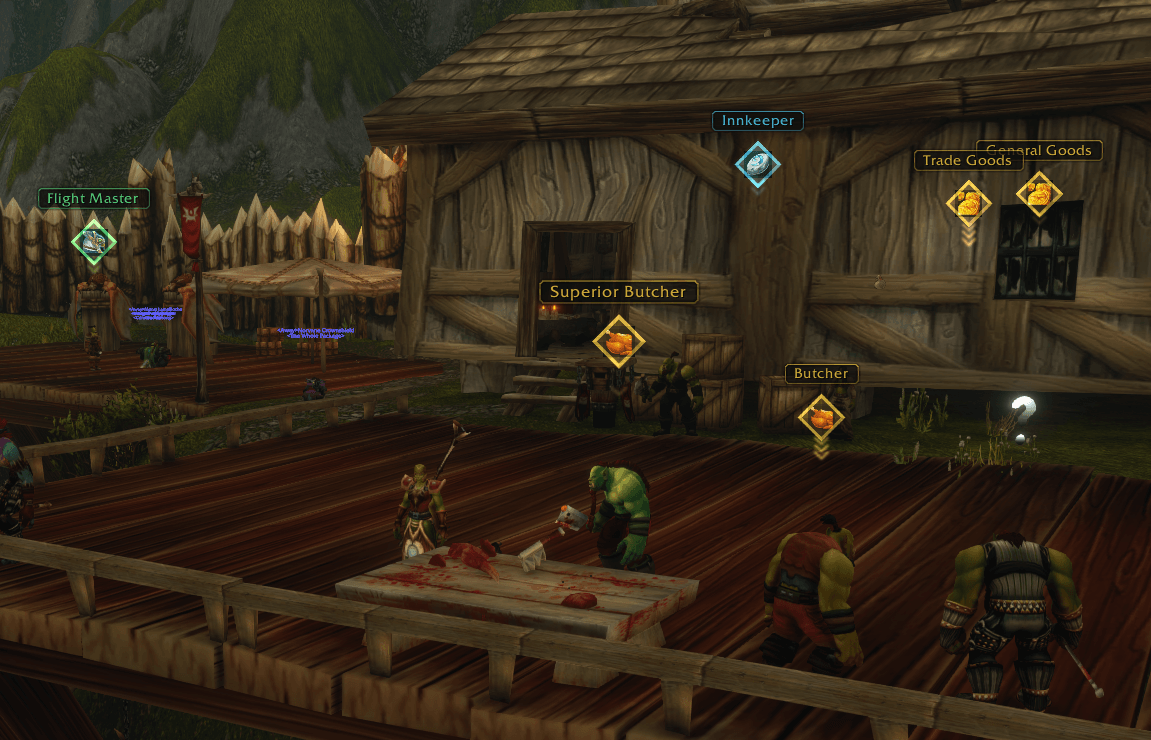
Highlights nearby Mailboxes, Repair NPCs, Vendors, Auctioneers, Bankers, Innkeepers, Flight Masters, and Trainers with floating Waypoint badges, cascading arrows, light beams, and loot-style sparkles.
pic1.png
pic2.png
Description
Waypoint Sparks makes finding town services and Points of Interest effortless in World of Warcraft: Forever. It combines the floating pinpoint badge, cascading chevrons, and light beam style of WaypointUI with the warm, rising world glints of Forever Loot Sparkles—automatically lighting up the NPCs and objects you care about most.
Key Features
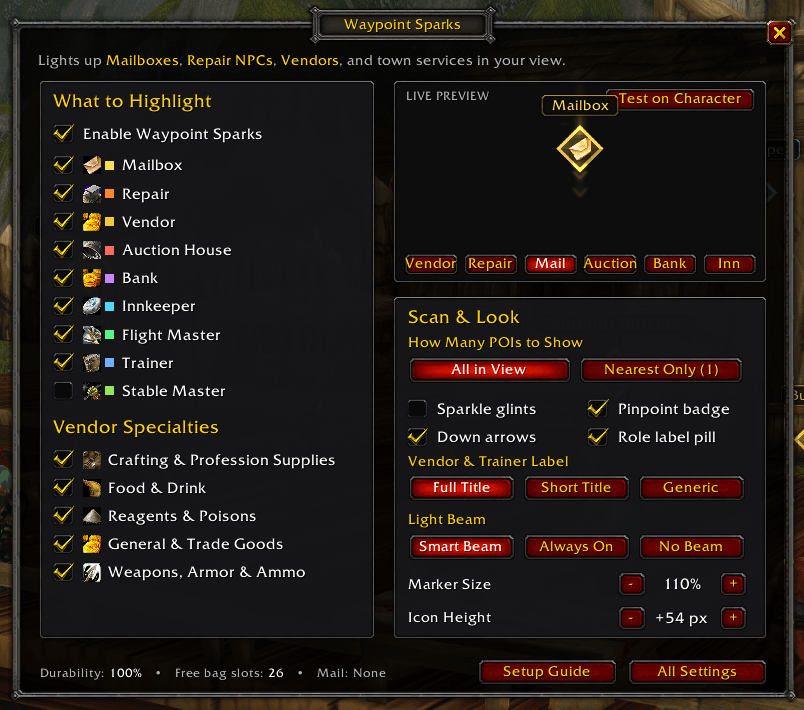
- All POIs in View or Nearest Only
- All in View (Default): Scans all friendly NPCs in your camera view at once so you can immediately spot the Repair vendor, Innkeeper, Mailbox, Auctioneer, and specialty vendors across the room—while automatically hiding default green healthbars so your screen stays clean. NPC names stay, and the vendor title under the name is hidden on sparked NPCs since the spark already shows it.
- Nearest Only (1): Uses Blizzard's Soft-Target system to light up only the single closest POI as you walk up to it.
- Specific Vendor & Trainer Specialties
- Instead of labeling every merchant "Vendor", Waypoint Sparks reads the NPC's specialty (such as Leatherworking & Tailoring Supplies, Food & Drink, Reagent Vendor, or General Goods) and displays it on the floating pill with a matching profession or supply icon inside the diamond badge.
- Filter individual vendor types on or off: Crafting & Profession Supplies, Food & Drink, Reagents & Poisons, General & Trade Goods, and Weapons, Armor & Ammo.
- Supported POI Categories
- Mailboxes (Warm Gold)
- Repair NPCs (Forge Orange)
- Vendors (Coin Amber — with per-specialty icons & filters)
- Auction House (Crimson Gold)
- Bankers & Guild Vaults (Royal Violet)
- Innkeepers (Hearthstone Cyan)
- Flight Masters (Wind Emerald)
- Class & Profession Trainers (Arcane Blue)
- Stable Masters (Hunter Green)
- Smart Context Alerts
- Low Durability: Boosts Repair NPCs with a vertical light beam and shows your gear durability (
Repair • 62%/BROKEN!) when it drops below your threshold. - Unread Mail: Boosts Mailboxes (
Mail • New Mail!) when you have mail waiting. - Full Bags: Boosts Vendors and Repair NPCs when your free bag slots run low.
- New Class Spells: Boosts your own class trainer at each even level, or while it still has spells to teach you.
- Hunter Ammo: Boosts bowyers, gunsmiths and general goods vendors when your ammo runs low.
- Class Reagents: Boosts vendors that actually sell the reagent you're low on (Ankhs at reagent vendors, poison ingredients at poison vendors).
- Food / Drink: Boosts food & drink vendors and innkeepers when you're running out (two separate switches).
- Boost Sound & Chat Hints: A sound when a boosted POI shows up, and a chat line pointing to the nearest known one when a need starts.
- Low Durability: Boosts Repair NPCs with a vertical light beam and shows your gear durability (
- Find Nearest
/ws find repair(or any type), or a button in the/wsquick popup, sets a map waypoint and an on-screen arrow to the closest one.- With Questie installed it knows every town service for your faction from the start; otherwise it remembers each POI you walk near.
- Navigation Arrow
- A glowing arrow with a ring in the POI's colour turns toward your target and shows its name and distance. It turns green when you face it and says "Arrived!" when you get there.
- Drag to move it. Right-click to pick a size (Small, Normal, Large, Huge), close it, clear the waypoint, lock it, or turn it off if you use another arrow addon.
- Quest Sparks (with Questie)
- Nearby quest givers and turn-ins get a gold spark high on screen in their direction, like a compass, which drops onto the NPC once it's in range. Turn-ins are bigger and brighter than new quests.
- An NPC with both a POI spark and a quest gets one spark with a "!" (new quest) or pulsing "?" (turn-in) badge and a
Quest/Turn intag on its label. - Sparks on quest NPCs lift smoothly above the game's quest mark as you approach.
- Only quests with one known spot get a spark, so it never points to the wrong place.
- Sparks at Any Height: POIs on ledges, hills or other floors keep their sparks.
- Camera Focus Fade: Sparks are at full strength where your camera faces and fade toward the edges of your view.
- City Declutter: In cities and inns, only the most useful sparks show (10 by default): boosted POIs and quest turn-ins first, then the ones you're facing, then the closest.
- Quick Popup:
/wsor the minimap button opens a small popup with a Find Nearest button for every POI type (with distances), the sparks on/off switch, and shortcuts to Spark Settings, All Options and Test on Character. - Redesigned Options Page: A header with a Sparks ON / OFF switch and live count, seven tabs (General, Look, Boosts, Detection, Find & Arrow, Quests, More), themed section cards, clickable icon tiles, boost cards with their thresholds, and a live spark preview.
- Live Preview & Character Demo
- Customize sparkle glints, Diamond/Circle badges, cascading down-arrows, role label pills, light beams, Spark Size, Icon Height and Beam Height in the live Spark Settings window (
/ws settings), or click Test on Character (/ws test) to preview the spark on your character. - A 5-step Setup Guide with live scenes, and an animated Patch Notes window that shows every change before and after.
- Full controller D-pad navigation support in all windows.
- Customize sparkle glints, Diamond/Circle badges, cascading down-arrows, role label pills, light beams, Spark Size, Icon Height and Beam Height in the live Spark Settings window (
Slash Commands
/ws(or/poi,/wayspark) — Quick popup: Find Nearest buttons, Spark Settings and All Options/ws settings(or/ws window) — Spark Settings: POI types, look and live preview/ws find <type>— Waypoint and arrow to the nearest POI (repair, vendor, food, reagent, ammo, trainer, bank, auction, inn, flight, stable, mail)/ws mail— Set a map waypoint to the nearest Mailbox/ws arrow— Turn the navigation arrow on or off/ws test— Toggle a live demo spark on your character/ws all— Show all POIs in view at once/ws single— Show only the single nearest POI on approach/ws on//ws off— Enable or pause all sparks/ws guide— Open the 5-step interactive setup guide/ws notes— Open the animated Patch Notes window/ws restore— Put your original nameplate and targeting settings back and pause sparks/ws options— Open Options > AddOns > Waypoint Sparks
Game Settings
To mark every POI in view, Waypoint Sparks turns on friendly NPC nameplates (with their healthbars hidden) and adjusts a few soft-target and nameplate settings. Your own values are saved first and put back when you turn the addon off. Before uninstalling, type /ws restore (or press Restore game settings in Options > AddOns > Waypoint Sparks) so your original settings come back.
Waypoint Sparks Team