Warrior Tracker
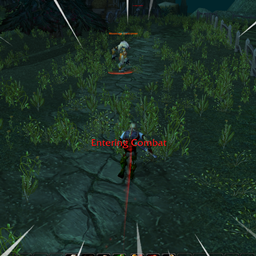
Warrior Tracker is a lightweight, all-in-one combat HUD built specifically for Classic Era warriors. It puts the information a warrior actually needs into a single compact, movable box, so you're not scanning across your whole UI mid-fight. On any non-warrior character it does nothing at all.
Features:
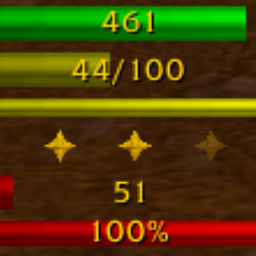
Player Health & Rage bars — Clean status bars showing your current HP and your rage (0–100), each with numeric text.
HP Advantage strip — A sliding arrow that moves right when your health percentage is ahead of your target's and left when you're behind, with a center "even" tick and subtle red/green tinting. Great for duels and PvP so you know if you're winning the race. The arrow turns green when you're comfortably ahead and red when you're falling behind.
Clickable stance buttons — Battle, Defensive, and Berserker stances shown in a row. The active stance is lit with a gold ring while the others are greyed out; stances you haven't learned yet are dimmed further. The buttons are secure, so you can click them to swap stances even in the middle of combat.
Battle Shout reminder — A Battle Shout button that lights up (with a glowing ring) whenever the buff is missing and greys out while it's active. Click it to cast.
Execute helper — An Execute button that stays dim until your target drops into execute range (20% health or lower), then brightens up. It's clickable to fire off the ability.
"Usable" sparkle glow — Battle Shout and Execute buttons get an animated sparkle/pulse whenever the ability is actually castable right now (enough rage, correct stance, valid target).
"EXECUTE!" flash — A big on-screen alert flashes when your target drops below 20% health, so you never miss the execute window.
Target Health bar — Appears during combat against an attackable target, showing the enemy's HP. It changes color when the target enters execute range.
Melee range indicator — A small dot on the target bar that turns green when you're in melee range and red when you're out of range.
Threat bar — Shows your current threat percentage on the target, color-coded (green = safe, yellow = getting close, orange = highest threat, red = actively tanking).
Usage:
The frame is movable — just drag it, and its position is saved. Slash commands:
/wt always— Always show the frame/wt combat— Only show the frame during combat/wt hide— Hide the frame/wt reset— Reset the frame to its default position/wt status— Show the current visibility setting
Warrior Tracker Team