


Warchiefs War Diary
- By
8lRG8T3.png
2426pxU.png
akyY75W.png
DOZrbdC.png
eBBDR3t.png
Description
Warchiefs War Diary
Your quest log, your route and your next step: one cohesive, Blizzard-native questing interface.
Warchiefs War Diary rebuilds the questing experience around the interface you already know. The objective tracker becomes a structured quest journal. Storyline guides load into tabs. A compact step bar always shows exactly what to do next, and a GPS arrow and world pin take you there. Everything uses Blizzard's own art, fonts and window templates, so it looks like it shipped with the game. Every part of it can be tuned, saved to a profile and shared across your characters.
Built for World of Warcraft retail 12.1.5. Standalone, with no external libraries required.
Why War Diary
- Native look and feel. Tabs, headers, list rows, dividers, scroll bars and window frames reuse Blizzard's own atlases and templates. The tracker is placed with Blizzard's Edit Mode, and the Options window follows the structure of the game's Settings panel.
- Built to stay out of your way. Tracker fading uses opacity only, so it is safe in combat. Quest item buttons are secure action buttons that are only created or moved out of combat, and pending changes simply wait until combat ends.
- Changes apply live. Look and layout settings redraw as soon as you change them, with no
/reload. - Your setup, everywhere. Named profiles, an optional shared account profile, and copy, reset and delete tools.
Features
Quest Guides with Tabs
- Retail guides built from the game itself. The War Diary window reads the client at run time: each zone's storylines (grouped by continent and zone), daily storylines and current world quests, legendary storylines, Adventure Guide dungeons and raids, holidays, reputations, battlegrounds, professions, mounts and pets, titles and achievements. Storylines load as guides. Other entries open Blizzard's own window for that content.
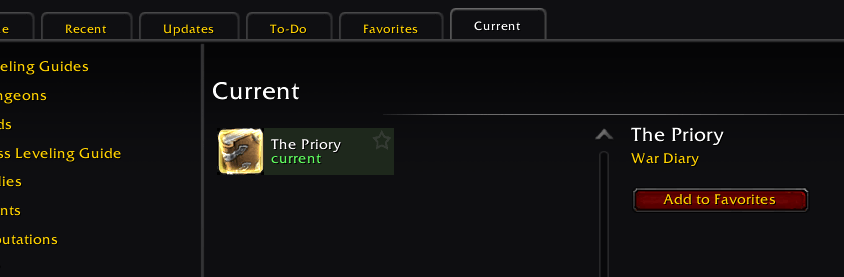
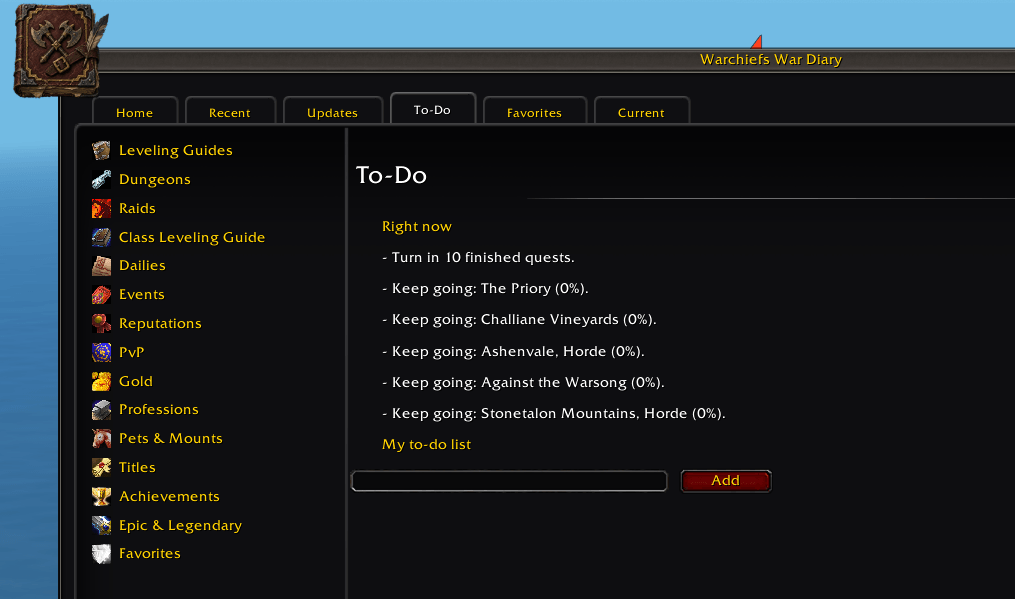
- Guide browser. Home, Recent, Updates, To-Do, Favorites and Current views, a search box, a star on every entry for your favourites, and a details pane that shows a guide's quests with completed ones ticked.
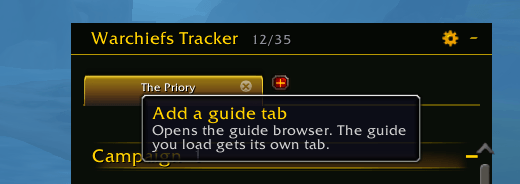
- Guide tabs on the tracker. Every guide you load gets its own tab, drawn with Blizzard's tab art and hover glow. An optional "+" tab opens the browser. An inactive tab turns green when its step is done, and each guide resumes at the step you left it on. An overflow menu holds tabs that don't fit.
- Smart skip. Passes over grey quests, account-wide quests you've already finished on another character, and (optionally) storylines the game isn't offering you right now. Quests in your log are never skipped, and skipped steps can be restored at any time.
- Travel steps. When the next quest is in another zone, a travel line comes first. It suggests your nearest known flight point or your Hearthstone and can point the arrow at the flight master.
Quest Tracker: Campaign, Main and Side
- Every quest in your log, organised. Campaign, Main and Side sections are read straight from the quest log, so breadcrumbs and auto-added campaign quests appear too. World quests, achievements, scenarios and other modules stay exactly as Blizzard draws them.
- Two guide styles. Classic matches the tracker's own entries. Steps adds action lines (Accept, Do, Turn in) with the quest name highlighted, coloured objective bands with (n/N) counts, progress bars and optional dividers.
- Fast, familiar controls. Click a quest to open it in the quest log. Shift-click to track or untrack it, right-click to point the GPS at it, Ctrl-click to pin it to the top of its section, and click a header to fold it.
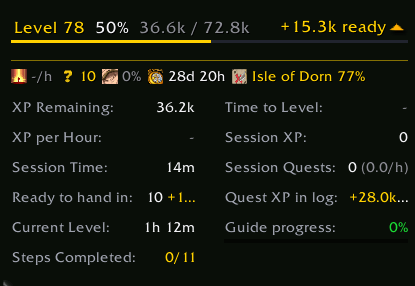
- Stats panel. A one-line summary (XP per hour, quests ready to hand in, rested %, time played and zone progress) plus an expandable grid: XP Remaining, Time to Level, XP per Hour, Session XP, Session Time, Session Quests, Ready to hand in, Quest XP in log, time at the current level, Guide progress and Steps Completed.
- Guide progress you can trust. Count by steps or by quests, and switch with a click on the stat. A mini progress bar sits under the value, and hovering it lists every step with its state.
- Visibility rules. Optionally fade the tracker in dungeons and raids, in combat, or at vendors, the bank, the mailbox and the auction house.
Compact Step Bar
- A slim bar, attached under the tracker and matched to its width by default, that shows the current step, its quest, the zone and the distance, with k/N paging.
- Moves on by itself when a step is done and can point the GPS at every new step.
- Arrow shortcuts: right-click jumps to the next or previous unfinished step, and Ctrl-click returns to the first step.
- Right-click menu: skip or restore steps, point the GPS here, open quest details, share, abandon (with the game's own confirmation), copy a Wowhead link, or lock the bar.
- Optional "Nearer quest" hint, mini mode that unfolds on mouse-over, a full-size layout, and an item button for the step's quest item.
GPS and Waypoint Arrow
- World pin: a teardrop marker standing on the target in the 3D world, showing the quest, the objective and the distance, with an edge arrow when the target is off screen.
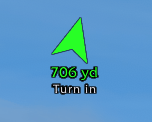
- Screen arrow in two styles. Choose the War Diary rotating arrow, or the Blizzard marker: the game's own in-world navigation icon, with Blizzard's small arrow circling it towards the target.
- Colour by pin colour, class colour or facing (green ahead, yellow to the side, red behind), plus size, opacity, distance in yards or metres, and an estimated time to arrive.
- Follows the quest you pick in Blizzard's tracker or map, or chooses the nearest objective automatically and moves on after each objective.
Compass Strip (Optional Companion)
- A heading strip across the top of the screen with N / E / S / W, a centre notch, and the world map's icons around you placed by direction, each with its distance.
- Quest objectives always show. Quest givers, world quests, bonus objectives, rares, treasures, events, delves, dungeon entrances, flight paths, pet tamers and more each have their own toggle.
- Learned NPC services: the game exposes no positions for trainers, vendors, banks and similar NPCs, so the compass learns them as you visit them and shares them across all your characters.
- Centre focus enlarge, smooth animation, distances only for nearby targets, and labels that never overlap.
- Included in War Diary up to v1.4.8d. From v1.4.9 it ships as the separate, optional Warchiefs War Diary - Compass addon, which carries your settings and learned spots over automatically.
Quest Item Buttons and Notifications
- Clickable quest item buttons in the tracker and on the step bar, with cooldown and charges.
- Quest sounds for objective progress, objective complete, quest ready to turn in, quest turned in and level up.
- Optional level-up announcement (to you, your party or your guild) with how long the last level took.
- A "What's new" note after each update, and a minimap button (left-click opens the journal, right-click opens the settings).
Journal
- Diary: a record of what this character has done.
- Quest log: your current quests, presented in the War Diary style.
- Search: find a quest and see its details.
Automation (Optional, Off by Default)
- Auto accept and turn in for guide quests only or for all quests, with a hold-to-pause key. Daily, weekly and repeatable quests can be skipped, as can quest givers with dialogue options. A reward is picked only when one item is clearly worth the most.
- Blizzard's own questing options (auto track, quest objectives on the map, auto loot, interact on left click, quest text contrast and more) are mirrored on the same page.
Options: 15 Pages, Fully Profiled
Guide Viewer · Step Display · Appearance · Automation · Waypoint Arrow · Maps · GPS Pins · Step Target · Quest Item Button · Compass · Notifications · Extras · Profiles · Credits / About · Commands (From v1.4.9 the Compass page is added by the Compass companion.)
Choose from eight background themes, set the font size, spacing, padding, colours, tab look, scroll limits and stats layout, and adjust the size of the Options window itself. Settings search, per-page defaults and an in-game changelog are built in.
Slash Commands
| Command | What it does |
|---|---|
/wwd |
Opens or closes the War Diary window (the guide browser). |
/wwd guides |
Opens the War Diary window. Alias: /wwd browser. |
/wwd options |
Opens the War Diary settings. Aliases: /wwd settings, /wwd config. |
/wwd commands |
Opens the Commands page. Alias: /wwd cmds. |
/wwd journal |
Opens the journal (Diary tab). Alias: /wwd diary. |
/wwd move |
Opens Blizzard's Edit Mode so you can move the tracker (not in combat). |
/wwd nav |
Shows what the GPS and waypoint arrow are doing, in a copyable window. Alias: /wwd gps. |
/wwd minimap |
Shows or hides the minimap button. |
/wwd difficulty |
Turns difficulty-coloured quest titles on or off. |
/wwd on / /wwd off |
Turns the tracker restyle on or off (/reload to fully restore Blizzard's colours). |
/wwd reset |
Restores every War Diary setting to its default. |
/wwd version |
Prints the loaded version of each file and opens a copyable debug report. Aliases: /wwd ver, /wwd debug. |
/wwd help |
Lists the commands in chat. Alias: /wwd ?. |
/rl |
Reloads the interface (same as /reload). |
Screenshots
See the Images tab for the full gallery.
Screenshots
Your journey, guided
 The War Diary at work in the Isle of Dorn: the tracker, waypoint arrow and step bar guide every move without cluttering your screen.
The Warchief's home
 One home for everything: leveling guides, dungeons, professions, reputations, achievements and more, organized in a clean, Blizzard-styled window.
Warchiefs Tracker
 A tracker that knows your story: guide tabs, campaign and main quest sections, and clear "Ready for turn-in" cues at a glance.
Live leveling stats
 Live leveling stats, including XP per hour, time to level, quest XP in your log and guide progress, so you always know how far you are from the next level.
Step bar
 The current step, its zone and the exact distance, with quick arrows to move between steps.
Waypoint arrow
 A crisp waypoint arrow that points the way and counts down the yards to your next objective.
Compass plugin
 The optional Compass plugin: a transparent strip that smoothly shows quests, NPCs and points of interest in the direction you're facing.
Deep, clear settings
 Every feature comes with its own settings, so you can shape the tracker, steps and layout exactly the way you play.
FAQ
Does it replace Blizzard's objective tracker?
It restyles it. The Campaign and quest sections are replaced by War Diary's Campaign / Main / Side sections, while world quests, achievements, bonus objectives and scenarios stay Blizzard's. /wwd off turns the restyle off.
Where do the guides come from? On retail, from the game itself. Storylines, campaigns and world quests are read from the client's own questline data at run time.
How do I move the tracker?
Use Blizzard's Edit Mode, either through /wwd move or with Guide Viewer > Tracker > Move the tracker. The compact step bar follows the tracker when it's attached.
Why doesn't the compass show the trainers or vendors in this town? The game has no API for those positions, so War Diary learns each one the first time you open it. Those spots are then shared by all your characters.
The compass says "No position here". Inside instances the game provides no map position or facing, so the strip pauses until you're back outside.
Will automation accept quests I don't want? Automation is off by default. When it's on, hold the pause key (Alt by default) at a quest giver to handle that NPC yourself. Reward choices are only made when one item is clearly the most valuable.
Can I use different settings on different characters? Yes. Under Options > Profiles, each character can use its own profile or the shared account profile, and you can copy, reset or delete profiles there.
I found a bug. What should I include?
Run /wwd version and paste the debug report into your comment along with the steps that caused the problem. For GPS issues, /wwd nav adds the navigation state.
Support
- Bug reports and suggestions: please use the Comments tab on this page. Include the
/wwd versionreport so issues can be reproduced quickly. - Changelog: the full history is on the Files tab and in game under Options > Changelog.
Credits and License
Warchiefs War Diary is written by TankyShrimp aka Mtechnik/Nolvus and released under the MIT License. War Diary contains no code from any other addon. In particular, no APR code is included. Retail guide content is generated at run time from the game's own data. World of Warcraft art, icons and data are the property of Blizzard Entertainment. This project is not affiliated with or endorsed by Blizzard Entertainment.
Warchiefs War Diary Team
